
1. Introduction
The KAYOTOM Global Walkie Talkie M22 utilizes Push-to-Talk Over Cellular (PoC) technology, enabling instant communication over 4G LTE networks. This device is designed for reliable, long-distance communication across wide areas with cellular coverage, making it suitable for various professional and recreational uses.
Key features include a pre-installed SIM card for global connectivity, a ruggedized chassis for durability, an extended battery life, and intuitive controls for ease of use.
2. Product Overview
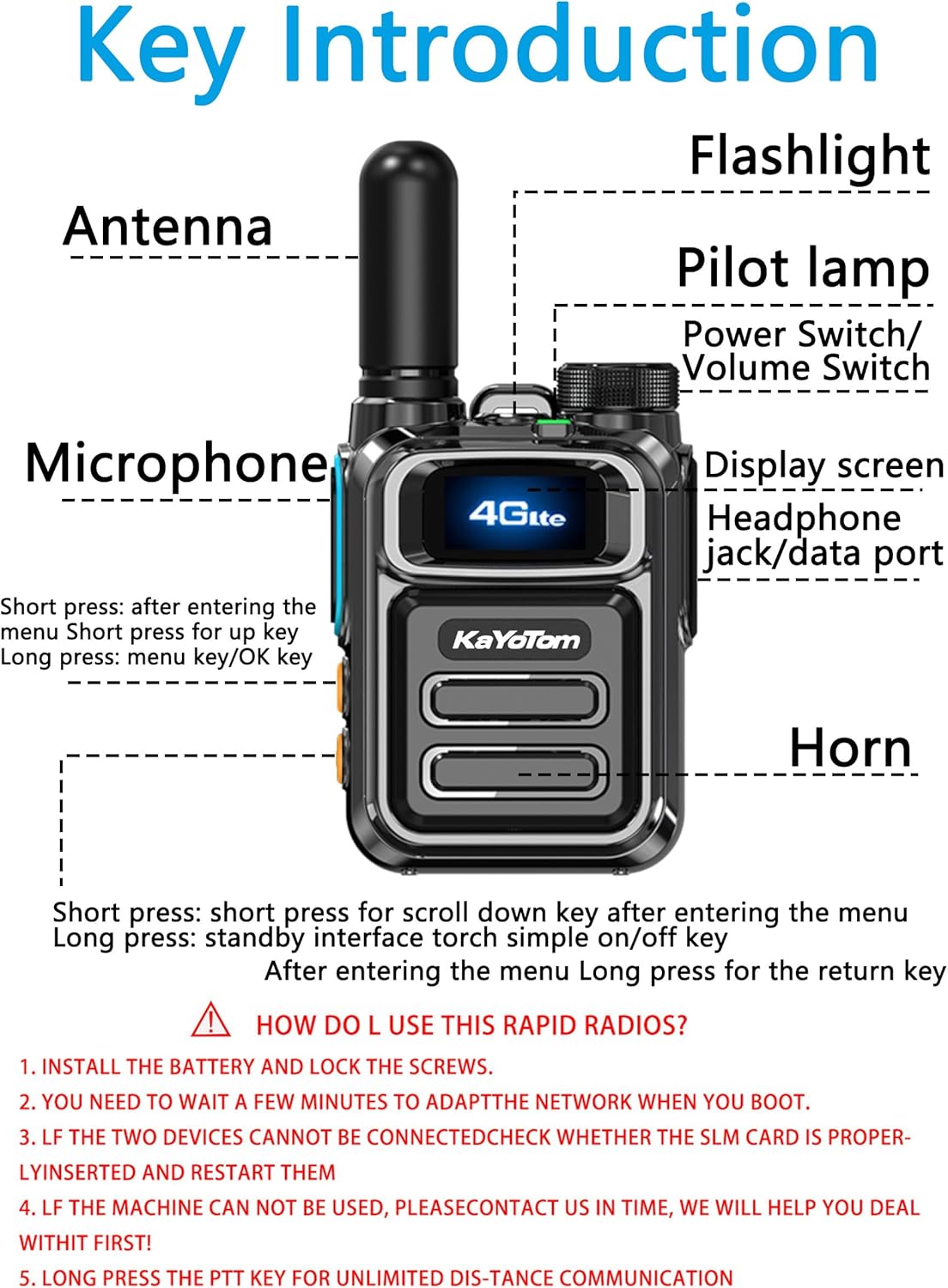
Image 2.1: Key components of the KAYOTOM M22 Walkie Talkie, including the antenna, flashlight, pilot lamp, power/volume switch, display screen, headphone/data port, microphone, and horn.
2.1. What's in the Box

Image 2.2: The package includes the walkie-talkie units, batteries, USB charging cables, power adapters, belt clips, wrist straps, and user manuals.
- KAYOTOM M22 Walkie Talkie Unit(s)
- Rechargeable Battery(ies)
- Antenna(s)
- USB Charging Cable(s)
- Power Adapter(s)
- Belt Clip(s)
- Wrist Strap(s)
- User Manual
3. Setup
3.1. Battery and SIM Card Installation
The device comes with a pre-installed SIM card. To install the battery:
- Remove the battery cover on the back of the walkie talkie.
- Align the battery with the contacts and gently push it into the compartment.
- Replace the battery cover and secure it.
Video 3.1: This video demonstrates the installation of the battery and SIM card, and the initial power-on sequence for the Global V1-6300 Walkie Talkie. The SIM card is pre-inserted for convenience.
3.2. Power On/Off
Press and hold the red button (power button) on the device to turn it on or off. The device will display a QR code upon initial power-on. Wait for approximately one minute for the device to automatically join the group and become ready for use.
Video 3.2: This video provides a guide on how to pair Global Walkie-Talkies, including the power-on process and automatic group joining.
3.3. Registration and Pairing
To register and pair your walkie talkies, use a smartphone to scan the QR code displayed on the device screen or on the product packaging. Follow the on-screen instructions to enter the required information, such as the phone number used for purchase and a group owner name. This process links your devices to the network for communication.
Video 3.3: This short video demonstrates the initial setup and registration process for the walkie-talkie using a QR code scan.
4. Operating Instructions
4.1. Push-to-Talk (PTT) Communication
To initiate communication, press and hold the Push-to-Talk (PTT) button located on the side of the device. Speak clearly into the microphone. Release the PTT button to end your transmission and listen for a response.
Video 4.1: This video provides instructions on how to use the rapid radios, focusing on the push-to-talk functionality.
4.2. Volume Control
Use the side buttons (up/down arrows) to adjust the volume of the speaker.
4.3. Flashlight Function
Press and hold the volume down button to activate or deactivate the built-in flashlight.
4.4. Menu Navigation and Screen Lock
- The green button is used for entering the menu.
- The red button serves as the return key.
- Press the red button once to lock or unlock the screen.
5. Features
5.1. Nationwide Communications

Image 5.1: Two KAYOTOM M22 Walkie Talkies illustrating their ability to connect across vast distances via the global cellular network for group and private calls.
Experience instant communication through PoC radio technology, enabling clear voice transmission via 4G LTE networks. This global walkie talkie operates seamlessly anywhere with cellular coverage, making it ideal for nationwide communication.
5.2. Lifetime Free SIM Card

Image 5.2: A close-up of the KAYOTOM M22 Walkie Talkie's back panel, highlighting the SIM card slots (SIM1 and SIM2) and the SIM card cover, indicating its Push-to-Talk Over Cellular (PoC) capability.
Enjoy free global PTT intercom connectivity without monthly fees or contracts. This feature allows for unlimited distance communication, suitable for cross-state or nationwide coverage.
5.3. Military-Grade Ruggedized Chassis
The two-way radio design features drop resistance and basic dust/water protection, engineered for extreme environments such as construction sites and warehouses.

Image 5.3: The KAYOTOM M22 Walkie Talkie emphasizing its durable zinc alloy material, large capacity 2500mAh battery, and loud, clear audio quality with strong anti-noise features.
5.4. Long Distance Communication Clarity
The walkie talkie system ensures stable voice quality over extended distances. With optimized signal processing, these long-distance walkie talkies deliver reliable performance for cross-site coordination.

Image 5.4: Multiple KAYOTOM M22 Walkie Talkies showcasing global 4G signal coverage, stable signal, durability, Type-C charging, infinite distance, and high-quality sound.
5.5. Extended Battery & Intuitive Controls
Equipped with a long-lasting 3000mAh battery for continuous field operations, offering up to seven days of ultra-long standby time. The device features a bright display and simplified button layout, ensuring quick access to global PTT functions.
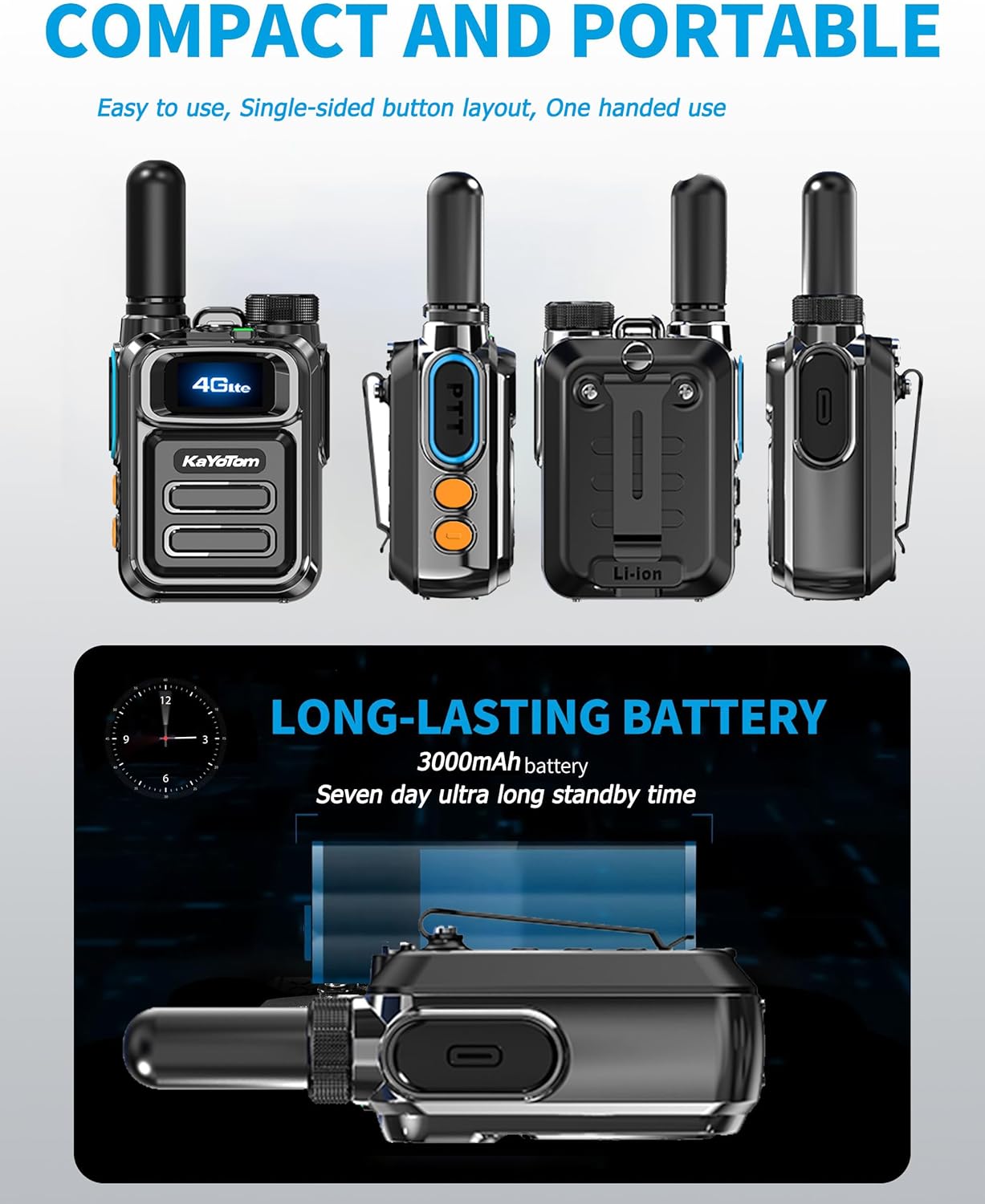
Image 5.5: A series of KAYOTOM M22 Walkie Talkies from different angles, highlighting their compact and portable design, single-sided button layout for one-handed use, and a 3000mAh long-lasting battery with seven-day ultra-long standby time.
5.6. LED Flashlight
The integrated LED flashlight allows for smooth operation even in dark conditions, useful for night patrol, emergency escape guidance, equipment inspection, wilderness search, document reading, vehicle breakdown assistance, cave/tunnel exploration, nighttime outdoor activities, medical emergency inspection, and power repair operations.

Image 5.6: A KAYOTOM M22 Walkie Talkie with its LED flashlight illuminated, demonstrating its utility for various tasks in low-light conditions.
5.7. Advanced Chip Support
Even in complex environments with numerous obstructions, the signal support provided by the powerful internal chip ensures direct and clear communication with the other party.

Image 5.7: A KAYOTOM M22 Walkie Talkie positioned on a digital circuit board background, symbolizing its advanced chip support for robust signal performance in challenging environments.
5.8. Application Scenes

Image 5.8: A collage depicting diverse usage scenarios for the walkie-talkie, including construction sites, outdoor activities, rescue operations, and hospital environments, highlighting its versatility.
The KAYOTOM M22 is suitable for a wide range of applications, including:
- Construction sites
- Outdoor adventures
- Rescue operations
- Hospital and healthcare facilities
- Team management and coordination
6. Maintenance
6.1. Charging the Battery
Connect the provided USB charging cable to the walkie talkie's charging port and plug the adapter into a power outlet. The charging indicator will show the charging status. Ensure the device is fully charged before extended use.
6.2. Cleaning
Use a soft, dry cloth to clean the exterior of the walkie talkie. Avoid using harsh chemicals or abrasive materials that could damage the device.
6.3. Storage
Store the walkie talkie in a cool, dry place away from direct sunlight and extreme temperatures. If storing for an extended period, ensure the battery is partially charged (around 50%) to prolong its lifespan.
7. Troubleshooting
- No Power: Ensure the battery is correctly installed and fully charged. Press and hold the power button for a few seconds.
- No Network Connection: Verify that the SIM card is properly inserted. Ensure you are in an area with 4G LTE cellular coverage. Restart the device.
- Cannot Communicate: Check if both devices are powered on and connected to the network. Ensure you are in the correct group for communication. Press and hold the PTT button firmly while speaking.
- Poor Audio Quality: Ensure the microphone is not obstructed. Adjust the volume. Move to an area with better cellular signal.
8. Specifications
| Feature | Specification |
|---|---|
| Item Weight | 0.48 Kilograms (1.04 pounds) |
| Product Dimensions | 1.22"D x 2.08"W x 2.83"H |
| Item Model Number | M22 |
| Color | Black |
| Number of Channels | 1 |
| Special Feature | Long Range |
| Frequency Range | 700-2600 MHz |
| Talking Range Maximum | 100,000 Miles |
| Voltage | 4.2 Volts (DC) |
| Water Resistance Level | Not Water Resistant |
9. Warranty and Support
This product comes with a 1-year warranty. For support or warranty claims, please contact KAYOTOM customer service through the retailer where the product was purchased.


