
1. Introduction
This manual provides essential information for the installation, operation, and maintenance of your FSP VITA GM 650W ATX 3.1 PC Power Supply. Please read this manual thoroughly before installation to ensure proper and safe usage of the product. The FSP VITA GM 650W is designed to deliver stable and efficient power to your computer system, adhering to the ATX 3.1 and PCIe Gen 5.1 specifications.
2. Safety Information
Always observe the following safety precautions to prevent injury or damage to your equipment:
- Do not open the power supply unit. High voltages are present inside, and opening the casing voids the warranty and poses a risk of electric shock.
- Install the power supply in a well-ventilated area, away from heat sources, direct sunlight, and moisture.
- Ensure the power supply is correctly installed and secured in your PC case.
- Use only the modular cables provided with the power supply. Using incompatible cables can cause damage.
- Connect the power supply to a grounded electrical outlet.
- Disconnect the AC power cord from the wall outlet before installing or removing the power supply or any other components.
- Avoid placing heavy objects on the power supply or its cables.
- If the power supply is damaged or malfunctioning, discontinue use immediately and contact FSP support.
3. Package Contents
Verify that all items are present in your package:
- FSP VITA GM 650W ATX 3.1 PC Power Supply
- Modular Cable Set (Motherboard, CPU, PCIe, SATA, Peripheral)
- AC Power Cord
- Mounting Screws
- User Manual (this document)
4. Product Overview
The FSP VITA GM 650W is a high-efficiency power supply designed for modern PC systems. It features:
- ATX 3.1 Compliance: Designed to meet the latest Intel Power Design Guide ATX 3.1 specifications, ensuring compatibility with future hardware.
- PCIe Gen 5.1 Support: Ready for next-generation graphics cards.
- 80 PLUS Gold Certification: Achieves high efficiency, reducing power dissipation, heat, and noise.
- Synchronous Rectifier LLC Resonance Converter Topology: Reduces switching loss and enhances efficiency.
- +5V & 3.3V DC to DC Circuit Design: Improves efficiency and stabilizes output voltage.
- 105°C Japanese Bulk Capacitor: Ensures reliability and extended lifespan.

Figure 4.1: Front-side view of the FSP VITA GM 650W Power Supply, showcasing its compact design and fan grille.
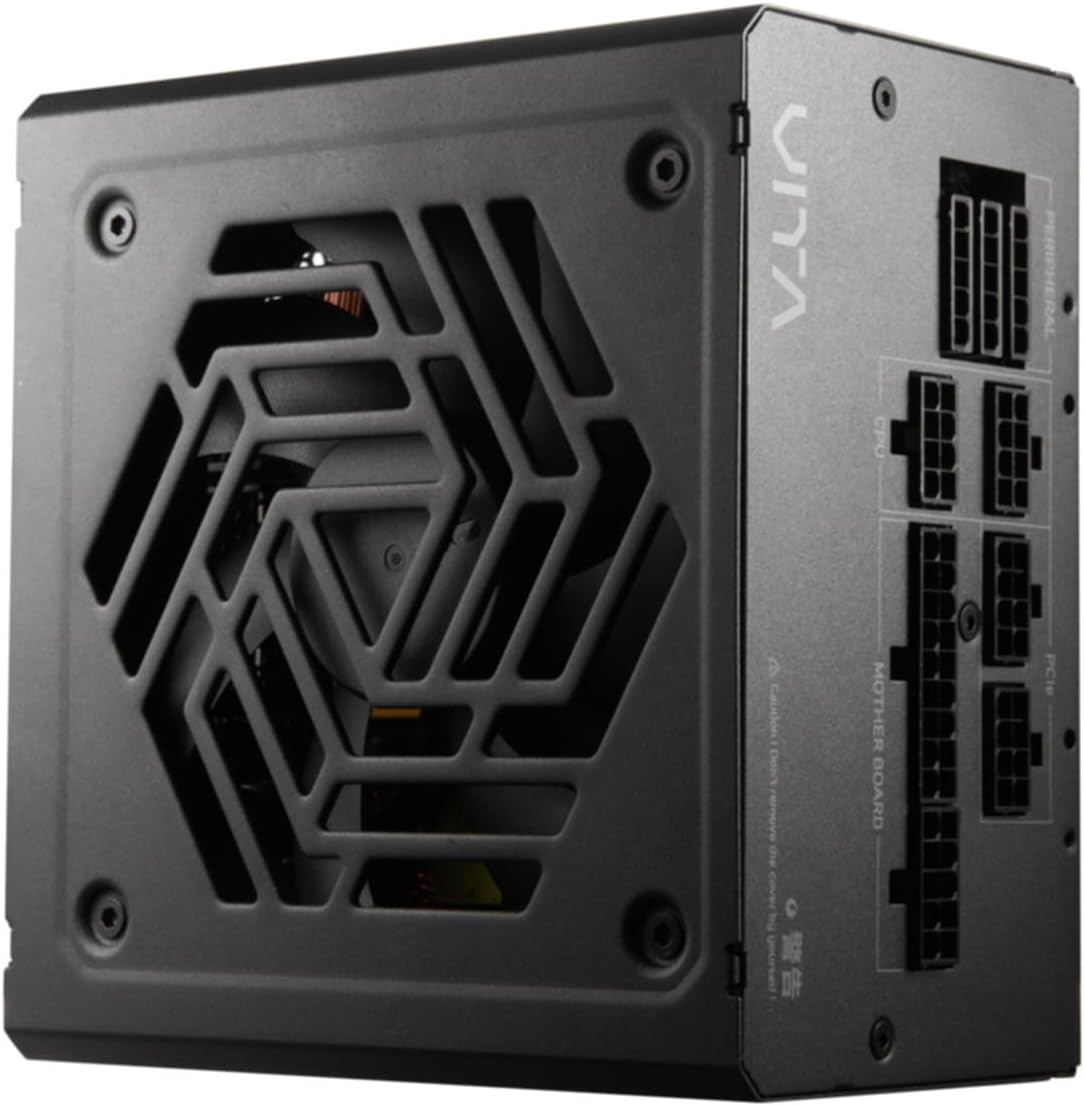
Figure 4.2: Top-down view of the FSP VITA GM 650W Power Supply, highlighting the fan and ventilation design.

Figure 4.3: Side view of the FSP VITA GM 650W Power Supply, showing the FSP branding and VITA model name.
5. Setup and Installation
Follow these steps to install your FSP VITA GM 650W power supply:
- Preparation:
- Turn off your computer and disconnect the AC power cord from the wall outlet.
- Open your computer case.
- If replacing an existing power supply, disconnect all cables from the old PSU and remove it from the case.
- Mounting the PSU:
- Carefully place the FSP VITA GM 650W into the power supply bay of your PC case.
- Align the screw holes on the PSU with those on the case.
- Secure the power supply using the provided mounting screws.
- Connecting Modular Cables:
The FSP VITA GM 650W is a modular power supply. Connect only the cables required for your system components.

Figure 5.1: Modular cable connection panel. Ensure cables are firmly seated.
- Motherboard Power: Connect the 24-pin ATX cable to the motherboard.
- CPU Power: Connect the 4+4-pin or 8-pin EPS/ATX12V cable(s) to the CPU power connector(s) on your motherboard.
- PCIe Power: Connect the 6+2-pin PCIe cables to your graphics card(s).
- SATA Power: Connect SATA power cables to SSDs, HDDs, and optical drives.
- Peripheral Power: Connect 4-pin Molex cables to other peripherals as needed.
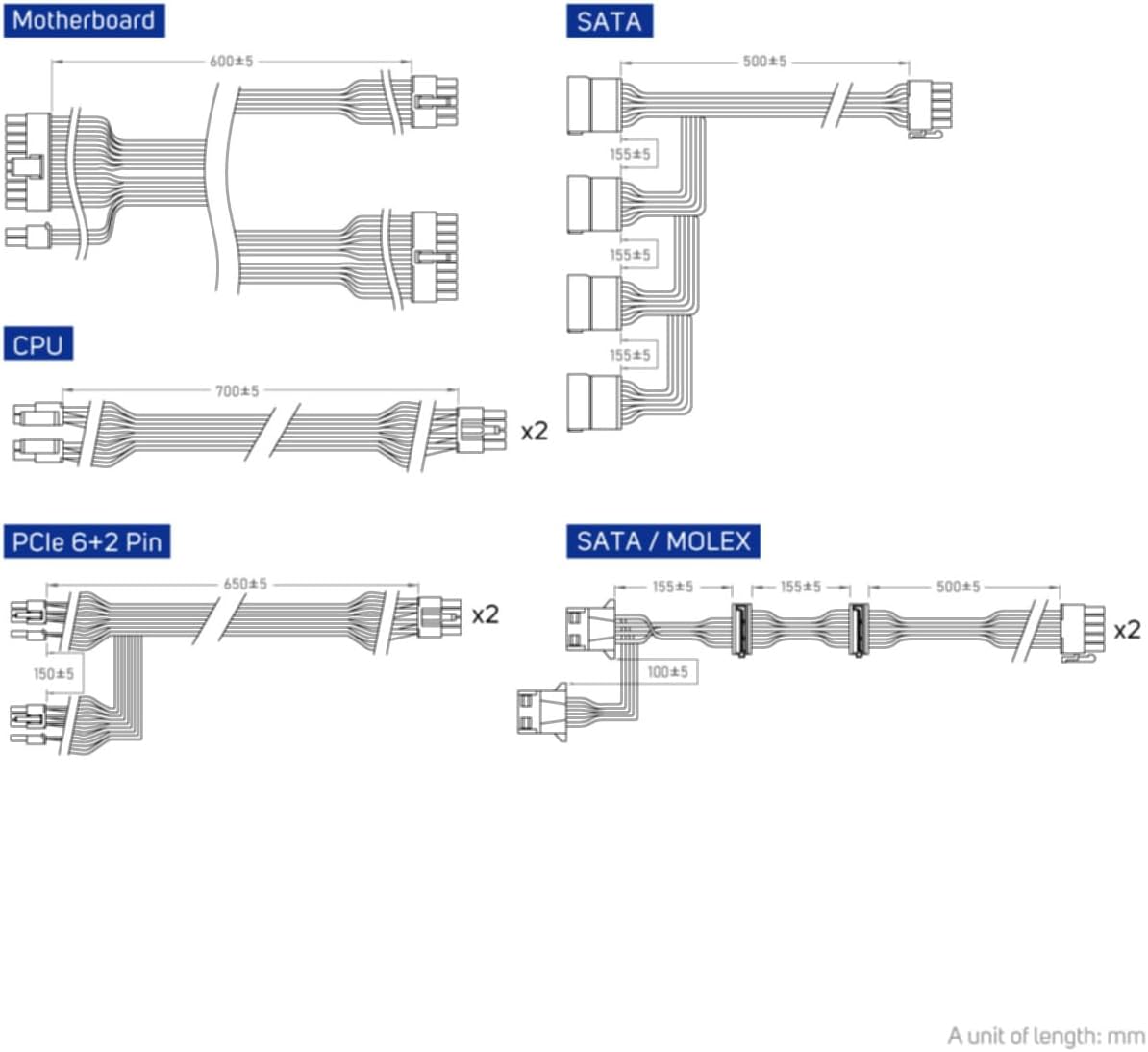
Figure 5.2: Diagram illustrating the various modular cables included and their approximate lengths (in mm).
- Final Checks:
- Ensure all cables are securely connected and routed to avoid obstructing airflow.
- Close your computer case.
- Connect the AC power cord to the power supply and then to a grounded wall outlet.
6. Operating Instructions
After installation, you can power on your system:
- Ensure the power switch on the back of the power supply is in the "ON" (I) position.
- Press the power button on your computer case.
- The power supply will provide stable power to your components.

Figure 6.1: Rear view of the power supply, showing the AC power input and the main power switch.
Bridge Time Importance: The FSP VITA GM 650W adheres to the recommended ATX 3.1 bridge time values. This feature ensures the power supply can maintain a stable output voltage for a critical duration after a power interruption, preventing system instability or damage during sudden power fluctuations or outages.
7. Maintenance
To ensure optimal performance and longevity of your power supply:
- Dust Cleaning: Periodically clean dust from the power supply's fan grille and vents using compressed air. Ensure the system is powered off and unplugged before cleaning.
- Cable Management: Maintain good cable management inside your PC case to ensure proper airflow and prevent overheating.
- Environmental Conditions: Operate the power supply within recommended temperature and humidity ranges.
8. Troubleshooting
If you encounter issues with your FSP VITA GM 650W power supply, refer to the following common problems and solutions:
| Problem | Possible Cause | Solution |
|---|---|---|
| System does not power on. |
|
|
| System powers on but shuts down immediately. |
|
|
| Unusual noises from PSU. |
|
|
If the problem persists after trying these solutions, please contact FSP customer support for further assistance.
9. Specifications
| Feature | Detail |
|---|---|
| Model Number | 790980 |
| Brand | FSP |
| Wattage | 650W |
| ATX Version | 3.1 |
| Efficiency Certification | 80 PLUS Gold |
| Item Weight | 2.72 Kilograms (5.98 pounds) |
| Manufacturer | FSP |
| Date First Available | August 15, 2024 |
10. Warranty and Support
For warranty information, technical support, or service inquiries, please refer to the official FSP website or contact their customer service department. Keep your proof of purchase for warranty claims.
FSP Official Website: www.fsp-group.com
11. Recycling and Disposal
Please dispose of this product responsibly. Electronic waste should not be disposed of with household waste. Contact your local authorities or recycling center for information on proper disposal methods for electronic components.


