
Beafon ML10
Beafon Silverline ML10 LTE Desk Phone User Manual
Model: ML10
1. Introduction
The Beafon Silverline ML10 LTE Desk Phone is designed for ease of use and reliability, offering essential communication features with enhanced safety options. This manual provides detailed instructions for setting up, operating, and maintaining your device.
Key features include:
- 4G LTE Desk Phone connectivity
- Hearing Aid Compatible (HAC M4/T4)
- Programmable SOS emergency numbers with included SOS wristband/necklace (433 MHz range)
- Three quick dial keys for photos or symbols
- Digital announcement when pressing keys
- Extra-large XXL digits on display
- Extra loud ringer (90 dB) and earpiece volume (+40 dB)
- Hands-free function and Bluetooth LE
- SMS functionality and Audio Booster button

2. Important Safety Information
Please read all safety instructions before using the device to prevent injury or damage. Keep this manual for future reference.
- Do not expose the device to extreme temperatures, direct sunlight, or moisture.
- Use only approved accessories and power adapters.
- Avoid dropping or subjecting the device to strong impacts.
- Do not attempt to disassemble or repair the device yourself. Contact qualified service personnel.
- Keep the device away from medical devices, such as pacemakers, to avoid interference.
3. Package Contents
Ensure all items are present in the package:
- Beafon Silverline ML10 LTE Desk Phone unit
- Handset and coiled cord
- Power adapter
- USB charger cable (USB-C)
- SOS wristband
- SOS necklace
- Lithium-ion battery (pre-installed or separate)
- User Manual (this document)
4. Product Overview
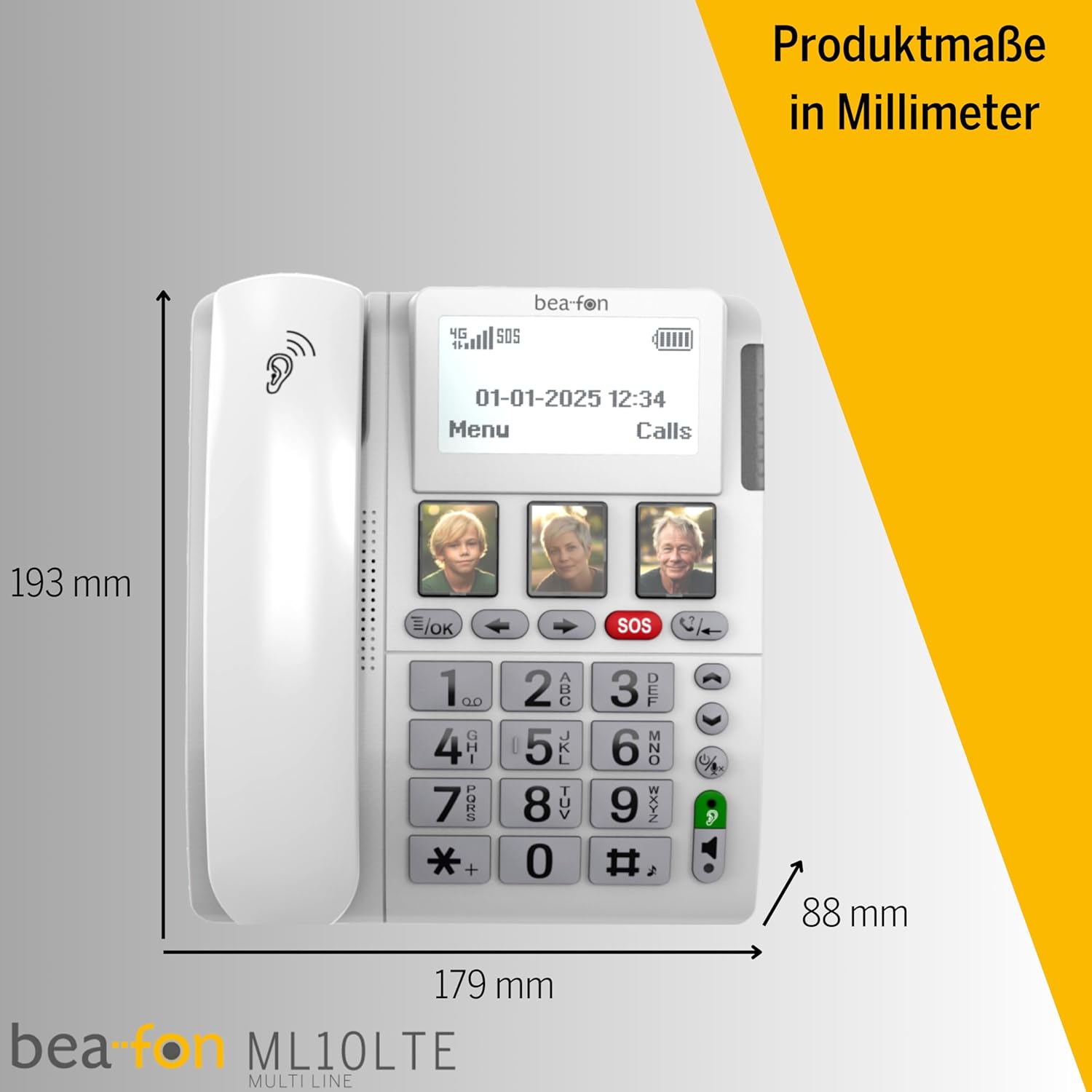
Familiarize yourself with the various parts of your Beafon ML10 desk phone.


5. Setup
5.1. Inserting the SIM Card
- Ensure the phone is powered off and disconnected from the power source.
- Locate the SIM card slot, usually on the back or side of the device.
- Insert a Nano SIM card into the designated slot, ensuring correct orientation.
- Close the SIM card slot cover securely.
5.2. Connecting Power
- Connect the USB-C charger cable to the phone's charging port.
- Plug the power adapter into a wall outlet.
- The phone can operate on battery power via 4G LTE, eliminating the need for a fixed line connection.
5.3. Initial Power On and Language Selection
- Press and hold the Power button until the display turns on.
- Follow the on-screen prompts to select your preferred language.
- The phone will automatically search for a 4G LTE network.

6. Operating Instructions
6.1. Making and Receiving Calls
- Making a Call: Lift the handset, dial the number using the large keypad, and press the green call button.
- Receiving a Call: When the phone rings (up to 90 dB), lift the handset or press the hands-free button to answer.
- Hands-Free Function: Press the dedicated hands-free button to activate speakerphone during a call.
6.2. Quick Dial Keys
The phone features three programmable quick dial keys (I, II, III) that can be customized with photos or symbols for easy access to frequently called contacts.
- Programming: Navigate to the phone's menu, select 'Quick Dial Settings', and assign a contact number to each key. You can also associate a photo or symbol.
- Using: Simply press the desired quick dial key to call the assigned contact.
6.3. SOS Emergency Function
The SOS function allows you to quickly contact pre-selected emergency numbers. It includes an SOS button on the phone and a separate SOS wristband/necklace.
- Programming SOS Numbers: Access the 'SOS Settings' in the menu to program up to five emergency contact numbers.
- Activating SOS (Phone): Press and hold the red SOS button on the phone. The phone will automatically call the programmed numbers in sequence until an answer is received.
- Activating SOS (Wristband/Necklace): Press the button on the SOS wristband or necklace. This will trigger the phone to initiate the emergency call sequence. The wristband/necklace has a range of 433 MHz.


6.4. Other Functions
- SMS: The phone supports sending and receiving text messages. Access the 'Messages' menu to compose or read SMS.
- Audio Booster: Press the Audio Booster button during a call to temporarily increase the earpiece volume for clearer audio.
- Bluetooth LE: Use Bluetooth Low Energy to connect compatible wireless accessories.
- HAC Compatibility: The phone is certified HAC M4/T4, making it suitable for users with hearing aids.
7. Maintenance
7.1. Cleaning the Device
To keep your phone in optimal condition:
- Wipe the phone's surface with a soft, damp cloth.
- Do not use harsh chemicals or abrasive cleaners.
- Ensure no moisture enters openings such as the microphone or speaker.
7.2. Battery Care
The phone is powered by a Lithium-ion battery. To prolong battery life:
- Avoid fully discharging the battery frequently.
- Charge the phone regularly, especially if not in use for extended periods.
- Store the device in a cool, dry place when not in use.
8. Troubleshooting
If you encounter issues with your Beafon ML10, refer to the following common problems and solutions:
| Problem | Possible Solution |
|---|---|
| Phone does not power on | Check if the power adapter is correctly connected and the battery is charged. Ensure the battery is properly inserted. |
| Cannot make or receive calls | Verify that the SIM card is correctly inserted and activated. Check for network signal strength on the display. Restart the phone. |
| SOS function not working | Ensure SOS numbers are correctly programmed. Check the battery level of the SOS wristband/necklace. Verify the wristband/necklace is within range (433 MHz). |
| Poor audio quality | Adjust the earpiece volume. Ensure the microphone is not blocked. If using hands-free, ensure you are close to the phone. |
| Display is blank or frozen | Try restarting the phone by holding the power button. If unresponsive, disconnect power and re-connect. |
9. Specifications
Technical details of the Beafon Silverline ML10 LTE Desk Phone:
| Feature | Detail |
|---|---|
| Brand | Beafon |
| Model Number | 15031162187 |
| Operating System | RTOS |
| Phone Type | Nano SIM |
| Connectivity | 4G LTE, Bluetooth LE |
| Battery Composition | Lithium-ion (1 included) |
| Power Source | Battery Powered |
| Ringer Volume | Up to 90 dB |
| Earpiece Volume | +40 dB |
| Hearing Aid Compatibility | HAC M4/T4 |
| SOS Wristband/Necklace Range | 433 MHz |
| Weight | 210 Grams |
| Caller ID | Yes |
| Multiline Operation | Single Line Operation |
10. Warranty and Support
Information regarding the specific warranty period and detailed support contact information for the Beafon Silverline ML10 LTE Desk Phone is not available in the provided product data. Please refer to the product packaging or the manufacturer's official website for the most current warranty terms and customer support details.
Ask a question about this manual
Ask about setup, troubleshooting, compatibility, parts, safety, or missing instructions. Manuals+ will review the question and use this page’s manual context to help answer it.