
Introduction
This manual provides detailed instructions for the safe installation, operation, and maintenance of your Barrina 4040 Remote Series LED Linear Light Fixture. This is a 3rd-Generation product designed for various indoor lighting applications, offering adjustable color temperature and dimmable brightness via remote control.
Important: This 3rd-Generation 4040 Remote Series is compatible only with other 3rd-Generation 4040 Remote Series linear LED lights. It is not compatible with 5568, 3575, or any other series of linear light fixtures.
Setup and Installation
Included Components
- LED Linear Light Fixture(s)
- Remote Control
- Power Extension Kit
- Common Mounting Clips
- Suspended Mounting Kit
- Ceiling-Mounted Clips
- Instruction Manual

Image: The complete packing list for the Barrina 4040 LED Linear Light Fixture, detailing all components and accessories included in the package.
Mounting Options
The Barrina 4040 Remote Series LED Linear Light Fixture offers two installation methods: ceiling-mount and pendant-mount. Choose the method that best suits your application.
- Ceiling-Mount: For direct attachment to the ceiling surface.
- Pendant-Mount: For suspending the fixture from the ceiling using adjustable cables, allowing for precise height control (0 to 59 inches).

Image: This visual guide demonstrates the two primary installation options: hanging the fixture from the ceiling using suspension cables or mounting it directly to the ceiling surface.
Ceiling Mounting Guide
Follow these steps for ceiling installation:
- Secure the ceiling-mounted clips to your ceiling using appropriate screws and anchors.
- Align the light fixture with the installed clips.
- Push the fixture into the clips until it locks securely into place.

Image: Instructions for securing the light fixture to the ceiling, including how to attach the mounting plate and lock the fixture into place.
Wiring Instructions
The wiring method involves a junction box with an extended power cord. Ensure all connections are secure and follow local electrical codes.
- Connect the fixture's wiring to your electrical supply within a junction box.
- Use the provided wire connectors to ensure a safe and stable connection.
- Ensure the ground wire (typically green or bare copper) is properly connected.
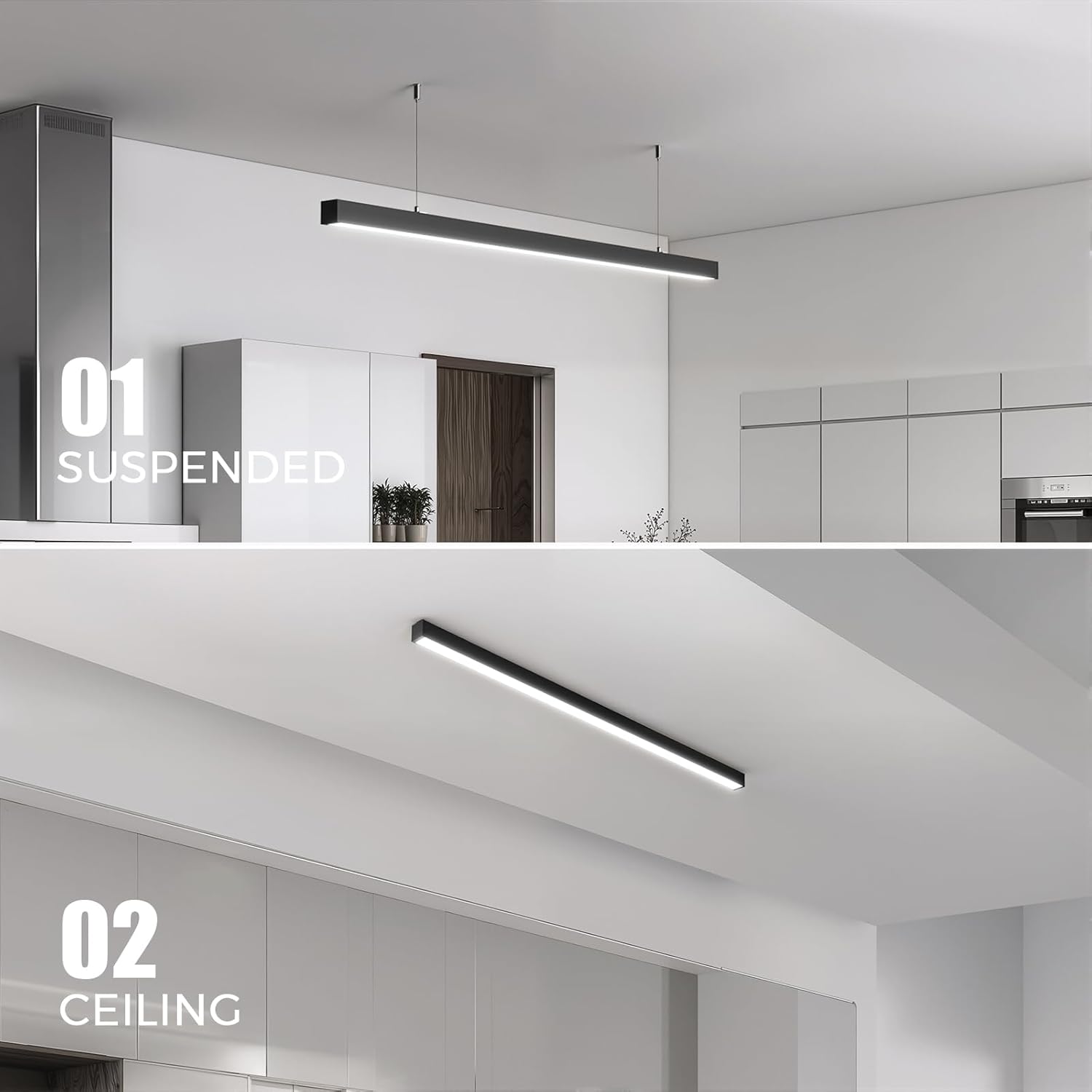
Image: This diagram illustrates the recommended wiring method using a junction box and wire connectors for safe electrical connection.
Linkable Design
These linear lights can be installed individually or linked in series with up to 11 fixtures for a seamless, continuous lighting solution.
Operating Instructions
Remote Control Functions
The Barrina 4040 Remote Series LED Linear Light Fixture is operated using the included remote control. Familiarize yourself with its functions:
- ON/OFF: Power the light fixture on or off.
- Color Temperature Adjustment (K-/K+): Adjust the color temperature between 3000K (warm white), 4000K (neutral white), and 6000K (cool white).
- Brightness Adjustment (Dimmer+/-): Adjust the brightness level from 5% to 100%.
- Night Mode: Sets the brightness to 5% at 4000K for a soft, ambient light.
- Quick Memory: Hold for 5 seconds to save your current settings. The fixture will automatically restore these preferences the next time it is turned on.
- Grouping (A, B, C): Manage multiple linkable light fixtures by assigning them to groups (A, B, or C) for customized control.

Image: This image displays the Barrina 4040 Remote Series LED Linear Light Fixture installed above a kitchen island, showcasing its sleek design and the included remote control for adjusting settings.
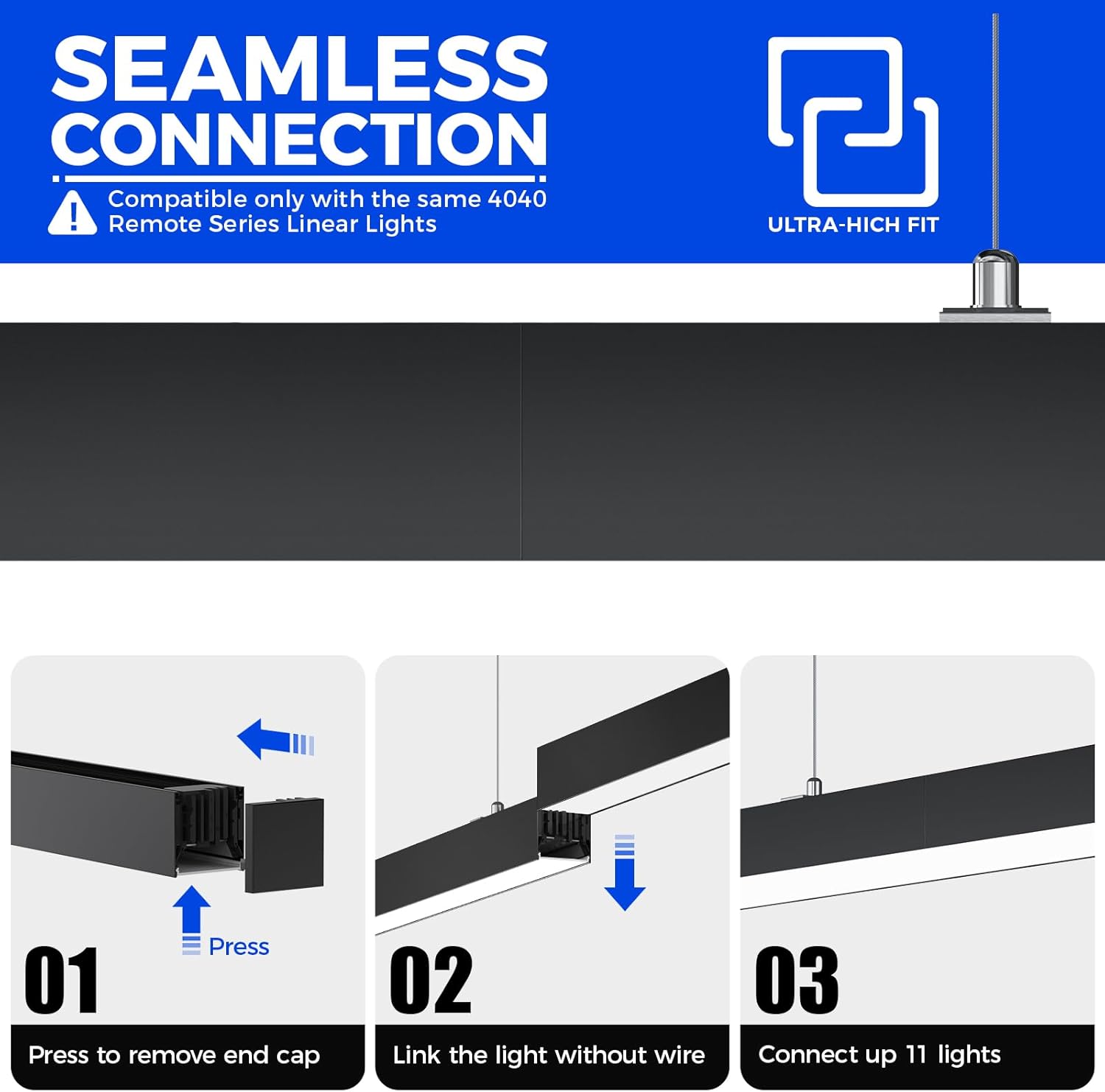
Image: A detailed view of the remote control, highlighting buttons for memory function, soft light, color change, ON/OFF, dimmer adjustments, and group selection (A, B, C).
Adjusting Color Temperature
Use the K- and K+ buttons on the remote to cycle through the available color temperatures: 3000K, 4000K, and 6000K.
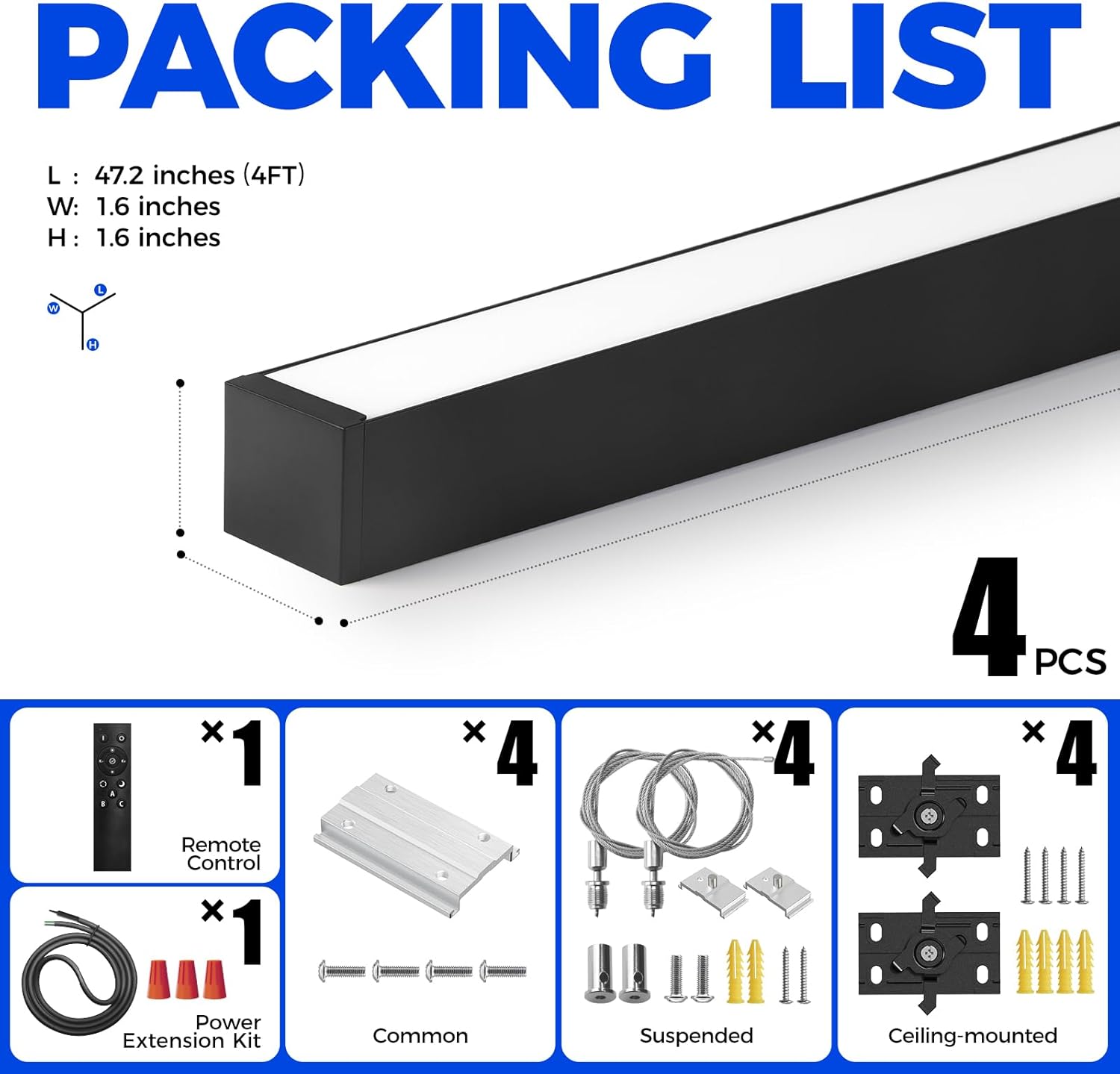
Image: This image shows the light fixture emitting different color temperatures, from warm white (3000K) to cool white (6000K), adjustable via the remote control.
Adjusting Brightness
Press the dimmer buttons (sun icon with +/-) to increase or decrease the light output from 5% to 100%.
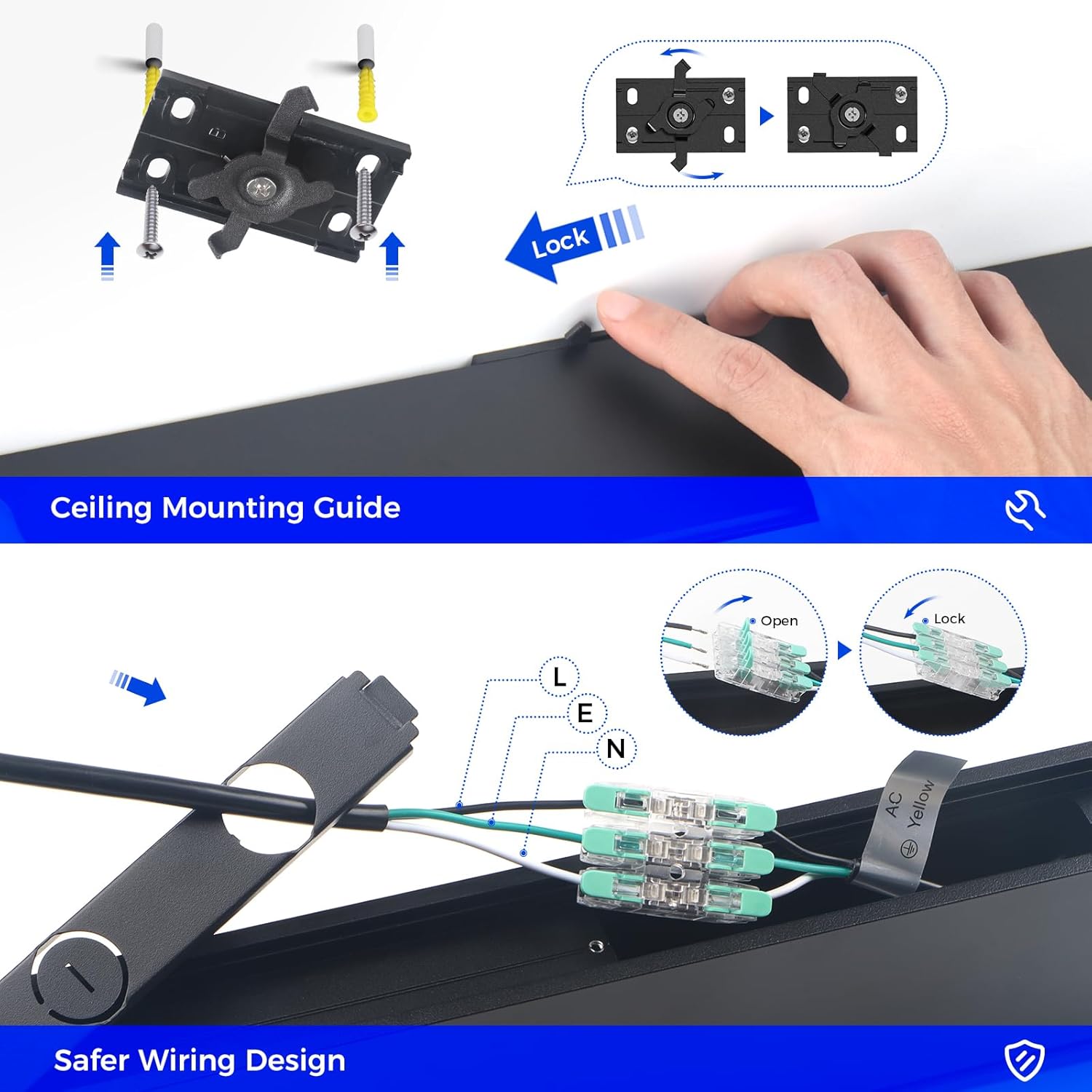
Image: A visual representation of the light fixture's dimming capability, showing brightness levels from 5% (dusky) to 100% (shining).
Maintenance
To ensure optimal performance and longevity of your Barrina LED Linear Light Fixture, follow these simple maintenance guidelines:
- Cleaning: Disconnect power before cleaning. Use a soft, dry cloth to wipe the fixture. Avoid abrasive cleaners, solvents, or harsh chemicals, as these can damage the finish or electrical components.
- Inspection: Periodically check for any loose connections or visible damage to the fixture or wiring. If any issues are found, consult a qualified electrician.
- Bulb Replacement: This fixture uses integrated LED technology, meaning the LED light source is not user-replaceable. The LEDs are designed for a long lifespan.
Troubleshooting
If you encounter issues with your Barrina 4040 Remote Series LED Linear Light Fixture, refer to the following common problems and solutions:
| Problem | Possible Cause | Solution |
|---|---|---|
| Light does not turn on. | No power supply; loose wiring; remote control battery dead or not paired. | Check power source and circuit breaker. Ensure all wiring connections are secure. Replace remote battery or re-pair remote according to instructions. |
| Remote control not responding. | Remote battery dead; remote not paired with fixture; obstruction between remote and fixture. | Replace remote battery. Ensure direct line of sight to the fixture. Re-pair the remote if necessary (refer to remote control instructions). |
| Light flickers or dims unexpectedly. | Unstable power supply; loose connection; incompatible dimmer (note: this fixture uses its own remote for dimming). | Verify stable power supply. Check wiring connections. Ensure no external dimmer is used, as this fixture is controlled by its dedicated remote. |
| Cannot change color temperature or brightness. | Remote control issue; incorrect remote operation. | Ensure you are using the correct buttons on the remote (K-/K+ for color, sun icon for brightness). Check remote battery. |
If the problem persists after attempting these solutions, please contact customer support.
Specifications
| Feature | Detail |
|---|---|
| Model Number | 4040 Remote Series |
| Product Dimensions | 120L x 4W x 4H Centimetres (4 ft) |
| Wattage | 40 watts |
| Brightness | 4000 lumens |
| Color Temperature | 3000K - 6000K (Adjustable White) |
| Dimmability | 5% - 100% (Remote Dimmable) |
| Control Method | Remote Control |
| Material | Aluminum, Polycarbonate |
| Mounting Type | Hanging / Ceiling Mount |
| Indoor/Outdoor Usage | Indoor |
| Special Features | Seamless Connection, Linkable Design, Adjustable Color Temperature, Remote Dimmable, Energy Efficient |
Warranty Information
The Barrina 4040 Remote Series LED Linear Light Fixture comes with a 3 Years Warranty from the manufacturer. Please retain your proof of purchase for warranty claims.
Customer Support
For any questions, technical assistance, or warranty inquiries, please contact Barrina customer support. Refer to the contact information provided with your product packaging or visit the official Barrina website.