1. Introduction
The Whitebite Pro Teeth Whitening Kit is designed to provide professional-level teeth whitening results at home, specifically formulated for individuals with sensitive teeth. This kit utilizes advanced blue LED light technology to accelerate the whitening process, combined with enamel-safe whitening and remineralizing gels.
2. Package Contents
Your Whitebite Pro Teeth Whitening Kit includes the following items:
- 1 x Wireless Rechargeable LED Accelerator Light with Mouth Tray
- 4 x 3ml Whitening Gel Pens (35% Carbamide Peroxide)
- 2 x 3ml Remineralizing Gel Pens
- 1 x USB Charging Cable for LED Light
- 1 x Teeth Shade Guide
- Instruction Manual

Image: The Whitebite Pro Teeth Whitening Kit box with all components laid out, including the LED light device, multiple gel pens, and a teeth shade guide.
3. Safety Information
- May cause temporary sensitivity or irritation.
- For adult use only.
- Avoid contact with eyes and mouth.
- Do not ingest.
- Keep out of reach of children.
- If swallowed, seek immediate medical attention.
Statements regarding dietary supplements have not been evaluated by the FDA and are not intended to diagnose, treat, cure, or prevent any disease or health condition.
4. Setup
- Charge the LED Light: Before first use, fully charge the LED accelerator light using the provided USB charging cable. The light will indicate when charging is complete.
- Prepare the Mouth Tray: The universal comfort tray is made of medical-grade silicone. If necessary, you can trim the tray for a more comfortable fit. Ensure the tray is clean before use.
- Prepare Whitening Gel: Remove the cap from a whitening gel pen. Twist the bottom of the pen until a small amount of gel appears on the brush tip.
Image: A hand demonstrating how to trim the silicone mouth tray with scissors for a customized fit.
5. Operating Instructions
Follow these steps for each whitening session:
- Brush Your Teeth: Begin by brushing your teeth thoroughly to remove any surface plaque or food particles.
- Dry Your Teeth: Use a tissue or cotton swab to dry the front surfaces of your teeth. This helps the gel adhere better.
- Apply Whitening Gel: Apply a thin, even layer of whitening gel directly onto the front surfaces of your upper and lower teeth. Avoid applying gel to your gums. Approximately 0.25ml to 0.5ml of gel is sufficient for both arches.
- Insert LED Mouth Tray: Place the LED accelerator light with the attached mouth tray into your mouth, ensuring your teeth are covered by the tray.
- Activate LED Light: Press the power button on the LED device to turn on the blue light. The device has a built-in 16-minute timer and will automatically shut off when the session is complete.
- Rinse Mouth: After the session, remove the mouth tray and rinse your mouth thoroughly with water. Clean the mouth tray with water and store it in a clean, dry place.
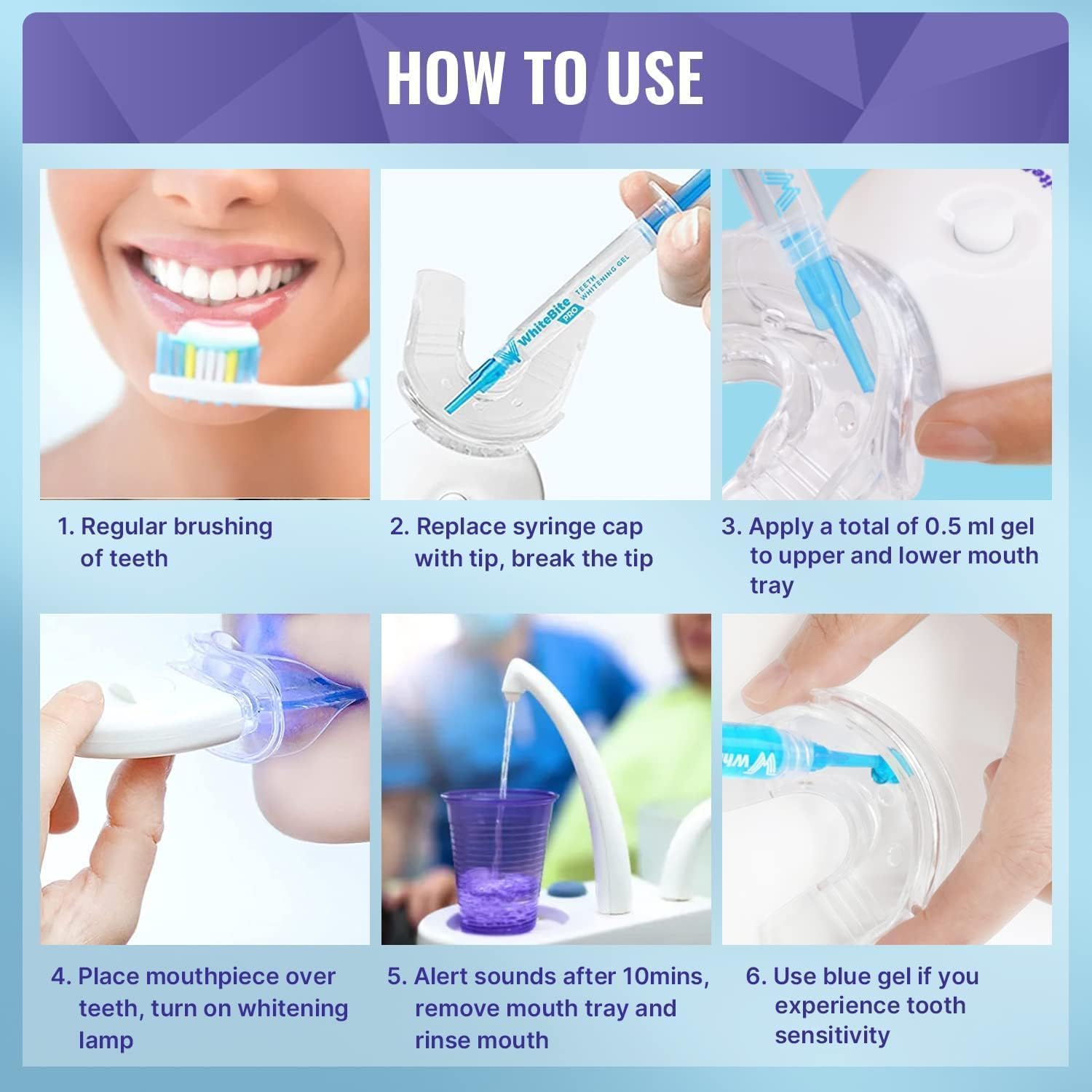
Image: A visual guide illustrating the six main steps for using the teeth whitening kit, from brushing to rinsing.

Image: A close-up view of the whitening gel being applied from a pen directly onto the mouth tray.
Image: A person wearing the LED mouth tray, with the blue light activated, indicating an active whitening session.
Video Demonstration: Operating Instructions
Video: A seller demonstrating the step-by-step process of using the Whitebite Pro Teeth Whitening Kit, including gel application and LED light usage.
6. Remineralizing Gel Usage (for Sensitive Teeth)
If you experience tooth sensitivity during or after whitening, use the remineralizing gel:
- After your whitening session and rinsing, dry your teeth.
- Apply a thin layer of the blue remineralizing gel to your teeth using the pen.
- Leave the gel on for 5-10 minutes. Do not rinse immediately.
- Rinse your mouth thoroughly after the recommended time.

Image: A close-up shot showing the application of the blue desensitizing gel to the teeth using a brush-tip pen.
7. Maintenance
- Cleaning the Mouth Tray: After each use, rinse the mouth tray thoroughly with water. Do not use harsh chemicals or abrasive cleaners. Allow it to air dry completely before storing.
- Storing Gels: Store the whitening and remineralizing gel pens in a cool, dry place, away from direct sunlight.
- Charging: Recharge the LED light as needed to ensure it is ready for your next session.
8. Troubleshooting
| Problem | Possible Cause | Solution |
|---|---|---|
| LED light not turning on | Low battery or device malfunction. | Ensure the device is fully charged. If the issue persists, contact customer support. |
| No visible whitening results | Inconsistent use, insufficient gel application, or severe staining. | Use consistently as directed (up to 9 shades whiter in 7 days). Ensure proper gel coverage. Consult a dental professional for severe staining. |
| Tooth sensitivity | Normal reaction to whitening agents, especially with sensitive teeth. | Use the included remineralizing gel after whitening sessions. Reduce frequency of whitening if sensitivity is severe. |
| Gel on gums causing irritation | Improper gel application. | Ensure gel is applied only to tooth surfaces. Wipe away any excess gel from gums immediately. |
9. Specifications
- Brand: Whitebite Pro
- Model: B0F2VPYLP8
- Active Ingredients: Carbamide Peroxide
- Item Form: Gel
- Number of Items: 1 Kit
- Batteries: 1 Lithium Ion battery required (included)
- Manufacturer: Whitebite LLC
- Package Dimensions: 5.94 x 4.41 x 1.26 inches; 4.66 ounces
10. Warranty and Support
The Whitebite Pro Teeth Whitening Kit is backed by a satisfaction guarantee. For any questions, concerns, or support needs, please refer to the contact information provided with your product packaging or visit the official Whitebite Pro website.


