
Introduction
Thank you for choosing the Vibe Sound V8 Power AF 8 Amplified Speaker. This manual provides essential information for the safe and efficient operation of your device. Please read it thoroughly before use and retain it for future reference.
Important Safety Instructions
- Do not expose the speaker to rain or moisture to prevent fire or electric shock.
- Do not block any ventilation openings. Install in accordance with the manufacturer's instructions.
- Do not install near any heat sources such as radiators, heat registers, stoves, or other apparatus (including amplifiers) that produce heat.
- Protect the power cord from being walked on or pinched, particularly at plugs, convenience receptacles, and the point where they exit from the apparatus.
- Only use attachments/accessories specified by the manufacturer.
- Unplug this apparatus during lightning storms or when unused for long periods of time.
- Refer all servicing to qualified service personnel. Servicing is required when the apparatus has been damaged in any way.
Package Contents
Ensure all items are present in the package:
- Vibe Sound V8 Power AF 8 Amplified Speaker
- Microphone
- Power Cable
- User Manual (this document)
Product Overview
The Vibe Sound V8 Power AF 8 is a versatile amplified speaker featuring 340W output, Bluetooth connectivity, USB and SD card playback, FM radio, and a wired microphone input for various audio needs.
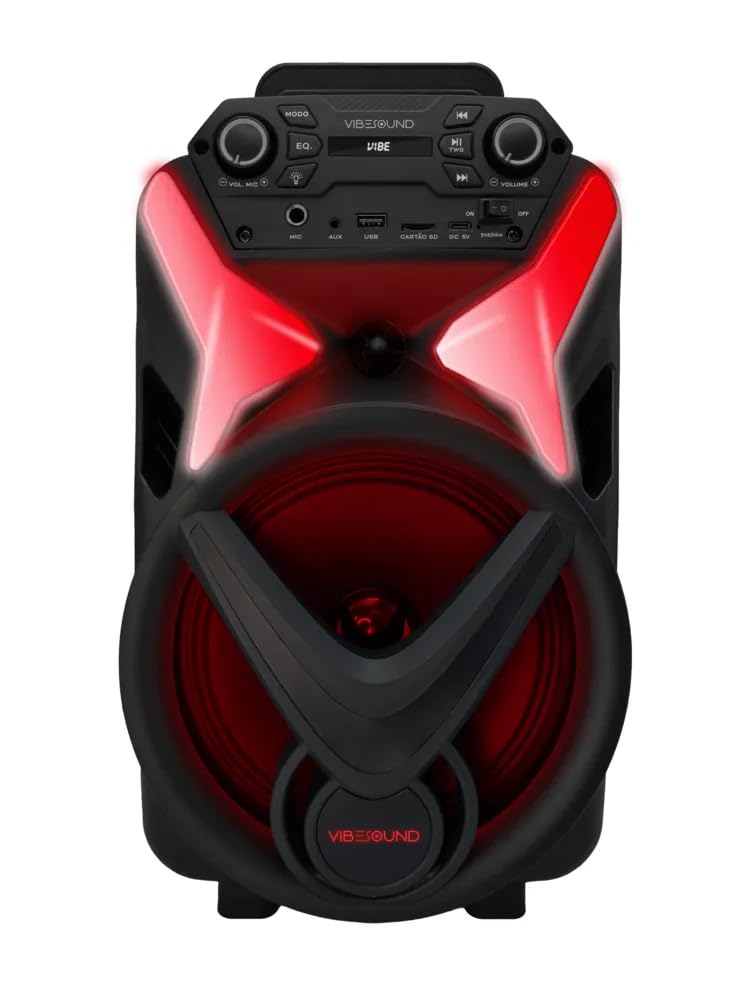
Figure 1: Front view of the Vibe Sound V8 Power AF 8 Amplified Speaker. This image shows the speaker's main grille, the Vibe Sound logo at the bottom, and the control panel at the top. Red LED lights are visible around the speaker cone and on the top panel, indicating its illuminated design.
Control Panel

Figure 2: Angled view of the Vibe Sound V8 Power AF 8 speaker, highlighting the top control panel. The panel includes buttons for MODE, EQ, playback controls (play/pause, skip), volume knobs, and input ports for MIC, AUX, USB, and SD card. The Vibe Sound logo is also visible on the panel.
The control panel located on the top of the speaker provides access to all functions. Key controls include:
- MODE Button: Switches between Bluetooth, FM Radio, USB, SD, and AUX input modes.
- EQ Button: Adjusts equalization presets.
- Playback Controls: Play/Pause, Previous Track, Next Track.
- Volume Knobs: Master Volume and Microphone Volume.
- Input Ports: MIC (6.3mm jack), AUX (3.5mm jack), USB, SD Card slot.
- Power Switch: On/Off.
Rear Panel

Figure 3: Rear view of the Vibe Sound V8 Power AF 8 Amplified Speaker. This image shows the textured back panel with a label indicating the model "VS002 V8 Power" and a DC 9V power input port. A handle is visible at the top for portability.
The rear panel typically houses the main power input and possibly additional connectivity options or product information labels.
Setup
1. Power Connection
- Ensure the speaker's power switch is in the OFF position.
- Connect the power cable to the DC 9V input port on the rear panel of the speaker.
- Plug the other end of the power cable into a suitable AC power outlet (100-240V, 50/60Hz).
- Flip the power switch to the ON position. The speaker will power on.
2. Microphone Connection

Figure 4: Wired microphone included with the Vibe Sound V8 Power AF 8 speaker. The microphone is black with a grille at the top and an ON/OFF switch on the side.
- Locate the MIC input jack on the control panel.
- Insert the microphone cable's plug into the MIC input jack.
- Adjust the microphone volume knob on the control panel to your desired level.
Operating Instructions
1. Power On/Off
To power on the speaker, flip the power switch located on the control panel to the ON position. To power off, flip it to the OFF position.
2. Mode Selection
Press the MODE button repeatedly on the control panel to cycle through available input modes: Bluetooth, FM Radio, USB, SD Card, and AUX input.
3. Bluetooth Pairing
- Switch the speaker to Bluetooth mode using the MODE button. The speaker will indicate it's in pairing mode (e.g., a voice prompt or flashing LED).
- On your mobile device (smartphone, tablet, etc.), enable Bluetooth and search for available devices.
- Select "VIBE SOUND" or a similar name from the list of devices.
- Once paired, the speaker will confirm the connection. You can now play audio from your device.
4. USB/SD Card Playback
- Insert a USB flash drive or an SD card (with MP3 audio files) into the respective port on the control panel.
- Switch the speaker to USB or SD mode using the MODE button. The speaker will automatically begin playing audio files.
- Use the playback control buttons (Play/Pause, Previous, Next) to manage your music.
5. FM Radio Operation
- Switch the speaker to FM Radio mode using the MODE button.
- Press and hold the Play/Pause button to initiate an automatic scan for FM stations. The speaker will save all found stations.
- Use the Previous and Next buttons to navigate between saved stations.
6. AUX Input
- Connect an external audio device (e.g., MP3 player, laptop) to the AUX input jack using a 3.5mm audio cable (not included).
- Switch the speaker to AUX mode using the MODE button.
- Control playback and volume from your external device.
7. Microphone Usage
After connecting the microphone as described in the Setup section, ensure the microphone's ON/OFF switch is in the ON position. Adjust the dedicated microphone volume knob on the control panel to achieve the desired vocal level. The microphone can be used in any mode.
8. Volume and EQ Adjustment
- Master Volume: Rotate the main volume knob on the control panel to increase or decrease the overall sound output.
- EQ: Press the EQ button to cycle through different equalizer presets (e.g., Pop, Rock, Jazz, Classic, Flat) to optimize the sound for your preference.
Maintenance
- Cleaning: Use a soft, dry cloth to clean the exterior of the speaker. Do not use liquid cleaners or abrasive chemicals.
- Storage: When not in use for extended periods, store the speaker in a cool, dry place, away from direct sunlight and extreme temperatures.
- Ventilation: Ensure the speaker's ventilation openings are not blocked to prevent overheating.
Troubleshooting
| Problem | Possible Cause | Solution |
|---|---|---|
| No power | Power cable not connected; Power switch OFF; Outlet malfunction. | Check power cable connection; Ensure power switch is ON; Try a different power outlet. |
| No sound | Volume too low; Incorrect mode selected; Device not connected properly. | Increase master volume; Select correct input mode (Bluetooth, USB, FM, AUX); Reconnect Bluetooth device or AUX cable. |
| Bluetooth not pairing | Speaker not in Bluetooth mode; Device too far; Bluetooth disabled on device. | Ensure speaker is in Bluetooth mode; Move device closer to speaker; Enable Bluetooth on your device. |
| Microphone not working | Microphone OFF; Microphone volume too low; Microphone not connected. | Ensure microphone switch is ON; Increase microphone volume knob; Check microphone cable connection. |
| FM radio poor reception | Weak signal; Interference. | Relocate the speaker to an area with better reception; Try rescanning for stations. |
Specifications
- Model: V8 Power AF 8 VS002
- Brand: Vibe Sound (Generic)
- Output Power: 340 Watts
- Connectivity Technology: Bluetooth, USB, SD, AUX, FM Radio
- Impedance: 3.6 Ohms
- Power Source: AC/DC
- Dimensions (L x W x H): 33 x 33 x 70 centimeters
- Item Weight: 11 Kilograms
- Compatible Devices: Bluetooth devices
- Mounting Type: Floor Mount
- Color: Black
- Recommended Uses: Party
Warranty and Support
This product comes with a manufacturer's warranty of 3 Months from the date of purchase. Please retain your proof of purchase for warranty claims.
For technical support or warranty inquiries, please contact your retailer or the manufacturer's customer service. Contact information may be available on the product packaging or the retailer's website.