Introduction
Thank you for choosing the SKMEI Kids Digital Sports Watch, Model 2346CMGN. This watch is designed for active children, offering a blend of fun, functionality, and durability. It features dual time zones, a stopwatch, alarm, week and date display, and an easy-to-read LED backlight. This manual provides detailed instructions to help you understand and operate your new watch effectively.

Image: Front view of the SKMEI Kids Digital Sports Watch in Army Camouflage, displaying its digital and analog features.
Safety Information
- Do not attempt to open the watch case or remove the battery unless you are a qualified technician.
- Avoid exposing the watch to extreme temperatures (hot or cold) or direct sunlight for prolonged periods.
- Keep the watch away from strong magnetic fields, as this may affect its accuracy.
- Clean the watch with a soft, dry cloth. Do not use chemical cleaners.
- While the watch is 50M water-resistant, it is not suitable for swimming, diving, or hot water activities. Avoid pressing buttons underwater.
Product Overview
The SKMEI 2346CMGN watch features a durable design with multiple functions. Familiarize yourself with the main components:
- Display: Digital and analog display for time, date, and other functions.
- Buttons: Typically four buttons (Mode, Light, Start/Stop, Reset) for navigation and function control.
- Strap: Comfortable TPU band with an adjustable buckle.
- Case: ABS case with a strong resin crystal face.

Image: Close-up view of the watch dial, highlighting the easy-to-read time and date display and the resin dial window.

Image: Visual representation of key features including Digital Analog display, Rectangle dial shape, TPU strap, WR 50M water resistance, and Alarm/Week Display functions.
Setup
Initial Activation
Upon receiving your watch, if the display is off or dim, it may be in a power-saving mode or require initial battery contact. Some watches come with a small plastic tab in the crown/button to prevent battery drain during shipping. Remove this tab if present.
Setting Time and Date
- In normal time display mode, press the MODE button repeatedly until the time setting mode is activated (usually indicated by flashing digits).
- Use the START/STOP button to adjust the flashing digit (hours, minutes, seconds).
- Press the RESET button to move to the next setting item (e.g., from hours to minutes, then to date, month, day of week).
- Once all settings are adjusted, press the MODE button to exit the setting mode and return to normal time display.
The watch supports both 12-hour (AM/PM) and 24-hour formats. This can typically be toggled during the hour setting by pressing the START/STOP button past 12 or 24, or by a dedicated setting option.
Operating Instructions
Mode Switching
Press the MODE button to cycle through the different functions:
- Normal Time Display
- Stopwatch Mode
- Alarm Setting Mode
- Dual Time Mode (if applicable)
Using the LED Backlight
Press the LIGHT button (usually top-left) to illuminate the display for a few seconds, allowing visibility in low-light conditions.
Setting the Alarm
- From normal time display, press MODE until you reach the Alarm setting mode (indicated by "AL" or an alarm icon).
- Use the START/STOP button to adjust the hour.
- Press the RESET button to move to the minute setting.
- Use the START/STOP button to adjust the minutes.
- Press MODE to exit and save the alarm setting.
- To turn the alarm ON/OFF, typically press START/STOP and RESET simultaneously in normal time mode, or use a dedicated button combination in alarm mode. Refer to the watch's display for an alarm indicator.
Using the Stopwatch
- From normal time display, press MODE until you reach the Stopwatch mode (indicated by "ST" or "CHRONO").
- Press the START/STOP button to start the stopwatch.
- Press START/STOP again to pause/resume the stopwatch.
- Press the RESET button to reset the stopwatch to zero.
Setting Dual Time (if applicable)
If your watch supports dual time, navigate to the Dual Time mode using the MODE button. The process for setting the second time zone is similar to setting the main time. Adjust hours and minutes using the START/STOP and RESET buttons.
Maintenance
- Cleaning: Wipe the watch regularly with a soft, lint-free cloth. For stubborn dirt, dampen the cloth slightly with water and mild soap, then wipe dry immediately.
- Water Resistance: The watch is rated 50M water-resistant. This means it can withstand splashes, rain, and brief immersion in shallow water (e.g., handwashing). It is not designed for swimming, showering, or diving. Do not operate buttons when the watch is wet or submerged.
- Battery Replacement: The watch uses 1 C battery (included). When the display becomes dim or functions are erratic, it may be time to replace the battery. Battery replacement should ideally be performed by a professional watch repair service to ensure water resistance is maintained.
- Storage: Store the watch in a cool, dry place away from direct sunlight and extreme temperatures when not in use.
Troubleshooting
| Problem | Possible Cause | Solution |
|---|---|---|
| Display is blank or dim. | Low battery or battery tab still in place. | Remove plastic battery tab if present. Replace battery if necessary. |
| Buttons are unresponsive. | Watch may be in a locked mode or internal issue. | Try pressing all buttons firmly. If problem persists, a reset (if available) or professional inspection may be needed. |
| Time is inaccurate. | Time not set correctly or low battery. | Re-set the time. Replace battery if issue continues. |
| Water inside the watch. | Exceeded water resistance limits or buttons pressed underwater. | Immediately stop using the watch. Seek professional repair to prevent further damage. |
Specifications
| Feature | Detail |
|---|---|
| Model Number | 2346CMGN |
| Brand | SKMEI |
| Movement Type | Quartz |
| Water Resistance | 50M (5ATM) |
| Case Diameter | 42 Millimetres |
| Case Thickness | 13 Millimetres |
| Band Material Type | Thermoplastic Polyurethane (TPU) |
| Item Weight | 39.9 Grams |
| Battery | 1 C battery (included) |
| Product Dimensions | 24.5 x 4.2 x 1.3 cm |
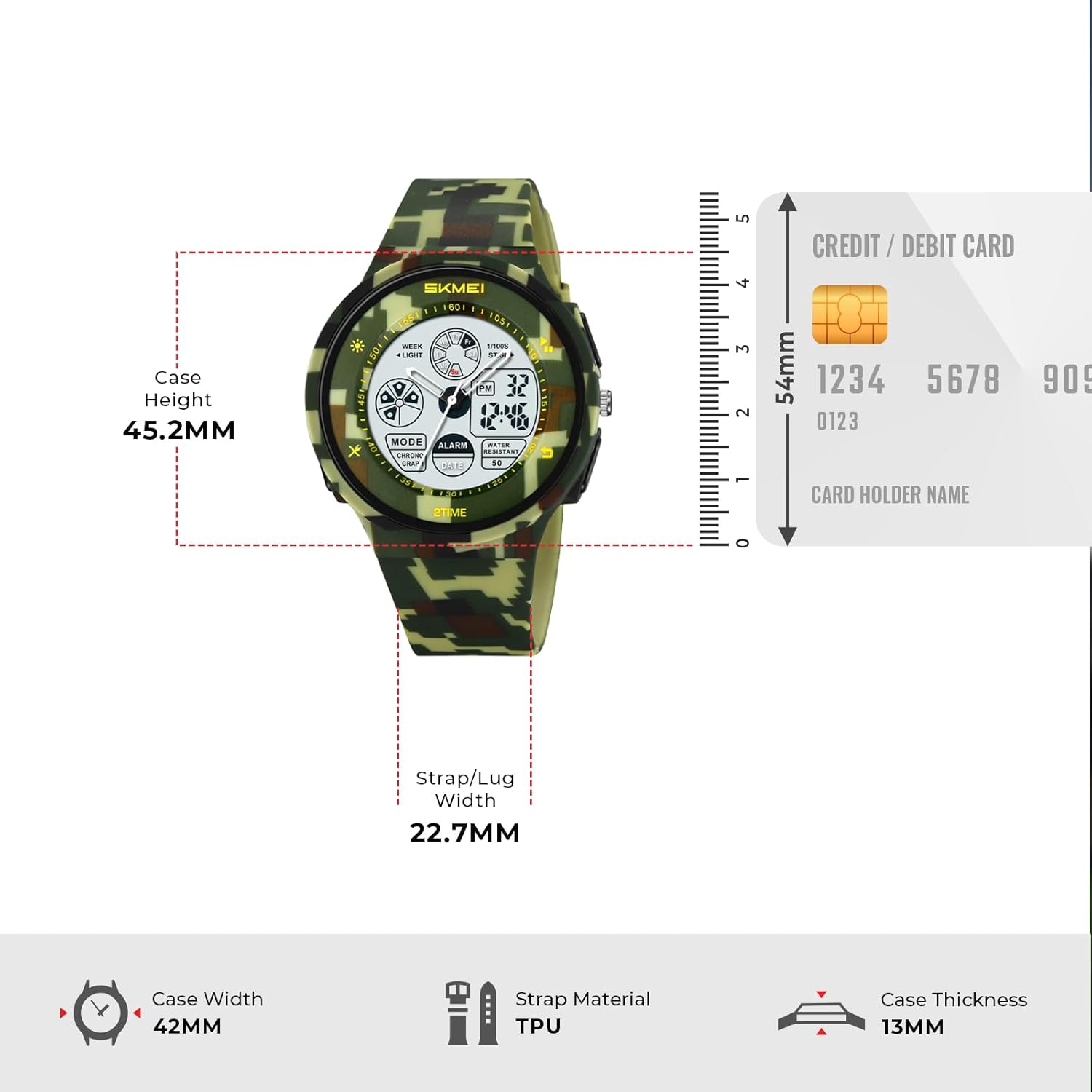
Image: Diagram showing the watch dimensions including case height (45.2mm), strap/lug width (22.7mm), case width (42mm), and case thickness (13mm).
Warranty and Support
Your SKMEI Kids Digital Sports Watch comes with a limited warranty. For specific warranty terms and conditions, please refer to the warranty card included with your purchase or visit the official SKMEI website. If you encounter any issues or require technical assistance, please contact SKMEI customer support through their official channels or the retailer from whom you purchased the product.
For more information, you can visit the SKMEI Store on Amazon.


