
1. Introduction
Thank you for choosing the SYMYNELEC Solar Security Camera System. This manual provides essential information for the proper setup, installation, operation, and maintenance of your new wireless surveillance system. Designed for both indoor and outdoor use, these 2K cameras offer advanced features like AI motion detection, color night vision, and two-way audio, powered by a rechargeable battery and a solar panel for continuous operation.
2. What's in the Box
Upon unboxing your SYMYNELEC Solar Security Camera System, please verify that all components listed below are present:
- 4x Smart Battery Solar Cameras
- 4x Removable Solar Panel Kits (each with a 2m connection cable)
- 4x USB-C Charging Cables (1 meter / 3.3 feet length)
- 4x Screws Sets & Mounting Brackets
- 4x Positioning Stickers & Surveillance Stickers
- 1x User Manual
Video Description: An unboxing video demonstrating the contents of the SYMYNELEC Security Cameras Wireless Outdoor package, showing the camera, solar panel, cables, and mounting accessories.
Video Description: A video showcasing the unboxing and display of the SYMYNELEC Security Camera Wireless Battery, highlighting its components and design.
3. Product Overview
The SYMYNELEC Solar Security Camera System provides robust home monitoring with the following key features:
- Solar and Battery Powered: Equipped with a removable solar panel and a built-in 5200mAh rechargeable battery, offering 1-3 months of battery life on a full charge depending on usage. Low-battery alerts are included. A 5V power adapter is required for charging (not included).
- AI Motion Detection, PIR Heat Sensing & Human Detection: Utilizes AI and PIR technology to identify humans, vehicles, and animals, significantly reducing false alarms. Captures HD video, enables two-way talk, and sends real-time app alerts.
- AI-Powered Descriptive Alerts: Provides precise notifications like "A courier with a package is standing on your front steps" with real-time snapshots, identifying persons, vehicles, packages, pets, and fire.
- 2K Ultra HD Resolution, Color Night Vision, 3x Zoom: Delivers sharp 2K resolution with a 100° wide-angle lens. Features IR night vision and HDR for clear views up to 33 ft. The Symynelec app supports viewing up to 16 real-time videos and 20 users.
- 2.4GHz Wi-Fi Only, 100% Wire-Free, IP65 Waterproof: Connects to 2.4GHz Wi-Fi (5GHz Wi-Fi is NOT supported) for easy, wire-free installation. IP65 waterproof design ensures reliable performance in various weather conditions. Compatible with Alexa and Google Home.
- Encrypted TF Card Storage or Cloud Backup: Supports encrypted TF card storage (up to 256GB, not included) for local recording, or cloud backup via Symynelec on AWS for playback. Cloud storage and AI features may require a subscription after a trial period.

Image Description: A white SYMYNELEC solar security camera with its solar panel mounted on a light-colored exterior wall, illustrating its wire-free design and solar charging capability.

Image Description: A graphic showcasing the main features of the SYMYNELEC 2K Solar Security Cameras Wireless Outdoor, including IP65 waterproof, battery powered, 2K color night vision, two-way talk, human body filtering, PIR/AI motion detection, auto light/siren alarm, and cloud/TF storage.
4. Setup
Follow these steps to set up your SYMYNELEC Solar Security Camera:
- Charge the Camera: Before initial use, fully charge the camera using the provided USB-C charging cable and a 5V power adapter (not included).
- Download the App: Download the official SYMYNELEC app from your smartphone's app store (iOS or Android).
- Create an Account: Open the app and follow the on-screen instructions to create a new user account.
- Add Device: Select "Add Device" or the '+' icon within the app. Choose your camera model (L1-2.4GHz).
- Power On Camera: Ensure the camera is powered on. The indicator light should blink blue for pairing mode.
- Connect to Wi-Fi: Enter your 2.4GHz Wi-Fi network password in the app. Note: 5GHz Wi-Fi is not supported.
- Scan QR Code: The app will generate a QR code. Hold your phone 10-25 cm (4-10 inches) from the camera lens for the camera to scan it. You will hear three beeps, and the indicator light will turn solid green upon successful connection.
Video Description: A short video demonstrating the setup process for the SYMYNELEC Solar Security Camera, including app pairing and Wi-Fi connection.
Video Description: A video showing the SYMYNELEC 2K Battery Powered WiFi Camera for Home, demonstrating its features and ease of use within the app.
5. Installation
The SYMYNELEC Solar Security Camera is designed for flexible installation, both indoors and outdoors. Choose a location that provides optimal coverage and sufficient sunlight for the solar panel.
5.1 Choosing a Location
- Ensure the camera is within range of your 2.4GHz Wi-Fi router for a stable connection.
- For solar charging, position the solar panel in direct sunlight, avoiding shaded areas. The 2.2m cable allows for flexible placement.
- Consider the viewing angle (100° wide-angle lens) and night vision range (up to 33 ft) when selecting a mounting spot.
- The camera can be placed on a tabletop, mounted on a wall, or hung under an eave.
5.2 Mounting the Camera and Solar Panel
Use the included mounting brackets and screws to secure the camera and solar panel. The solar panel can be adjusted (30°/90°) to ensure optimal energy harvesting.
Image Description: A white SYMYNELEC solar security camera with its solar panel mounted on a light-colored exterior wall, illustrating its wire-free design and solar charging capability.

Image Description: A diagram illustrating how the adjustable solar panel (30°/90°) can be positioned to capture optimal sunlight for charging the security camera.

Image Description: An image showing different installation options for the SYMYNELEC camera, including mounting on a wall, ceiling, or placing it on a desktop, demonstrating its versatility for indoor and outdoor use.
6. Operating Instructions
The SYMYNELEC app is your central hub for managing and monitoring your security cameras.
6.1 Live View and Recording
- Open the SYMYNELEC app and select the desired camera to view its live feed.
- You can view up to 16 cameras simultaneously and share access with up to 20 users.
- Record video or capture screenshots directly from the live view.
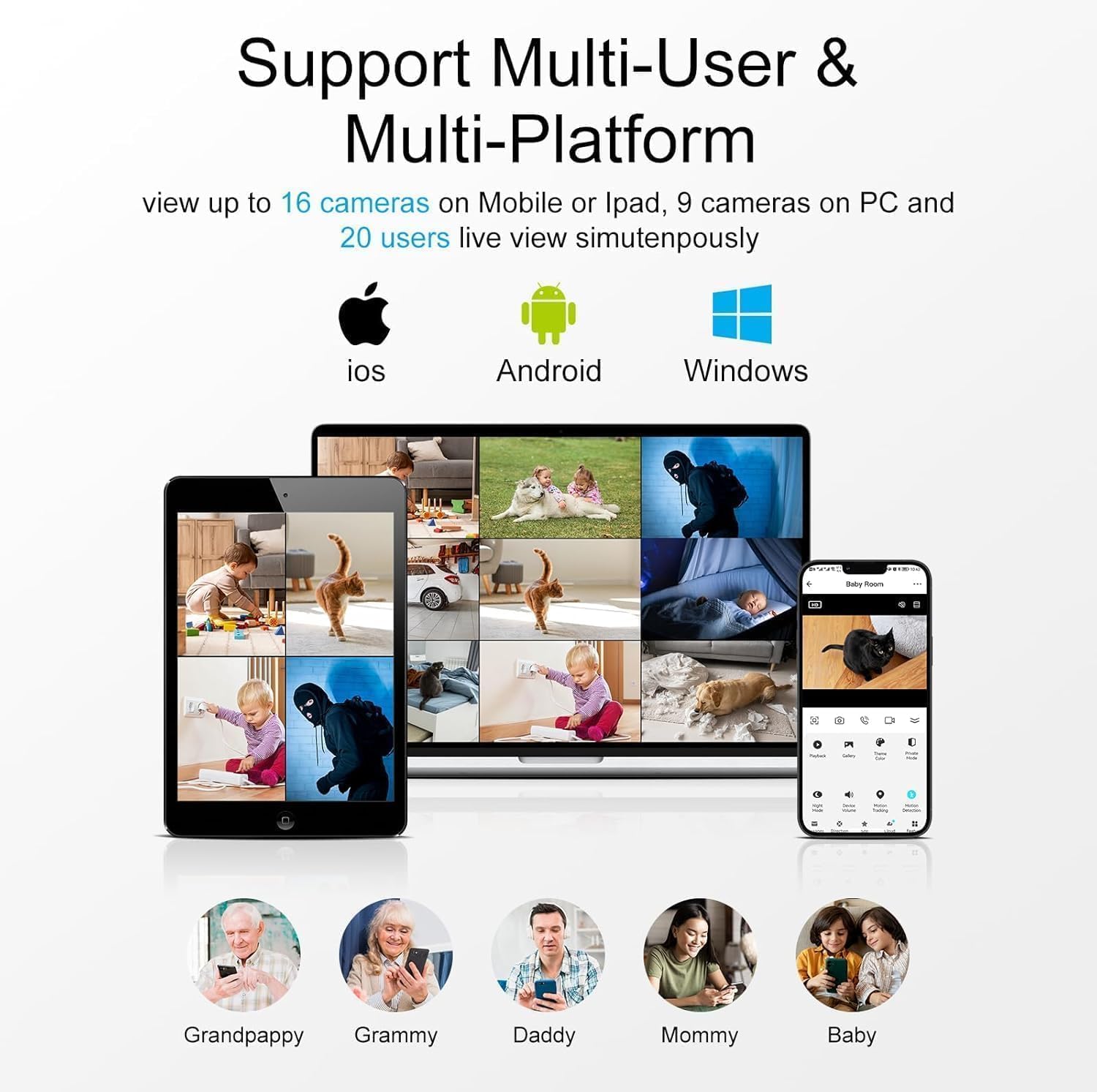
Image Description: A graphic illustrating the SYMYNELEC app's support for multi-user and multi-platform access, showing various devices (iOS, Android, Windows) viewing multiple camera feeds simultaneously.

Image Description: Screenshots of the SYMYNELEC app interface on a smartphone, demonstrating easy real-time access to camera feeds and motion detection alerts for home security.
6.2 Motion Detection and Alerts
- The camera uses AI and PIR technology for accurate motion detection.
- Receive real-time descriptive alerts on your phone, identifying specific objects like persons, vehicles, or packages.
- Adjust PIR sensitivity levels (Low, Medium, High) in the app settings to minimize false alarms.
- Enable AI Human Body Filtering to focus alerts on human presence only.
- Activate the motion alarm and auto spotlight to deter intruders.

Image Description: A graphic illustrating the PIR Motion Detection and Siren feature of the SYMYNELEC camera, showing an intruder being detected and an alarm notification on a smartphone.

Image Description: A graphic explaining the AI Human Body Filtering feature, which helps reduce unnecessary alerts by focusing on human detection, shown with a smartphone displaying a "Human detected" notification.
6.3 Night Vision
- The camera offers 2K color night vision for clear, detailed footage even in low-light conditions.
- IR night vision is also available, providing visibility up to 33 ft.

Image Description: A split image comparing daytime footage with color night vision footage from the SYMYNELEC camera, demonstrating its ability to capture clear details in the dark.

Image Description: A graphic highlighting the Superior Night Vision feature of the SYMYNELEC camera, showing a comparison between Infrared Mode and Color Mode at night, ensuring clear visibility.
6.4 Two-Way Audio
- Use the two-way audio feature in the app to communicate with visitors or deter unwanted guests.

Image Description: A graphic demonstrating the Two-Way Audio feature, showing a person communicating through the app with someone in the camera's view, enhancing child safety and remote monitoring.
6.5 Storage Options
- TF Card Storage: Insert a TF card (up to 256GB, not included) into the camera for local event recording. Note that loop recording is not supported.
- Cloud Storage: Utilize Symynelec's cloud backup service via AWS for secure video storage and playback. A 7-day trial is available, with subscription options thereafter.

Image Description: A graphic illustrating the Cloud Storage (7-day trial) and TF Card Storage (max 256g, not included) options for SYMYNELEC cameras, showing how events are recorded and can be viewed.
7. Maintenance
- Solar Panel Cleaning: Regularly clean the solar panel surface to ensure maximum sunlight absorption and efficient charging.
- Battery Monitoring: Keep an eye on the battery level via the app and recharge if necessary, especially during prolonged periods of low sunlight.
- Firmware Updates: Check the app regularly for firmware updates to ensure optimal performance and security.
- Lens Cleaning: Gently clean the camera lens with a soft, dry cloth to maintain clear image quality.
8. Troubleshooting
- Connectivity Issues: Ensure your camera is within range of a 2.4GHz Wi-Fi network. Restart your router and camera if connection problems persist.
- No Recording/Playback: Verify that a TF card is properly inserted and formatted, or that your cloud storage subscription is active. Check recording settings in the app.
- False Alarms: Adjust the PIR sensitivity settings in the app. Enable AI Human Body Filtering to reduce alerts from non-human movements.
- Poor Night Vision: Ensure the camera lens is clean and there are no obstructions blocking the view. Check if the night vision mode is correctly set in the app.
- Battery Draining Quickly: Ensure the solar panel is receiving adequate direct sunlight. Reduce the frequency of motion detection events or live view access if possible.
9. Specifications
| Feature | Detail |
|---|---|
| Model Number | L1P-Solar-2.4GHz-4PCS |
| Video Capture Resolution | 2K (1440p) |
| Power Source | Solar Powered, 5200mAh Battery |
| Connectivity Technology | 2.4GHz Wi-Fi Only (5GHz not supported) |
| Indoor/Outdoor Usage | Indoor, Outdoor |
| Water Resistance Level | IP65 |
| Night Vision Range | Up to 33 Feet |
| Viewing Angle | 100 Degrees |
| Storage Options | TF Card (up to 256GB, not included), Cloud Backup |
| Special Features | 2-Way Audio, Built-In Light, HD Resolution, Night Vision, Weather Proof, AI Motion Detection |
| Compatible Devices | Android, iOS, Amazon Alexa, Google Assistant |
| Item Dimensions L x W x H | 6.41 x 5.56 x 6.19 inches |
| Item Weight | 15 ounces |
10. Warranty and Support
Your SYMYNELEC Solar Security Camera System comes with a one-year replacement warranty and 24/7 technical support. For any installation assistance or inquiries, please contact our customer support team. We are dedicated to ensuring your satisfaction.

Image Description: A graphic depicting a professional live chat service with customer support representatives, highlighting quick response, step-by-step guides, and lifetime support for SYMYNELEC products.