
1. Introduction
This manual provides essential information for the safe and efficient use of your DOOGEE S200 Ultra Rugged Phone. Please read it thoroughly before operating your device. The DOOGEE S200 Ultra is designed for durability and high performance, featuring a 5G-enabled MediaTek Dimensity 7400 processor, 48GB RAM, 1TB storage, an 11000mAh battery, and a versatile AI quad-camera system.
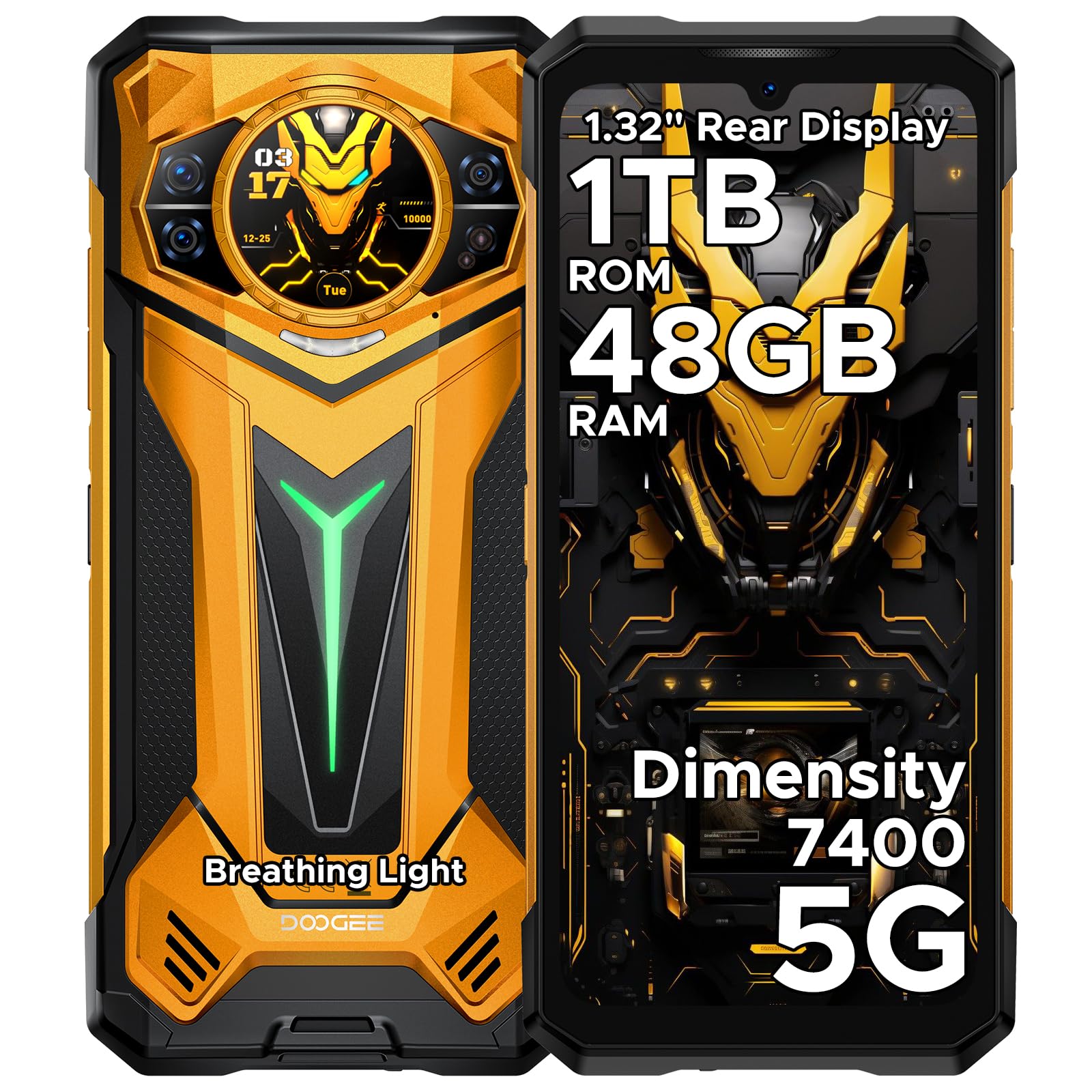
Figure 1: Front and rear view of the DOOGEE S200 Ultra Rugged Phone.
Video 1: Overview of the DOOGEE S200 Ultra Rugged Phone features.
2. Setup
2.1 Unboxing and Initial Inspection
Upon receiving your DOOGEE S200 Ultra, carefully unbox all components. Verify that the package contains the phone, charger, Type-C cable, protective film, anti-explosion film, user manual, and service card. Inspect the device for any visible damage.
Video 2: Unboxing the DOOGEE S200 Ultra, showing included accessories.
2.2 SIM Card Installation
- Locate the SIM card tray on the side of the phone.
- Use the provided SIM ejector tool to open the tray.
- Carefully place your Nano-SIM cards (up to two) and/or a microSD card into the designated slots. Ensure correct orientation.
- Gently push the tray back into the phone until it is flush with the device body.

Figure 2: The DOOGEE S200 Ultra, illustrating the location of the SIM card tray.
2.3 Initial Charging and Power On
- Connect the Type-C cable to the phone's charging port and the 66W power adapter. Plug the adapter into a wall outlet.
- Allow the phone to charge until the battery indicator shows a sufficient charge, or fully charge it before first use.
- To power on, press and hold the Power button (located on the side) until the DOOGEE logo appears on the screen.
- Follow the on-screen prompts to complete the initial setup, including language selection, Wi-Fi connection, and Google account setup.

Figure 3: The DOOGEE S200 Ultra connected to its 66W fast charger, highlighting its 11000mAh battery.
3. Operating Instructions
3.1 Main Display (6.72" FHD+ 120Hz IPS)
The 6.72-inch FHD+ IPS display offers a 120Hz refresh rate for smooth visuals. Navigate the Android 15 interface using touch gestures: tap to select, swipe to scroll, pinch to zoom. Customize your home screen with widgets and app shortcuts.

Figure 4: The 6.72-inch FHD+ 120Hz IPS main display of the DOOGEE S200 Ultra.
3.2 Secondary Display (1.32" AMOLED 60Hz)
The circular 1.32-inch AMOLED rear display provides quick access to information without activating the main screen. It can show the time, notifications, music controls, and a compass. Customize its appearance with dynamic watch dials.

Figure 5: The 1.32-inch AMOLED 60Hz secondary display on the rear of the DOOGEE S200 Ultra.
3.3 Camera System
The DOOGEE S200 Ultra features an AI Quad Camera system:
- 100MP Main Camera: For high-resolution photos.
- 32MP Front Camera: For selfies and video calls.
- 20MP Night Vision Camera: Captures clear images in low-light or total darkness.
- 2MP Macro Camera: For detailed close-up shots.
The camera supports various modes including AI imaging, EIS (Electronic Image Stabilization), and an underwater mode. It also supports Ultra-Clear 4K video recording.

Figure 6: Overview of the DOOGEE S200 Ultra's quad-camera system.

Figure 7: The DOOGEE S200 Ultra's capability for Ultra-Clear 4K video recording.
3.4 Biometric Security and Toolbox
Unlock your phone using the side-mounted fingerprint sensor or face recognition. The fingerprint sensor can also be configured for quick access to specific functions. The device includes a practical software toolbox with tools like a compass, sound meter, and plumb bob.

Figure 8: The DOOGEE S200 Ultra's instant access to handy tools.
3.5 Connectivity and Performance
The S200 Ultra supports 5G cellular networks, Wi-Fi 6E, and Bluetooth 5.4 for fast and stable connections. It is powered by the MediaTek Dimensity 7400 4nm Octa-Core processor, ensuring smooth multitasking and gaming. The phone runs on Android 15 and integrates Gemini AI for enhanced smart features.

Figure 9: The MediaTek Dimensity 7400 5G Octa-Core Chipset powering the DOOGEE S200 Ultra.

Figure 10: The DOOGEE S200 Ultra's large memory configuration: 48GB RAM and 1TB ROM.

Figure 11: Key features of the Android 15 OS on the DOOGEE S200 Ultra.
4. Maintenance
4.1 Rugged Durability
The DOOGEE S200 Ultra is built to withstand harsh environments, meeting IP68, IP69K, and MIL-STD-810H standards. This means it is waterproof, dustproof, and shockproof. While designed for durability, avoid intentional abuse to prolong its lifespan.

Figure 12: The DOOGEE S200 Ultra showcasing its rugged design in natural settings.

Figure 13: Visual representation of the DOOGEE S200 Ultra's resistance to water, drops, and dust.
4.2 Battery Care
The 11000mAh silicon-negative battery provides extended usage. To maintain battery health:
- Use only the official 66W charger and cable.
- Avoid extreme temperatures.
- Do not fully discharge the battery regularly.
- The phone supports 10W reverse charging via OTG, allowing it to act as a power bank for other devices.
5. Troubleshooting
If you encounter issues with your DOOGEE S200 Ultra, try the following common solutions:
- Device not powering on: Ensure the battery is charged. Connect to the charger for at least 15 minutes before attempting to power on again.
- Screen frozen or unresponsive: Press and hold the Power button for about 10-15 seconds to force a restart.
- Network connectivity issues: Check if your SIM card is properly inserted. Toggle Airplane Mode on and off. Restart the phone. Verify network settings.
- Battery draining quickly: Reduce screen brightness, close unused apps, disable unnecessary background processes, and check for app updates.
- Apps crashing: Clear the app's cache and data in Settings > Apps. If the issue persists, reinstall the app.
- Factory Reset: As a last resort, if software issues persist, you may perform a factory reset. Go to Settings > System > Reset options > Erase all data (factory reset). Warning: This will erase all data on your phone. Back up important data before proceeding.
6. Specifications
| Feature | Specification |
|---|---|
| Brand | DOOGEE |
| Model Name | S200 Ultra |
| Operating System | Android 15 |
| CPU Model | Mediatek Dimensity 7400 |
| RAM Memory Installed Size | 48 GB (12GB physical + 36GB extended) |
| Internal Storage | 1 TB |
| Screen Size | 6.72 Inches |
| Resolution | 1080 x 2400 (FHD+) |
| Refresh Rate | 120 Hz |
| Rear Display | 1.32" AMOLED 60Hz |
| Main Camera | 100 MP |
| Front Camera | 32 MP |
| Night Vision Camera | 20 MP |
| Macro Camera | 2 MP |
| Battery Capacity | 11000 mAh |
| Fast Charging | 66W |
| Reverse Charging | 10W |
| Water Resistance Level | IP68, IP69K, MIL-STD-810H |
| Wireless Carrier | Unlocked for All Carriers |
| Connectivity Technology | 5G, WiFi 6E, Bluetooth 5.4 |
| SIM Card Slot Count | Dual SIM |
| Biometric Security Feature | Fingerprint Recognition, Face Recognition |
7. Warranty and Support
Your DOOGEE S200 Ultra Rugged Phone comes with a limited manufacturer's warranty. Please refer to the included service card for specific warranty terms and conditions. For technical support, troubleshooting assistance, or warranty claims, please contact DOOGEE customer service through their official website or the contact information provided in your product packaging.


