
1. Important Safety Instructions
Please read and understand all safety instructions before installing or operating the ALEOPIX 3000W Pure Sine Wave Power Inverter. Failure to follow these instructions may result in electric shock, fire, serious injury, or property damage.
- Ventilation: Ensure the inverter is installed in a well-ventilated area. Do not block ventilation openings.
- Environment: Avoid exposure to moisture, rain, snow, or liquids. Do not operate in areas with flammable materials or gases.
- Polarity: Always connect battery cables with correct polarity (positive to positive, negative to negative). Reverse polarity will damage the inverter and void the warranty.
- Grounding: The inverter must be properly grounded. Connect the ground terminal to a suitable earth ground.
- Connections: Ensure all DC and AC connections are tight and secure to prevent overheating and arcing.
- Children: Keep the inverter out of reach of children.
- Servicing: Do not attempt to service the inverter yourself. Refer all servicing to qualified personnel.
2. Product Overview
The ALEOPIX 3000W Pure Sine Wave Power Inverter converts 12V DC battery power to 110V/120V AC household power. It is designed for sensitive electronics and provides clean, stable electricity for various applications, including RVs, trucks, homes, solar systems, and off-grid setups.
2.1 Package Contents
Verify that all items are present in your package:
- ALEOPIX 3000 Watt Pure Sine Wave Inverter (x1)
- Battery Cables (x2)
- Remote Control (x1)
- Ground Wire (x1)
- User Manual/Instruction (x1)
2.2 Component Identification

Figure 2.2.1: ALEOPIX 3000W Pure Sine Wave Inverter and Accessories. This image displays the main inverter unit, the remote control, and the red and black battery cables.
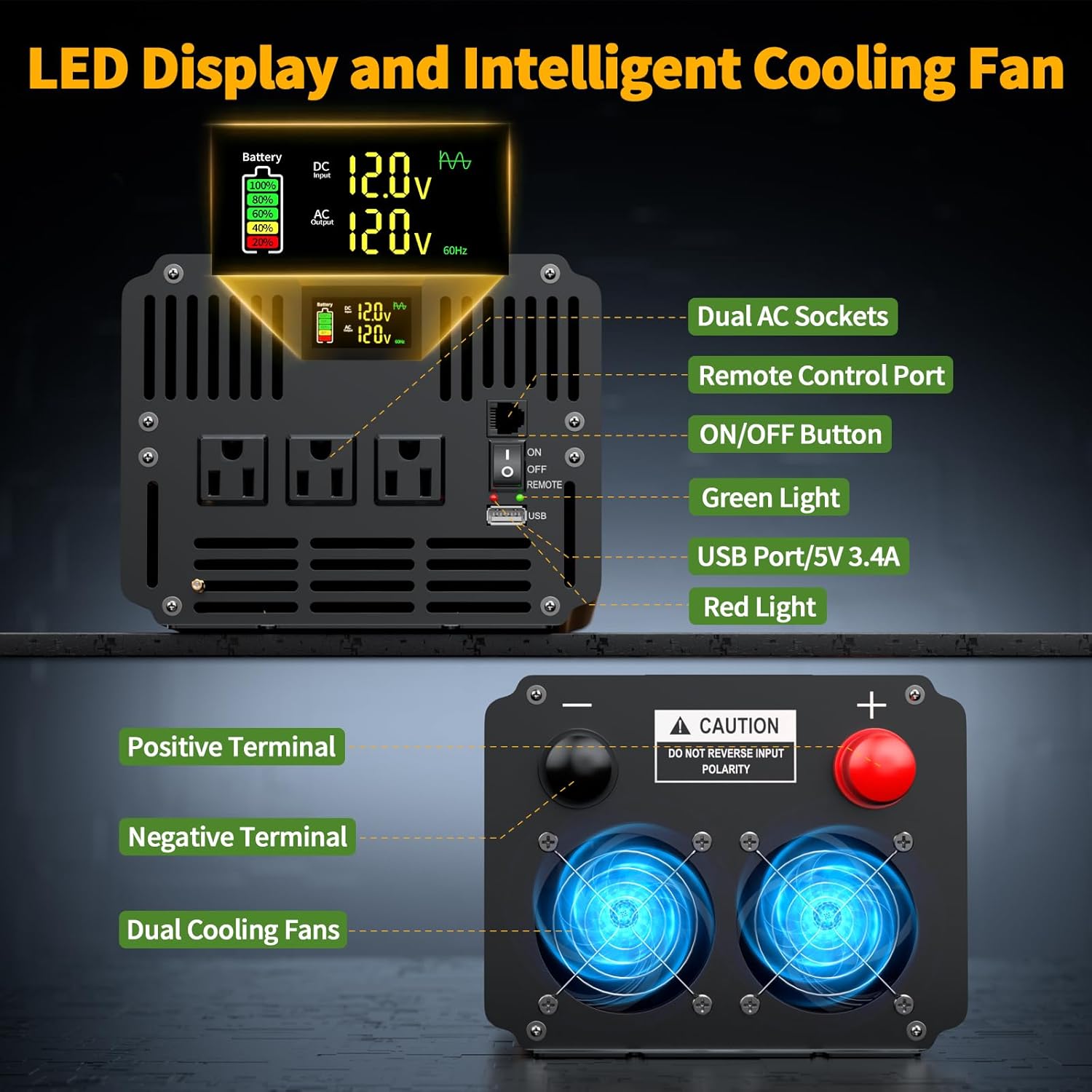
Figure 2.2.2: Front and Rear Panel Features. The front panel includes dual AC sockets, a remote control port, an ON/OFF button, a green power light, a red fault light, and a USB port. The rear panel shows the positive and negative terminals and dual cooling fans.

Figure 2.2.3: Inverter Dimensions and Package Contents. This image illustrates the physical dimensions of the inverter (11.02 inches long, 7.08 inches wide, 5.51 inches high) and confirms the inclusion of the remote control with a 14.76ft cord, positive and negative power cables, ground wire, and user manual.
3. Setup and Installation
Proper installation is crucial for the safe and efficient operation of your inverter.
3.1 Choosing an Installation Location
- Mount the inverter on a flat, stable surface.
- Ensure adequate ventilation around the inverter. Do not install in a confined space.
- Keep the inverter away from direct sunlight, heat sources, and moisture.
- Maintain a safe distance from flammable materials.
3.2 Connecting to a 12V Battery
- Ensure the inverter is switched OFF.
- Connect the red battery cable to the positive (+) terminal of the inverter and then to the positive (+) terminal of the 12V battery.
- Connect the black battery cable to the negative (-) terminal of the inverter and then to the negative (-) terminal of the 12V battery.
- Tighten all connections securely. Loose connections can cause excessive heat and damage.
3.3 Grounding the Inverter
Connect the provided ground wire from the inverter's ground terminal to a reliable earth ground point (e.g., vehicle chassis, ground rod).
3.4 Connecting the Remote Control
Plug the remote control cable into the designated remote control port on the inverter's front panel. The remote allows for convenient power control from a distance.
4. Operating Instructions
4.1 Powering On/Off
- To turn on the inverter, press the ON/OFF button on the inverter's front panel or the remote control. The green 'Power' indicator light will illuminate.
- To turn off the inverter, press the ON/OFF button again. The green light will turn off.
4.2 Understanding the LED Display
Figure 4.2.1: LED Display. The digital display provides real-time information on battery voltage, AC output voltage, and battery charge level.
The bright LED display provides critical operational information at a glance:
- Battery Voltage (DC): Shows the current input voltage from your 12V battery.
- AC Output Voltage: Displays the inverter's output voltage (110V/120V AC).
- Battery Level Indicator: Provides a visual representation of the battery's charge status.
4.3 Connecting AC Appliances and USB Devices
- Plug your 110V/120V AC appliances into the three AC sockets on the inverter's front panel.
- Connect your USB-powered devices to the 5V 3.4A USB port.
- Ensure the total continuous wattage of all connected appliances does not exceed 3000W. The inverter can handle a surge of up to 6000W for a short duration.
4.4 Remote Control Operation

Figure 4.4.1: Remote Control Usage. The remote control allows for convenient power management from inside a vehicle or another room, featuring an ON/OFF button, a green power indicator, and a red fault indicator.
The remote control provides convenient operation from up to 14.76 feet away:
- ON/OFF Button: Toggles the inverter power.
- Green Light (Power): Indicates the inverter is operating normally.
- Red Light (Fault): Indicates an error or fault condition.
4.5 Typical Applications
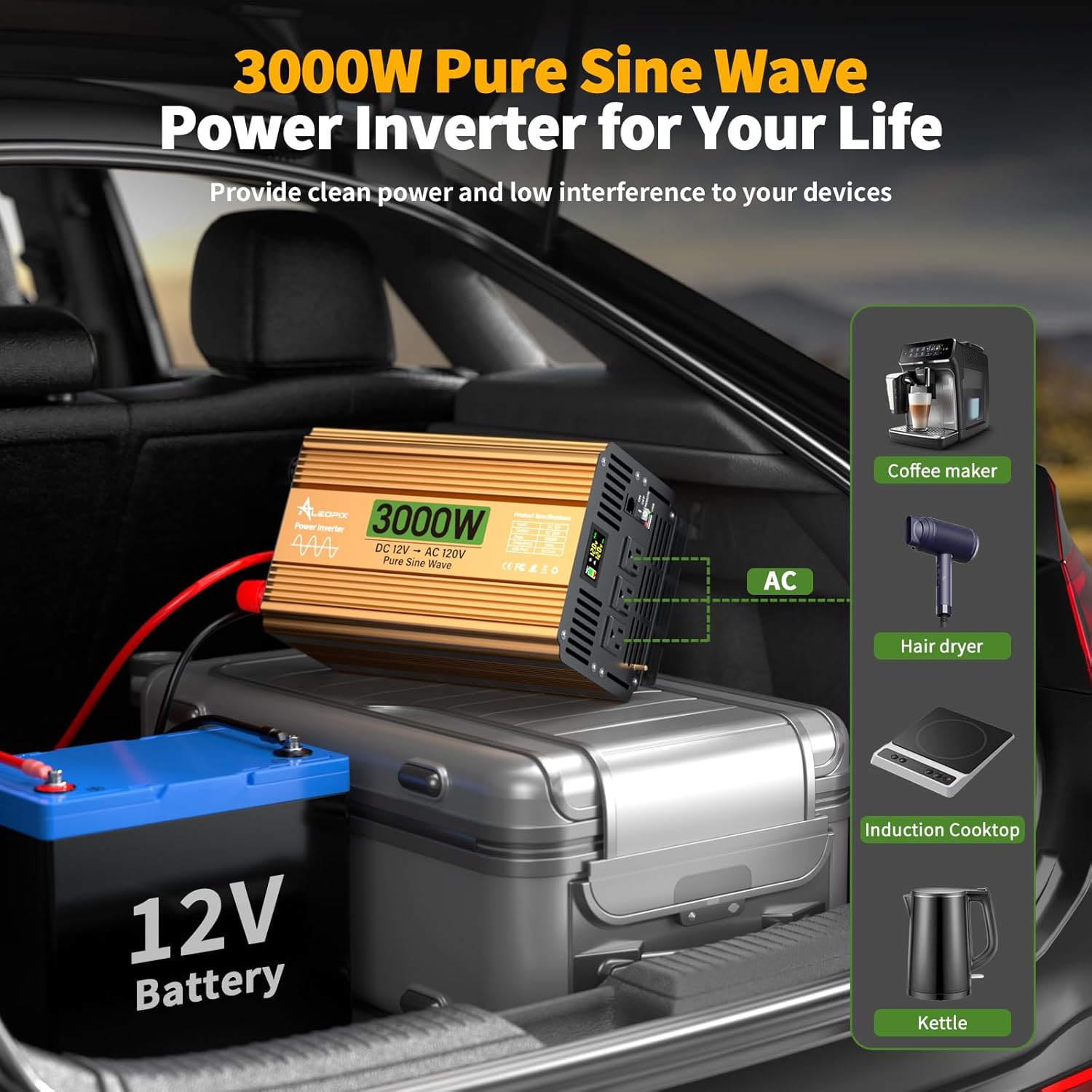
Figure 4.5.1: Inverter in Vehicle Application. The inverter can power various household appliances like coffee makers, hair dryers, induction cooktops, and kettles from a 12V battery source in a vehicle.

Figure 4.5.2: Diverse Inverter Applications. This image shows the inverter being used for road trips, camping, RV systems, during power outages, in trucks, and for emergency situations, highlighting its versatility.
The ALEOPIX 3000W Pure Sine Wave Inverter is suitable for a wide range of applications:
- Vehicles: Trucks, RVs, cars, semi-trucks, boats, vans for powering laptops, phones, and small appliances.
- Outdoor Activities: Camping, road trips, outdoor movies, providing power for various electrical tools and devices.
- Home/Off-Grid: Backup power during outages, solar power systems, off-grid cabins, tool rooms.
5. Maintenance
Regular maintenance ensures the longevity and optimal performance of your inverter.
- Cleaning: Periodically clean the exterior of the inverter with a dry cloth. Ensure ventilation openings are free from dust and debris. Do not use liquid cleaners.
- Connections: Regularly check all battery and AC connections to ensure they remain tight and free from corrosion.
- Battery Maintenance: Ensure your 12V battery is properly maintained and charged according to its manufacturer's instructions. A healthy battery is essential for inverter performance.
- Storage: If storing the inverter for an extended period, disconnect it from the battery and store it in a cool, dry place.
6. Troubleshooting
This section addresses common issues you might encounter with your inverter.
| Problem | Possible Cause | Solution |
|---|---|---|
| No AC output / Inverter not turning on | Low battery voltage Loose battery connections Inverter OFF Blown fuse (internal) | Charge battery or replace Check and tighten connections Turn inverter ON Contact support (do not open inverter) |
| Low AC output voltage | Low battery voltage Overload | Charge battery Reduce connected load |
| Inverter shuts down (Red Fault Light) | Overload Over-temperature Low/High input voltage Short circuit | Reduce load Allow inverter to cool, ensure ventilation Check battery voltage Remove short, restart inverter |
| Humming noise from appliances | Normal for some appliances with pure sine wave inverters (rare) Appliance incompatibility | This inverter provides pure sine wave output, which is compatible with most appliances. If humming occurs, it may be due to the appliance itself. |
If the problem persists after attempting these solutions, please contact ALEOPIX customer support.
7. Specifications
| Feature | Specification |
|---|---|
| Model Name | RT-PSW-3000W+RC |
| Continuous Wattage | 3000 watts |
| Peak/Surge Wattage | 6000 watts |
| Input Voltage | 12V DC |
| Output Voltage | 110V/120V AC |
| Output Waveform | Pure Sine Wave |
| USB Output | 5V 3.4A |
| AC Outlets | 3 |
| Remote Control Cable Length | 14.76 feet |
| Product Dimensions (L x W x H) | 11.02 x 7.08 x 5.51 inches |
| Item Weight | 9.25 pounds |
| Power Source | Solar and Battery Powered |
| Conversion Efficiency | >90% |
8. Warranty and Support
ALEOPIX products are manufactured to high-quality standards. For warranty information or technical support, please refer to the contact details provided with your purchase documentation or visit the official ALEOPIX website.
No official product videos were provided in the product data for embedding in this manual.