Product Overview
The RadioShack AM/FM 2-Band Vintage Radio with Bluetooth Function and USB/TF Ports (Black) is a versatile audio device designed for both classic radio listening and modern digital media playback. It features a vintage aesthetic combined with contemporary functionalities like Bluetooth connectivity and USB/TF card support.

Front view of the RadioShack Vintage Radio, showcasing its classic design and LED display.
What's in the Box
- 1 x RadioShack Vintage Radio (Model 1202265)
- 1 x Type-C USB Charging Cable

The package includes the RadioShack Vintage Radio and its Type-C charging cable.
Product Features
- AM/FM 2-Band Radio with LED Display: For clear reception of radio stations.
- Bluetooth Functionality: Wireless audio streaming from compatible devices.
- Versatile Media Playback: Supports MP3 files via USB/TF ports and AUX-in.
- High Power Dual Speakers: Delivers rich sound with preset EQ function.
- Portable Design: Features a rechargeable battery, built-in antenna, and carry handle.

Key features of the radio include a rechargeable battery, Bluetooth connectivity, AM/FM radio, and AUX input.
Setup
1. Charging the Battery
Before first use, fully charge the radio's internal rechargeable battery. Connect the supplied Type-C USB cable to the radio's charging port and the other end to a compatible USB power adapter (not included) or a computer USB port. The LED indicator will show charging status.
2. Antenna Setup
For optimal radio reception, extend the telescopic antenna fully. Adjust its direction to improve signal clarity for both AM and FM bands.
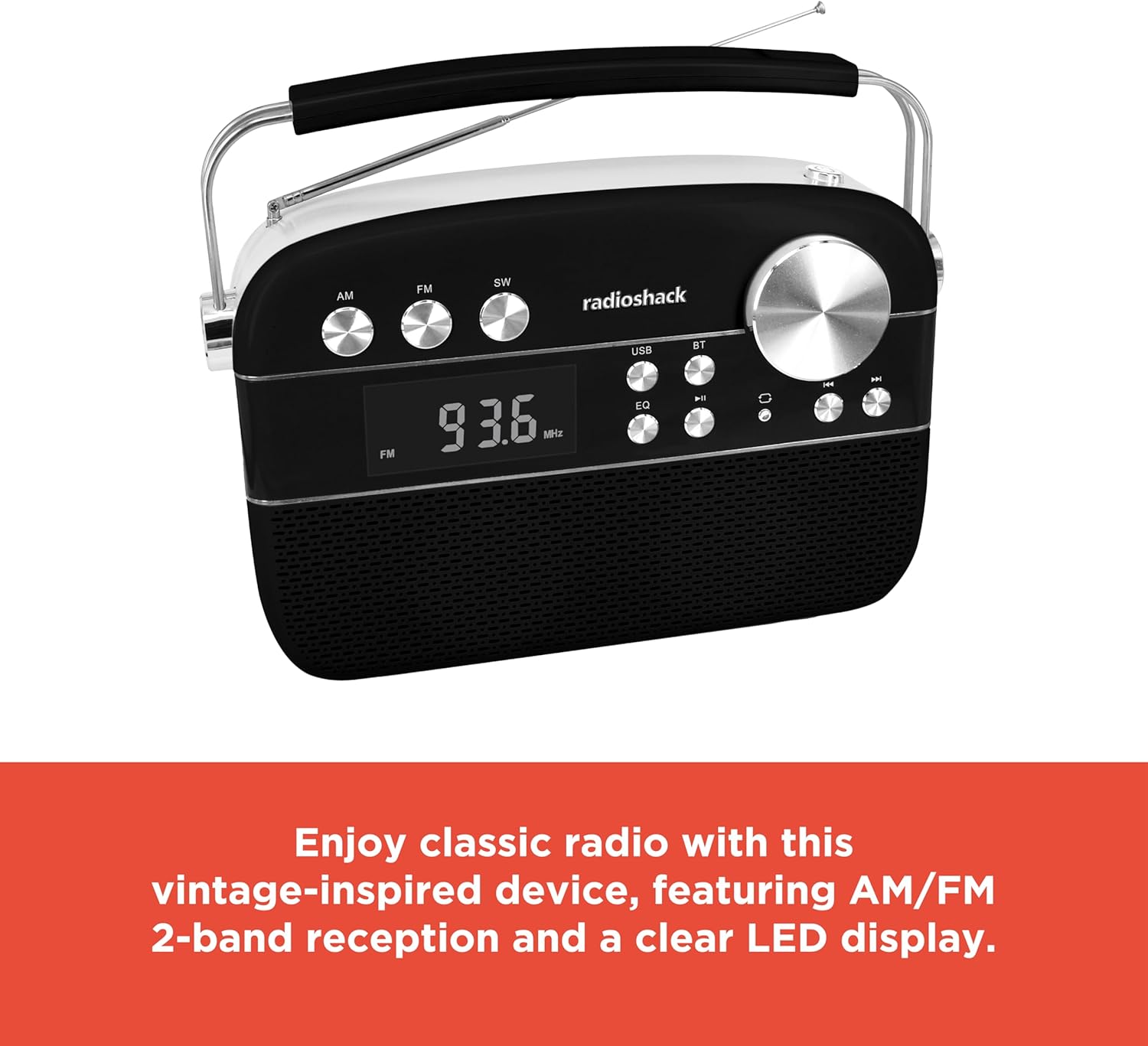
The radio features an extendable antenna for improved reception and a clear LED display for tuning.
Operating Instructions
Power On/Off
Press the Power button to turn the radio on or off.
Mode Selection
Use the Mode button to switch between FM, AM, Bluetooth (BT), USB/TF, and AUX input modes. The LED display will indicate the current mode.
Radio Operation (AM/FM)
- Switch to FM or AM mode using the Mode button.
- Rotate the Tuning knob to scan for available radio stations. The frequency will be displayed on the LED screen.
- Adjust the Volume knob to your desired listening level.
Bluetooth Pairing
- Switch the radio to Bluetooth (BT) mode. The display will show "BLUE" and the Bluetooth indicator will flash, indicating it's ready for pairing.
- On your smartphone or tablet, enable Bluetooth and search for available devices.
- Select "RadioShack" from the list of devices. Once paired, the Bluetooth indicator will stop flashing and remain solid.
- You can now stream audio wirelessly from your device to the radio.
USB/TF Card Playback
- Insert a USB flash drive or TF (microSD) card containing MP3 audio files into the respective port.
- Switch the radio to USB/TF mode. The radio will automatically detect and begin playing the audio files.
- Use the Previous/Next buttons to navigate between tracks.
- Press the Play/Pause button to pause or resume playback.
- The "ONE/ALL/RND" button allows you to cycle through playback modes (single track repeat, all tracks repeat, random playback).
- The "FOLDER" button allows navigation through folders on the storage device.
AUX-in Mode
Connect an external audio device (e.g., MP3 player, smartphone) to the radio's AUX-in port using a 3.5mm audio cable (not included). Switch the radio to AUX mode to play audio from the connected device.
Equalizer (EQ) Function
Press the EQ button to cycle through preset equalizer modes, adjusting the audio output to suit different music genres or personal preferences.

Detailed view of the control panel, highlighting the various buttons and the tuning knob for different playback options.
Product Demonstration Video
This video demonstrates the key features and operation of the RadioShack Vintage Radio, including tuning to FM stations and connecting via Bluetooth.
Maintenance
Cleaning
Wipe the exterior of the radio with a soft, dry cloth. Do not use abrasive cleaners, waxes, or solvents as they may damage the finish. Avoid getting moisture into any openings.
Battery Care
To prolong battery life, avoid fully discharging the battery frequently. If the radio will not be used for an extended period, charge it periodically (e.g., every 3 months) to maintain battery health.
Troubleshooting
| Problem | Possible Cause | Solution |
|---|---|---|
| No power | Battery is discharged. | Charge the radio using the supplied Type-C USB cable. |
| No sound | Volume is too low or muted. Incorrect mode selected. | Increase the volume. Ensure the correct input mode (FM, AM, BT, USB/TF, AUX) is selected. |
| Poor radio reception | Antenna not extended or positioned incorrectly. Weak signal area. | Fully extend and adjust the telescopic antenna. Try moving the radio to a different location. |
| Bluetooth not connecting | Radio not in pairing mode. Device too far. Previously paired device connected. | Ensure radio is in BT mode and "BLUE" is flashing. Move device closer. Disconnect from other Bluetooth devices. |
| USB/TF playback not working | Incorrect file format. USB/TF card not inserted correctly or corrupted. | Ensure files are in MP3 format. Reinsert the USB/TF card. Try a different USB/TF card. |
Specifications
| Feature | Detail |
|---|---|
| Brand | RadioShack |
| Model Number | 1202265 |
| Product Dimensions | 4.53 x 11.42 x 7.36 inches |
| Item Weight | 3.41 pounds |
| Power Source | Rechargeable Battery (included), Corded Electric |
| Radio Bands Supported | AM/FM 2-Band |
| Connectivity Technology | Bluetooth, USB, TF Card, AUX-in |
| Color | Black |
Warranty and Support
For warranty information and customer support, please refer to the documentation provided with your purchase or visit the official RadioShack website. Keep your proof of purchase for any warranty claims.


