
1. Introduction and Safety Instructions
Thank you for choosing the EMERIO MO-125236.4 32L Oven with 2 Hotplates. This appliance is designed for versatile cooking in small kitchens, camping, or office environments. Please read this instruction manual carefully before using the appliance to ensure safe and efficient operation. Keep this manual for future reference.
Important Safety Precautions:
- Always place the appliance on a stable, heat-resistant surface, away from flammable materials.
- Do not immerse the appliance, cord, or plug in water or any other liquid.
- Ensure adequate ventilation around the appliance during operation. Do not block any ventilation openings.
- The oven and hotplate surfaces become very hot during use. Use oven mitts or gloves when handling hot parts.
- Unplug the appliance from the power outlet when not in use and before cleaning.
- This appliance is not intended for use by persons (including children) with reduced physical, sensory, or mental capabilities, or lack of experience and knowledge, unless they have been given supervision or instruction concerning use of the appliance by a person responsible for their safety.
- Do not operate the appliance with a damaged cord or plug, or after the appliance malfunctions or has been damaged in any manner.
- Do not use abrasive cleaners or sharp objects for cleaning, as this may damage the surfaces.
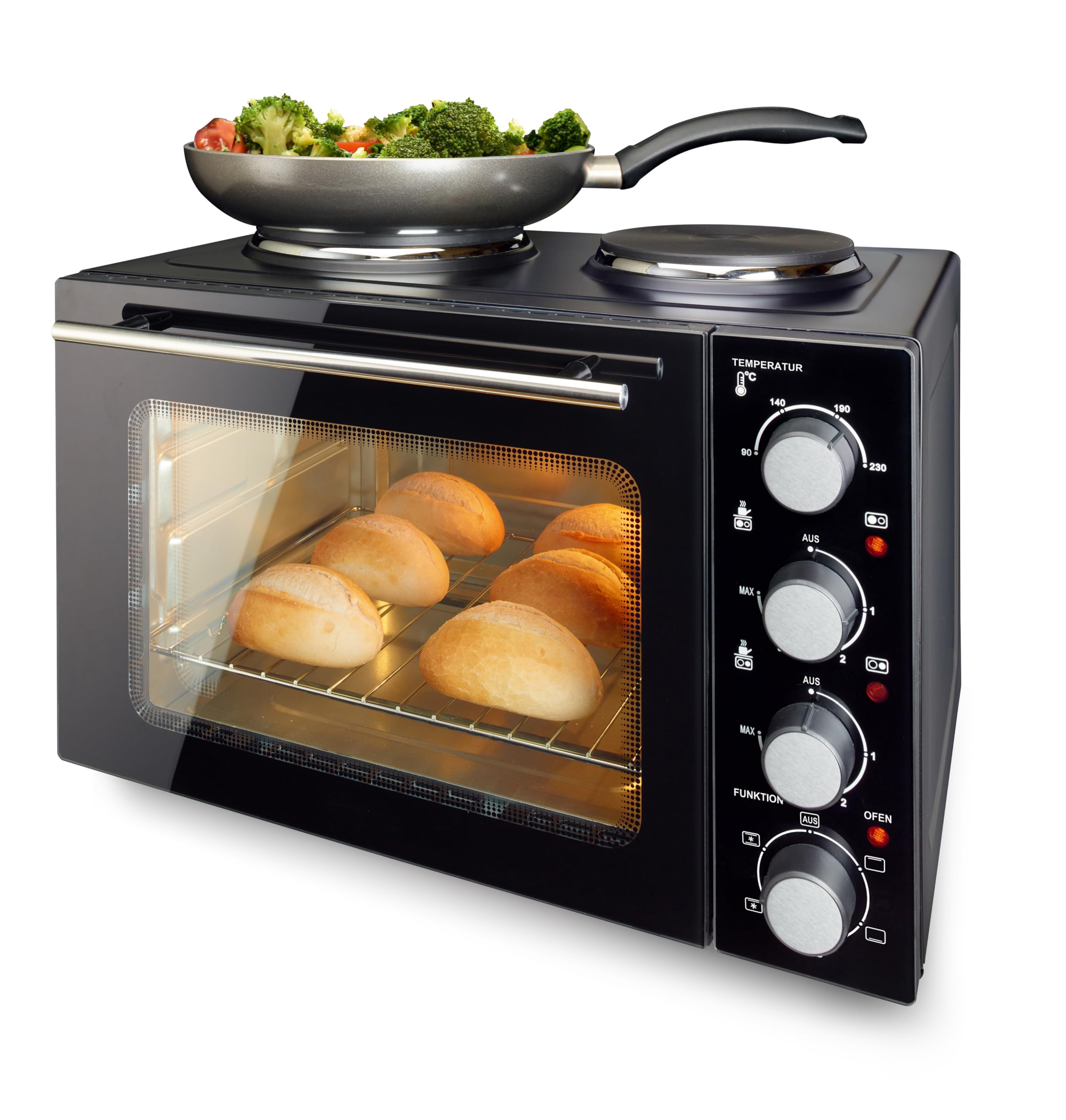
Image 1.1: EMERIO MO-125236.4 Oven with door open, revealing the interior and controls.
2. Product Overview and Components
The EMERIO MO-125236.4 is a compact multifunction appliance featuring a 32-liter oven and two integrated hotplates. It is designed for ease of use and versatility.
Main Components:
- Oven Cavity: 32-liter capacity with top and bottom heating elements.
- Double-Glazed Door: Insulated door with a viewing window and interior lighting for monitoring cooking progress.
- Control Panel: Features knobs for temperature, function, timer, and hotplate control.
- Hotplates: Two integrated hotplates, one 18.5 cm (1000W) and one 15.5 cm (700W).
- Accessories: Includes a baking tray, grill rack, and a universal handle for safe removal of hot accessories.

Image 2.1: Front view of the EMERIO MO-125236.4 Oven with door closed.
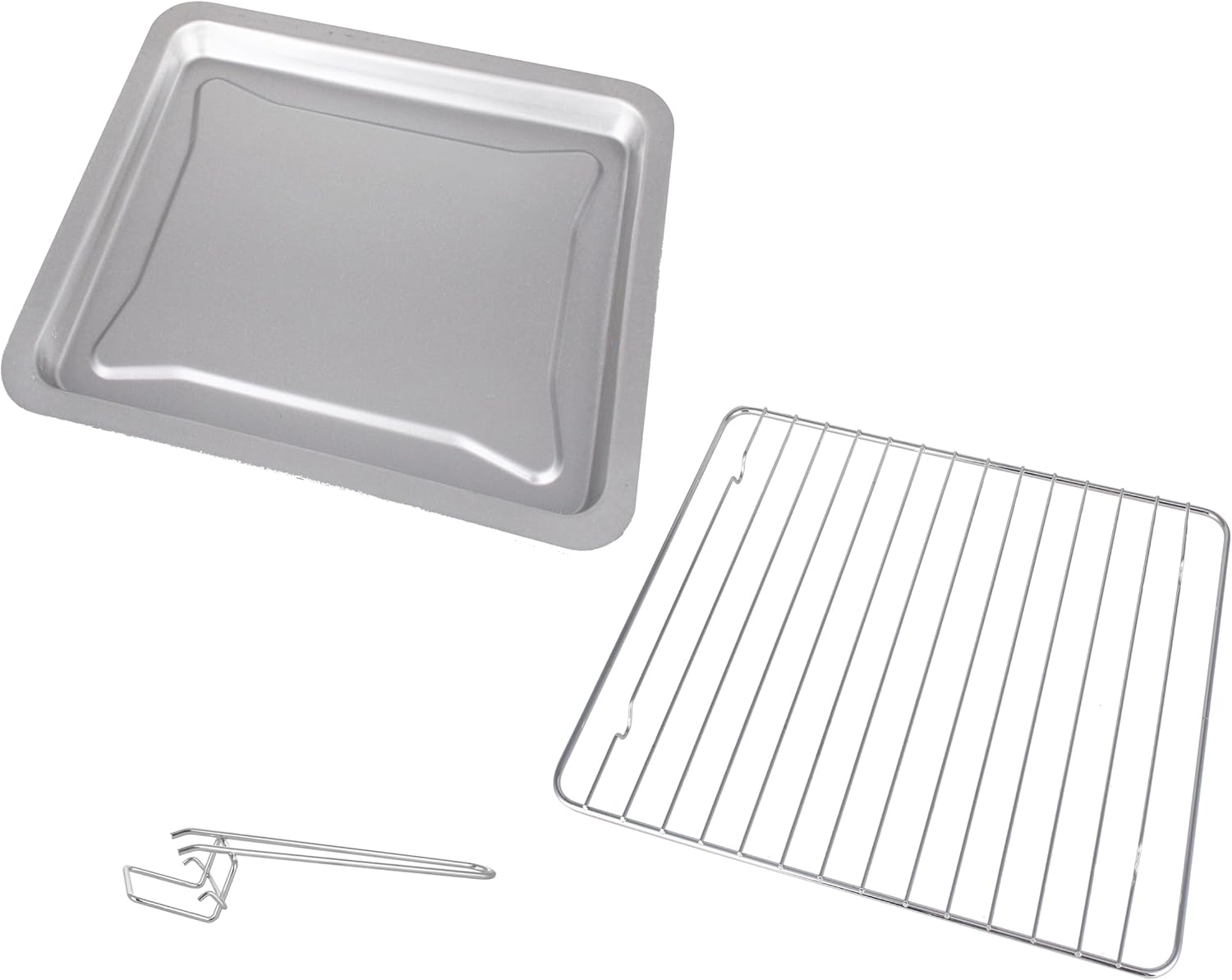
Image 2.2: Included accessories: baking tray, grill rack, and universal handle.
3. Setup
Before first use, ensure the appliance is properly set up.
Initial Preparation:
- Unpack the oven and all accessories. Remove any packaging materials, stickers, or protective films.
- Wipe the exterior of the oven with a damp cloth. Wash the baking tray, grill rack, and universal handle in warm, soapy water, then rinse and dry thoroughly.
- Place the oven on a flat, stable, and heat-resistant surface. Ensure there is sufficient space (at least 10-15 cm) around the appliance for proper ventilation.
- Plug the power cord into a grounded electrical outlet.
- Before cooking food, it is recommended to run the oven empty for about 15 minutes at maximum temperature (230°C) with the oven function set to top and bottom heat. This will burn off any manufacturing residues and odors. Ensure the room is well-ventilated during this process.
4. Operating the Appliance
The EMERIO MO-125236.4 features independent controls for the oven and hotplates.
4.1. Operating the Oven:
The oven has three control knobs on the right side:
- Temperature Control Knob (Top): Adjusts the oven temperature from 90°C to 230°C.
- Function Selector Knob (Middle): Selects the heating mode:
- Off (AUS)
- Top Heat
- Bottom Heat
- Top and Bottom Heat
- Convection (Fan-assisted heat)
- Combined settings (e.g., Top/Bottom Heat + Convection)
- Timer Knob (Bottom): Sets the cooking time up to 60 minutes. The oven will automatically switch off when the timer reaches zero. A continuous ON setting is also available.
Oven Operation Steps:
- Place food on the baking tray or grill rack and insert it into the desired rack position inside the oven.
- Close the oven door.
- Turn the Temperature Control Knob to the desired temperature.
- Turn the Function Selector Knob to the desired heating mode.
- Turn the Timer Knob to the desired cooking time. The oven will start heating.
- When cooking is complete, the timer will ring, and the oven will switch off. If using the continuous ON setting, manually turn the timer knob to 'OFF' when done.
4.2. Operating the Hotplates:
The two hotplates are located on top of the oven and are controlled by separate knobs on the right side of the control panel, below the oven controls.
- Hotplate Control Knobs: Each hotplate has its own control knob with settings from 'OFF' to 'MAX' (1-3 or similar markings).
- The larger hotplate (18.5 cm) has a power of 1000W.
- The smaller hotplate (15.5 cm) has a power of 700W.
Hotplate Operation Steps:
- Place a suitable pot or pan on the desired hotplate. Ensure the cookware base matches the hotplate size for efficient heating.
- Turn the corresponding Hotplate Control Knob to the desired heat setting.
- After use, turn the knob back to 'OFF'.
Note: The oven and hotplates can be used simultaneously, but this will draw maximum power (3200W total). Ensure your electrical circuit can handle this load.

Image 4.1: Oven with hotplate dimensions indicated.
5. Maintenance and Cleaning
Regular cleaning and maintenance will prolong the life of your appliance.
Cleaning Instructions:
- Always unplug the appliance from the power outlet and allow it to cool completely before cleaning.
- Exterior: Wipe the exterior surfaces with a soft, damp cloth. Do not use abrasive cleaners or harsh chemicals.
- Interior: For the oven interior, wipe with a damp cloth and mild detergent. For stubborn stains, a non-abrasive oven cleaner designed for conventional ovens can be used, following the product instructions carefully. Ensure all cleaner residue is removed.
- Baking Tray and Grill Rack: These accessories can be washed in warm, soapy water or placed in a dishwasher. Rinse and dry thoroughly.
- Hotplates: Wipe the hotplates with a damp cloth after they have cooled. For burnt-on food, use a non-abrasive scraper designed for ceramic or electric cooktops.
- Do not immerse the main unit in water or spray water directly onto it.
6. Troubleshooting
If you encounter issues with your EMERIO MO-125236.4, refer to the following common problems and solutions:
| Problem | Possible Cause | Solution |
|---|---|---|
| Appliance does not turn on. | Not plugged in; power outage; faulty outlet; timer not set. | Check power cord connection; verify power supply; try a different outlet; ensure timer is set or on 'ON' position. |
| Oven not heating. | Temperature or function knob not set correctly; timer not set. | Ensure temperature and function knobs are set to desired settings; set the timer. |
| Hotplates not heating. | Hotplate control knob not set correctly. | Turn the hotplate control knob to a heat setting (1-3 or MAX). |
| Food not cooking evenly. | Incorrect rack position; oven door opened too frequently; uneven food distribution. | Adjust rack position; avoid opening door unnecessarily; arrange food evenly on tray/rack. |
| Smoke or unusual odor during first use. | Manufacturing residues burning off. | This is normal for first use. Ensure good ventilation. If it persists after initial burn-in, contact support. |
If the problem persists after trying these solutions, please contact customer support.
7. Specifications
| Feature | Specification |
|---|---|
| Brand | emerio |
| Model Number | MO-125236.4 |
| Color | Black |
| Product Dimensions (L x W x H) | 41 x 51 x 35.5 cm |
| Item Weight | 11.45 kg |
| Oven Capacity | 32 Liters |
| Total Power | 3200 Watts |
| Oven Temperature Range | 90°C to 230°C |
| Oven Functions | Top Heat, Bottom Heat, Top & Bottom Heat, Convection, Combined |
| Hotplate 1 (Large) | 18.5 cm, 1000 Watts |
| Hotplate 2 (Small) | 15.5 cm, 700 Watts |
| Control Type | Knob control |
| Door Style | Side opening, double-glazed |
| Included Components | Baking tray, grill rack, universal handle |
8. Warranty and Support
This EMERIO appliance is covered by a warranty for spare parts availability for 1 year from the date of purchase. For specific warranty terms and conditions, please refer to the documentation provided with your purchase or contact your retailer.
For technical support, service, or questions regarding your appliance, please contact the customer service department of your retailer or the EMERIO support line. Please have your model number (MO-125236.4) and proof of purchase ready when contacting support.