ANCHEER AMAK00015 Folding Electric Bike User Manual
Model: AMAK00015 | Brand: ANCHEER
1. Introduction
This manual provides essential information for the safe and efficient operation, assembly, and maintenance of your ANCHEER AMAK00015 Folding Electric Bike. Please read it thoroughly before your first ride and keep it for future reference.
Key Features:
Compact & Portable: Designed for urban commuting, this folding electric bike measures 49.2 inches long and weighs 48.5 lbs, offering easy maneuverability and storage.
Powerful Performance: Equipped with a brushless motor, capable of reaching speeds up to 20 MPH.
Extended Range: The integrated 48V 7.8Ah battery provides an estimated range of 20-50 miles on a single charge.
Enhanced Comfort: Features triple shock absorption with front suspension, rear suspension, and seat springs to minimize impact from bumps.
Adjustable & Safe: A height-adjustable seat accommodates riders between 4.5-5.9 feet. Includes high-brightness front and rear lights for improved visibility during night rides.
Smart Control: An LCD digital display shows battery level, current speed, and mileage. Smart cruise control allows for relaxed riding on long, smooth roads.
Durable Construction: Built with an aluminum alloy frame and double-walled rims for durability and portability.
Certified Safety: This e-bike is SGS certified to the UL2849 standard.
2. Setup & Assembly
Your ANCHEER electric bike arrives 95% pre-assembled. The following steps detail the final assembly process. A tool kit is included to assist with installation.
2.1 Unpacking and Initial Inspection
Carefully remove the electric bike and all components from the packaging. Inspect for any visible damage during transit. Ensure all parts listed in the packing list are present.
Image: The ANCHEER Folding Electric Bike as it appears when first removed from its packaging, partially folded and protected.
2.2 Unfolding the Bike Frame
Locate the main folding hinge on the bike frame. Release the safety latch and carefully unfold the frame until it locks into place. Ensure the latch is securely fastened to prevent accidental folding during use.
Image: A man demonstrating the folding mechanism of the ANCHEER electric bike, placing it into a car trunk. This illustrates the compact folded size.
2.3 Handlebar and Stem Assembly
Unfold the stem and secure it in the upright position using the quick-release lever. Ensure the lever is fully closed and the stem is stable. Adjust the handlebar to your preferred riding angle and tighten any securing bolts.
2.4 Seat Installation and Adjustment
Insert the seat post into the frame's seat tube. Adjust the seat height to ensure comfortable pedaling with a slight bend in your knee at the bottom of the pedal stroke. Secure the seat post with the quick-release clamp. Important: Do not exceed the marked safety scale range on the seat post.
Image: A close-up view of the bike's saddle, highlighting its extra thickness for comfort.
2.5 Pedal Installation
Identify the left (L) and right (R) pedals. The right pedal screws in clockwise, and the left pedal screws in counter-clockwise. Thread them into the crank arms by hand first to avoid cross-threading, then tighten securely with a wrench from the included tool kit.
2.6 Final Checks
Before riding, ensure all quick-release levers are closed, bolts are tightened, and tires are inflated to the recommended pressure. Check brake functionality and ensure the lights are working.
3. Operating Instructions
3.1 Powering On/Off and LCD Display
To power on the bike, press and hold the power button on the LCD display. The display will illuminate, showing battery level, current speed, and mileage. To power off, press and hold the power button again.
Image: A detailed view of the intelligent digital LCD display, showing battery level, speed, and mileage indicators.
3.2 Riding Modes
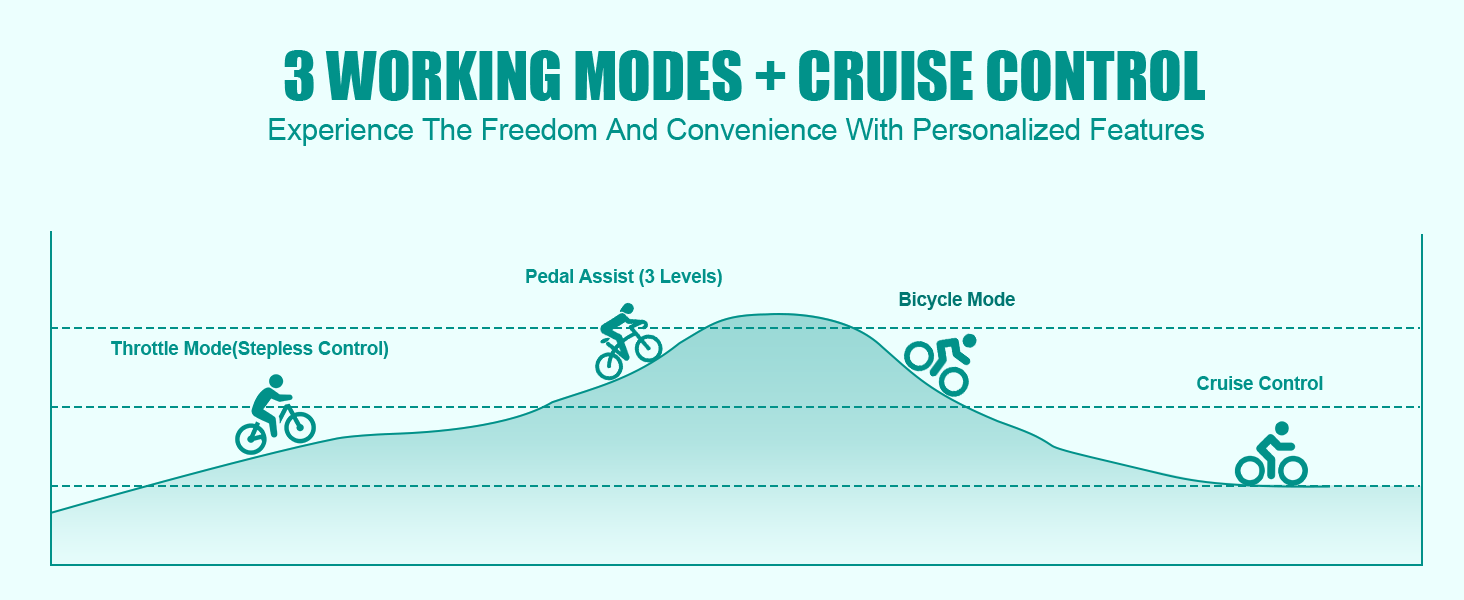
Your ANCHEER electric bike offers three distinct riding modes:
Throttle Mode (Stepless Control): Engage the throttle for motor-assisted propulsion without pedaling.
Pedal Assist Mode (3 Levels): The motor provides assistance as you pedal. You can adjust the level of assistance (1-3) via the LCD display controls.
Bicycle Mode: Ride the bike like a traditional bicycle, with no motor assistance.
Image: A graphic depicting the three working modes: Throttle Mode, Pedal Assist (3 Levels), and Bicycle Mode.
3.3 Smart Cruise Control Setting
The bike features a smart cruise control function for maintaining a consistent speed.
Step 1: Press the 'M' button once to change the interface. The display will indicate "P8", signifying the cruise control setting.
Step 2: Press and hold the 'M' button for more than 3 seconds to enter the selection interface for cruise control. The default setting is "0000" (no cruise control). Press 'M' once to change it to "0001" to activate cruise control.
Step 3: Press and hold the 'M' button for more than 3 seconds to set the selection and return to the previous interface.
Once activated, maintain a consistent speed for 8-10 seconds to engage cruise control. To disengage, simply apply the brakes or twist the throttle.
Image: Step-by-step instructions for activating and deactivating the cruise control feature via the bike's display.
3.4 Lighting System
The electric bike is equipped with front and rear lights for safety. Use the dedicated button on the handlebar controls to turn the lights on or off, especially during low-light conditions or night riding.
Image: The ANCHEER electric bike's front and rear lights illuminated, demonstrating its thoughtful design for night riding safety.
4. Maintenance
Regular maintenance ensures the longevity and safe operation of your electric bike. Perform these checks periodically:
Tire Pressure: Check tire pressure before each ride. Maintain recommended PSI for optimal performance and safety.
Brakes: Regularly inspect brake pads for wear and ensure brake levers provide firm, responsive stopping power. Adjust as needed.
Chain: Keep the chain clean and lubricated to prevent rust and ensure smooth operation.
Battery Care: Charge the battery regularly, even when not in use, to maintain its health. Avoid fully discharging the battery. Store in a cool, dry place.
Fasteners: Periodically check all bolts, nuts, and quick-release levers to ensure they are securely tightened.
Cleaning: Clean the bike with a damp cloth. Avoid using high-pressure water jets directly on electrical components.
5. Troubleshooting
This section addresses common issues you might encounter with your electric bike. For problems not listed here, please contact customer support.
Problem
Possible Cause
Solution
Bike does not power on.
Low battery, loose battery connection, faulty power button.
Charge the battery. Ensure battery is properly seated. Check power button connection.
Motor not assisting.
Pedal assist level set to zero, throttle not engaged, brake levers engaged, motor connection issue.
Worn brake pads, loose brake cable, air in hydraulic system (if applicable).
Inspect and replace brake pads. Adjust brake cable tension. Consult a professional for hydraulic brake issues.
6. Specifications
Feature
Detail
Bike Type
Electric Bike
Model Name
AMAK00015
Brand
ANCHEER
Age Range
Adult
Wheel Size
14 Inches
Frame Material
Aluminum
Suspension Type
Dual (Front and Rear)
Special Feature
LCD-Display, Folding Design
Brake Style
Disc Brakes
Power Source
Electric motor (rechargeable battery)
Battery Capacity
48V 7.8Ah (374.4 Watt Hours)
Electric Assist Type
Electric Pedal Assist (Pedelec)
Battery Life (Charging)
Approx. 3 Hours
Bicycle Weight
48.5 lbs
Load Capacity
265 lbs
Recommended Height
4'7" - 5'11"
Certification
UL2849 Certified
Included Components
Tool Kit
Image: A diagram illustrating the key dimensions, recommended rider height, bicycle weight, and load capacity of the ANCHEER electric bike.
7. Warranty & Support
ANCHEER provides a limited warranty for this product. The warranty covers the battery and motor for 1 year from the date of purchase.
For any questions or concerns regarding installation, maintenance, operation, or other aspects of your ANCHEER electric bike, please contact our professional after-sales service team. We are dedicated to providing reliable support.
Please refer to your purchase documentation or the ANCHEER official website for detailed warranty terms and contact information.
Ask a question about this manual
Ask about setup, troubleshooting, compatibility, parts, safety, or missing instructions. Manuals+ will review the question and use this page’s manual context to help answer it.