
1. Introduction
This manual provides detailed instructions for the installation, operation, and maintenance of your PopBloom RL180 180W Smart App Controlled Saltwater Aquarium LED Light. Designed for 48-60 inch reef and marine fish tanks, this lighting system offers full spectrum control for optimal coral growth and vivid coloration. Please read this manual thoroughly before use to ensure proper function and longevity of the product.
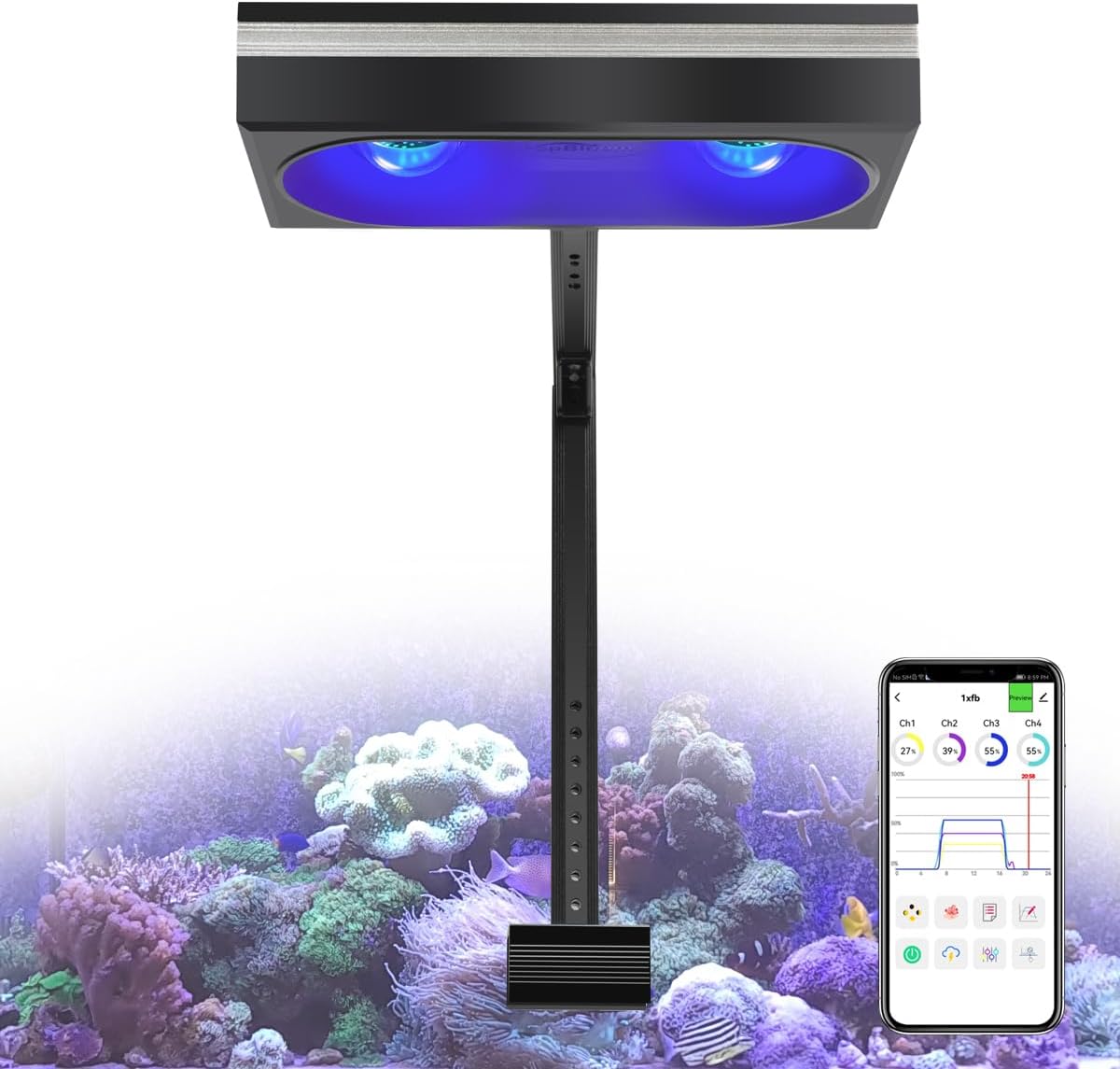
Image 1.1: PopBloom RL180 LED light illuminating a saltwater reef tank.
2. Package Contents
Verify that all items listed below are included in your package. If any components are missing or damaged, please contact customer support.
- 1x PopBloom RL180 WiFi Light
- 1x Arm Kit (for tank mounting)
- 1x Power Supply
- 1x Power Plug
- 1x User Manual

Image 2.1: All components included in the PopBloom RL180 package.
3. Product Features
- Marine Fish Tank Light: Engineered for balanced PAR/Lumen output and coverage, ideal for 30-inch deep tanks, supporting hard and soft corals (SPS/LPS) and marine fish.
- Full Spectrum: Provides a light intensity and spectrum optimized for coral utilization, promoting growth, vivid colors, and a gentle shimmer.
- High-performance Reef LED Lighting: Features hollow optical-glass lenses for homogeneous light spread and consistent PAR values, preventing hotspots.
- Effective Cooling & Low Noise: Utilizes a quality aluminum heatsink and PWM smart fan for efficient heat transfer, maintaining an operating temperature below 38°C and a fan noise level of 32 dB.
- Smart APP Control: Dual WiFi and Bluetooth connectivity allows for easy management and adjustment of lighting settings anytime, anywhere, even in offline WiFi conditions.
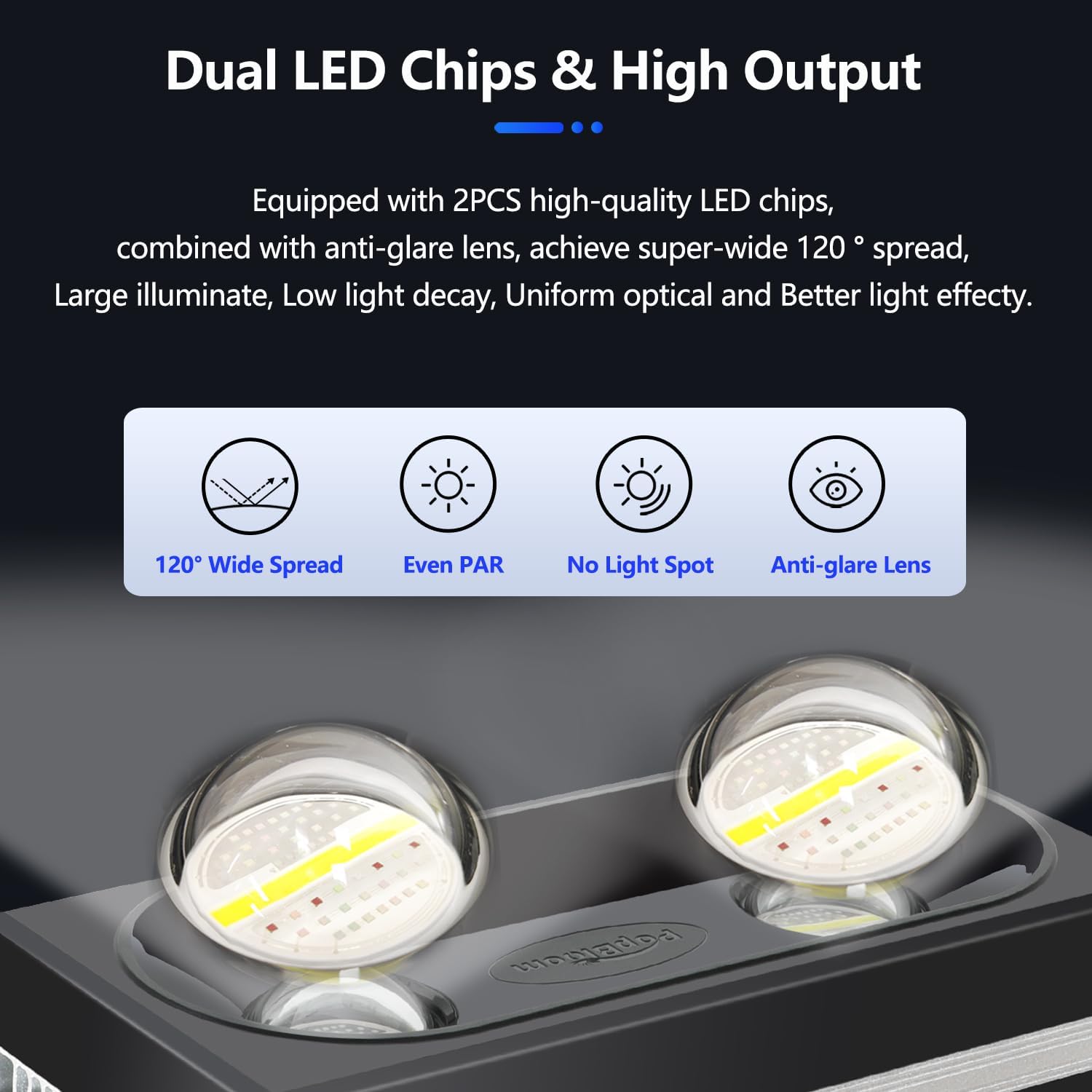
Image 3.1: Dual LED Chips and High Output design.

Image 3.2: Multi-efficient Heat Dissipation system.
4. Setup Instructions
4.1 Mounting the Light
The PopBloom RL180 light can be installed using either a hanging kit or an arm mount kit. This package includes the arm mount kit. Ensure the mounting method chosen is secure and appropriate for your aquarium setup.

Image 4.1: Multi-installation Methods for the RL180 light.
4.2 Smart App Connection
The RL180 light is controlled via a smart application. Follow these steps to connect your device:
- Download and install the 'Smart Life' app from your device's app store (available on iOS and Android). You can scan the QR code provided in the manual or visit smartapp.tuya.com/smartlife.
- Ensure your phone's Wi-Fi and Bluetooth are enabled.
- Open the app and tap 'Add Device'.
- Connect your phone to your home 2.4GHz Wi-Fi network and enter the password.
- Follow the in-app instructions to add and connect to the PopBloom light.

Image 4.2: Easy 4-step setup for Smart App control.

Image 4.3: Simple Connection steps for the app.
Video 4.1: Unboxing and initial app connection demonstration for the PopBloom RL180 light.
5. Operating Instructions
The PopBloom app provides comprehensive control over your RL180 light, allowing for customization of light cycles and effects.
5.1 Program Library and Customization
The app offers a program library with various preset modes, including seasonal simulations (Tropical spring, summer, autumn, winter; Temperate spring, summer, autumn, winter), Kelvin temperature settings (5m, 10m, 15m), and specific modes for reducing algae, SPS dominant, LPS & Soft coral, Fish & plants, and Cut & frag. You can also create your own custom programs.
- Preset Modes: Select from 16 preset modes for quick setup.
- DIY Program: Customize ramp up/down times, brightness for each of the 4 channels, and set a 24-hour auto cycle.
Image 5.1: Program Library interface in the app.

Image 5.2: DIY (Custom) Program settings.
5.2 Natural Simulations
The app includes features to simulate natural environmental conditions:
- Lunar Cycle: Activates a 29-day lunar cycle, adjusting light intensity to mimic moon phases.
- Coral Acclimation: Gradually increases light intensity over a set period to help corals adapt to the new lighting environment.
- 4 Seasons: Simulates seasonal light changes.
- Lightning: Randomly flashes lights to simulate lightning, running for at least 10 minutes.
Image 5.3: Natural Simulation options in the app.
5.3 Group Control System
Manage multiple PopBloom lights simultaneously with the group control feature. This allows for synchronized lighting across several aquariums or different sections of a large tank.

Image 5.4: Group Control System for multiple lights.
5.4 Sharing Settings
Share your customized lighting programs with other users directly through the app.

Image 5.5: Sharing Setting interface.
6. Specifications
| Feature | Detail |
|---|---|
| Model Number | MarineFullSpectrum RL180-A-1 |
| Wattage | 180 watts |
| Product Dimensions | 10.2"L x 4.7"W x 2.2"H (26cm x 12cm x 5.5cm) |
| Material | Aluminum |
| Light Source Type | COB (Chip On Board) |
| Power Source | Corded Electric |
| Mounting Type | Arm Mounting |
| Bulb Features | 4 Channels Dimmable and Programmable |
| PAR Value (Water Surface) | 550 PAR |
| PAR Value (80cm Depth) | 130 PAR |
6.1 Channel Breakdown
- Channel 1: 20W (Cool White)
- Channel 2: 10W (Moonlight)
- Channel 3: 130W (Reef-grow Blue)
- Channel 4: 20W (Vivid Color)

Image 6.1: Product Specifications and Full Spectrum details.

Image 6.2: Optimal PAR Distribution across the aquarium.
7. Maintenance
Regular maintenance ensures the optimal performance and longevity of your PopBloom RL180 light.
- Cleaning: Periodically wipe the light fixture and lenses with a soft, dry cloth to remove dust, salt creep, and water spots. Ensure the unit is unplugged before cleaning.
- Fan Inspection: Check the cooling fans for any obstructions or excessive dust buildup. Clean gently with compressed air if necessary.
- Cable Integrity: Inspect power cables and connections regularly for any signs of wear or damage. Replace immediately if damage is found.
- Ventilation: Ensure adequate airflow around the light fixture to facilitate proper heat dissipation. Do not block ventilation openings.
8. Troubleshooting
If you encounter issues with your PopBloom RL180 light, refer to the following common problems and solutions:
- Light Not Turning On:
- Check if the power plug is securely connected to both the light and the power outlet.
- Verify that the power outlet is functional.
- Ensure the power supply unit is correctly connected to the light.
- App Connection Issues:
- Confirm your phone's Wi-Fi and Bluetooth are enabled.
- Ensure your Wi-Fi network is 2.4GHz. The light does not support 5GHz networks.
- Restart the app and attempt to reconnect.
- Reset the light (refer to the app or manufacturer's instructions for specific reset procedures) and try pairing again.
- Inconsistent Light Output:
- Check your app's programmed schedule for any unintended settings or conflicts.
- Ensure the light's lenses are clean and free from obstructions.
- Verify that the light is receiving stable power.
- Excessive Noise from Fans:
- Inspect fans for dust or debris accumulation and clean if necessary.
- Ensure the light has adequate ventilation and is not overheating.
If problems persist after attempting these solutions, please contact PopBloom customer support for further assistance.
9. Warranty and Support
For warranty information and customer support, please refer to the documentation included with your product or visit the official PopBloom website. Keep your purchase receipt as proof of purchase for any warranty claims.
