Introduction
This manual provides detailed instructions for the operation and maintenance of your SKMEI Digital Watch Model 2269. Please read this manual thoroughly to ensure proper use and to maximize the lifespan of your watch. This durable sports watch is designed for men, offering both fashion and functionality with features like 2-time zones, chronograph, alarm, countdown timer, and LED backlight.

Image: Front view of the SKMEI Digital Watch Model 2269, showcasing its digital display and gold-colored case with a black silicone band.
Key Features
- Multi-Functional Digital Display: Includes 2-time zones, chronograph, alarm, date and week display, countdown timer, and 12/24-hour modes.
- Waterproof & Shockproof: Water-resistant up to 30 meters, suitable for splashes and daily wear. Shockproof design for enhanced durability.
- LED Backlight: Ensures clear visibility in low-light conditions.
- Durable Construction: Features a zinc alloy case, stainless steel rear cover and buckle, and a comfortable silica gel band.
- Comfortable Fit: Lightweight design with a soft silica gel band for secure and comfortable wear.

Image: Visual representation of the watch highlighting key features such as digital display, rectangular dial shape, silica gel strap, and 50m water resistance.
Setup
1. Initial Power On / Battery Installation
Your SKMEI 2269 watch comes with a pre-installed C battery. If the display is blank or dim, the battery may need to be replaced. Please refer to the "Maintenance" section for battery replacement instructions.
2. Setting Time and Date
- Enter Time Setting Mode: Press and hold the MODE button (usually bottom-left) until the seconds start flashing.
- Adjust Seconds: Press the RESET button (usually bottom-right) to reset seconds to zero.
- Navigate to Next Setting: Press the START button (usually top-right) to move to the next setting (e.g., hours, minutes, year, month, day).
- Adjust Value: Use the MODE button (or another designated button, refer to watch specific button labels) to increase the flashing value.
- Select 12/24 Hour Mode: While setting the hour, you can toggle between 12-hour (with AM/PM indicator) and 24-hour modes.
- Exit Setting Mode: Once all settings are adjusted, press the MODE button again to return to normal time display.
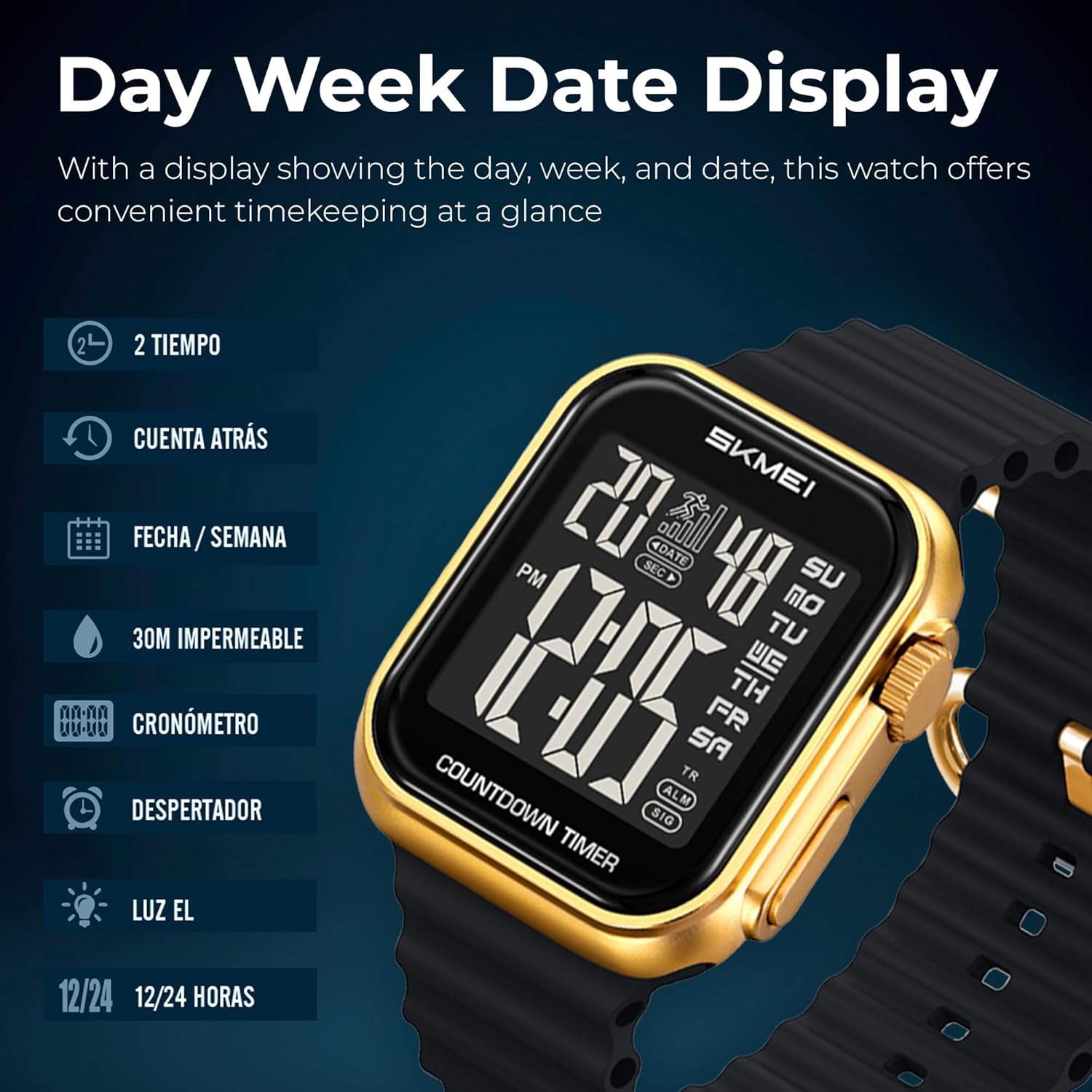
Image: Close-up of the watch display showing the day, week, and date, along with icons for 2-time zones, countdown, date/week, 30M waterproof, chronograph, alarm, EL light, and 12/24 hour modes.
Operating Instructions
1. Time Mode
This is the default display mode, showing the current time, day of the week, and date. Press the LIGHT button (usually top-left) to activate the LED backlight for a few seconds.
2. Chronograph (Stopwatch) Mode
- Enter Chronograph Mode: From Time Mode, press the MODE button once. The display will show "00:00:00" or similar.
- Start/Stop: Press the START button to begin timing. Press it again to stop.
- Lap/Split Time: While timing, press the RESET button to record a lap time without stopping the main timer. Press RESET again to return to the running timer.
- Reset: While the stopwatch is stopped, press the RESET button to clear the time to zero.
- Exit Chronograph Mode: Press the MODE button to return to the next mode (e.g., Alarm).
3. Alarm Mode
- Enter Alarm Mode: From Chronograph Mode, press the MODE button. The display will show the alarm time.
- Set Alarm Time: Press and hold the RESET button until the alarm hours flash. Use the START button to adjust the hours. Press RESET again to move to minutes, and use START to adjust.
- Activate/Deactivate Alarm: In Alarm Mode, press the START button to toggle the alarm ON/OFF. An alarm icon will appear/disappear on the display.
- Snooze Function: When the alarm sounds, press the LIGHT button to activate snooze (alarm will sound again after a few minutes). Press any other button to stop the alarm completely.
- Exit Alarm Mode: Press the MODE button to return to the next mode (e.g., Countdown Timer).

Image: The watch display showing an alarm time, emphasizing its alarm and reminder capabilities.
4. Countdown Timer Mode
- Enter Countdown Timer Mode: From Alarm Mode, press the MODE button. The display will show the countdown time.
- Set Countdown Time: Press and hold the RESET button until the hours flash. Use the START button to adjust hours. Press RESET again to move to minutes, then seconds, adjusting with START.
- Start/Stop: Press the START button to begin the countdown. Press it again to pause.
- Reset: While the timer is paused, press the RESET button to reset the countdown to the preset time.
- Exit Countdown Timer Mode: Press the MODE button to cycle back to Time Mode.
5. Dual Time Mode (2-Time Display)
Your watch supports a second time zone display. To access and set it:
- Enter Dual Time Mode: Cycle through modes using the MODE button until you reach the Dual Time display (often indicated by "TR" or "T2").
- Set Dual Time: Press and hold the RESET button until the hours flash. Use the START button to adjust hours. Press RESET again to move to minutes, adjusting with START.
- Exit Dual Time Setting: Press the MODE button to save and exit.

Image: A comprehensive overview of the watch's functions, including 2-time zones, countdown timer, date/week, 30M water resistance, stopwatch, alarm, EL light, and 12/24 hour modes.
Maintenance
- Cleaning: Wipe the watch regularly with a soft, dry cloth. For stubborn dirt, use a slightly damp cloth and then dry thoroughly. Avoid harsh chemicals or abrasive cleaners.
- Water Resistance: The watch is 30M water-resistant, meaning it can withstand splashes, rain, and brief immersion. It is not suitable for hot water activities, diving, or prolonged swimming. Do not press any buttons underwater.
- Temperature: Avoid exposing the watch to extreme temperatures (hot or cold) or sudden temperature changes, as this can affect its accuracy and lifespan.
- Impact: While shockproof, avoid strong impacts or dropping the watch, which can damage internal components or the display.
- Battery Replacement: When the display becomes dim or functions become erratic, it's time to replace the battery (1 C battery, included). It is recommended to have battery replacement performed by a qualified watch technician to ensure water resistance is maintained.

Image: Rear view of the SKMEI 2269 watch, showing the stainless steel back cover with model number (2269), water resistance (3atm), and battery code (CR2025).
Troubleshooting
| Problem | Possible Cause | Solution |
|---|---|---|
| Display is blank or dim. | Low or dead battery. | Replace the battery (CR2025). |
| Time is inaccurate. | Incorrect time setting; exposure to strong magnetic fields. | Reset the time according to "Setting Time and Date" section. Keep away from strong magnets. |
| Buttons are unresponsive. | Watch may be in a locked mode; internal malfunction. | Try pressing all buttons to see if any respond. If not, remove and reinsert battery (if comfortable) or contact support. |
| Water inside the watch. | Water resistance compromised; buttons pressed underwater. | Stop using the watch immediately. Take it to a professional watch repair service. |
Specifications
| Feature | Detail |
|---|---|
| Model Number | 2269GDBK |
| Display Type | Digital |
| Case Material | Zinc Alloy |
| Band Material | Silica Gel |
| Water Resistance | 30 Meters (3 ATM) |
| Movement Type | Quartz |
| Case Diameter | 40 Millimetres |
| Case Thickness | 12.2 Millimetres |
| Item Weight | 71.7 Grams |
| Battery Type | 1 C battery (CR2025) |

Image: Diagram illustrating the dimensions of the watch, including case height (45.3mm), case width (40mm), strap/lug width (22mm), and case thickness (12.2mm).
Warranty and Support
Your SKMEI Digital Watch Model 2269 comes with a manufacturer's warranty. Please refer to the warranty card included in your product packaging for specific terms and conditions, including coverage period and what is covered.
For technical support, warranty claims, or any other inquiries, please contact SKMEI customer service through the official channels provided on the product packaging or the brand's official website. You can also visit the SKMEI Store on Amazon for more information.

Image: The black and red SKMEI branded product box, indicating the original packaging.