
1. Introduction
Thank you for choosing the Superun S1 Indoor Exercise Bike. This manual provides essential information for the safe assembly, operation, and maintenance of your new fitness equipment. Please read it thoroughly before use and keep it for future reference.
The Superun S1 is designed for home use, offering a stable and quiet cycling experience with adjustable magnetic resistance and smart features.
2. Important Safety Information
- Consult a physician before starting any new exercise program.
- Ensure all parts are securely fastened before each use. Regularly check bolts and connections.
- Keep children and pets away from the exercise bike during operation.
- Wear appropriate athletic clothing and footwear. Avoid loose clothing that could get caught in moving parts.
- Place the bike on a flat, stable surface with adequate clearance around it.
- The maximum user weight capacity for this bike is 136 kg (300 lbs). Do not exceed this limit.
- Stop exercising immediately if you feel faint, dizzy, or experience pain.

The Superun S1 features a stable triangular frame design, ensuring exceptional durability and stability for users up to 136 kg.
3. Setup and Assembly
The Superun S1 exercise bike is designed for quick assembly, typically taking around 30 minutes. Detailed assembly instructions are included in the product packaging.
3.1 Package Contents
Please refer to the packing list provided with your product to ensure all components are present before beginning assembly.
3.2 Assembly Steps
- Unpack all components and lay them out on a clean, flat surface.
- Follow the step-by-step instructions and diagrams in the included assembly manual.
- Use the provided tools to secure all bolts and connections. Do not overtighten.
- Once assembled, double-check all connections for tightness and stability.

The Superun S1 is designed for quick and straightforward assembly, typically completed within 30 minutes.
4. Adjustments for Optimal Comfort
The Superun S1 offers multiple adjustment points to ensure a comfortable and ergonomically correct riding position for various users.
4.1 Seat Adjustment
- The seat can be adjusted both vertically (up/down) and horizontally (forward/backward).
- Loosen the adjustment knob located beneath the seat post to adjust the height. Ensure the seat is at a height where your leg has a slight bend at the knee when the pedal is at its lowest point.
- Loosen the knob under the seat to slide it forward or backward for optimal reach to the handlebars.
- Tighten all knobs securely after adjustment.
4.2 Handlebar Adjustment
- The handlebars can be adjusted vertically (up/down).
- Loosen the adjustment knob on the handlebar post to raise or lower the handlebars to a comfortable position.
- Tighten the knob securely after adjustment.

Adjust the seat and handlebars to find your most comfortable and effective riding position. The seat adjusts in 4 directions, and the handlebars in 2 directions.
5. Operating Instructions
The Superun S1 offers a smooth and interactive workout experience.
5.1 Magnetic Resistance System
The bike features a magnetic resistance system for quiet and precise control over your workout intensity. Unlike traditional friction-based systems, magnetic resistance requires no brake pad replacement and produces minimal noise.
- To increase resistance, turn the resistance knob clockwise.
- To decrease resistance, turn the resistance knob counter-clockwise.
- The bike offers 1-32 levels of resistance, allowing for a wide range of workout intensities from leisure exercise to intensive muscle training.

Select from 1 to 32 resistance levels to match your desired workout intensity, from light aerobic exercise to intense muscle training.
5.2 LCD Monitor and App Connectivity
The integrated LCD monitor displays key workout data, and the bike can connect to a fitness application for enhanced tracking and interactive training.
- LCD Display: The multifunctional LCD monitor tracks and displays data such as Time, Speed, Distance, Calories, RPM (Revolutions Per Minute), ODO (Odometer), and Resistance Level.
- App Connection: Download the recommended fitness application (e.g., PitPat APP) to your smartphone or tablet. Enable Bluetooth on your device and follow the app's instructions to connect to your Superun S1 bike.
- The app allows for real-time data tracking, virtual routes, and potentially interactive training sessions, helping you exercise more scientifically.

The LCD monitor on the handlebars displays 8 types of data, including RPM, Distance, Speed, Calories, Time, Odometer, and Resistance Level.
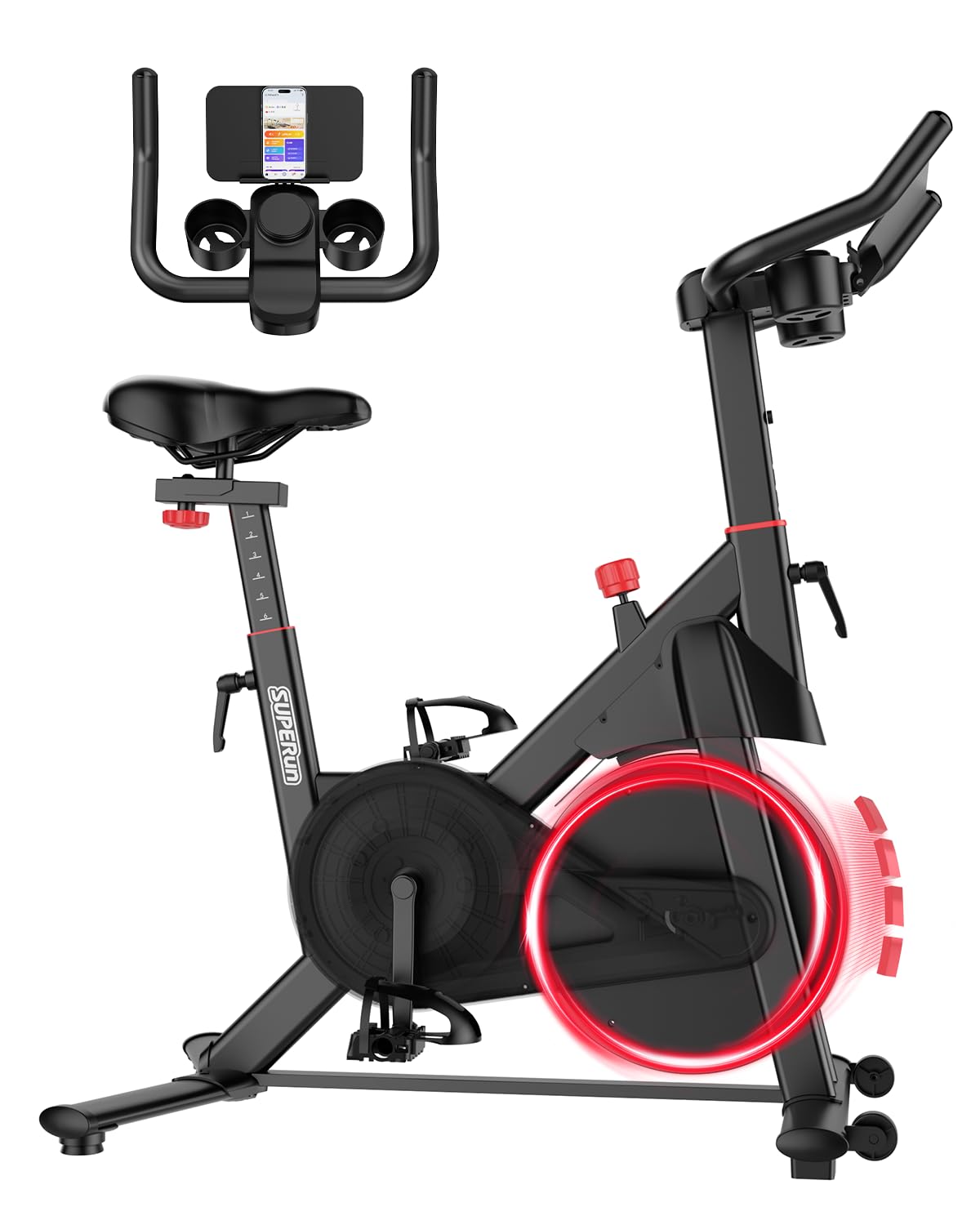
Connect your bike to the PitPat APP for an immersive and interactive cycling experience, tracking your progress and engaging with virtual routes.
5.3 Quiet Operation
The Superun S1 features a smooth and silent belt drive system combined with magnetic resistance, ensuring a quiet workout environment. This allows you to exercise without disturbing others.

The silent belt drive and magnetic resistance ensure a quiet workout, allowing you to exercise at any time without disturbance.
6. Maintenance
Regular maintenance helps prolong the life of your exercise bike and ensures safe operation.
- Cleaning: Wipe down the bike with a damp cloth after each use to remove sweat and dust. Avoid abrasive cleaners.
- Inspection: Periodically check all nuts, bolts, and moving parts for tightness and wear. Tighten any loose fasteners.
- Lubrication: The magnetic resistance system generally requires no lubrication. Refer to the specific assembly manual for any lubrication points if indicated.
- Storage: Store the bike in a dry, cool place away from direct sunlight and extreme temperatures. The transport wheels allow for easy relocation.
7. Troubleshooting
| Problem | Possible Cause | Solution |
|---|---|---|
| Bike is unstable or wobbles | Loose bolts; uneven floor | Check and tighten all assembly bolts. Adjust the leveling feet on the base stabilizers. |
| Resistance not changing | Resistance knob not properly engaged or internal mechanism issue | Ensure the resistance knob is turning freely and engaging. If the issue persists, contact customer support. |
| LCD monitor not displaying data | Batteries low or incorrectly installed; loose cable connection | Replace batteries in the LCD monitor. Check all cable connections to the monitor. |
| Unusual noise during operation | Loose parts; friction from moving components | Inspect all bolts and connections for tightness. Ensure no foreign objects are near the flywheel or pedals. |
8. Specifications
- Brand: Superun
- Model Name: S1
- Special Features: LCD Screen, App Data Tracking, Magnetic Resistance, Adjustable Seat
- Color: Black & Red
- Power Source: Electric Cable (for LCD monitor)
- Recommended Use: Indoor
- Material: Stainless Steel
- Resistance Mechanism: Magnetic
- Product Dimensions (D x W x H): 90 cm x 46 cm x 104 cm (35.4 x 18.1 x 40.9 inches)
- Maximum Weight Recommendation: 136 Kilograms (300 lbs)
- Drive System: Pedals
- Assembly Instructions: Included
- UPC: 717382351988
9. Warranty and Support
Superun is committed to providing quality products and customer satisfaction. Your Superun S1 Indoor Exercise Bike comes with a standard manufacturer's warranty. Please refer to the warranty card included in your package for specific terms and conditions.
For any questions, concerns, or technical assistance, our 24/7 after-sales service team is available to help resolve your issues. Please contact us through the retailer's platform or the contact information provided in your product documentation.


