
DownyPaws DPWFP6
DownyPaws Stainless Steel Wireless Cat Water Fountain
Model: DPWFP6
Product Overview
The DownyPaws Stainless Steel Wireless Cat Water Fountain (Model DPWFP6) is designed to provide fresh, filtered water for your pets. Featuring a cordless design, motion sensor activation, and a multi-stage filtration system, it encourages pets to drink more, promoting better hydration and health. Its stainless steel construction ensures durability and ease of cleaning.
Safety Instructions
- Ensure the battery compartment remains dry. Do not immerse the battery unit in water.
- Only clean the spout by rinsing. The main stainless steel tank is dishwasher safe, but plastic parts should be hand-washed.
- Keep the fountain away from direct sunlight and heat sources.
- Supervise pets, especially kittens or puppies, during initial use to ensure safe interaction.
- Do not allow pets to chew on the USB-C charging cable.
- Use only original DownyPaws replacement filters for optimal performance.
Package Contents
Verify that all components are present in the package:
- 1x Fursink 3.0 Battery Operated Cat Water Fountain (Stainless Steel Unit)
- 1x Cleaning Brush
- 1x Filter & Pump Sponge
- 1x USB-C Cable
- User Manual
Setup Guide
- Unpack Components: Carefully remove all parts from the packaging.
- Clean the Fountain: Wash the stainless steel tank and tray with mild soap and water. The stainless steel tank is dishwasher safe. Hand-wash plastic components. Ensure all parts are thoroughly rinsed.
- Prepare the Filter: Submerge the filter in clean water for 5 minutes before first use. This activates the filter material.
- Assemble the Pump Unit:
- Insert the pump sponge into the designated slot on the pump.
- Place the prepared filter into the filter tray.
- Attach the pump unit to the filter tray, ensuring it is securely in place.
- Fill the Tank: Fill the stainless steel tank with fresh water up to the "MAX" line indicated on the side window.
- Place the Filter Tray: Carefully place the assembled filter tray with the pump unit onto the filled stainless steel tank.
- Insert the Water Spout: Attach the curved water spout to the top of the pump unit.
- Charge and Install Battery:
- Locate the battery pack. Connect the USB-C cable to the charging port on the battery pack and plug it into a wall adapter (not included).
- Charge until the indicator light turns solid blue (approximately 4.5 hours for a full charge).
- Once charged, insert the battery pack into the designated slot at the back of the fountain's top unit.

Image: Fully assembled DownyPaws Stainless Steel Wireless Cat Water Fountain.
Video: Demonstration of how to disassemble and clean the pump unit.
Operating Instructions
The fountain offers two primary operating modes:
- Motion Sensor Mode:
- Press and hold the power button on the pump unit for 2 seconds to turn on the fountain. The default mode is motion sensor.
- In this mode, the fountain will dispense water for 20 seconds when a pet is detected within a 5ft/1.5m range and 120° angle.
- If no motion is detected for 1 hour, the fountain will automatically run for 20 seconds to ensure water freshness.
- Timed Mode:
- Briefly press the power button to switch from motion sensor mode to timed mode.
- In timed mode, the fountain dispenses water for 20 seconds every 15 minutes.
- Continuous Mode (Plugged In): If the battery unit is continuously plugged in via the USB-C cable, the fountain can operate in a continuous flow mode.
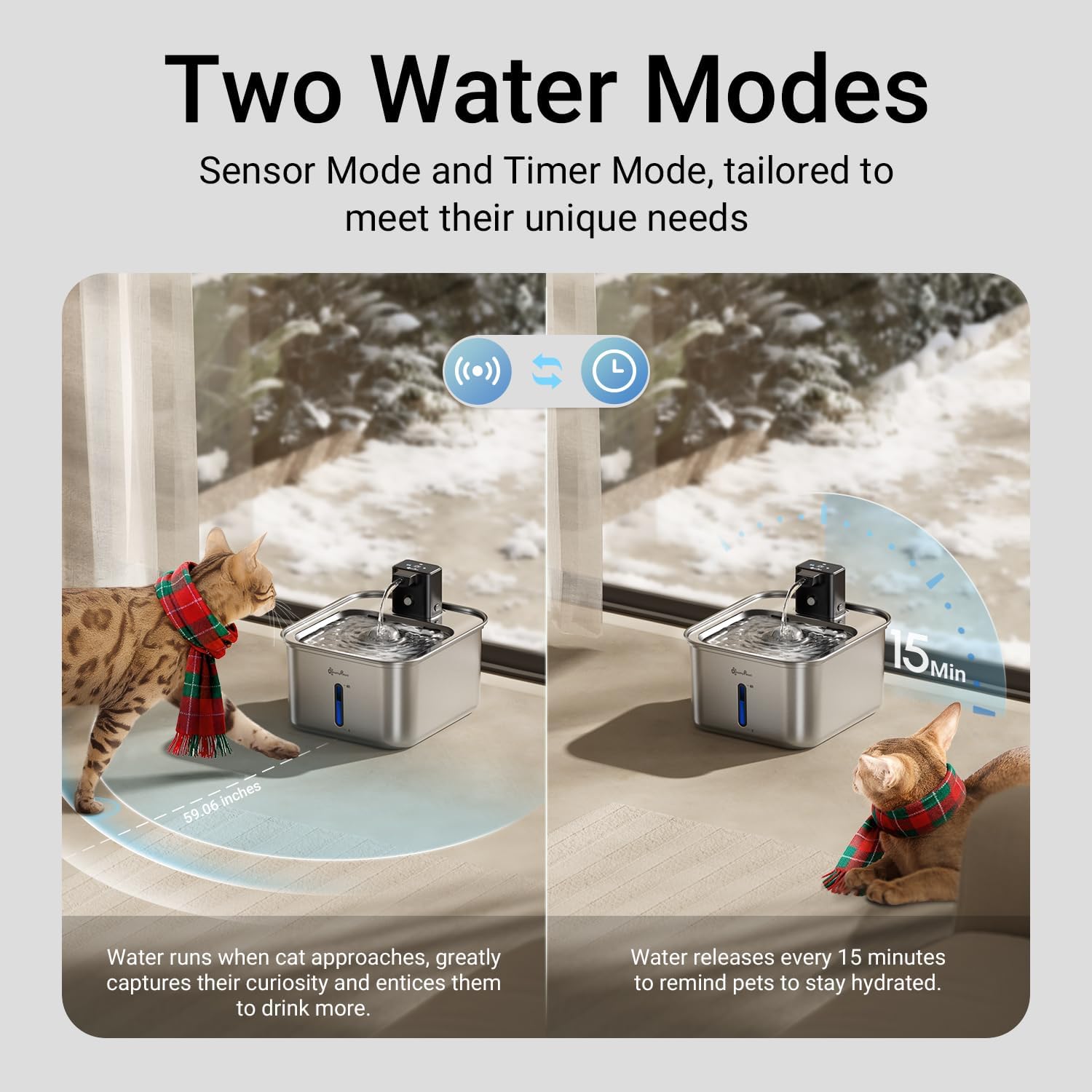
Image: A cat drinking from the fountain, demonstrating the motion sensor activation.
Video: Overview of the DownyPaws Cat Water Fountain's cordless operation and features.
Maintenance
Regular cleaning and filter replacement are crucial for maintaining water quality and extending the life of your fountain.
- Daily Water Check: Monitor the water level using the transparent window on the tank. Refill as needed to keep the water above the minimum line.
- Weekly Cleaning:
- Disconnect the power supply (if plugged in) and remove the battery pack.
- Disassemble the fountain components (stainless steel tank, tray, pump unit, spout).
- Wash the stainless steel tank and tray in a dishwasher or by hand with mild soap.
- Clean the pump unit and spout using the provided cleaning brush to remove any debris or hair.
- Rinse all components thoroughly before reassembly.
- Filter Replacement: Replace the multi-stage filter every 2-4 weeks, or more frequently if you have multiple pets or notice reduced water flow.
- Pump Sponge Replacement: Replace the pump sponge every 2-4 weeks, or as needed.

Image: The stainless steel tank of the fountain placed in a dishwasher for easy cleaning.
Video: Detailed instructions on how to clean the cat fountain pump.
Troubleshooting
| Problem | Possible Cause | Solution |
|---|---|---|
| Fountain not dispensing water. | Low battery, clogged filter/pump, insufficient water level, incorrect mode. | Charge battery. Clean filter and pump. Refill water to MAX line. Check operating mode. |
| Weak water flow or noise. | Clogged filter/pump, low water level. | Clean or replace filter and pump. Refill water. |
| Red blinking light on battery unit. | Low battery. | Recharge the battery pack. |
| Pet is hesitant to drink. | Unfamiliarity with the fountain, preference for still water. | Allow time for adjustment. Ensure the fountain is clean. Some cats prefer running water, others may need encouragement. |
Specifications
- Brand: DownyPaws
- Model Name: DPWFP6
- Material: Stainless Steel
- Capacity: 3L (101 oz)
- Item Weight: 1.65 Pounds
- Product Dimensions: 8.9"L x 7.9"W x 6.9"H
- Battery: Built-in 4,000mAh rechargeable battery (up to 7 days continuous supply for an adult cat)
- Filtration System: 5-stage purification (Carbon, Resin, Filter stones, Non-woven fabric, High-density sponge)
- Motion Sensor Range: 5ft/1.5m, 120° angle)
- Noise Level: Ultra-quiet operation (approx. 30dB)
Warranty and Support
For any product inquiries, technical support, or warranty claims, please contact DownyPaws customer service through the retailer's platform or the official brand website. Keep your purchase receipt as proof of purchase.
Ask a question about this manual
Ask about setup, troubleshooting, compatibility, parts, safety, or missing instructions. Manuals+ will review the question and use this page’s manual context to help answer it.