
Greadio GB-X2A-H
Greadio GB-X2A-H Multifunctional Boombox CD Cassette Player Instruction Manual
Model: GB-X2A-H | Brand: Greadio
Product Overview
This Greadio GB-X2A-H Boombox is a versatile audio system designed for various music playback options. It combines a CD player, cassette player, AM/FM radio, Bluetooth connectivity, AUX input, and USB playback, offering a comprehensive listening experience. Its portable design allows for both AC power and battery operation, making it suitable for home use or on-the-go entertainment.
What's in the Box
- CD Player Boombox x 1
- AC Power Cord x 1
- Remote Control x 1
- User Manual x 1

Image: Contents of the Greadio Boombox package including the boombox, AC power cord, remote control, and user manual.
Key Features
- CD Player: Supports CD, CD-R, CD-RW, and MP3 formats.
- Cassette Player/Recorder: Built-in cassette tape deck with recording function.
- AM/FM Radio: Integrated radio tuner with extendable antenna for enhanced reception.
- Bluetooth 5.1: Wireless connectivity for streaming audio from compatible devices.
- AUX Input: 3.5mm auxiliary input for wired audio connections.
- USB Playback: USB port for playing MP3/WAV files from a USB drive (up to 32GB).
- Dual Speakers: Equipped with 3W dual speakers for stereo sound.
- Headphone Jack: 3.5mm headphone output for private listening.
- Power Options: Operates via AC power cord (110-120V) or 6 x C size batteries (not included).
- Remote Control: Full-function remote control for convenient operation.
- LCD Display: Clear LCD screen for mode and tuning information.
- Portable Design: Compact size with a built-in handle for easy transport.
Setup
Powering the Device
The Greadio Boombox offers two power options:
- AC Power: Connect the provided AC power cord to the AC IN jack on the back of the unit and plug the other end into a standard 110-120V wall outlet.
- Battery Power: For portable use, insert 6 x C size batteries (not included) into the battery compartment located on the bottom of the unit. Ensure correct polarity (+/-) when inserting batteries.

Image: Greadio Boombox powered by AC cord plugged into a wall outlet, with a CD on a nightstand.

Image: Greadio Boombox on a beach towel with 6 C-size batteries, illustrating battery power option.
Operating Instructions
General Controls
The boombox features intuitive controls for easy operation. Buttons for Pause, Stop/Eject, Fast Forward, Rewind, Play, and Record are located on the top panel. The Function/Power button and Volume controls are on the front. The LCD display shows the current mode and track information.

Image: Close-up of the Greadio Boombox's control panel and LCD display showing 'Cd' mode.
CD Playback
- Press the FUNC. button to select "CD" mode.
- Open the CD compartment cover by gently lifting it.
- Place a CD (CD, CD-R, CD-RW, MP3 format) onto the spindle with the label side facing up.
- Close the CD compartment cover.
- Press the PLAY button to start playback.
- Use the SKIP buttons to navigate tracks and STOP/EJ. to stop playback.
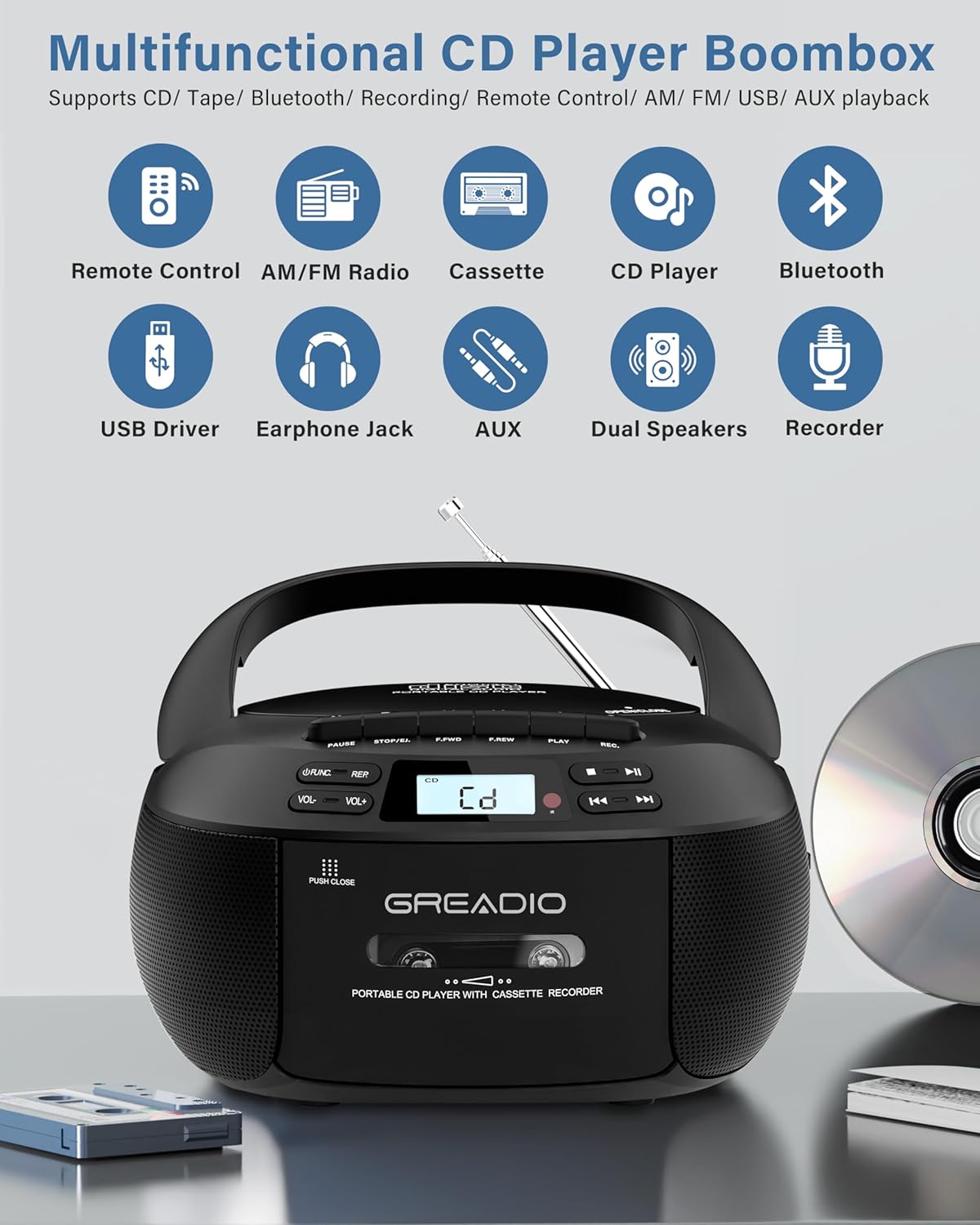
Image: Greadio Boombox with a CD being inserted into the top-loading compartment.
Cassette Playback and Recording
- Press the FUNC. button to select "TAPE" mode.
- Press the STOP/EJ. button to open the cassette door.
- Insert a cassette tape into the compartment and close the door.
- Press the PLAY button to start playback.
- To record, press the REC button while in TAPE mode. Note: Voice recording is not supported in TAPE mode.
Image: Greadio Boombox with a cassette tape being inserted into the front-loading compartment.
Bluetooth Connection
- Press the FUNC. button to select "BT" (Bluetooth) mode. The display will show "bt" and flash, indicating it's in pairing mode.
- Enable Bluetooth on your mobile device and search for "CD-X2A".
- Select "CD-X2A" to pair. Once connected, the "bt" indicator will stop flashing.
- You can now play audio from your Bluetooth device through the boombox.

Image: Greadio Boombox with Bluetooth symbol and a smartphone displaying Bluetooth connection.
AM/FM Radio Tuning
- Press the FUNC. button to select "RADIO" mode.
- Extend the telescopic antenna for optimal reception.
- Use the TUNING dial on the side of the unit to manually tune to your desired AM or FM station.
- The LCD display will show the current frequency.

Image: Greadio Boombox with extended antenna, showing AM/FM radio frequencies.
Video: Demonstrates how to tune AM/FM radio channels on the Greadio Boombox.
AUX/USB Playback
- AUX Input: Connect an external audio device (e.g., smartphone, computer) to the AUX port using a 3.5mm audio cable. Press the FUNC. button to select "AUX" mode.
- USB Playback: Insert a USB flash drive (containing MP3/WAV files) into the USB port. Press the FUNC. button to select "USB" mode. The boombox will automatically detect and play the audio files.

Image: Greadio Boombox showing AUX, USB, and Headphone ports on the side.
Headphone Use
Plug your 3.5mm headphones into the headphone jack located on the side of the unit for private listening. The internal speakers will automatically mute when headphones are connected.
Remote Control
The included remote control allows you to operate the boombox from a distance. It provides control over power, volume, mode selection, track navigation, and playback functions for CD, USB, and Bluetooth modes.
Maintenance
Cleaning the Cassette Head
To ensure optimal performance and prevent playback issues, regularly clean the magnetic head of the cassette player. Use a clean rag dipped in alcohol (optional) to gently wipe the heads from left to right. This helps remove dust and debris that can affect sound quality and recording.
Video: Demonstrates how to clean the magnetic head of the cassette player to resolve tape playback and recording problems.
Troubleshooting
Tape Playback Speed and Recording Issues
If you experience issues with tape playback speed or recording functionality, it is often due to a dirty magnetic head. Refer to the "Cleaning the Cassette Head" section under Maintenance for instructions on how to clean the device. Regular cleaning can prevent these common problems.
Specifications
| Feature | Detail |
|---|---|
| Product Dimensions | 8.54 x 8.39 x 4.8 inches |
| Item Weight | 3.3 pounds |
| Model Number | GB-X2A-H |
| Connectivity Technology | Auxiliary, Bluetooth, USB |
| Speaker Type | Dual Speaker |
| Power Source | AC (110-120V) / 6 x C size batteries |
| Manufacturer | Greadio |
Warranty and Support
Greadio offers a 12-month warranty for this product, along with a 30-day money-back guarantee. Customer service is available 24/7 to assist with any questions or concerns. Your satisfaction is our priority.
Related documentsGB-X2A-H


Ask a question about this manual
Ask about setup, troubleshooting, compatibility, parts, safety, or missing instructions. Manuals+ will review the question and use this page’s manual context to help answer it.