
1. Introduction
Thank you for choosing the ORIA Wireless Indoor Outdoor Weather Station. This device is designed to provide accurate and real-time monitoring of indoor and outdoor temperature and humidity, along with weather forecasts and barometric pressure readings. With its three remote sensors, you can monitor conditions in up to four different locations simultaneously. Please read this manual carefully to ensure proper setup and operation.
2. What's in the Box
- 1 x Main Display Unit (Digital Thermometer Hygrometer)
- 3 x Wireless Remote Sensors
- 1 x USB Power Cable
- 1 x User Manual
Note: 3 AAA batteries for the main unit and 2 AAA batteries for each remote sensor are not included and must be purchased separately.
3. Product Features
- Multi-Location Monitoring: Simultaneously monitors temperature and humidity in four locations (one indoor, three outdoor) using the main unit and three remote sensors.
- Extended Wireless Range: Sensors transmit data up to 100 meters (328 feet) in open areas.
- Color LCD Display: Features a clear, color-coded LCD screen for easy reading of indoor and outdoor data.
- Temperature Alarm Function: Set maximum and minimum temperature alerts for both indoor and outdoor sensors. The main unit measures -9.9°C to 50°C (14.2°F to 122°F), and sensors measure -40°C to 70°C (-40°F to 158°F).
- Weather Forecast: Provides 12-hour weather predictions based on barometric pressure trends, displaying seven weather conditions: sunny, partly cloudy, cloudy, light rain, heavy rain, light snow, and heavy snow.
- MAX/MIN Records: View maximum and minimum temperature and humidity values recorded over a 24-hour period.
- Indoor Comfort Indicator: Displays comfort levels (Dry, Average, Humid) for the indoor environment.
- Dual Power Options: The main unit can be powered by the included USB cable or 3 AAA batteries (not included). Each sensor requires 2 AAA batteries (not included).
- Adjustable Backlight: When powered by USB, the backlight has three adjustable brightness levels (high, medium, off). When powered by batteries only, the backlight activates for 10 seconds with a button press.

Image: Overview of the ORIA Wireless Weather Station, highlighting its multi-functionality including temperature, humidity, weather forecast, air pressure, and MAX/MIN records.

Image: Visual representation of the seven weather forecast icons: Sunny, Partly Cloudy, Overcast, Rain, Thunderstorm, Snow, and Heavy Snowfall.

Image: The comfort indicator feature, showing icons for Dry (<40% humidity), Average (40%~70% humidity), and Humid (>70% humidity).
4. Setup Guide
4.1. Battery Installation
- Main Unit: Open the battery compartment cover on the back of the main unit. Insert 3 new AAA batteries, ensuring correct polarity (+/-). Alternatively, connect the USB power cable to the main unit and a suitable USB power adapter (not included).
- Remote Sensors: Open the battery compartment cover on the back of each remote sensor. Insert 2 new AAA batteries into each sensor, ensuring correct polarity (+/-).

Image: Illustration of the main unit's dual power supply: 3 AAA batteries (not included) for temporary use with 10-second backlight, and USB power (cable included) for continuous backlight with 3 adjustable levels.

Image: Detailed diagram showing battery compartments for the main unit (3 AAA batteries) and a remote sensor (2 AAA batteries).
4.2. Sensor Placement
Place the remote sensors in desired outdoor locations or other rooms you wish to monitor. Ensure sensors are protected from direct sunlight and heavy rain for accurate readings and extended lifespan. The main unit can be placed on a desktop or mounted on a wall.

Image: Depiction of the 100-meter (328 feet) monitoring range, showing the main unit and three remote sensors placed around a house to cover different zones.

Image: Demonstrates both wall-mount and desktop stand options for the main display unit, along with its dimensions (6.2 inches / 156mm width, 4.2 inches / 106mm height).
4.3. Sensor Synchronization
After installing batteries in both the main unit and sensors, the main unit will automatically search for and connect to the sensors. Ensure all sensors are within range. If a sensor does not connect, press the 'CH' button on the main unit to cycle through channels or re-insert batteries in the sensor.
5. Operating Instructions
5.1. Display Overview
The color LCD screen displays indoor temperature and humidity, outdoor temperature and humidity for each of the three sensors, weather forecast icons, barometric pressure, and MAX/MIN records.
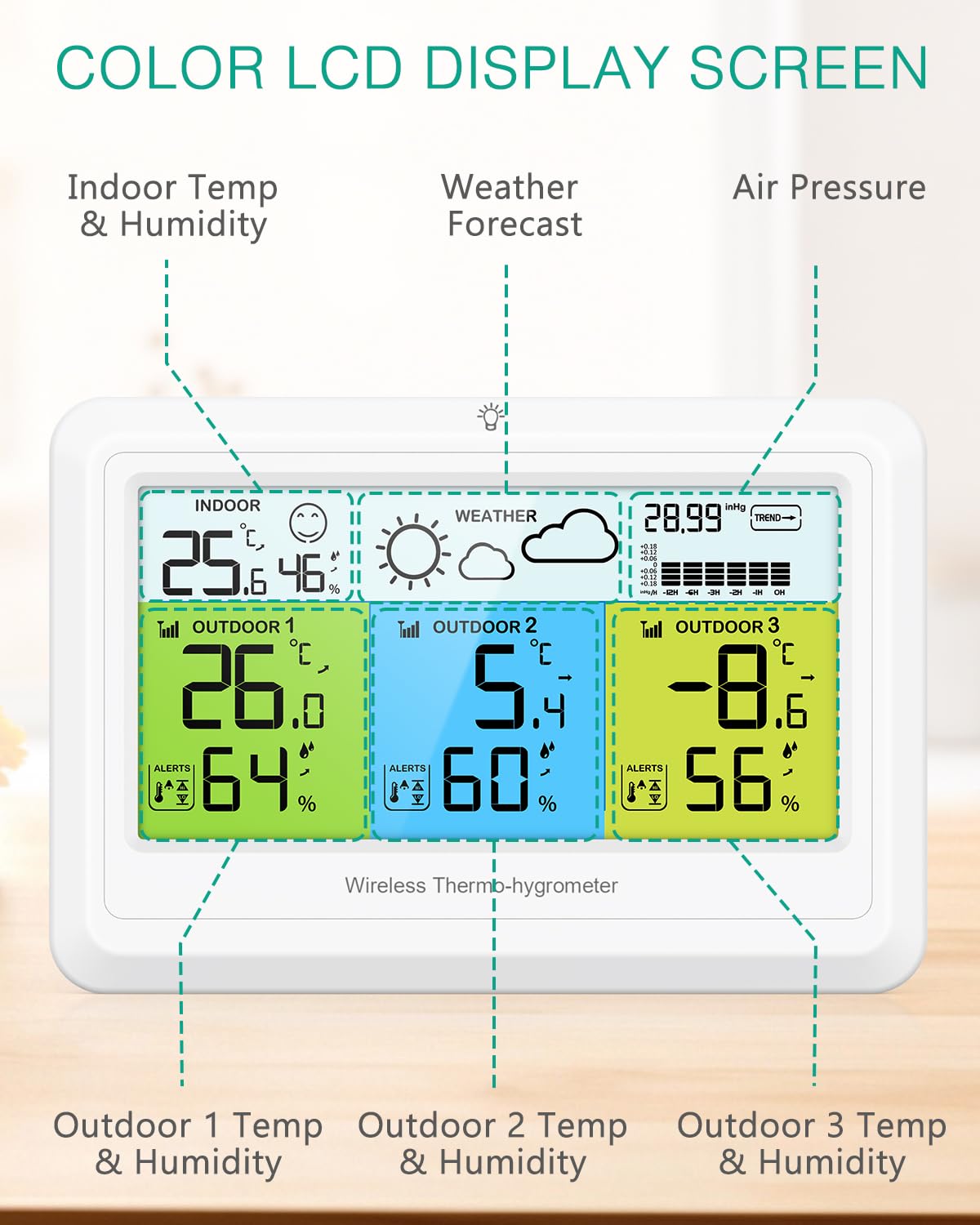
Image: A close-up view of the main display unit, clearly showing indoor temperature and humidity, outdoor temperature and humidity for three sensors, weather forecast, and barometric pressure.
5.2. Setting Temperature Alarms
Press the 'ALERT' buttons (ALERT1, ALERT2, ALERT3) to set high and low temperature alarms for each outdoor channel. Use the 'UP' and 'DOWN' buttons to adjust the alarm thresholds. An alarm icon will appear when activated. The device will alert you if the temperature exceeds the set thresholds.

Image: The main display unit with the 'ALERTS' section highlighted, indicating the ability to set high (HI) and low (LO) temperature alerts for each sensor.
5.3. Weather Forecast Adjustment
The weather forecast is automatically calibrated over 7 to 10 days. If the default weather icon is cloudy, you can manually adjust it by pressing the 'WEATHER' button. Use the 'UP' and 'DOWN' buttons to select the current weather condition. This helps the station to calibrate more accurately over time.
5.4. Viewing MAX/MIN Records
Press the 'MAX/MIN' button to cycle through the maximum and minimum temperature and humidity records for the past 24 hours. Press again to return to current readings.
5.5. Backlight Operation
If the main unit is powered by USB, briefly press the 'LIGHT' button to adjust the backlight brightness through three levels: high, medium, and off. If powered by batteries only, a short press of the 'LIGHT' button will activate the backlight for 10 seconds before it automatically turns off.
5.6. Temperature Unit Selection
Press the '°C/°F' button to switch between Celsius and Fahrenheit temperature units.
6. Maintenance
- Battery Replacement: Replace batteries in the main unit and sensors when the low battery indicator appears on the display.
- Cleaning: Wipe the display and unit surfaces with a soft, dry cloth. Do not use abrasive cleaners or immerse the unit in water.
- Placement: For optimal performance, ensure remote sensors are placed in shaded, well-ventilated areas, away from direct heat sources or extreme cold.
7. Troubleshooting
| Problem | Possible Cause | Solution |
|---|---|---|
| No outdoor temperature/humidity display | Sensors out of range, low battery, or interference. | Move sensors closer to the main unit. Replace sensor batteries. Press 'CH' button on main unit to re-sync. |
| Inaccurate readings | Sensors exposed to direct sunlight, rain, or heat sources. | Relocate sensors to a shaded, protected area. Allow time for readings to stabilize. |
| Display is dim or blank | Low battery in main unit or no USB power. | Replace main unit batteries or connect USB power cable. |
| Weather forecast is incorrect | Initial calibration period not complete or manual adjustment needed. | Allow 7-10 days for auto-calibration. Manually adjust the current weather icon if necessary using the 'WEATHER' button. |
8. Specifications
- Brand: ORIA
- Model: WA165KM
- Special Feature: Ultra-clear color LCD screen
- Color: White
- Exterior Material: Polypropylene
- Display Type: Digital
- Indoor Temperature Range: -9.9°C to 50°C (14.2°F to 122°F)
- Outdoor Temperature Range: -40°C to 70°C (-40°F to 158°F)
- Humidity Range: 20% to 95% RH
- Wireless Transmission Range: Up to 100 meters (328 feet) in open areas
- Power Source (Main Unit): 3 x AAA batteries (not included) or USB power cable (included)
- Power Source (Sensors): 2 x AAA batteries per sensor (not included)
- Compliance: CE
- Usage: Indoor/Outdoor
9. Warranty and Support
- Warranty: 2-Year Warranty
- Replacements: 90 Days Free Replacements
- Returns: 30 Days Free Returns
- Customer Support: 24/7 Customer Support
- Technical Assistance: Lifetime Technical Support
For any questions or assistance, please contact ORIA customer service through the retailer's platform or visit the official ORIA website.
10. Product Video
Video: An official ORIA product video demonstrating the features and usage of the Wireless Indoor Outdoor Weather Station, including its multi-sensor monitoring, weather forecasting, and display capabilities.


