1. Introduction
This manual provides detailed instructions for the assembly, operation, and maintenance of your KWOKING L-Shape Wood Desktop Office Desk. Please read this manual thoroughly before beginning assembly and retain it for future reference. Proper assembly and care will ensure the longevity and optimal performance of your desk.
The KWOKING L-Shape Office Desk (Model JG1372725) is designed for home and office environments, offering a spacious work surface, integrated cable management, and a sturdy H-shape base. This specific model features a White Left Hand Return configuration with dimensions of 63"L x 47"W x 29"H.
2. Safety Information
- Read all instructions: Ensure you understand all assembly steps and safety warnings before proceeding.
- Two-person assembly recommended: For safety and ease, it is advisable to assemble this desk with two adults.
- Keep children and pets away: Small parts can be a choking hazard. Keep them out of reach during assembly.
- Use appropriate tools: Only use the tools provided or recommended in the assembly instructions.
- Assemble on a soft, clean surface: This prevents scratching the desk components during assembly.
- Do not overtighten screws: Overtightening can damage the material. Tighten until snug.
- Check stability: Before using the desk, ensure all connections are secure and the desk is stable.
- Maximum weight capacity: Do not exceed the recommended weight capacity for the desktop to prevent damage or injury.
3. Package Contents
Please verify that all components listed below are present before beginning assembly. If any parts are missing or damaged, please contact KWOKING customer support.
- Desktop Panels (Main Desk and Return)
- H-Shape Base Metal Frames
- Support Beams/Crossbars
- Cable Management Grommets/Channels
- Accessory Kit (Screws, bolts, washers, Allen wrench)
- Instruction Manual (this document)
Note: Chairs, CPU storage, keyboard trays, exterior shelves, cabinets, drawers, bookcases, and hutches are not included with this desk.
4. Setup and Assembly Instructions
Follow these steps carefully for proper assembly. It is recommended to have a second person assist with assembly.
- Unpack and Identify Parts: Carefully unpack all components and lay them out on a clean, soft surface to prevent scratches. Refer to the parts list (usually found on a separate sheet or within the accessory kit) to identify each piece.

Image 1: Fully assembled KWOKING L-Shape Office Desk. This image provides an overview of the final product.
- Assemble the H-Shape Bases: Attach the horizontal support beams to the vertical H-shape metal frames using the provided screws and Allen wrench. Ensure all connections are secure but do not fully tighten yet.

Image 2: Detail of the robust square metal tubing used for the H-shape base, highlighting the durable construction.
- Attach Desktop Panels: Carefully place the main desktop panel onto the assembled H-shape bases. Align the pre-drilled holes in the desktop with the holes in the frame. Secure the desktop to the frame using the appropriate screws. Repeat this process for the desk return panel, ensuring it aligns correctly with the main desktop for the L-shape configuration.
- Install Cable Management: Insert the cable management grommets into the designated holes on the desktop. If cable channels are provided, attach them to the underside of the desk as per the separate diagram in the accessory kit.
- Final Tightening: Once all components are loosely assembled and aligned, go back and securely tighten all screws. Be careful not to overtighten.
- Level the Desk: If your desk includes adjustable feet, use them to level the desk on uneven floors, preventing wobbling.
5. Usage and Operation
Your KWOKING L-Shape Office Desk is designed for versatility and efficiency. Here are some tips for optimal use:
- Workspace Organization: Utilize the L-shape design to separate different tasks or accommodate multiple monitors. The main desk area is ideal for your primary computer setup, while the return can be used for secondary tasks, paperwork, or accessories.
- Cable Management: Route your power cords and data cables through the integrated cable management grommets to maintain a tidy and organized workspace. This helps prevent clutter and potential tripping hazards.
- Ergonomics: Position your monitor at eye level and ensure your chair allows for proper posture to maximize comfort during extended use.

Image 3: The L-Shape desk configured for a gaming setup, showcasing ample space for a monitor, keyboard, mouse, and other peripherals.
6. Maintenance
To keep your KWOKING L-Shape Office Desk in excellent condition, follow these simple maintenance guidelines:
- Cleaning: Wipe the desktop and metal frame with a soft, damp cloth. For stubborn marks, use a mild, neutral cleanser. Avoid abrasive cleaners or harsh chemicals, as these can damage the finish.
- Spills: Immediately wipe up any spills to prevent staining or damage to the wood desktop.
- Regular Checks: Periodically check all screws and connections to ensure they remain tight. Retighten if necessary to maintain stability.
- Avoid Extreme Conditions: Do not place the desk in direct sunlight or near heat sources, as this can cause warping or discoloration. Avoid placing extremely hot or cold items directly on the desktop without protection.
7. Troubleshooting
If you encounter any issues with your desk, refer to the following common solutions:
- Desk is Wobbly:
- Ensure all screws are securely tightened.
- Check if the desk is on an even surface. Adjust the leveling feet (if present) to stabilize the desk.
- Verify that all frame components are correctly assembled according to the instructions.
- Parts Don't Align:
- Loosen all screws slightly, realign the components, and then retighten.
- Double-check that you are using the correct parts for each step as per the assembly diagram.
- Scratches on Desktop:
- Minor scratches can sometimes be minimized with furniture polish or repair kits.
- Always use mouse pads and coasters to protect the desktop surface during use.
8. Specifications
| Feature | Detail |
|---|---|
| Brand | KWOKING |
| Model Number | JG1372725 |
| Overall Dimensions | 63"L x 47"W x 29"H (160cm L x 120cm W x 75cm H) |
| Color | White Left Hand Return |
| Desktop Material | Engineered Wood (P2 MDF Board) |
| Base Material | Metal (H-Shape Base) |
| Assembly Required | Yes, Full Assembly |
| Special Features | Cable Management Included, Desk Return Included, Fixed Height |
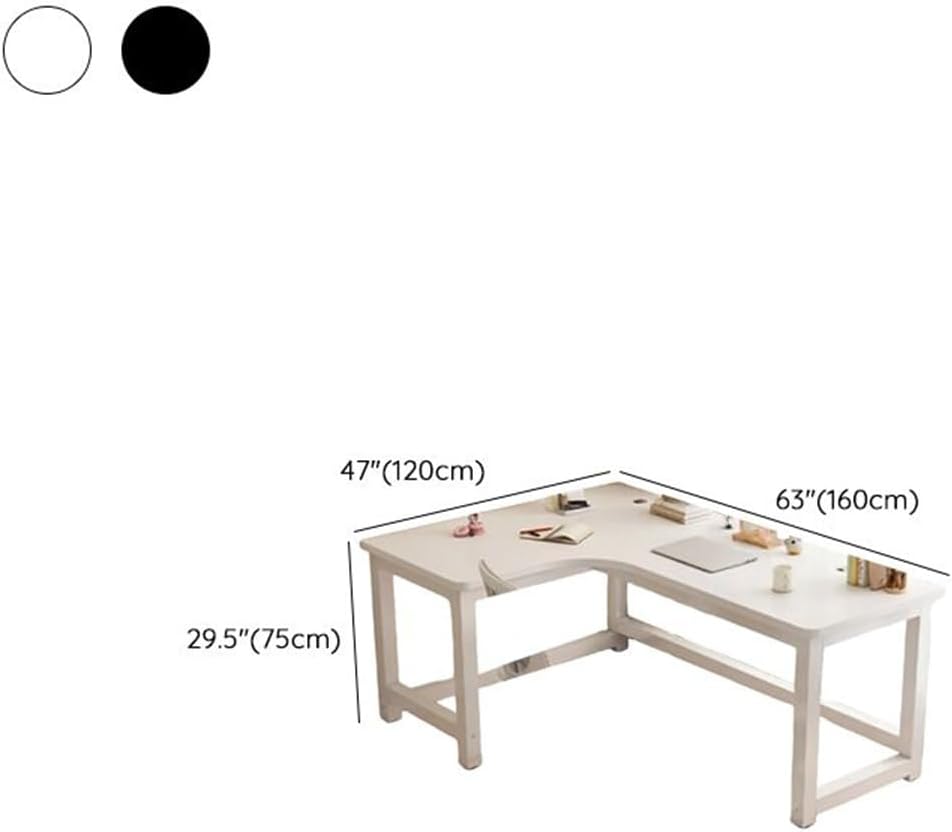
Image 4: Dimensional diagram of the KWOKING L-Shape Office Desk, illustrating its length, width, and height.
9. Warranty and Support
KWOKING is committed to your satisfaction. While specific warranty details are not provided in this document, we stand by the quality of our products.
If you encounter any problems during assembly or use, or if you have questions regarding your KWOKING L-Shape Office Desk, please do not hesitate to contact KWOKING customer support. Our team is ready to assist you.
Please refer to your purchase documentation or the KWOKING official website for the most current warranty information and contact details.