
BAOFENG BF-5RH PRO
Contents
BAOFENG BF-5RH PRO GPS 10W Ham Handheld Radio
Model: BF-5RH PRO | Brand: BAOFENG

The BAOFENG BF-5RH PRO GPS 10W Ham Handheld Radio, featuring a large color display and multiple accessories.
1. Product Overview
The BAOFENG BF-5RH PRO is a professional 10W ham radio designed for multi-band long-range communication. It features GPS location sharing, an 8-band frequency range (VHF/1.25M/UHF/AM/FM), 640 channels across 10 zones, Frequency Match, APRS (firmware 2.0.7), IP54 ruggedness, a 1.8-inch color display, and various functions like CTCSS, DCS, DTMF, BCL, TOT, and stopwatch. This radio is ideal for outdoor activities, emergency preparedness, and professional use, offering enhanced signal transmission and stable communication.

Key features of the BAOFENG 5RH Pro, including GPS, APRS, 10W power, Aviation Frequency Band, One Key Frequency Match, and NOAA Weather.

An overview of the upgraded features of the BAOFENG 5RH PRO, highlighting GPS, APRS, 10 zones, and 64 channels.
Product Unboxing and Overview Video
This video provides an unboxing experience and highlights the key features and physical aspects of the BAOFENG 5RH PRO GPS 10W Ham Radio, including its large display and charging options.
2. Setup
2.1 What's in the Box
- 2 × BF-5RH Pro Ham Radio
- 2 × 2500mAh USB-C Battery
- 2 × 18.89 inch Tactical Antennas
- 2 × 805S Antennas
- 2 × Original antenna
- 2 × AirBand antenna
- 2x Earpieces
- 2x Belt clip
- 2 x Hand strap
- 2 × USB-C charger with cable
- 1 x User's Manual
- 1 × CH340 Programming Cable
2.2 Battery Installation and Charging
The BF-5RH PRO comes with a 2500mAh battery. To install the battery, align it with the back of the radio and slide it into place until it clicks securely. To remove the battery, push the release button located on the top side of the battery compartment and slide the battery out.
The radio supports USB-C charging directly via a port on the battery pack, or you can use the included charging dock. Simply place the radio with the battery attached into the charging dock to begin charging.
2.3 Antenna Installation
The package includes multiple antennas for various frequency bands and uses. Select the appropriate antenna for your communication needs. To install an antenna, screw it clockwise onto the antenna connector at the top of the radio until it is finger-tight. Do not overtighten.

The 18.89-inch tactical antenna, designed for enhanced signal transmission and durability.
3. Operation
3.1 Power On/Off and Display
To power on the radio, rotate the power/volume knob clockwise. The 1.8-inch color display will illuminate, showing frequency information and various indicators. The display offers adjustable brightness levels (1 to 5) and a customized interface for clear readability.

The new menu interface of the BAOFENG 5RH Pro, providing a different operating experience.

Details of the 1.77-inch large color display and adjustable brightness levels (1 to 5).
3.2 GPS Functionality
The BF-5RH PRO features GPS for location sharing and requesting. For optimal performance, use the GPS function in an open area. Long press side key 1 to toggle the GPS function on/off. Long press the red Return key to access the GPS information page.
GPS location sharing and requesting is done via the DTMF function. You can send your own location information to team members or request theirs. Ensure both radios are on the same frequency and within communication range. Program the IDs of your radio and team members' radios using the DTMF part of the CPS software, then set the contact ID. Each radio's self-ID must be unique.
Note: In the GPS information interface, communication is not possible. Return to the walkie-talkie communication page to transmit. Transmitting is disabled while waiting to receive GPS requests.

The GPS location feature allows real-time positioning of other parties.

Instructions on how to use the GPS function, including toggling, accessing information, and sharing/requesting positions.

The integration of GPS and APRS helps prevent users from getting lost.
3.3 Zone and Channel Management
The radio supports 10 zones, with 64 channels each, totaling 640 channels for efficient team control. Instant zone switching allows adaptation to various operational needs. Dual Band control enables monitoring two zones simultaneously, which is beneficial for events or security operations. Press the '#' key to switch the input method when naming zones.

Efficient, secure, and convenient communication with 10 zones and 64 channels per zone.

Visual representation of the 10 groups (zones) each containing 64 channels.
3.4 Frequency Range and Power Output
The BF-5RH PRO offers an 8-band frequency range, including VHF, 1.25M, UHF, AM, and FM. It provides a real 10-watt output, significantly extending transmission range and enabling access to more repeaters. Combined with the 18.89-inch tactical antenna, this ensures stable and long-range communication.

Detailed frequency ranges for TX (VHF, 1.25M, UHF) and RX (FM, AM, VHF, 1.25M, UHF).
3.5 NOAA Weather Alert
The radio includes a NOAA weather alert system that provides real-time updates on extreme weather conditions, offering early risk prevention. This feature is crucial for safety during outdoor activities and disaster relief efforts.

The NOAA Weather Radio feature provides alerts for various hazards like hurricanes, fires, floods, earthquakes, tsunamis, and snowstorms.
3.6 Programming with CPS
The BF-5RH PRO supports manual programming and CPS (Customer Programming Software) programming. It does not support Chirp or Bluetooth programming. You can download the free CPS software and firmware from walkietalkiesoftware.com under BAOFENG → 5RH PRO (GPS).
For Air-band scanning, you need to set the scan range (108-136). Navigate to Menu > Scan > Freq Range.
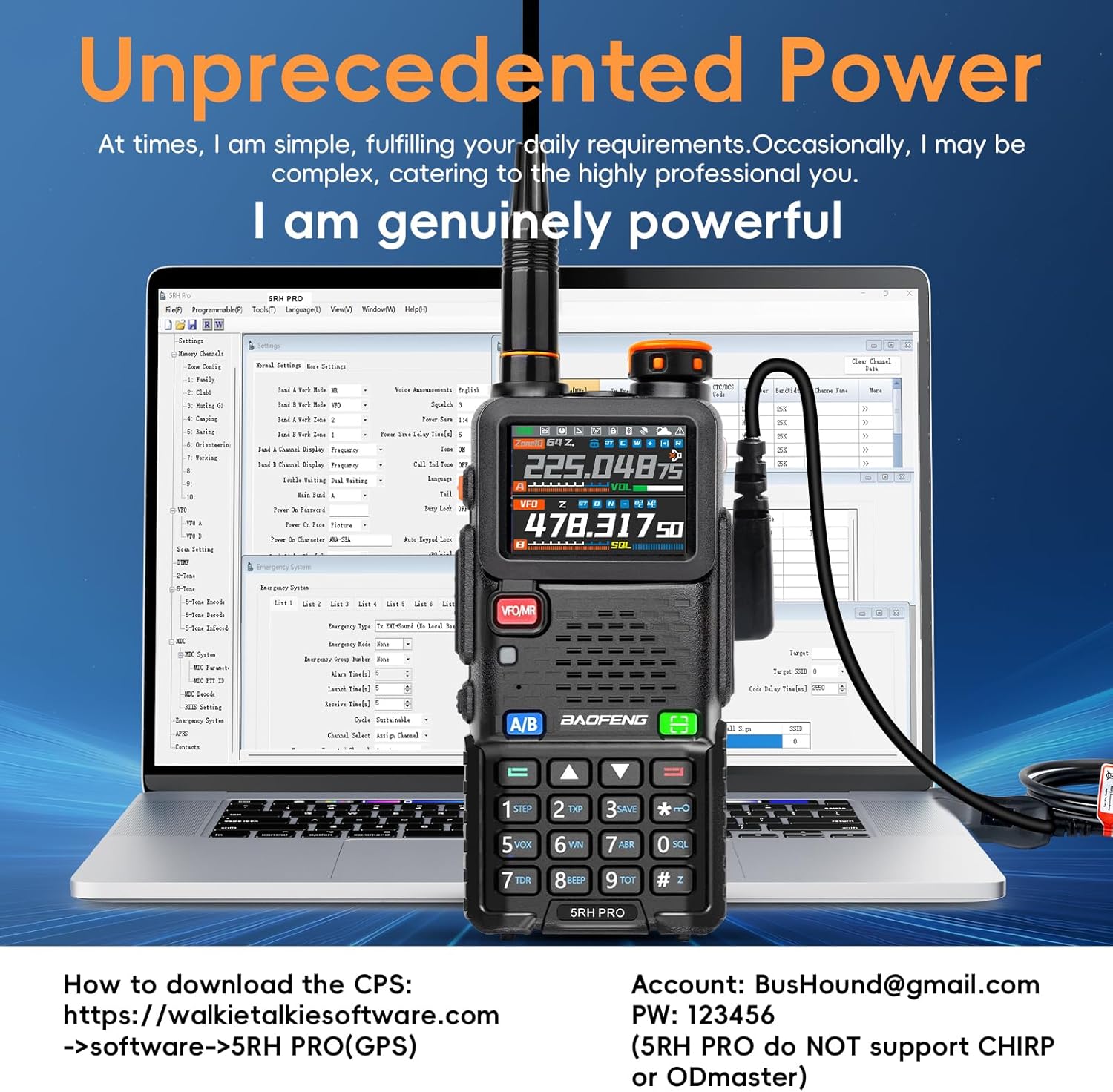
The radio connected to a computer for programming using the CPS software, with instructions on where to download it.
4. Maintenance
To ensure the longevity and optimal performance of your BAOFENG BF-5RH PRO radio, keep it clean and dry. Avoid exposing it to extreme temperatures or direct sunlight for prolonged periods. Regularly check the antenna connection and ensure the battery is properly seated. If the radio functions unusually, contact customer support for firmware upgrades or assistance.
5. Troubleshooting
- Radio functions unusually: Contact customer support for firmware upgrade.
- GPS not working: Ensure you are in an open area. Long press side key 1 to switch GPS on/off.
- Cannot communicate in GPS info interface: Return to the walkie-talkie communication page. Transmitting is disabled while waiting to receive.
- Programming issues: Ensure you are using the correct CPS software from the official website. Chirp and Bluetooth programming are not supported.
6. Specifications
| Feature | Detail |
|---|---|
| Item Weight | 3.3 pounds |
| Package Dimensions | 9.13 x 7.91 x 4.21 inches |
| Item model number | 5RH Pro |
| Batteries | 2 Lithium Polymer batteries required (included) |
| Color | Black |
| Number of Channels | 640 |
| Special Feature | Battery Saver Mode, Weather Alert, GPS APRS Function, Emergency Alarm |
| Frequency Range | UHF/1.25/VHF/AM/FM/NOAA/APRS |
| Talking Range Maximum | 10 Kilometers |
| Tuner Technology | UHF/1.25/VHF |
| Voltage | 7.4 Volts |
| Water Resistance Level | Water Resistant |
7. Warranty & Support
BAOFENG provides a 30-day no-questions-asked after-sale policy for complete peace of mind. A professional support team is available 24-hours to assist customers.
For additional information, you can refer to the official User Manual PDF: User Manual (PDF)
Protection plans are also available for extended coverage:
- 2-Year Protection Plan: $8.99
- 3-Year Protection Plan: $11.99
- Complete Protect: $16.99/month (covers all eligible past and future purchases)
Documents and downloads
Ask a question about this manual
Ask about setup, troubleshooting, compatibility, parts, safety, or missing instructions. Manuals+ will review the question and use this page’s manual context to help answer it.