
ILIFE A30 Pro
ILIFE A30 Pro Robotic Vacuum Cleaner User Manual
Model: A30 Pro | Brand: ILIFE
Product Overview
The ILIFE A30 Pro Robotic Vacuum Cleaner is an advanced cleaning solution designed for comprehensive floor care. It features a self-emptying station, powerful suction, and intelligent navigation to provide a hands-free cleaning experience. This manual provides essential information for setting up, operating, and maintaining your A30 Pro.

Image: The ILIFE A30 Pro robotic vacuum cleaner, its self-empty station, remote control, and a smartphone displaying the control app interface.
Key Features
- Self-Emptying Station: Equipped with a 2.5L dust bag, the station automatically empties the robot's dust tank, offering up to 7 weeks of hands-free dust disposal.
- Powerful 5000Pa Suction: Delivers strong suction for effective cleaning across various floor types, including tiles, hardwood, marble, and carpets.
- LiDAR Navigation: Utilizes advanced LiDAR technology for fast and accurate home mapping, enabling efficient cleaning routes and obstacle avoidance.
- Vacuum and Mop Combo: Features a hybrid dust and water tank for simultaneous vacuuming and 'Y'-shaped mopping, ensuring thorough cleaning.
- Multiple Control Options: Control your robot via remote control, the dedicated ILIFECLEAN App, or voice commands through Alexa and Google Home.
- Multi-Floor Mapping & Customization: Supports saving multiple maps and allows for custom area cleaning, virtual walls, no-go zones, and room-specific cleaning.
- Long-Lasting Battery: High-capacity battery ensures extended runtime, with automatic recharge and resume functionality for complete cleaning cycles.

Image: Visual summary of ILIFE A30 Pro features including 5000Pa suction, 2-in-1 roller brush, self-emptying station, simultaneous vacuum & mop, smart LiDAR navigation, and app/voice/remote control.
Setup and Installation
Follow these steps to set up your ILIFE A30 Pro for the first time.
What's in the Box
Ensure all components are present before proceeding with setup:
- 1x A30 Pro Robotic Vacuum Cleaner
- 1x Self-empty Charging Station
- 5x Dust Bags (2.5L capacity each)
- 1x 2-in-1 Water Tank
- 1x Remote Control
- 2x Mop Cloths
- 2x Side Brushes
- 1x Cleaning Brush
- 2x Filters (High-efficiency)
- 1x User Manual

Image: A visual representation of all components included with the ILIFE A30 Pro, such as the robot, self-empty station, dust bags, water tank, remote, and brushes.
Initial Charging and Docking
- Place the self-empty charging station against a wall in an open area, ensuring there are no obstacles within 1 meter to the sides and 1.5 meters in front.
- Connect the power adapter to the charging station and plug it into a wall outlet.
- Place the A30 Pro robot onto the charging station. Ensure the charging contacts on the robot align with those on the station. The robot will begin charging automatically.
- Allow the robot to fully charge before its first use (approximately 5-6 hours). The indicator light on the robot will change when fully charged.
App Connection (ILIFECLEAN App)
- Download the "ILIFECLEAN" app from your smartphone's app store (available for iOS and Android).
- Open the app and register an account.
- Follow the in-app instructions to add your A30 Pro robot. Ensure your phone is connected to a 2.4GHz Wi-Fi network.
- The app will guide you through connecting the robot to your Wi-Fi network and performing the initial mapping of your home.

Image: A user interacting with the ILIFECLEAN app on a smartphone, demonstrating control over the robotic vacuum cleaner.
Operating Your A30 Pro
The ILIFE A30 Pro offers various cleaning modes and smart navigation features for optimal cleaning.
LiDAR Navigation and Mapping
The A30 Pro uses LiDAR technology to create a precise map of your home, allowing it to navigate efficiently and avoid obstacles. It can save multiple maps for different floors.
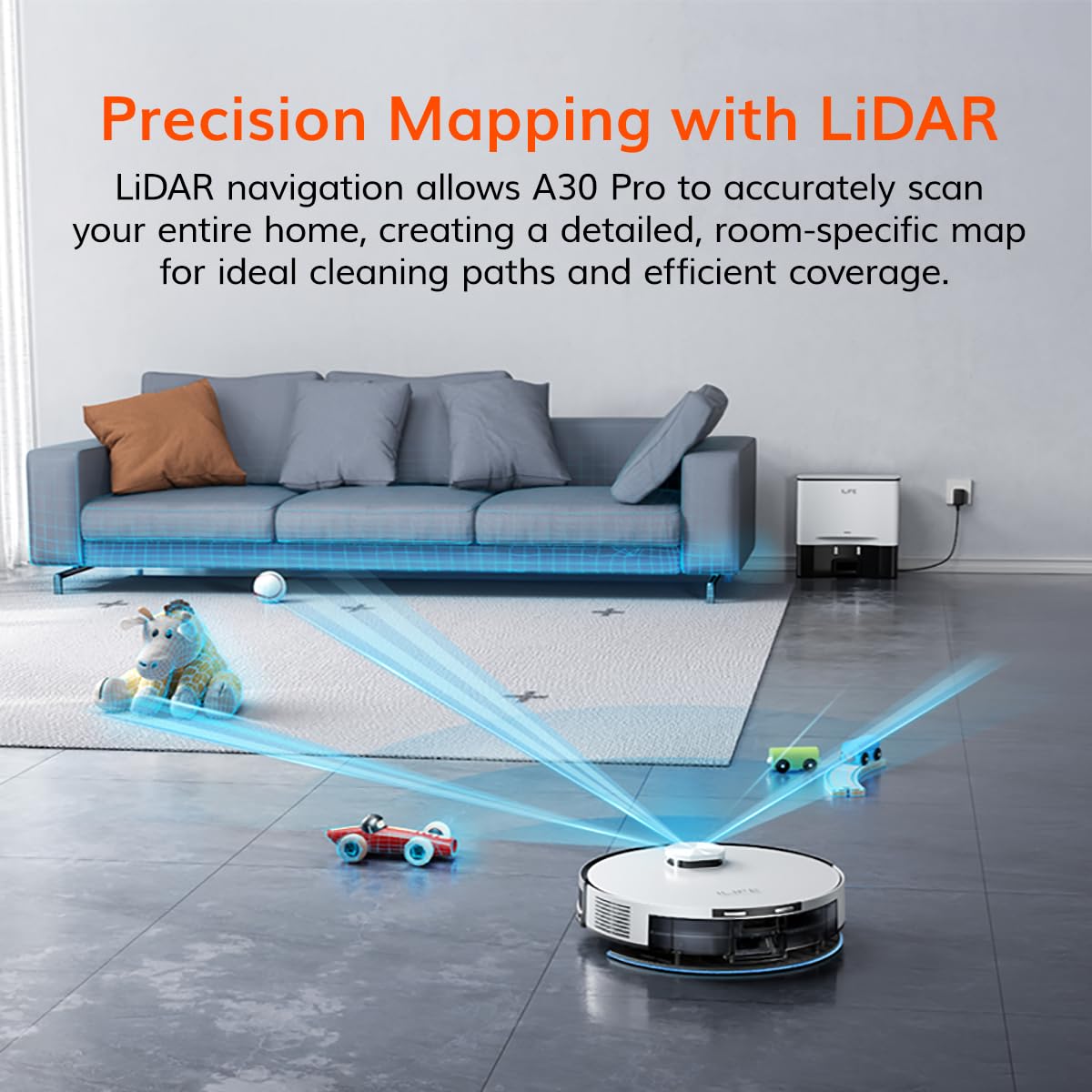
Image: The ILIFE A30 Pro robot vacuum actively mapping a room using its LiDAR sensor, with blue laser lines illustrating the mapping process.
Cleaning Modes
- Plan Mode: The robot cleans the entire mapped area systematically.
- Edge Mode: The robot cleans along the edges of walls and furniture.
- Spot Mode: The robot cleans a specific concentrated area in a spiral pattern.
- Max Mode: Increases suction power for deeper cleaning on tough dirt or carpets.

Image: The ILIFE A30 Pro robot vacuum demonstrating different cleaning paths and modes, including Plan, Edge, Spot, and Max modes.
Vacuum and Mop Functionality
The A30 Pro can vacuum and mop simultaneously using its 2-in-1 dust and water tank. The 'Y'-shaped mopping path mimics manual scrubbing for effective wet cleaning.

Image: The ILIFE A30 Pro robot vacuum alongside its self-empty station and the detached 2-in-1 dustbin and water tank, illustrating its vacuum and mop capabilities.
Customizing Cleaning Areas
Using the ILIFECLEAN app, you can define specific cleaning preferences:
- Virtual Walls & No-Go Zones: Draw virtual boundaries on the map to restrict the robot from entering certain areas.
- No-Mop Zones: Designate areas where the robot should only vacuum and not mop (e.g., carpeted areas).
- Room Selection: Choose specific rooms to clean or schedule cleaning for individual rooms.
- Suction & Water Levels: Adjust suction power (4 levels) and water flow (3 levels) via the app to suit different floor types and cleaning needs.

Image: A collage of images showing various customizable cleaning features of the ILIFE A30 Pro, including custom area cleaning, dedicated to-go zones, 'Y' path cleaning, multiple maps, no-mop zones, and no-go zones.
Maintenance
Regular maintenance ensures optimal performance and extends the lifespan of your ILIFE A30 Pro.
Self-Emptying Station and Dust Bag
- The 2.5L dust bag in the self-empty station can hold debris for up to 7 weeks. Replace the dust bag when the indicator light on the station signals it's full.
- Periodically check the dust collection port on the station for any blockages.

Image: The ILIFE A30 Pro robot vacuum docked at its self-empty station, with an inset showing the 2.5L dust bag being emptied into the station.
Robot Components Cleaning
- Dustbin and Filters: Empty the robot's internal dustbin after each cleaning session. Clean the HEPA and sponge filters regularly using the provided cleaning brush. Replace filters every 3-6 months depending on usage.
- 2-in-1 Roller Brush: Remove hair and debris tangled around the main roller brush. Use the cleaning tool to cut and remove tangled hair.
- Side Brushes: Check side brushes for wear and tear. Clean any tangled hair or debris. Replace if bristles are bent or damaged.
- Water Tank & Mop Cloths: Empty and rinse the water tank after each mopping session. Wash mop cloths regularly and allow them to air dry.
- Sensors and Charging Contacts: Wipe all sensors (cliff sensors, wall sensors) and charging contacts on both the robot and the station with a clean, dry cloth to ensure proper function.
Troubleshooting
This section addresses common issues you might encounter with your ILIFE A30 Pro.
| Problem | Possible Cause | Solution |
|---|---|---|
| Robot does not turn on or charge. | Battery low; charging contacts dirty; power adapter not connected. | Ensure robot is properly docked. Clean charging contacts. Check power connection to station. |
| Robot gets stuck frequently. | Obstacles (cables, rugs); cliff sensors dirty; robot in a confined space. | Clear obstacles. Clean cliff sensors. Use virtual walls/no-go zones in app. |
| Poor cleaning performance. | Dustbin full; filters clogged; brushes tangled; suction level too low. | Empty dustbin. Clean/replace filters. Clean main and side brushes. Increase suction level via app. |
| Robot cannot connect to Wi-Fi. | Incorrect Wi-Fi password; 5GHz network; router too far. | Verify password. Ensure 2.4GHz network. Move robot closer to router. Restart robot and router. |
| Self-empty station not emptying dustbin. | Dust bag full; dust collection port blocked; station not powered. | Replace dust bag. Clear any blockages in the station's port. Ensure station is powered. |
For more detailed troubleshooting or persistent issues, please contact customer support.
Specifications
| Feature | Detail |
|---|---|
| Brand | ILIFE |
| Model Name | A30 Pro |
| Product Dimensions | 31.5L x 31.5W x 7.6H Centimeters |
| Colour | White |
| Suction Power | 5000Pa |
| Dust Bag Capacity (Station) | 2.5 litres |
| Navigation Type | LiDAR Technology |
| Filter Type | HEPA Filter, Sponge, 4 Layer Filter, High Efficiency Filter, Microfilter |
| Power Source | Battery Powered |
| Control Methods | App, Remote, Voice (Alexa, Google Home) |
| Item Weight | 7 kg 700 g |
| Manufacture Year | 2025 |
| Country of Origin | Hong Kong |
Warranty and Support
For warranty information, product demonstrations, or technical support, please contact ILIFE customer service.
- Customer Service Hotline: 1800-274-5433
- Manufacturer: ILIFE Innovations Ltd: 15 Chong Yip Street, Montery Plaza, Kwun Tong, Kowloon, Hong Kong.
- Importer/Packer (India): ILIFE Innovations | Shariden Pvt. Ltd. B-37, Devasandra Industrial Estate, Mahadevapura, Bengaluru, Karnataka 560048

Image: An advertisement for ILIFE product installation and free demonstration, featuring the customer service hotline number.
Related documentsA30 Pro


Ask a question about this manual
Ask about setup, troubleshooting, compatibility, parts, safety, or missing instructions. Manuals+ will review the question and use this page’s manual context to help answer it.