
1. Introduction
This manual provides detailed instructions for the safe and efficient operation of your UNIWEIGH Digital Hanging Scale, Model UNI-ADM-BL. This portable scale is designed for weighing items up to 660lb (300kg) with high accuracy, featuring a clear LCD display, tare, hold, and unit conversion functions. It is suitable for various applications including industrial, agricultural, fishing, hunting, and luggage weighing.
2. Safety Information
- Do not exceed the maximum weight capacity of 660lb (300kg) to prevent damage to the scale and potential injury.
- Ensure the scale is securely hung from a stable support before attaching any load.
- Keep hands and body clear of the suspended load during operation.
- Avoid dropping or subjecting the scale to severe impacts.
- Do not immerse the scale in water or expose it to extreme temperatures.
- Store the scale in a dry, safe place when not in use.
3. Package Contents
Verify that all items are present in the package:
- UNIWEIGH Digital Hanging Scale (Model UNI-ADM-BL)
- Upper Aluminum Hook
- Lower Stainless Steel S-Hook
- 2 x AAA Batteries
- User Manual (this document)
4. Product Features

Image: Overview of UNIWEIGH Digital Hanging Scale components and features.
- High Capacity: Weighs up to 660lb / 300kg / 2941N.
- Accuracy: 0.2lb / 0.1kg / 1N precision.
- Multiple Units: Easily switch between kilograms (kg), pounds (lb), and Newtons (N).
- Large LCD Display: Backlit for clear readability in various lighting conditions.
- Tare Function: Allows you to subtract the weight of a container for net weight measurement.
- Hold Function: Locks the displayed weight for easy reading.
- Auto-Off: Conserves battery power by automatically shutting off after a period of inactivity.
- Durable Construction: Features an ABS plastic case, aluminum upper hook, and stainless steel lower S-hook for robust performance.
- Portable Design: Compact and lightweight for easy transport and use in various environments.
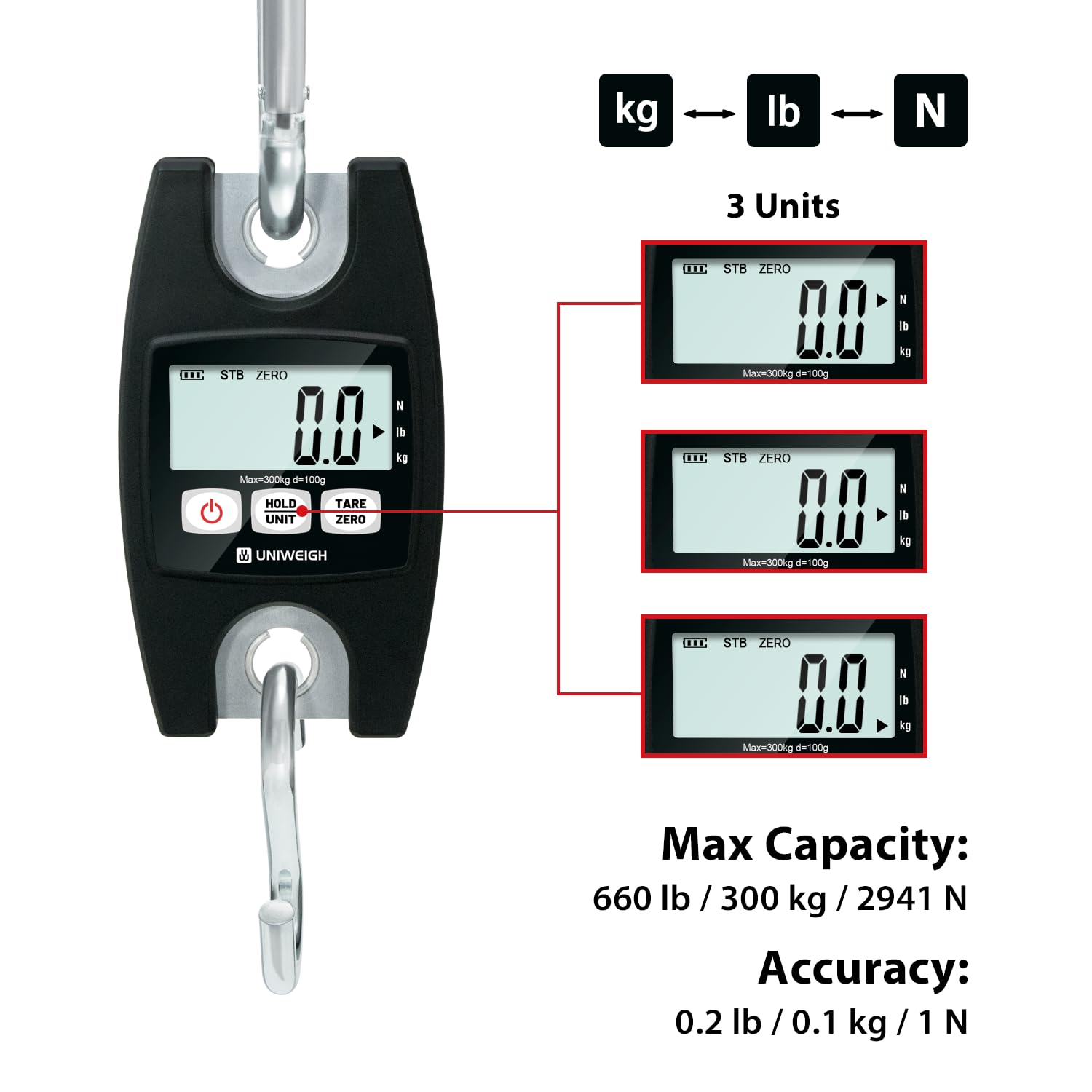
Image: Displaying the scale's unit options, maximum capacity, and accuracy.
5. Setup
5.1 Battery Installation
- Locate the battery compartment on the back of the scale.
- Open the battery cover.
- Insert the 2 AAA batteries, ensuring correct polarity (+/-).
- Close the battery cover securely.
5.2 Attaching Hooks
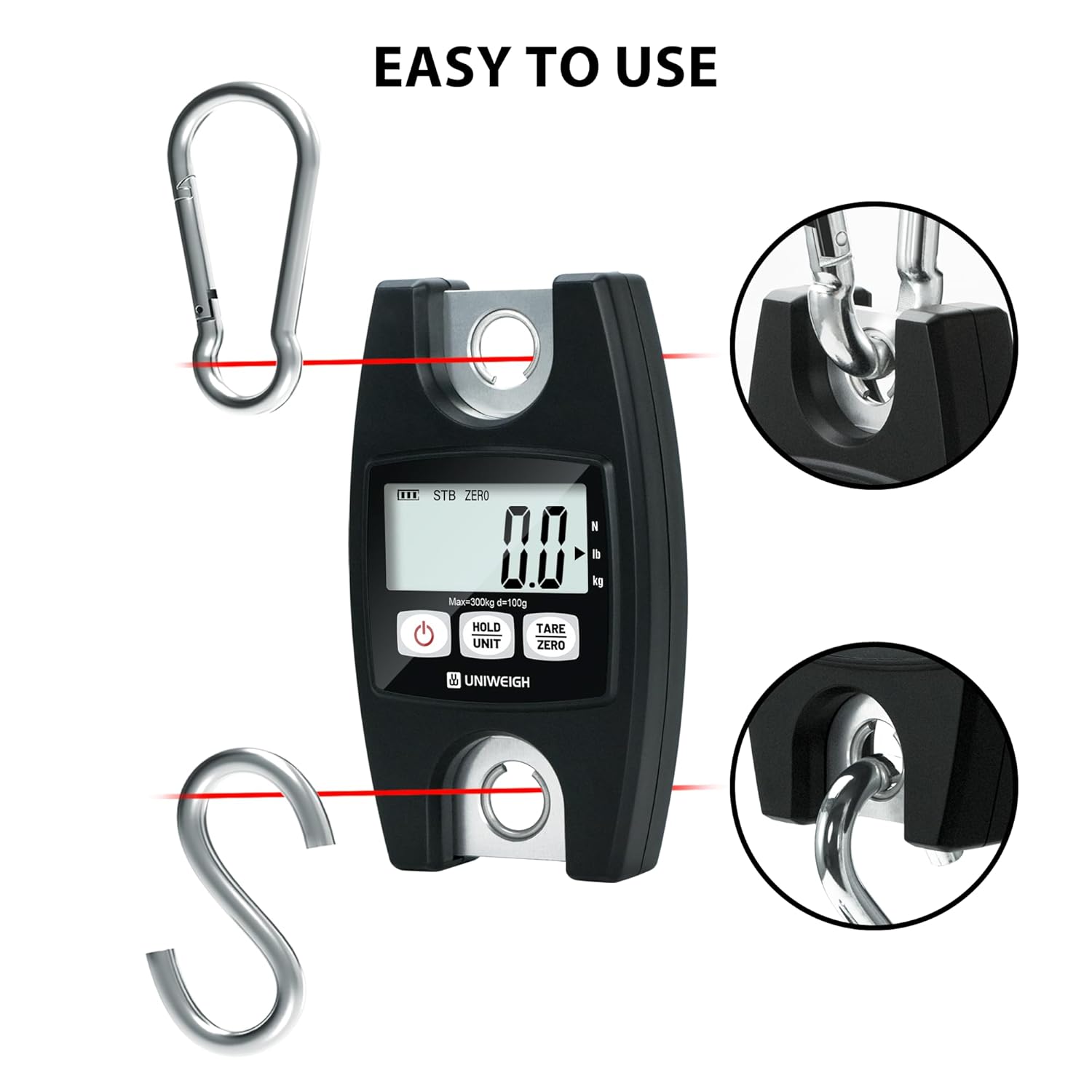
Image: Illustration of hook attachment points.
- Attach the aluminum hook to the upper loop of the scale. This hook is used to hang the scale from a support.
- Attach the stainless steel S-hook to the lower loop of the scale. This hook is used to suspend the item to be weighed.
- Ensure both hooks are securely fastened before use.
6. Operating Instructions

Image: Step-by-step guide for basic scale operations.
6.1 Power On/Off
- To turn on the scale, press the POWER button. The display will show "8888" and then "0.0" (or "0.00") indicating it's ready for use.
- To turn off the scale, press and hold the POWER button for a few seconds until the display turns off. The scale will also automatically turn off after a period of inactivity to save battery.
6.2 Unit Conversion (UNIT)
- With the scale on, press the UNIT button to cycle through the available weighing units: kilograms (kg), pounds (lb), and Newtons (N).
- The selected unit will be displayed on the LCD screen.
6.3 Tare Function (TARE ZERO)
- To weigh items in a container, first hang the empty container on the lower hook.
- Wait for the display to stabilize, then press the TARE ZERO button. The display will reset to "0.0".
- Now, place the items to be weighed into the container. The display will show the net weight of the items.
6.4 Hold Function (HOLD)
- When weighing an item, the display will show the weight. If the weight fluctuates, or if you need to remove the item to read the display more clearly, press the HOLD button.
- The displayed weight will lock, indicated by a "HOLD" icon on the screen.
- Press the HOLD button again to release the hold function and return to live weighing.
6.5 Weighing Procedure
- Hang the scale securely from a stable support using the upper aluminum hook.
- Turn on the scale by pressing the POWER button.
- Ensure the display shows "0.0" before weighing. If not, press TARE ZERO.
- Carefully attach the item to be weighed to the lower stainless steel S-hook.
- Wait for the display to stabilize. The stable weight will be shown on the LCD.
- If desired, press HOLD to lock the reading.
- Remove the item from the hook.

Image: Example of the scale in use for outdoor weighing.
7. Maintenance
- Cleaning: Wipe the scale with a soft, damp cloth. Do not use abrasive cleaners or immerse the scale in water.
- Storage: Store the scale in a cool, dry place away from direct sunlight and extreme temperatures. If storing for an extended period, remove the batteries to prevent leakage.
- Battery Replacement: Replace batteries when the "Lo" indicator appears on the display.
8. Troubleshooting
| Problem | Possible Cause | Solution |
|---|---|---|
| Scale does not turn on. | Dead or incorrectly installed batteries. | Check battery polarity or replace batteries. |
| "Lo" displayed. | Low battery power. | Replace batteries. |
| "O-Ld" displayed. | Overload. Weight exceeds maximum capacity. | Remove some weight immediately to prevent damage. |
| Inaccurate readings. | Unstable hanging point, scale not zeroed, or environmental factors (wind). | Ensure stable hanging, press TARE ZERO before weighing, and use in a calm environment. |
9. Specifications
| Feature | Detail |
|---|---|
| Model Number | UNI-ADM-BL |
| Brand | UNIWEIGH |
| Maximum Weight Capacity | 660 lbs / 300 kg / 2941 N |
| Reading Precision | 0.1 kg (0.2 lbs / 1 N) |
| Display Type | LCD with Backlight |
| Power Source | 2 x AAA Batteries (included) |
| Material | ABS Plastic Case, Aluminum Hook, Stainless Steel Hook |
| Special Features | Easy Setup, Auto-Off, Backlit Screen, High Capacity, Tare Function, Hold Function, Portable |
| Product Dimensions | 17.2 x 16 x 3.7 cm (Package dimensions) |
| Product Weight | 620 grams (Package weight) |
| Recommended Uses | Agriculture, Fishing, Commerce, Warehousing, Construction, Manufacturing, Logistics, Shipping |
10. Warranty Information
UNIWEIGH products are manufactured to high-quality standards. This product comes with a standard manufacturer's warranty against defects in materials and workmanship. Please refer to the product packaging or contact UNIWEIGH customer support for specific warranty terms and conditions.
11. Customer Support
If you have any questions, require assistance, or encounter issues not covered in this manual, please contact UNIWEIGH customer support. Contact information can typically be found on the product packaging or the official UNIWEIGH website.
For online resources, you may visit the UNIWEIGH official website or the retailer's support page where you purchased the product.
