
1. Introduction
Thank you for choosing the Avhrit Electric Glass Suction Cup, Model JY001. This heavy-duty vacuum lifter is designed for safe and efficient handling of large, smooth, non-porous materials such as glass, tiles, granite, and metal. Featuring an automatic pumping system, LCD pressure display, and a robust 3600mAh battery, this tool simplifies lifting tasks and enhances workplace safety. Please read this manual thoroughly before operation to ensure proper use and maintenance.
2. Safety Information
Always prioritize safety when operating this device. Failure to follow these instructions may result in injury or damage to property.
- Surface Compatibility: Use only on clean, dry, smooth, and non-porous surfaces. Avoid rough, textured, or leaky materials, as these can compromise suction integrity.
- Weight Capacity: Do not exceed the maximum load capacity of 300 kg (660 lbs). Overloading can lead to loss of suction and material drop.
- Pre-Operation Check: Before each use, inspect the suction cup pad for any damage, cracks, or debris. Ensure the LCD display is functional and the battery is adequately charged.
- Secure Attachment: Always ensure the suction cup is fully attached and the pressure reading on the LCD display is stable before attempting to lift.
- Environmental Conditions: The device is designed to operate in temperatures from -20°C (-4°F) to 65°C (150°F). Extreme temperatures outside this range may affect performance.
- Release Mechanism: Understand the quick-release function and use it intentionally. Avoid accidental release during lifting.
- Personal Protective Equipment (PPE): Wear appropriate safety gear, such as gloves and safety shoes, when handling heavy materials.
- Children and Unauthorized Users: Keep the device out of reach of children and ensure only trained personnel operate it.
3. Product Overview and Components
The Avhrit Electric Glass Suction Cup JY001 is a portable, battery-powered lifting tool.
3.1 Package Contents
- 1 x Avhrit Electric Suction Cup (9.45-inch / 24cm)
- 1 x USB-C Charging Cable
- 1 x Instruction Manual
- 1 x Customized Storage Box
3.2 Key Features
- Automatic Vacuum Pumping: Eliminates manual pumping, maintaining consistent suction.
- LCD Pressure Display: Real-time monitoring of vacuum status and remaining battery power.
- High Load Capacity: Supports up to 300 kg (660 lbs).
- Built-in 3600mAh Battery: Long-lasting power for extended use.
- Triple Air Seal: Enhanced sealing for reliable grip.
- Quick Exhaust Knob: For assisted removal in case of power loss.

Figure 1: Avhrit Electric Glass Suction Cup JY001 and its carrying case.
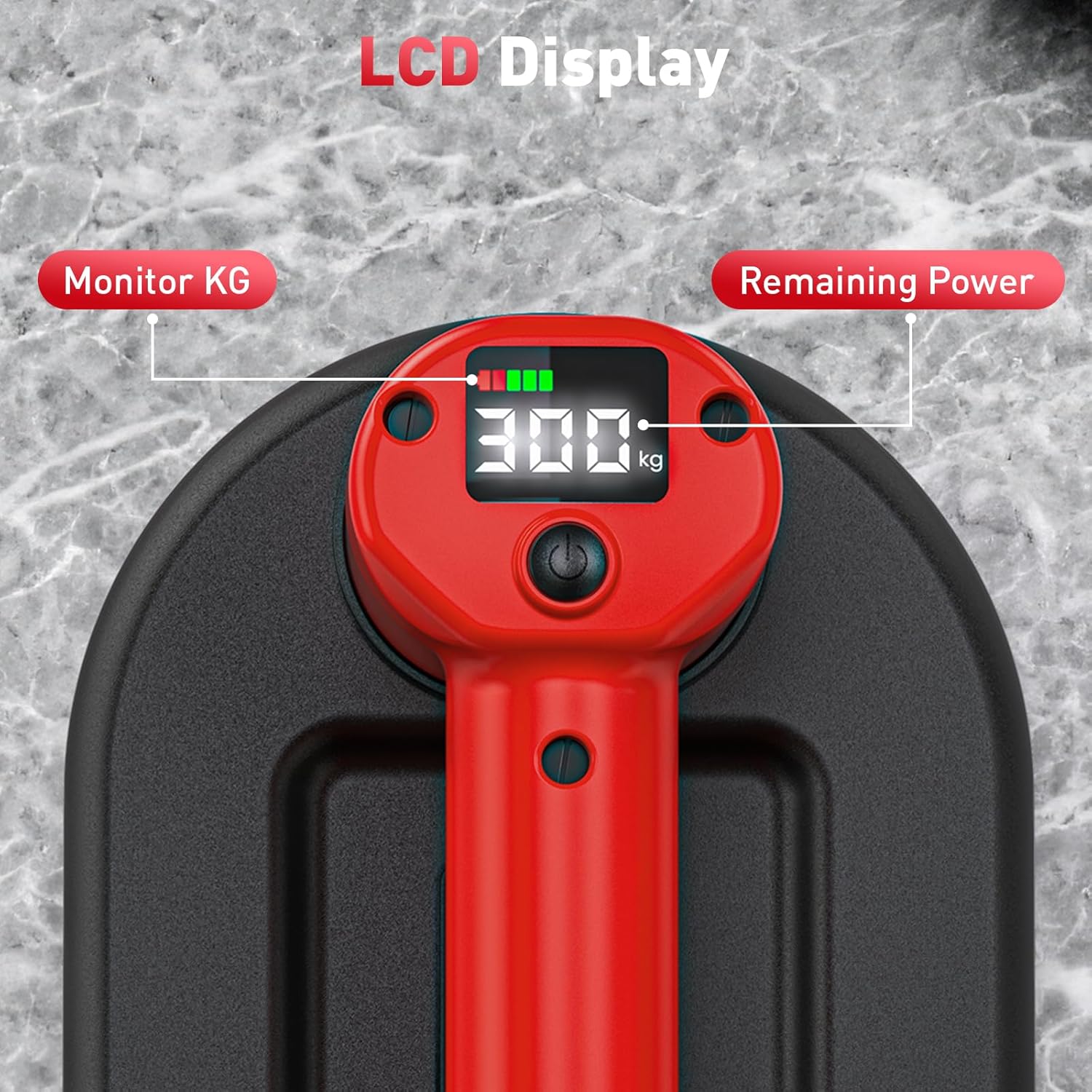
Figure 2: Close-up view of the LCD display, showing monitored weight in KG and remaining battery power.
4. Setup
4.1 Initial Charging
- Locate the USB-C charging port on the device.
- Connect the provided USB-C cable to the suction cup and the USB-A end to a compatible power adapter (not included).
- The LCD display will indicate charging status. A full charge typically takes approximately 3 hours.
- Ensure the device is fully charged before first use for optimal performance.
4.2 Preparing the Suction Cup
- Remove the protective cover from the rubber suction pad.
- Inspect the rubber pad for any dust, dirt, or damage. Clean if necessary with a damp cloth and dry thoroughly.
- Ensure the surface to be lifted is clean, dry, and free of any obstructions or porous areas.
5. Operating Instructions
5.1 Attaching the Suction Cup
- Place the suction cup firmly onto the desired smooth, non-porous surface.
- Press and hold the power button on the handle. The automatic vacuum pump will activate, creating a strong seal.
- Monitor the LCD display. The pressure reading will increase as the vacuum forms. Wait until the pump stops and the pressure reading stabilizes (typically around 70 kPa or 300 kg).
- Once the pressure is stable, the suction cup is securely attached and ready for lifting.

Figure 3: Attaching the suction cup to a glass panel for lifting.
5.2 Lifting and Transporting
- With the suction cup securely attached, carefully lift and transport the material.
- The device features an auto-suction guard that will automatically reactivate the pump if the pressure drops below a safe threshold (e.g., from 70 kPa to 60 kPa), ensuring continuous secure hold.
- Always maintain a firm grip on the handle during transport.

Figure 4: Demonstrating the 300KG (660LBS) maximum suction force on a stack of panels.
5.3 Releasing the Suction Cup
- Once the material is safely placed, double-tap the power button. This will activate the quick-release function, allowing air to enter and break the vacuum seal.
- Gently remove the suction cup from the surface.
- In case of battery depletion or malfunction, use the quick exhaust knob (pull tab) located on the side of the suction pad to manually release the vacuum.
6. Maintenance
6.1 Cleaning
- After each use, wipe the rubber suction pad with a clean, damp cloth to remove any dust or debris. Ensure it is completely dry before storage.
- Periodically check the dust adhesive (filter) located near the air intake for cleanliness. Replace if heavily soiled or damaged.
- Clean the main body of the device with a soft, dry cloth. Do not use abrasive cleaners or solvents.
6.2 Storage
- Store the Avhrit Electric Glass Suction Cup in its customized storage box to protect the rubber pad and internal components from damage and dust.
- Keep the device in a cool, dry place, away from direct sunlight and extreme temperatures.
- Ensure the battery is partially charged (around 50%) before long-term storage to prolong battery life. Recharge every 3-6 months if not in use.

Figure 5: The suction cup is designed to remain reliable in temperatures from -20°C to 65°C.
7. Troubleshooting
| Problem | Possible Cause | Solution |
|---|---|---|
| Suction cup does not hold or loses suction quickly. |
|
|
| Device does not turn on. |
|
|
| Battery not charging. |
|
|
| LCD display is blank or erratic. |
|
|
8. Specifications
| Feature | Detail |
|---|---|
| Model Number | JY001 |
| Max Load Capacity | 300 kg (660 lbs) |
| Suction Cup Diameter | 9.45 inches (24 cm) |
| Battery Capacity | 3600 mAh (Built-in Lithium Battery) |
| Charging Interface | USB-C |
| Operating Temperature | -20°C to 65°C (-4°F to 150°F) |
| Product Dimensions | 17.83 x 11.93 x 4.8 inches |
| Product Weight | 4.63 Pounds (approx. 2.1 kg) |
9. Warranty and Support
Avhrit is committed to providing high-quality products and customer satisfaction.
- Return Policy: This product is covered by a 30-day unconditional return policy. Please refer to your purchase platform for specific return procedures.
- Technical Support: Avhrit offers lifetime service and technical support for the JY001 Electric Glass Suction Cup.
- Contact: For any questions, troubleshooting assistance, or warranty claims, please contact Avhrit customer service through the platform where you purchased the product.