
CMF BY NOTHING CMF buds 2a
CMF Buds 2a Wireless Earbuds User Manual
Brand: CMF BY NOTHING | Model: CMF buds 2a
1. Introduction
Welcome to the user manual for your CMF Buds 2a Wireless Earbuds. These earbuds are designed to provide a superior audio experience with advanced features such as Active Noise Cancellation, clear call technology, and extended battery life. This manual will guide you through the setup, operation, maintenance, and troubleshooting of your new earbuds to ensure optimal performance and longevity.
2. What's in the Box
Please check the contents of your package to ensure all items are present:
- CMF Buds 2a Wireless Earbuds
- Ear tips in size S, M, L
- Charging case
- User Manual (this document)
- Safety information and warranty information

Image: CMF Buds 2a Wireless Earbuds and their charging case.
3. Product Overview
Familiarize yourself with the main components of your CMF Buds 2a:
- Earbuds: Each earbud features a 12.4mm Bio-fibre dynamic driver, multiple microphones for calls and ANC, and touch control surfaces.
- Charging Case: The compact case not only protects your earbuds but also charges them on the go. It has a USB-C charging port and an LED indicator.
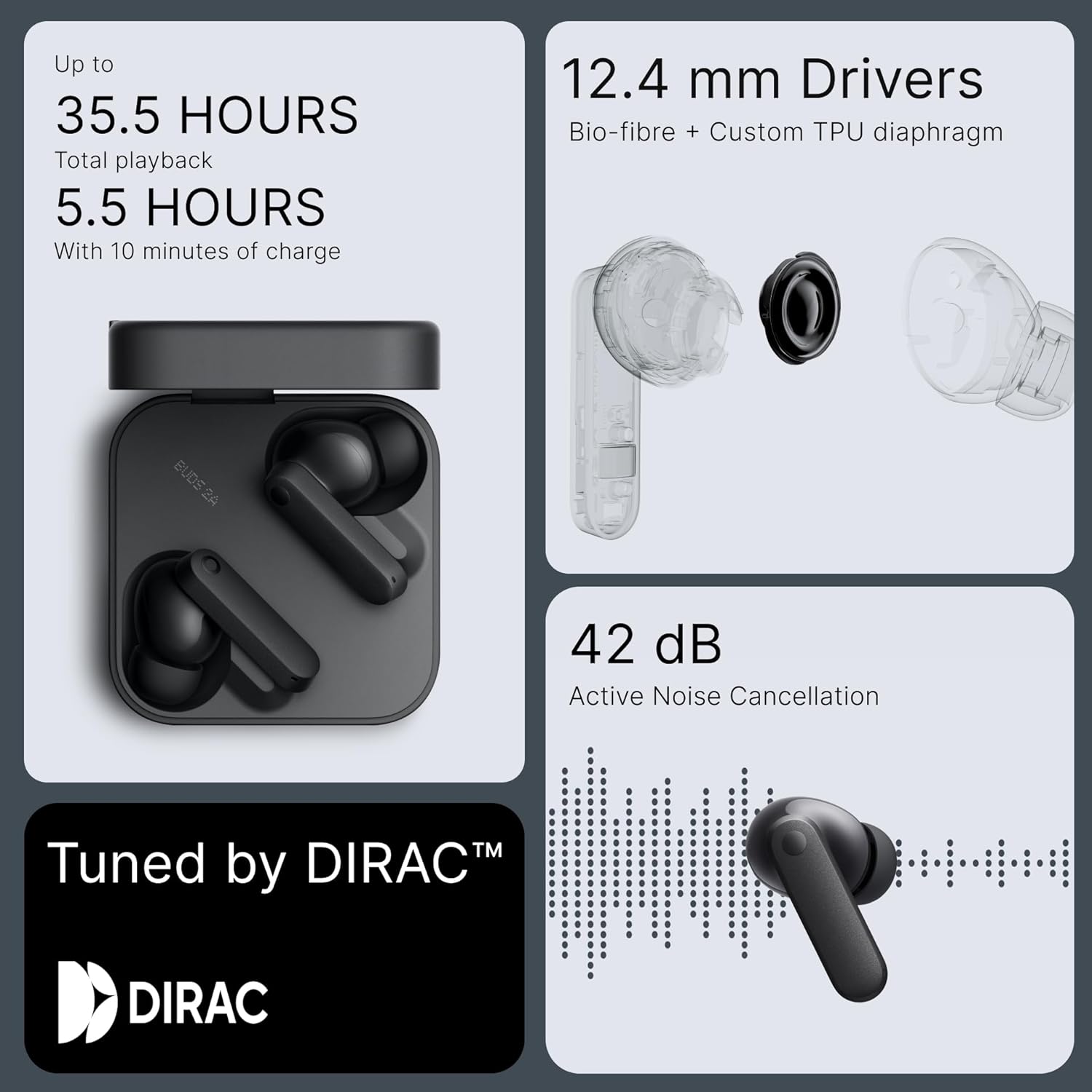
Image: Detailed view of the CMF Buds 2a's internal components, highlighting the 12.4mm driver and Active Noise Cancellation capabilities.
4. Setup Guide
4.1. Charging Your Earbuds
Before first use, fully charge your CMF Buds 2a. Place the earbuds into the charging case and close the lid. Connect the charging case to a power source using a USB-C cable. The LED indicator on the case will show the charging status.
- A full charge provides up to 8 hours of playback for the earbuds and up to 35.5 hours with the charging case.
- A quick 10-minute charge can provide up to 5.5 hours of listening time (with ANC turned off).

Image: A hand holding the CMF Buds 2a charging case, illustrating the impressive battery life of 8 hours on a single charge and 35.5 hours with the case.
4.2. Pairing with Your Device
- Initial Pairing:
- Open the charging case with the earbuds inside.
- The earbuds will automatically enter pairing mode (indicated by a flashing LED on the case).
- On your device (smartphone, tablet, laptop), enable Bluetooth and search for "CMF Buds 2a" in the list of available devices.
- Select "CMF Buds 2a" to connect.
- Google Fast Pair & Microsoft Quick Switch: For compatible Android and Windows devices, simply open the case near your device, and a pop-up notification will appear for quick pairing.
- Dual Device Connectivity: The CMF Buds 2a supports connecting to two devices simultaneously. After pairing with the first device, pair with the second device. The earbuds will intelligently switch between devices based on audio playback.
4.3. Choosing the Right Ear Tips
The correct ear tip size is crucial for optimal sound quality and Active Noise Cancellation performance. Experiment with the included S, M, and L ear tips to find the best fit for your ears. A snug fit ensures proper bass response and effective noise isolation.
5. Operating Your Earbuds
5.1. Touch Controls
The CMF Buds 2a features intuitive touch controls on each earbud. These controls can be customized via the Nothing X app.
| Action | Default Control |
|---|---|
| Play/Pause | Single tap |
| Next Track | Double tap (Right earbud) |
| Previous Track | Triple tap (Left earbud) |
| Answer/End Call | Double tap |
| Switch ANC/Transparency Mode | Press and hold |
Note: Default controls may vary slightly or be fully customizable through the Nothing X app.
5.2. Active Noise Cancellation (ANC) & Transparency Mode
The CMF Buds 2a features 42dB Hybrid ANC to block out ambient noise, and a Transparency Mode to let you hear your surroundings without removing the earbuds.
- Active Noise Cancellation: Reduces external sounds, ideal for noisy environments.
- Transparency Mode: Allows you to hear your surroundings, useful for conversations or being aware of traffic.
Switch between modes by pressing and holding the touch control area on either earbud, or through the Nothing X app.

Image: A user enjoying audio on a bus, demonstrating the effectiveness of the Smart ANC feature for daily use.
5.3. Clear Calls
Equipped with Quad HD ENC mics, "Clear Voice Tech," and "Wind Noise Reduction 2.0," your earbuds ensure crystal-clear communication even in challenging environments.

Image: A woman using the CMF Buds 2a, highlighting the crystal-clear call quality provided by the 4 HD microphones and Clear Voice Technology.
5.4. Nothing X App Features
Download the Nothing X app from your device's app store to unlock the full potential of your CMF Buds 2a. The app allows you to:
- Customize EQ profiles for personalized sound.
- Adjust ANC levels and switch between noise cancellation and transparency modes.
- Enable Gaming Low-Lag Mode for synchronized audio during gaming.
- Utilize the "Find Earbuds" feature to locate misplaced earbuds.
- Access ChatGPT for voice-activated assistants when paired with Nothing/CMF Phones.

Image: A visual representation of the Nothing X app interface, demonstrating various customization options for the earbuds.
6. Maintenance
6.1. Cleaning Your Earbuds
Regular cleaning helps maintain sound quality and hygiene:
- Gently wipe the earbuds and charging case with a soft, dry, lint-free cloth.
- Remove ear tips and clean them with mild soap and water. Ensure they are completely dry before reattaching.
- Use a dry cotton swab to clean the mesh and charging contacts, being careful not to push debris further in.
6.2. Storage
Always store your earbuds in their charging case when not in use to protect them from damage and keep them charged.
6.3. Water and Dust Resistance (IP54)
The CMF Buds 2a are IP54-rated for water and dust resistance. This means they are protected against splashes of water and limited dust ingress. They are suitable for workouts and light rain but should not be submerged in water or exposed to heavy downpours.

Image: CMF Buds 2a earbuds being sprayed with water, demonstrating their IP54 water and dust resistance for everyday protection.
7. Troubleshooting
If you encounter any issues with your CMF Buds 2a, try the following solutions:
- No Sound:
- Ensure earbuds are charged.
- Check Bluetooth connection on your device.
- Increase volume on both earbuds and device.
- Try re-pairing the earbuds.
- Pairing Issues:
- Ensure earbuds are in pairing mode.
- Turn off and on Bluetooth on your device.
- Forget "CMF Buds 2a" from your device's Bluetooth list and re-pair.
- Ensure no other devices are trying to connect simultaneously.
- ANC Not Working Effectively:
- Ensure ear tips provide a proper seal.
- Check ANC settings in the Nothing X app.
- Charging Problems:
- Ensure charging cable and adapter are working.
- Clean charging contacts on earbuds and case.
- Ensure earbuds are correctly seated in the case.
For persistent issues, refer to the official CMF BY NOTHING support website or contact customer service.
8. Specifications
| Feature | Detail |
|---|---|
| Model Name | CMF Buds 2a |
| Noise Control | Active Noise Cancellation (42 dB) |
| Audio Driver Type | Dynamic Driver |
| Audio Driver Size | 12.4 Millimeters |
| Connectivity Technology | Wireless (Bluetooth 5.4) |
| Bluetooth Range | 10 Meters |
| Battery Life (Earbuds) | 8 Hours |
| Battery Life (with Case) | 35.5 Hours |
| Quick Charge | 5 mins charge for 2 hours playtime |
| Microphones | 4 (Quad HD ENC mics with Clear Voice Tech & Wind Noise Reduction 2.0) |
| Water Resistance Level | IP54 (Waterproof) |
| Control Type | Touch Control, App Control |
| Compatible Devices | Cellphones, Laptops |
| Item Weight | 91 Grams (total) |
| Product Dimensions | 2.15 x 2.15 x 0.91 inches |
| Material | Plastic |
| Frequency Range | 20Hz - 2900Hz |
| Impedance | 32 Ohm |
9. Official Product Video
Watch the official product video for an overview of the CMF Buds 2a Wireless Earbuds:
Video: An official product video showcasing the design and key features of the CMF Buds 2a Wireless Earbuds.
10. Warranty and Support
Your CMF Buds 2a Wireless Earbuds come with a limited warranty. Please refer to the "Safety information and warranty information" document included in your product package for detailed terms and conditions.
For further assistance, technical support, or warranty claims, please visit the official CMF BY NOTHING support website or contact their customer service directly.
Related documentsCMF buds 2a


Ask a question about this manual
Ask about setup, troubleshooting, compatibility, parts, safety, or missing instructions. Manuals+ will review the question and use this page’s manual context to help answer it.