
1. Introduction
This manual provides essential information for the safe and efficient operation of your SinKeu 300W Portable Power Station with 40W Solar Panel. Please read this manual thoroughly before using the product and retain it for future reference. Proper use and maintenance will ensure optimal performance and longevity of your device.
2. Product Overview
The SinKeu 300W Portable Power Station is a versatile power solution featuring a 256Wh (80000mAh, 3.2V) LiFePO4 battery. It is designed for various applications including outdoor adventures, camping, RV trips, and emergency home backup. The unit is compact, weighing only 6.5 lbs, and includes a built-in camping light.
Key Features:
- 300W Pure Sine Wave AC Output
- 256Wh (80000mAh) LiFePO4 Battery
- 8 Output Ports for diverse devices
- Advanced Battery Management System (BMS) for safety
- Integrated camping light
- Lightweight and portable design
Ports and Controls:
The power station features a comprehensive set of input and output ports to accommodate various devices:
- Input: 1x DC 19V/3.42A (for AC adapter, car charger, solar panel)
- AC Output: 2x Pure Sine Wave 110V (up to 300W)
- USB Output: 2x USB-A 5V/3.1A, 1x USB-C PD 5V/3A, 9V/2A, 12V/1.5A
- DC Output: 2x DC 5521 output
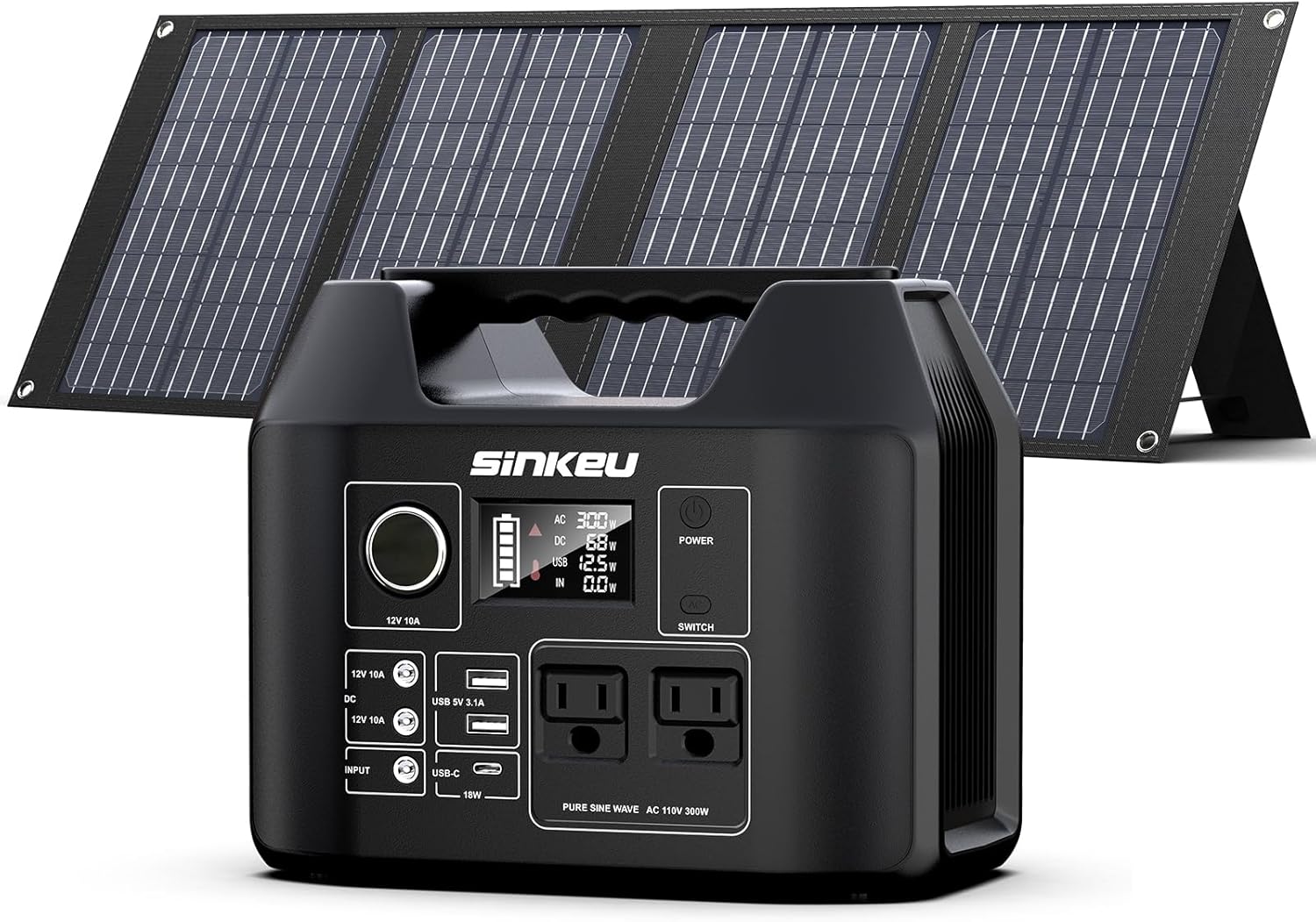

3. Setup
Initial Charging of the Power Station:
Before first use, fully charge the power station using the provided AC power adapter. Plug the AC adapter into the DC input port on the power station and connect it to a wall outlet. The display will indicate charging status.
Solar Panel Setup:
The 40W foldable solar panel is designed for convenient charging in outdoor environments. Unfold the solar panel and position it directly towards the sun for maximum efficiency. Connect the solar panel's DC output to the DC input port of the power station. The power station's display will show the incoming wattage.


4. Operating Instructions
Charging the Power Station:
- AC Wall Charger: Connect the provided AC adapter to the DC input port and a wall outlet.
- Car Charger: Use the provided car charging cable to connect the power station to your vehicle's 12V cigarette lighter port.
- Solar Panel: Connect the 40W solar panel to the DC input port. Ensure the panel is in direct sunlight.
Outputting Power to Devices:
The power station can charge multiple devices simultaneously, provided the total power draw does not exceed 300W.
- AC Devices: Press the AC ON/OFF button to activate the 110V AC outlets. Plug in your devices (e.g., laptops, mini-refrigerators, fans).
- USB Devices: Plug your USB-A or USB-C devices into the corresponding ports. These ports are always active when the power station is on.
- DC Devices: Plug your 12V DC devices into the DC 5521 output ports.


5. Maintenance
- Storage: Store the power station in a cool, dry place away from direct sunlight and extreme temperatures.
- Battery Care: For optimal battery life, fully charge the unit every 3-6 months, even if not in use. Avoid completely draining the battery for extended periods.
- Cleaning: Use a soft, dry cloth to clean the exterior of the power station. Do not use abrasive cleaners or immerse the unit in water.
- Safety: The integrated BMS monitors voltage, current, and temperature to ensure safe operation and extend battery lifespan.
6. Troubleshooting
If you encounter issues with your power station, please refer to the following common troubleshooting steps:
- Unit Not Turning On: Ensure the battery is charged. If the battery is depleted, connect it to a power source.
- No Output Power: Verify that the specific output (AC, DC, USB) is activated by pressing its respective ON/OFF button. Check if the device being charged is functioning correctly.
- Slow Charging: For solar charging, ensure the solar panel is in direct sunlight and free from obstructions. Adjust the panel's angle for maximum sun exposure.
- Overload Protection: If the power station shuts down unexpectedly, it may be due to an overload. Disconnect some devices and restart the unit.
For more detailed troubleshooting or persistent issues, please consult the comprehensive user manual included in your package.
7. Specifications
| Feature | Detail |
|---|---|
| Brand | SinKeu |
| Model | B0F2LYK2HV |
| Wattage (Output) | 300 Watts (Pure Sine Wave) |
| Starting Wattage | 819 Watts |
| Running Wattage | 300 Watts |
| Battery Capacity | 256Wh (80000mAh, 3.2V) LiFePO4 |
| Solar Panel Power | 40W (Foldable) |
| Total Power Outlets | 8 |
| Weight | 6.5 lbs |
8. Warranty and Support
For detailed warranty information, product registration, or technical support, please refer to the warranty card and contact information provided in the user manual included with your SinKeu Portable Power Station. You may also visit the official SinKeu website for further assistance.
