
Bose 884367-1500
Contents
Bose QuietComfort Headphones User Manual
Model: 884367-1500 (Petal Pink)
Brand: Bose

Image: Bose QuietComfort Headphones in Petal Pink, showcasing the elegant design.
Introduction
This manual provides instructions for setting up, operating, and maintaining your Bose QuietComfort Headphones. These wireless Bluetooth headphones feature advanced noise cancellation, high-fidelity audio, and comfortable over-ear design, offering an immersive listening experience.
What's in the Box
- Bose QuietComfort Headphones
- Protective Case
- Audio Cable
- USB-C® (A to C) Cable (12")
- Safety Sheet

Image: The Bose QuietComfort Headphones shown with their protective case and charging cable.
Setup
1. Charging the Headphones
Before first use, fully charge your headphones. Connect the smaller end of the USB-C cable to the USB-C port on the right earcup and the other end to a USB-A wall charger (not included) or a computer that is turned on.
- A full charge takes approximately 2.5 hours.
- A 15-minute charge provides up to 2.5 hours of playtime.
- The battery indicator light will show charging status.
2. Bluetooth Pairing
- Slide the Power/Bluetooth switch on the right earcup to the Bluetooth symbol and hold until you hear "Ready to connect" and the status light blinks blue.
- On your device, turn on Bluetooth and select "Bose QuietComfort Headphones" from the list of available devices.
- Once connected, you will hear "Connected to <device name>" and the status light will glow solid blue.
3. Bose Music App
Download the Bose Music app for additional features, customization, and software updates. The app guides you through setup and allows personalization of settings.
Operating Your Headphones
Power On/Off
Slide the Power/Bluetooth switch to the right to power on, and to the left to power off.
Noise Cancellation Modes
Your headphones feature two primary listening modes:
- Quiet Mode: Provides full noise cancellation, blocking out distractions.
- Aware Mode: Allows you to hear your surroundings while still enjoying your audio.
- Wind Block: Activate this feature via the Bose Music app to reduce wind noise in breezy environments.
Toggle between modes using the Mode button on the left earcup or through the Bose Music app.

Image: A detailed view of the left earcup, highlighting the control buttons for power, volume, and mode selection.
Audio Control
Use the buttons on the right earcup for audio playback control:
- Volume Up/Down: Press the '+' or '-' buttons.
- Play/Pause: Press the center button once.
- Skip Track: Press the center button twice for next track, three times for previous track.
- Answer/End Call: Press the center button once.
Adjustable EQ
Customize your audio experience by adjusting the bass, mid-range, and treble settings through the Bose Music app.
Multi-point Connection
The headphones can connect to multiple devices simultaneously. Use the multi-point toggle feature in the Bose Music app to switch between connected devices without needing to disconnect and reconnect.
Wired Headphones Option
Plug the included audio cable with an in-line microphone into the 3.5mm jack on the left earcup to use the headphones in wired mode. This allows use without a Bluetooth connection or when the battery is depleted.
Maintenance
Cleaning
- Wipe the headphones with a soft, dry cloth.
- Do not use liquid cleaners or solvents.
- Keep the charging port free of dust and debris.
Storage
When not in use, store the headphones in their protective case to prevent damage. The headphones are designed to fold for compact storage.

Image: Bose QuietComfort Headphones in a serene setting, emphasizing their portability and design.
Troubleshooting
If you encounter issues with your Bose QuietComfort Headphones, try the following steps:
- No Power: Ensure the headphones are charged. Connect them to a power source using the USB-C cable.
- No Audio: Check Bluetooth connection. Ensure volume is up on both headphones and connected device. Try restarting both devices.
- Poor Noise Cancellation: Ensure earcups are properly sealed around your ears. Adjust the noise cancellation mode.
- Connection Issues: Clear the Bluetooth device list on your headphones (refer to the Bose Music app or full PDF manual for specific steps) and re-pair. Ensure your device is within the 30-foot Bluetooth range.
- App Not Connecting: Ensure the Bose Music app is updated to the latest version. Restart the app and your headphones.
For more detailed troubleshooting, refer to the full User Manual PDF linked in the Warranty and Support section.
Specifications
| Feature | Detail |
|---|---|
| Brand | Bose |
| Model Number | 884367-1500 |
| Color | Petal Pink |
| Ear Placement | Over Ear |
| Noise Control | Active Noise Cancellation |
| Battery Life (Average) | Up to 24 hours |
| Battery Charge Time | 2.5 hours |
| Connectivity Technology | Wired, Wireless (Bluetooth 5.1) |
| Bluetooth Range | 30 feet |
| Headphone Jack | 3.5 mm Jack |
| Charging Port | USB-C |
| Item Weight | 0.24 kg |
| Control Type | App, Button |
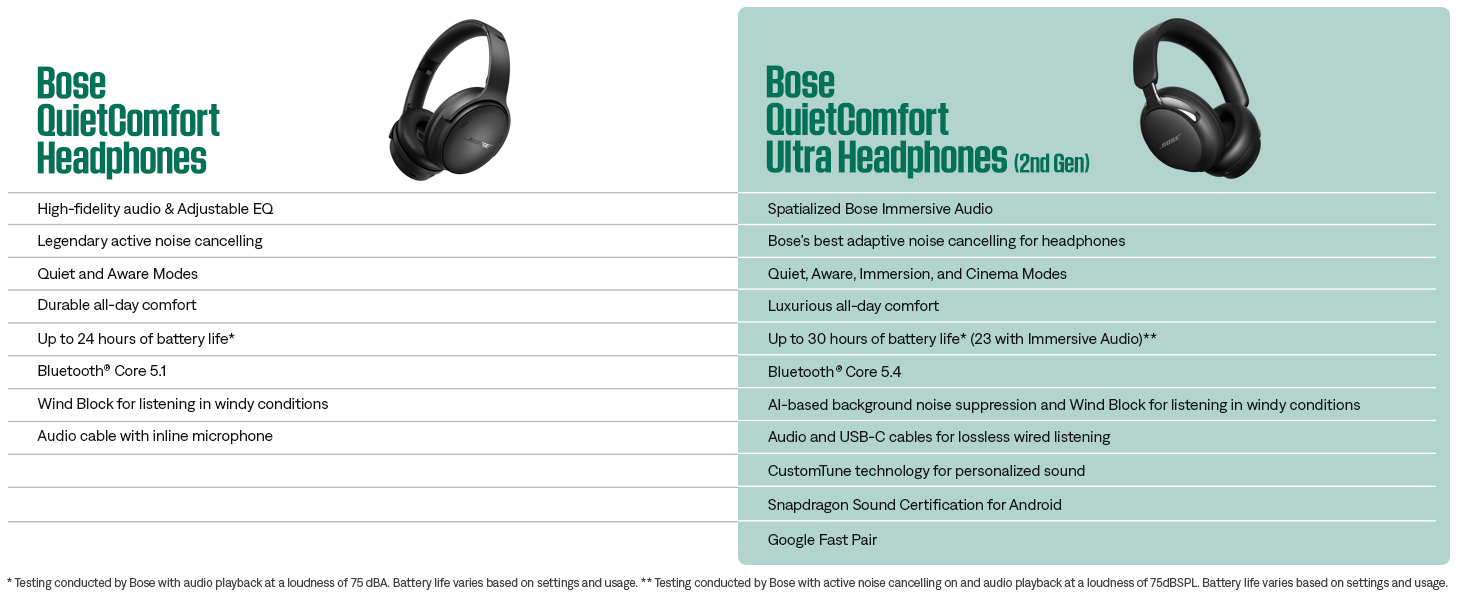
Image: A comparison chart highlighting key features of Bose QuietComfort Headphones.
Warranty and Support
Your Bose QuietComfort Headphones come with a 1 Year Manufacturer Warranty.
For comprehensive information, including detailed setup guides, advanced features, and troubleshooting, please refer to the official User Manual PDF:
Download Full User Manual (PDF)
For further assistance, visit the official Bose support website or contact customer service.
Ask a question about this manual
Ask about setup, troubleshooting, compatibility, parts, safety, or missing instructions. Manuals+ will review the question and use this page’s manual context to help answer it.