
1. Introduction and Safety Information
This manual provides essential instructions for the safe and efficient operation, maintenance, and troubleshooting of your Tornado Marathon SE900 Commercial Carpet Extractor Cleaner. Read all instructions thoroughly before operating the machine to ensure proper use and to prevent injury or damage.
1.1 General Safety Precautions
- Always disconnect the power cord from the electrical outlet before performing any maintenance, cleaning, or when the machine is not in use.
- Do not operate the machine with a damaged cord or plug. If the cord or plug is damaged, contact authorized service personnel.
- Keep hands, feet, and loose clothing away from moving parts, especially the brush.
- Use only cleaning solutions recommended for carpet extractors. Follow manufacturer's instructions for dilution and application.
- Do not use the machine to pick up flammable or combustible liquids, or in areas where such liquids or vapors may be present.
- Ensure proper ventilation when operating the machine in enclosed spaces.
- This machine is designed for commercial use. Operators should be trained in its proper use.
2. Product Overview
The Tornado Marathon SE900 is a 9-gallon commercial carpet extractor designed for effective deep cleaning of carpets. It features an 18-inch fixed vacuum shoe, a 1300 RPM chevron brush, and a 3-stage vacuum motor for powerful extraction and fast drying.

Figure 2.1: Front-side view of the Tornado Marathon SE900 Commercial Carpet Extractor. This image displays the overall design, including the handle, solution and recovery tanks, and the cleaning head with the vacuum shoe.
2.1 Key Components
- Solution Tank: Holds clean water and cleaning solution. Capacity: 9 gallons.
- Recovery Tank: Collects dirty water extracted from the carpet.
- Control Panel: Contains switches for vacuum, pump, and brush operation.
- Handle: Ergonomic handle for maneuvering the machine.
- Vacuum Shoe: 18-inch fixed shoe for water extraction.
- Chevron Brush: 1300 RPM rotating brush for agitating carpet fibers and loosening dirt.
- Wheels: For easy transport and maneuverability.
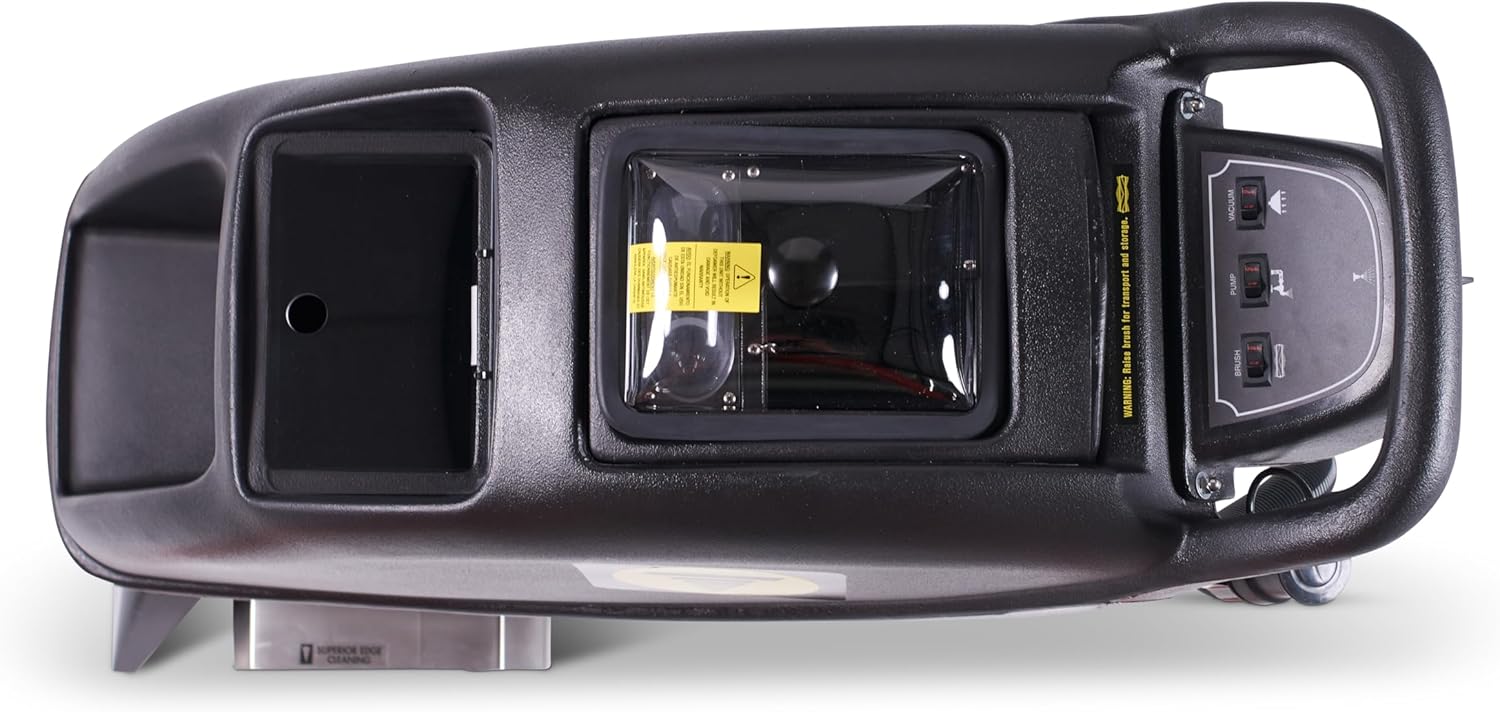
Figure 2.2: Top view of the Tornado Marathon SE900, showing the control panel with switches for vacuum, pump, and brush, as well as the access points for the solution and recovery tanks.

Figure 2.3: Close-up view of the 18-inch fixed vacuum shoe and the chevron brush assembly, which are critical for effective carpet cleaning and water extraction.
3. Setup
3.1 Unpacking and Inspection
- Carefully remove the extractor from its packaging.
- Inspect the machine for any signs of shipping damage. Report any damage to your supplier immediately.
- Ensure all components listed in the packing list are present.
3.2 Filling the Solution Tank
- Ensure the machine is unplugged.
- Locate the solution tank fill port (refer to Figure 2.2).
- Prepare your cleaning solution according to the chemical manufacturer's instructions. Use only low-foaming, non-corrosive carpet cleaning solutions.
- Pour the prepared solution into the solution tank, being careful not to overfill.
- Securely close the fill port cap.
4. Operating Instructions
4.1 Pre-Operation Checks
- Verify the solution tank is filled with the appropriate cleaning solution.
- Ensure the recovery tank is empty and clean.
- Check that the vacuum shoe and brush are free of debris.
- Inspect the power cord for any damage.
4.2 Cleaning Procedure
- Plug the machine into a grounded electrical outlet.
- Turn on the PUMP switch on the control panel (Figure 2.2) to prime the pump and begin spraying solution.
- Turn on the BRUSH switch to engage the chevron brush.
- Turn on the VACUUM switch to activate the vacuum motor.
- Begin cleaning by slowly pushing the machine forward over the carpet area. Overlap each pass slightly to ensure thorough cleaning.
- For heavily soiled areas, make multiple passes or allow the solution to dwell for a short period before extracting.
- Monitor the recovery tank. When it is full, the vacuum motor sound will change, and suction will decrease.
4.3 Emptying the Recovery Tank
- Turn off all switches (PUMP, BRUSH, VACUUM) and unplug the machine.
- Locate the recovery tank drain hose or access point.
- Drain the dirty water into an appropriate disposal area.
- Rinse the recovery tank with clean water to remove any residue.
- Securely close the drain and replace any covers.
4.4 Shutting Down
- Turn off all switches (PUMP, BRUSH, VACUUM).
- Unplug the power cord from the outlet.
- Empty and rinse both the solution and recovery tanks.
- Perform post-operation cleaning as described in the Maintenance section.
5. Maintenance
Regular maintenance ensures optimal performance and extends the life of your carpet extractor.
5.1 After Each Use
- Empty and rinse both the solution and recovery tanks thoroughly with clean water.
- Wipe down the exterior of the machine with a damp cloth.
- Check the vacuum shoe for any debris or blockages and clean as necessary.
- Inspect the brush for tangled fibers or wear. Remove any debris.
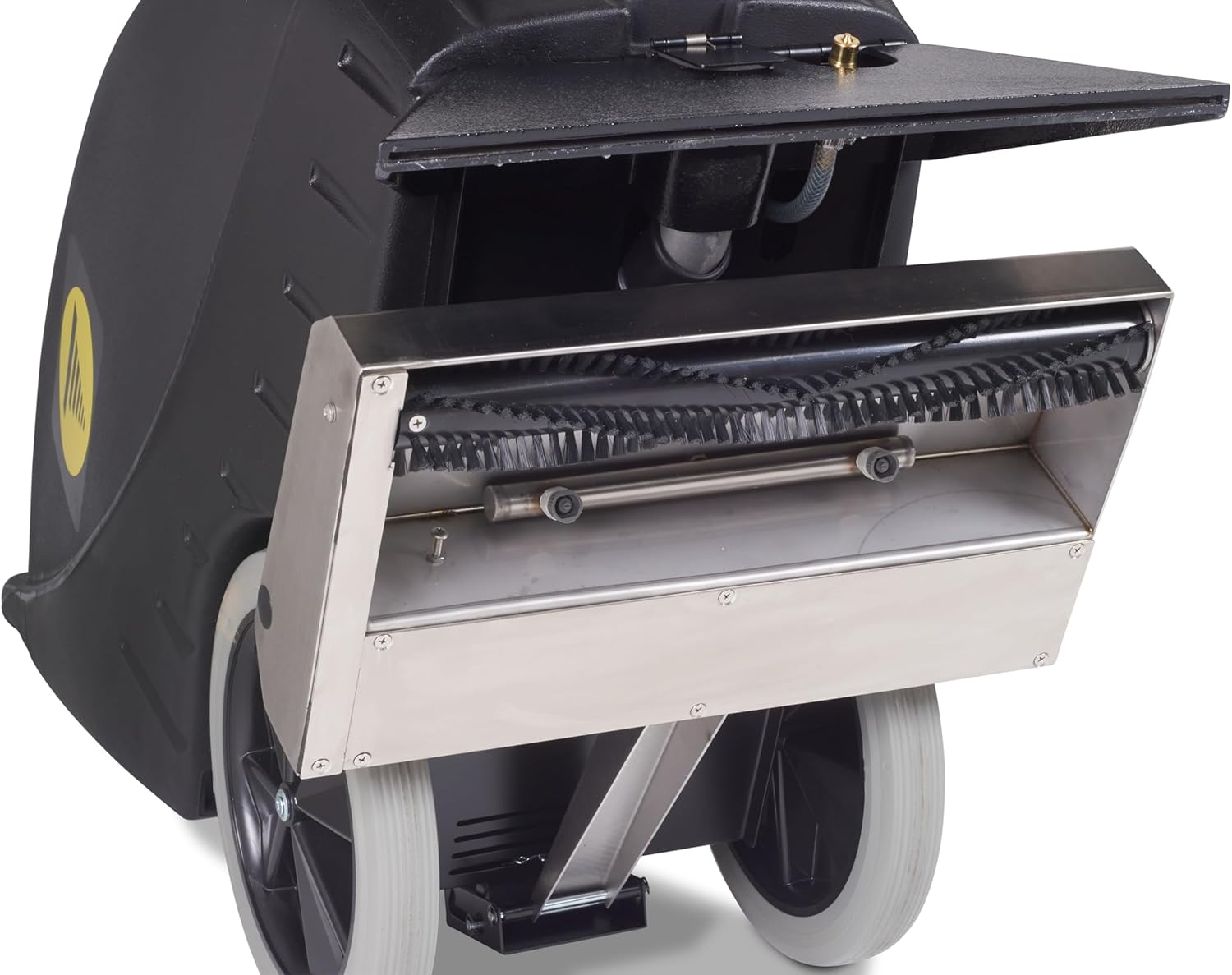
Figure 5.1: View of the brush and vacuum shoe assembly with the access panel open, illustrating how to inspect and clean these components.
5.2 Weekly / As Needed
- Brush Inspection: Check the chevron brush for excessive wear. If bristles are significantly worn or damaged, replace the brush. Refer to the service manual for brush replacement procedures.
- Vacuum Hose/Filter: Inspect the vacuum hose for cracks or blockages. Clean or replace any filters associated with the vacuum system.
- Spray Nozzles: Check spray nozzles for blockages. If clogged, carefully clean them with a small brush or pin.
- Power Cord: Inspect the power cord and plug for any cuts, fraying, or damage. Replace if necessary.
5.3 Storage
Store the machine in a clean, dry area, protected from freezing temperatures. Ensure all tanks are empty and clean before storage.
6. Troubleshooting
This section provides solutions to common operational issues. For problems not listed here, contact authorized service personnel.
| Problem | Possible Cause | Solution |
|---|---|---|
| Machine does not start | No power; faulty switch; tripped circuit breaker | Check power cord connection; check outlet; reset circuit breaker; contact service if switch is faulty. |
| No spray from nozzles | Solution tank empty; clogged nozzles; pump not operating | Fill solution tank; clean nozzles; check pump switch and motor. |
| Poor vacuum suction | Recovery tank full; vacuum hose clogged; vacuum shoe blocked; recovery tank lid not sealed | Empty recovery tank; clear hose blockage; clean vacuum shoe; ensure recovery tank lid is properly sealed. |
| Brush not rotating | Brush switch off; motor issue; brush jammed with debris | Turn on brush switch; remove debris from brush; contact service for motor issues. |
7. Specifications
The following are the technical specifications for the Tornado Marathon SE900 Commercial Carpet Extractor Cleaner:
- Model: SE900
- Brand: Tornado
- Solution Tank Capacity: 9 Gallons
- Vacuum Shoe Width: 18 inches (Fixed)
- Brush Speed: 1300 RPM (Chevron Brush)
- Vacuum Motor: 3-Stage
- Body Material: Polyethylene
- UPC: 098612023692
- Style: Modern
- ASIN: B0F2JPQZ3L
8. Warranty and Support
For warranty information, service, or technical support, please refer to the warranty card included with your product or contact Tornado customer service directly. Keep your purchase receipt as proof of purchase for warranty claims.
For further assistance, please visit the official Tornado website or contact their authorized service centers.