
Introduction
Thank you for purchasing the QFX PBX-1260 Dual 12" Party Speaker. This versatile PA speaker is designed to provide powerful audio and vibrant LED lighting for various events. It features multiple connectivity options including Bluetooth, USB, TF card, and AUX-in, along with FM radio and microphone input. This manual provides essential information for safe operation, setup, and maintenance of your speaker.
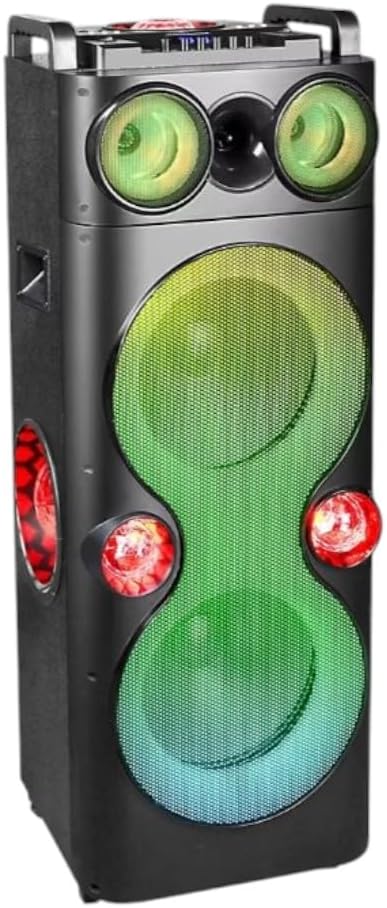
Figure 1: QFX PBX-1260 Dual 12" Party Speaker
The QFX PBX-1260 is equipped with dual 12-inch woofers and a rechargeable battery, offering 6-8 hours of playback. It also supports True Wireless Stereo (TWS) for pairing two PBX-1260 units for an enhanced stereo experience.
Safety Information
- Read all instructions before operating the speaker.
- Keep the speaker away from water, moisture, and extreme temperatures.
- Do not block ventilation openings. Ensure adequate space around the speaker for proper airflow.
- Use only the power cord supplied with the speaker.
- Do not attempt to repair or modify the speaker yourself. Refer all servicing to qualified personnel.
- Avoid prolonged exposure to high volume levels, which may cause hearing damage.
- When moving the speaker, use caution due to its weight and dimensions.
What's in the Box
Carefully unpack your QFX PBX-1260 speaker and ensure all items are present:
- 1 x QFX PBX-1260 Dual 12" Party Speaker
- 1 x AC Power Cord
- 1 x Remote Control
- 1 x User Guide (this manual)
Note: The product description mentions "2x 12" Bluetooth Speakers" and "2x AC Power Cords" in the 'Included Components' and 'whats_in_the_box' sections. However, the main product title and description refer to a single "DUAL 12" PARTY Speaker". This manual assumes a single unit is included as per the primary product description.
Product Overview
Speaker Components

Figure 2: Speaker Driver Configuration
- Tweeters: Two 1-inch tweeters for clear high-frequency sound.
- Woofers: Two 12-inch woofers for powerful bass and mid-range audio.
- LED Lights: Multi-color LED lights integrated into the speaker grilles and side panels for visual effects.
Control Panel
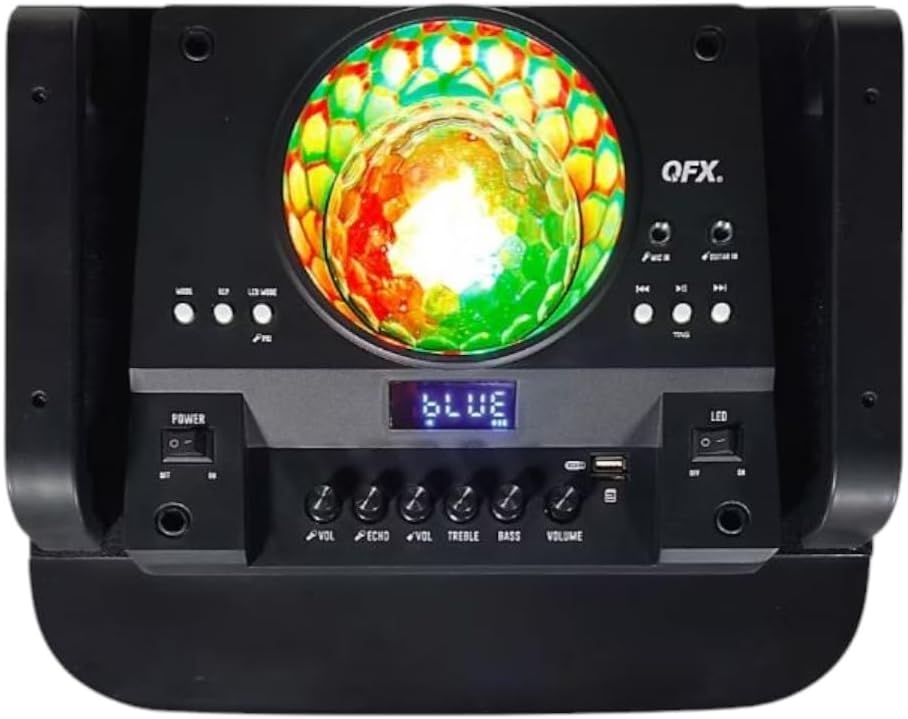
Figure 3: Top Control Panel
The main control panel is located on the top of the speaker. It includes:
- Power Switch: Turns the speaker on/off.
- Mode Button: Switches between Bluetooth, FM, AUX, USB, and TF card modes.
- Play/Pause Button: Controls playback in media modes.
- Previous/Next Track Buttons: Navigates through tracks or FM stations.
- Volume Knob: Adjusts the master volume.
- Treble Knob: Adjusts high-frequency sound.
- Bass Knob: Adjusts low-frequency sound.
- Echo Knob: Adjusts the echo effect for the microphone.
- Mic Volume Knob: Adjusts the microphone volume.
- USB Port: For USB flash drives.
- TF Card Slot: For TF (microSD) cards.
- AUX-in Port: For connecting external audio devices via a 3.5mm cable.
- Microphone Input: For connecting a wired microphone.
- LED Switch: Turns the LED lights on/off.
- Display Screen: Shows current mode, track information, or FM frequency.
Setup
Charging the Battery
Before first use, fully charge the speaker's internal rechargeable battery. Connect the supplied AC power cord to the speaker's power input and then to a standard 120V AC outlet. The charging indicator (if present) will illuminate. Charging typically takes several hours. A full charge provides approximately 6-8 hours of playback, depending on volume and LED usage.
Powering On/Off
Locate the Power Switch on the control panel. Flip the switch to the 'ON' position to power on the speaker. The display screen will light up. To power off, flip the switch to the 'OFF' position.
Operating Instructions
Bluetooth Pairing
- Power on the speaker. It will automatically enter Bluetooth mode, indicated by 'BLUE' on the display and a pairing tone.
- Enable Bluetooth on your smart device (smartphone, tablet, etc.).
- Search for 'QFX PBX-1260' in your device's Bluetooth list.
- Select 'QFX PBX-1260' to connect. Once paired, the speaker will emit a confirmation tone.
- You can now play audio from your device through the speaker.
True Wireless Stereo (TWS) Pairing

Figure 4: TWS Pairing Capability
TWS allows you to pair two PBX-1260 speakers wirelessly for a true stereo sound experience.
- Ensure both PBX-1260 speakers are powered on and in Bluetooth mode.
- On one of the speakers (this will be the primary speaker), press and hold the 'TWS' button (if available, or a designated pairing button) until you hear a pairing tone.
- The two speakers will attempt to connect to each other. Once connected, you will hear a confirmation tone.
- Now, connect your smart device to the primary speaker via Bluetooth as described above. Audio will play through both speakers in stereo.
USB/TF Card Playback
Insert a USB flash drive or TF (microSD) card into the respective port on the control panel. The speaker will automatically switch to USB/TF mode and begin playing audio files (MP3, WAV, etc.) from the storage device. Use the Play/Pause and Previous/Next Track buttons to control playback.
AUX-in Connection
Connect an external audio device (e.g., MP3 player, laptop) to the AUX-in port using a 3.5mm audio cable. Press the 'Mode' button until 'AUX' is displayed. Audio from your connected device will now play through the speaker.
FM Radio Operation
Press the 'Mode' button until 'FM' is displayed. The speaker will enter FM radio mode. Press the Play/Pause button to auto-scan and save available FM stations. Use the Previous/Next Track buttons to navigate between saved stations.
Microphone Usage
Connect a wired microphone to the Microphone Input port. Adjust the 'Mic Volume' knob to control the microphone's loudness. Use the 'Echo' knob to add an echo effect to your voice.
Adjusting Audio Controls
Use the 'Volume' knob for overall sound level. The 'Treble' and 'Bass' knobs allow you to fine-tune the high and low frequencies of the audio output. The speaker also features 5 Equalizer Modes, which can be cycled through using a dedicated EQ button (refer to the control panel diagram for location).
LED Light Modes

Figure 5: Multi-Color LED Lights
The speaker features multi-color LED lights that illuminate the woofers and side panels. Use the 'LED' switch on the control panel to turn the lights on or off. Some models may have additional buttons to cycle through different light patterns or modes.
Maintenance
- Cleaning: Use a soft, dry cloth to clean the exterior of the speaker. Do not use abrasive cleaners or solvents.
- Battery Care: To prolong battery life, avoid fully discharging the battery frequently. Recharge the speaker regularly, even if not in use, to maintain battery health. If storing for a long period, charge the battery to about 50% every few months.
- Storage: Store the speaker in a cool, dry place away from direct sunlight and extreme temperatures.
Troubleshooting
| Problem | Possible Cause | Solution |
|---|---|---|
| Speaker does not power on. | Battery is depleted. Power cord not connected. | Connect the AC power cord and charge the battery. Ensure the power switch is in the 'ON' position. |
| No sound from speaker. | Volume too low. Incorrect mode selected. Device not connected properly. | Increase the master volume. Press the 'Mode' button to select the correct input. Ensure Bluetooth is paired or AUX/USB/TF is connected securely. |
| Bluetooth not connecting. | Speaker not in pairing mode. Device Bluetooth off. Interference. | Ensure speaker is in Bluetooth mode. Turn Bluetooth on your device. Move speaker closer to device. Forget device on your phone and re-pair. |
| TWS pairing fails. | Speakers too far apart. One speaker not in TWS pairing mode. | Ensure both speakers are in Bluetooth mode and close to each other. Re-initiate TWS pairing on the primary speaker. |
| Bluetooth connection stops playing intermittently. | Weak Bluetooth signal. Interference. Low battery. | Move the connected device closer to the speaker. Ensure no obstacles are between the device and speaker. Charge the speaker's battery. |
Specifications

Figure 6: Speaker Dimensions and Weight
| Feature | Detail |
|---|---|
| Model Name | PBX-1260 |
| Speaker Type | Dual 12" Two-Way Party Speaker |
| Connectivity Technology | Bluetooth, USB, TF Card, AUX-in |
| Audio Output Mode | Stereo |
| Speaker Maximum Output Power | 500 Watts |
| Battery Life | 6-8 Hours (average charge) |
| Input Voltage | 120 Volts |
| Control Method | Manual controls, Remote Control |
| Product Dimensions (D x W x H) | 15"D x 17.1"W x 42.8"H |
| Item Weight | 12 Pounds |
| Color | Black |
| UPC | 606540007563 |
| Manufacturer | QFX |
Warranty Information
The QFX PBX-1260 Party Speaker comes with a limited warranty. Please refer to the warranty card included in your product packaging for specific terms, conditions, and duration of the warranty. Keep your purchase receipt as proof of purchase for any warranty claims.
Customer Support
For technical assistance, troubleshooting beyond this manual, or warranty inquiries, please contact QFX customer support. You can typically find contact information on the manufacturer's official website or on the product packaging. Please have your model number (PBX-1260) and proof of purchase ready when contacting support.