
1. Product Overview
The Turtlebox Grande is a rugged, waterproof, and ultra-portable Bluetooth speaker designed for outdoor environments. It delivers powerful, distortion-free audio with deep bass and offers extended battery life, along with multi-speaker pairing capabilities.
Key Features
- High Output Audio: Delivers up to 125dB of clear, bass-heavy sound, engineered to perform in outdoor settings.
- IP67 Rated Durability: Fully waterproof, dustproof, and shockproof construction for extreme outdoor use.
- Extended Battery Life: Provides up to 25 hours of continuous playback on a single charge.
- Unlimited Pairing (Party Mode): Connect multiple Grande speakers wirelessly for an expansive surround sound experience.
- Robust Design: Features reinforced corner bumpers, a durable handle, and tie-down anchors for secure transport and placement.
What's in the Box
- Turtlebox Grande Speaker
- Power Cable
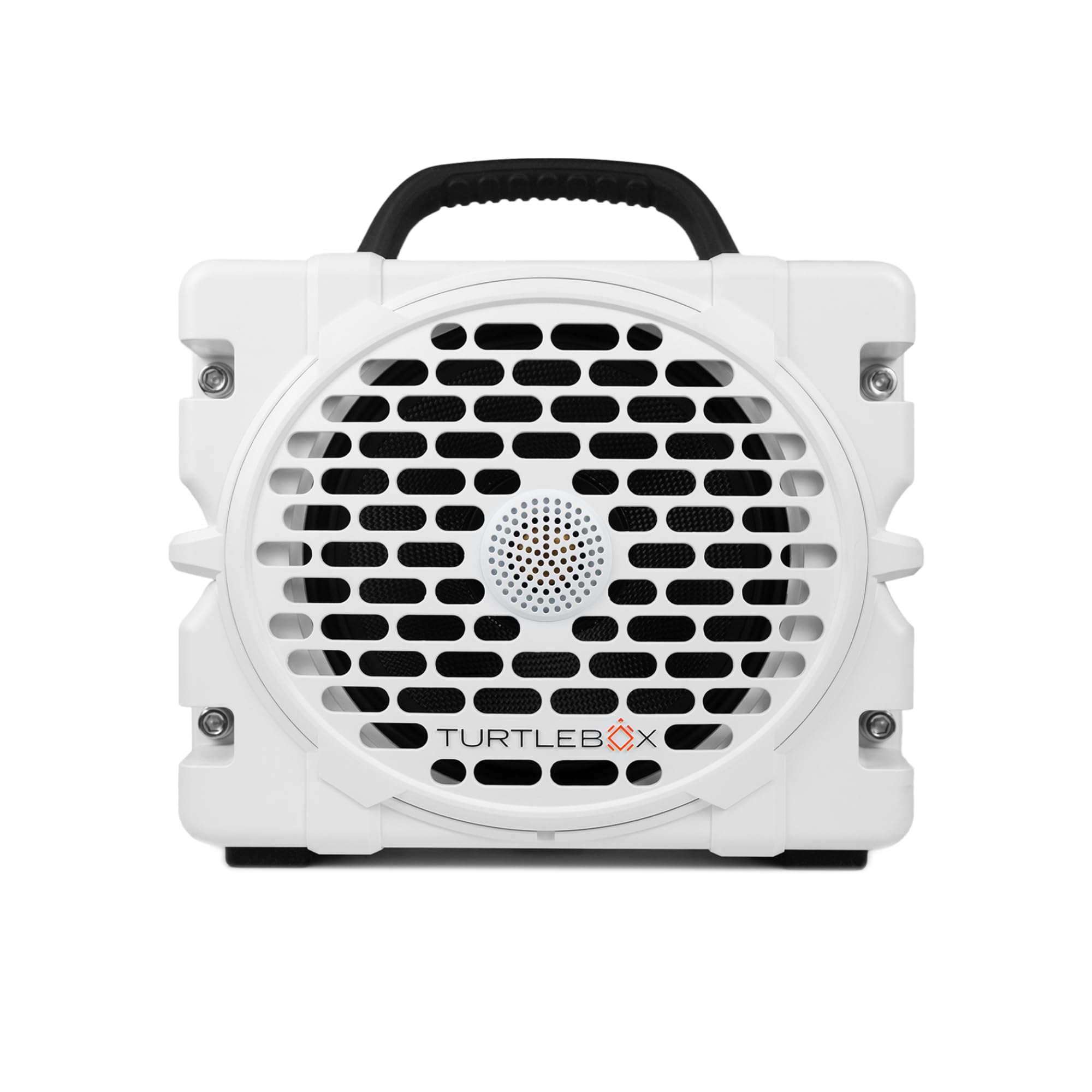
Figure 1: Turtlebox Grande Speaker. This image shows the front of the white Turtlebox Grande speaker with its protective grille and black carrying handle.
2. Setup Instructions
2.1. Charging the Speaker
Before initial use, fully charge your Turtlebox Grande. Connect the provided power cable to the charging port on the speaker and plug it into a standard electrical outlet. The battery indicator lights on the control panel will illuminate to show charging progress. A full charge can take several hours.
- The battery indicator lights will show the current charge level.
- When fully charged, all indicator lights will be solid.
- The speaker can also charge external devices via its USB-C output port.
2.2. Powering On/Off
To power on the speaker, press and hold the power button located on the control panel until the indicator light illuminates. To power off, press and hold the power button again until the light turns off.
2.3. Bluetooth Pairing
- Ensure the Turtlebox Grande is powered on.
- Press the Bluetooth button on the control panel. The Bluetooth indicator light will flash, indicating it is in pairing mode.
- On your mobile device (smartphone, tablet, etc.), go to the Bluetooth settings.
- Select "Turtlebox Grande" from the list of available devices.
- Once connected, the Bluetooth indicator light on the speaker will become solid.

Figure 2: Control Panel. This image highlights the power, volume, track control, and Bluetooth pairing buttons on the top of the speaker.
3. Operating the Speaker
3.1. Volume Control and Playback
- Volume Up: Press the + button.
- Volume Down: Press the - button.
- Play/Pause: Press the Play/Pause button (often integrated with the Bluetooth button or a separate button).
- Next Track: Press the >| button.
- Previous Track: Press the |< button.
3.2. Party Mode (Multiple Speaker Pairing)
The Turtlebox Grande supports Party Mode, allowing you to wirelessly connect multiple Grande speakers for a synchronized audio experience. This creates a wider soundstage and increased volume for larger outdoor gatherings.
- Ensure all Turtlebox Grande speakers are powered on and not currently paired to any device.
- On the first speaker (which will be the primary), press and hold the Party Mode button (often indicated by a chain link or multiple speaker icon) until its indicator light flashes.
- On subsequent speakers, press the Party Mode button briefly. They will automatically search for and connect to the primary speaker.
- Once all speakers are connected, the indicator lights will become solid. You can then pair your mobile device to the primary speaker via Bluetooth as described in Section 2.3.

Figure 3: Party Mode Controls. This image shows the control panel with specific labels for Bluetooth, 2-box stereo pairing, and Party Mode functions.
4. Maintenance and Care
4.1. Waterproofing and Cleaning
The Turtlebox Grande is IP67 rated, meaning it is fully waterproof and dustproof. It can withstand submersion in up to 1 meter of water for 30 minutes. To clean the speaker, simply rinse it with fresh water and wipe it dry with a soft cloth. Do not use harsh chemicals or abrasive cleaners.
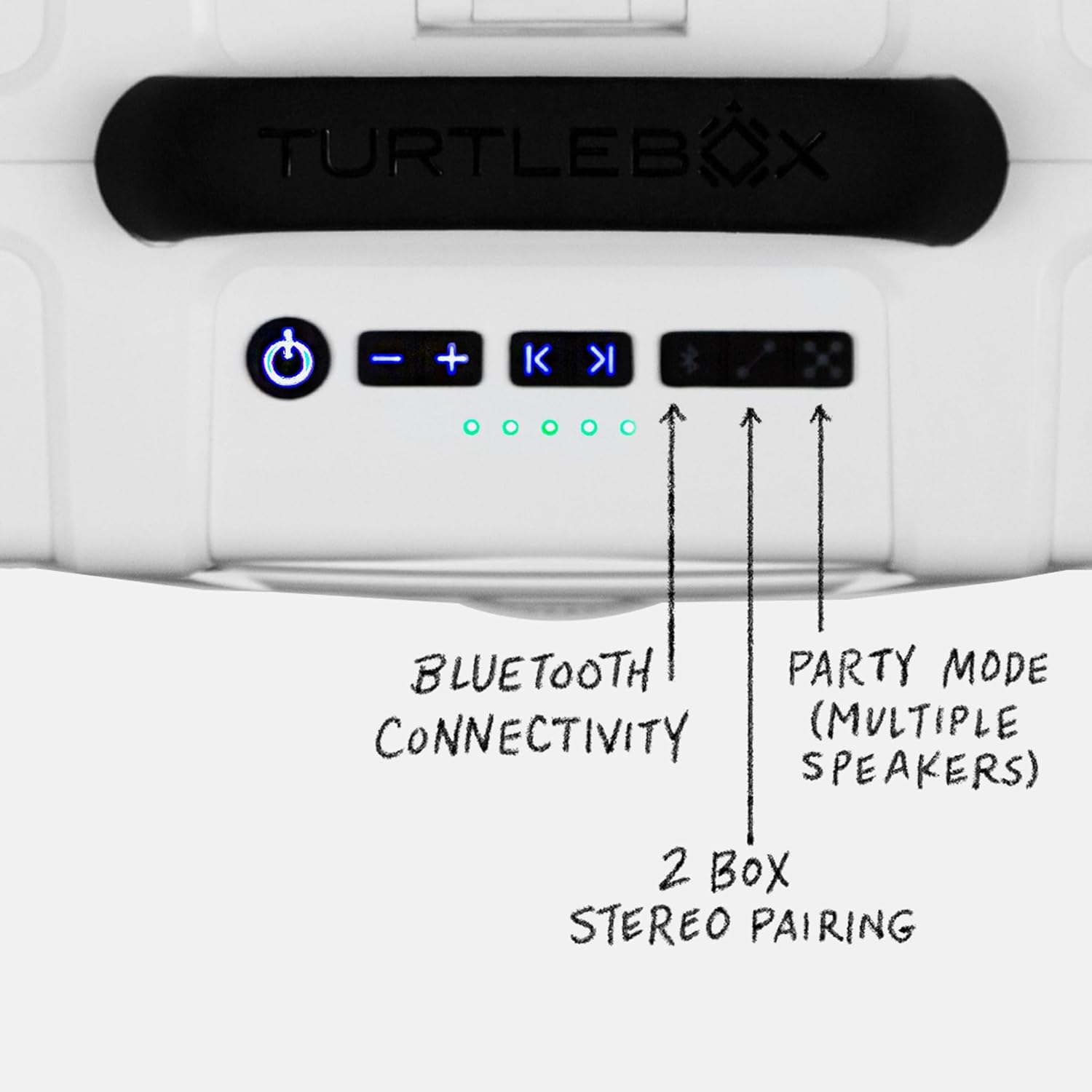
Figure 4: Waterproof Design. The speaker is shown in water, highlighting its IP67 waterproof rating.
4.2. Battery Care
To prolong battery life, avoid fully discharging the speaker frequently. Store the speaker in a cool, dry place when not in use. If storing for an extended period, charge the battery to approximately 50% every few months.
5. Troubleshooting Guide
| Problem | Possible Cause | Solution |
|---|---|---|
| No power | Battery is discharged. | Charge the speaker using the provided power cable. |
| Cannot pair via Bluetooth | Speaker is not in pairing mode or already connected to another device. | Ensure the Bluetooth indicator is flashing. Disconnect from other devices. Move speaker closer to your device. |
| No sound | Volume is too low or muted. Device is not connected. | Increase volume on both speaker and connected device. Verify Bluetooth connection. |
| Party Mode not connecting | Speakers are already paired to a device or not in correct pairing sequence. | Ensure all speakers are unpaired from devices. Follow Party Mode pairing steps carefully (Section 3.2). |
6. Technical Specifications
| Feature | Detail |
|---|---|
| Brand | Turtlebox |
| Model Name | Turtlebox Grande |
| Speaker Maximum Output Power | 100 Watts |
| Connectivity Technology | Bluetooth |
| Audio Output Mode | Stereo, Surround |
| Mounting Type | Tabletop Mount |
| Enclosure Material | Metal, Plastic |
| Speaker Type | Outdoor |
| Additional Features | 1.25” Titanium tweeter, 10” woofer, 126 decibels of sound, 158Wh Lithium-ion battery, 2 powerful, Class D digital amplifiers with enhanced DSP tuning for optimal audio performance |
| Antenna Location | Indoor/Outdoor |
| Color | White |
| Battery Average Life | 25 Hours |
| Is Waterproof | True (IP67 rated) |
| Control Method | Touch |
| Speaker Size | 10 Inches (woofer) |
| Water Resistance Level | Waterproof |
| Specific Uses For Product | Outdoor, Travel |
| Number of Audio Channels | 2.0 |
| Wireless Technology | Bluetooth |
| Connectivity Protocol | Bluetooth |
| Battery Capacity | 158000 Milliamp Hours (158Wh) |
| Item Dimensions (D x W x H) | 8.4"D x 14"W x 11.5"H |
| Compatible Devices | Smartphone, Tablet |
| Power Source | Battery Powered |
| Audio Driver Type | Dynamic Driver |
| UPC | 850024307414 |

Figure 5: Speaker Dimensions. This image provides a visual representation of the speaker's physical dimensions and weight.
7. Warranty Information
The Turtlebox Grande comes with a Limited 1 Year Warranty from the date of purchase. This warranty covers manufacturing defects and workmanship under normal use. Please retain your proof of purchase for warranty claims. For full details and terms, refer to the official Turtlebox website or contact customer support.
8. Customer Support
If you encounter any issues not covered in this manual or require further assistance, please contact Turtlebox customer support. For the most up-to-date contact information and additional resources, visit the official Turtlebox website.
When contacting support, please have your product model name (Turtlebox Grande) and purchase details readily available.
