1. Introduction
This manual provides essential information for the proper installation, operation, and maintenance of your Drhomeam CS532AF, CS532AE, or CS532AX WiFi module. This module is designed to integrate with compatible air conditioning systems, enabling smart control functionalities. Please read this manual thoroughly before installation and keep it for future reference.
2. Safety Information
WARNING: To reduce the risk of electric shock, fire, or injury, always follow basic safety precautions when installing or servicing electrical equipment.
- Ensure the air conditioning unit is completely powered off and disconnected from the main power supply before attempting any installation or maintenance.
- Installation should only be performed by qualified personnel or under the supervision of a professional.
- Do not expose the module to water or excessive moisture.
- Do not attempt to modify or repair the module yourself. Contact qualified service personnel.
- Keep packaging materials away from children.
3. Package Contents
Verify that all items are present in the package:
- 1 x Drhomeam CS532AF/AE/AX WiFi Module (with selected line length)
- 1 x Instruction Manual (this document)
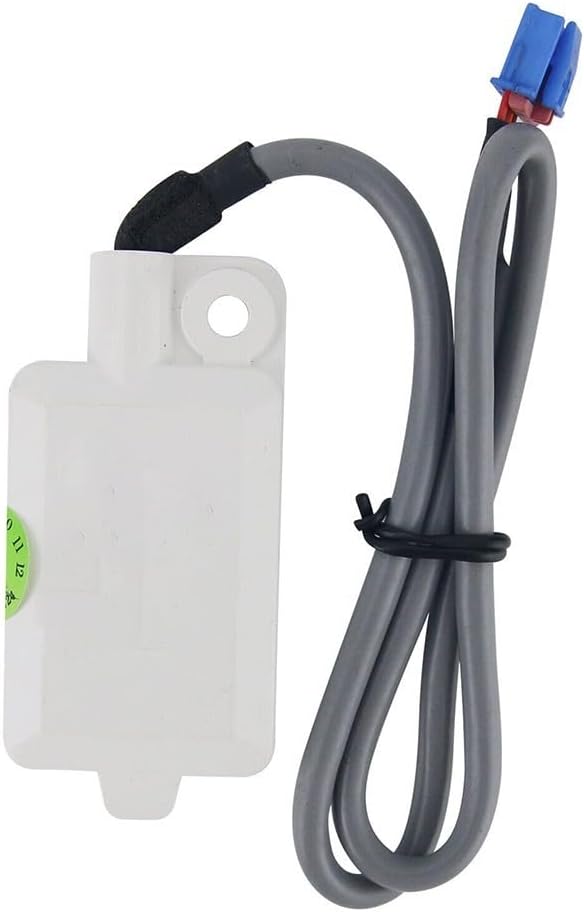
Image: Drhomeam CS532AF/AE/AX WiFi Module with 60cm line length. This image shows the white module unit connected to a grey cable, terminating in blue and red connectors. The cable is secured with a black tie.
4. Product Overview
The Drhomeam WiFi module (models CS532AF, CS532AE, CS532AX) is an accessory designed to enable wireless connectivity for compatible air conditioning units. It allows for remote control and monitoring of your air conditioner through a smart device application (application details typically provided by the air conditioner manufacturer). The module is available in various cable lengths to suit different installation requirements.

Image: Angled view of the Drhomeam CS532AF/AE/AX WiFi Module. This perspective highlights the compact white module casing and the grey connecting cable with its blue and red terminals.
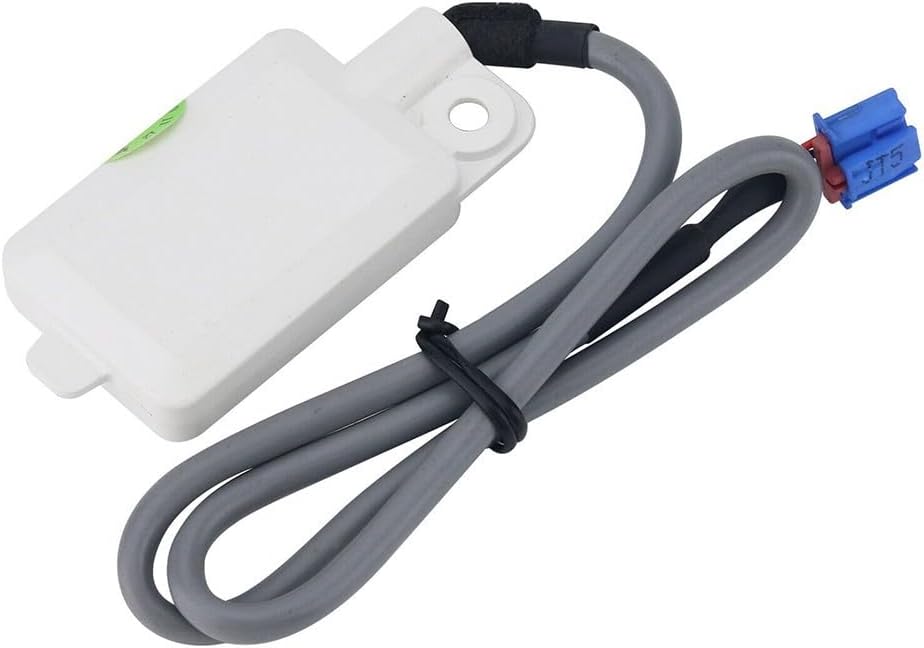
Image: Top view of the Drhomeam CS532AF/AE/AX WiFi Module. This shows the flat top surface of the white module and the cable extending from one end.

Image: Drhomeam CS532AF/AE/AX WiFi Module showing the blue and red connectors. This image focuses on the end of the cable with the distinct blue and red electrical connectors.
5. Setup and Installation
This module is designed for specific air conditioner models (CS532AF, CS532AE, CS532AX). Refer to your air conditioner's manual for the exact location of the WiFi module port. The installation process typically involves connecting the module to a dedicated port within the air conditioning unit.
- Power Off: Ensure the air conditioner is completely powered off and unplugged from the electrical outlet. This is a critical safety step.
- Locate Port: Open the air conditioner's front panel or access cover as instructed in your air conditioner's user manual. Locate the designated port for the WiFi module. This port is usually a multi-pin connector.
- Connect Module: Carefully align the connectors of the Drhomeam WiFi module with the port on the air conditioner. Gently push until it clicks into place, ensuring a secure connection. Do not force the connection.
- Route Cable: Route the module's cable neatly within the air conditioner's casing, avoiding any moving parts or heat sources. Use the appropriate line length (20cm, 40cm, or 60cm) for a clean installation.
- Secure Module: If applicable, use the mounting hole on the module to secure it within the air conditioner's casing using a screw (not included) or adhesive, ensuring it does not interfere with other components.
- Close Panel: Close the air conditioner's front panel or access cover securely.
- Power On: Plug the air conditioner back into the electrical outlet and power it on.
Note: The specific location of the WiFi module port and the method of securing the module may vary depending on your air conditioner model. Always consult your air conditioner's instruction manual for detailed installation steps.
6. Operating Instructions
Once the WiFi module is installed, your air conditioner should be ready for smart control. The exact operating procedure depends on the specific smart application provided by your air conditioner manufacturer.
- Download App: Download the official smart control application for your air conditioner model from your device's app store (e.g., Google Play Store, Apple App Store). Refer to your air conditioner's manual for the correct app name.
- Register/Login: Open the app and follow the on-screen instructions to register a new account or log in if you already have one.
- Add Device: Within the app, select the option to "Add Device" or "Pair Device." Follow the app's instructions to connect your air conditioner to your home WiFi network. This typically involves putting the air conditioner into a pairing mode (often indicated by a specific light pattern on the unit or remote control).
- Control: Once successfully paired, you can use the app to control your air conditioner's functions, such as turning it on/off, adjusting temperature, changing modes, setting timers, and more, from your smartphone or tablet.
Note: Ensure your home WiFi network is stable and within range of the air conditioner for optimal performance.
7. Maintenance
The Drhomeam WiFi module requires minimal maintenance. Follow these guidelines to ensure its longevity:
- Cleaning: If necessary, gently wipe the exterior of the module with a dry, soft cloth. Do not use liquid cleaners or solvents.
- Environment: Ensure the module is not exposed to extreme temperatures, direct sunlight, or high humidity, as these can affect its performance and lifespan.
- Connections: Periodically check that the module's connection to the air conditioner is secure.
8. Troubleshooting
If you encounter issues with your Drhomeam WiFi module, refer to the following troubleshooting steps:
| Problem | Possible Cause | Solution |
|---|---|---|
| Module not recognized by AC. | Incorrect installation; module not fully seated; incompatible AC model. |
|
| Cannot connect to WiFi network. | Incorrect WiFi password; AC not in pairing mode; weak WiFi signal; router issues. |
|
| App cannot control AC. | Module not paired with app; app issues; internet connectivity problems. |
|
If the problem persists after trying these solutions, contact your air conditioner manufacturer's support or a qualified technician.
9. Specifications
| Feature | Detail |
|---|---|
| Part Name | Air conditioner module |
| Model Compatibility | CS532AF, CS532AE, CS532AX (for air conditioners) |
| Material | ABS |
| Available Line Lengths | 20cm, 40cm, 60cm |
| Color | White (module), Grey (cable) |
| Product Dimensions (approx.) | 4.72 x 1.97 x 1.18 inches (module only) |
| Item Weight (approx.) | 1.76 ounces |
| Manufacturer | Drhomeam |
10. Warranty and Support
For warranty information and technical support regarding your Drhomeam WiFi module, please refer to the documentation provided with your air conditioner or contact the air conditioner manufacturer directly. This module is an accessory designed for specific air conditioner models, and support is typically handled by the primary appliance manufacturer.
For general inquiries about the Drhomeam brand, you may visit the Drhomeam Store on Amazon.


