
1. Introduction
This manual provides essential instructions for the safe and efficient operation of your Rastar R/C Car Oracle Red Bull Racing RB18. Please read this manual thoroughly before using the product to ensure proper function and to prevent damage.
The Rastar R/C Car Oracle Red Bull Racing RB18 is a 1:12 scale remote-controlled replica of the iconic Formula 1 car, designed for enthusiasts aged 6 years and up. It features USB charging for the car battery and requires AA batteries for the remote controller.
2. Safety Information
While this product does not carry specific safety warnings beyond general toy safety, please observe the following precautions:
- Not suitable for children under 3 years due to small parts.
- Adult supervision is recommended during operation, especially for younger users.
- Do not operate the R/C car near roads, water, or in crowded areas.
- Avoid operating during thunderstorms or in wet conditions to prevent electrical damage.
- Do not attempt to modify or disassemble the car or remote control.
- Ensure batteries are inserted with correct polarity.
- Remove batteries from the remote control when not in use for extended periods.
- Dispose of used batteries responsibly.
3. Package Contents
Verify that all items are present in the package:
- Rastar R/C Car Oracle Red Bull Racing RB18 (1:12 Scale)
- Remote Controller
- USB Charging Cable
- Instruction Manual (this document)
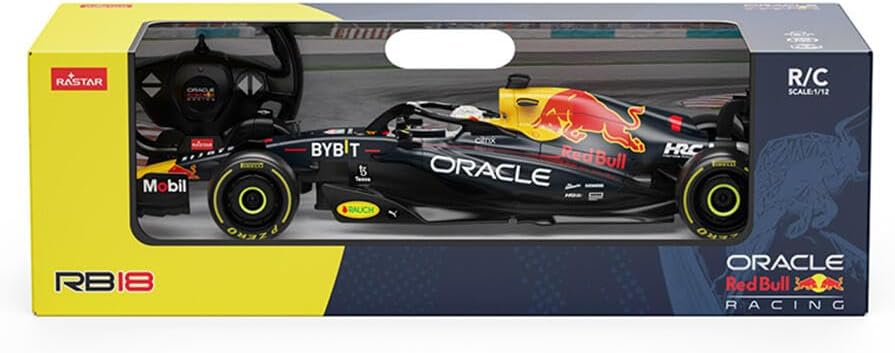
Image 1: Rastar R/C Car Oracle Red Bull Racing RB18 in its retail packaging, showing the car and remote.
4. Setup
4.1. Remote Controller Battery Installation
- Locate the battery compartment on the back of the remote controller.
- Open the battery compartment cover.
- Insert the required AA batteries (not included) according to the polarity markings (+/-).
- Close the battery compartment cover securely.
4.2. Car Battery Charging
The R/C car uses a rechargeable battery. Use the provided USB charging cable.
- Locate the charging port on the R/C car.
- Connect the USB charging cable to the car's charging port.
- Connect the other end of the USB cable to a standard USB power adapter (e.g., phone charger, computer USB port).
- The charging indicator light (if present) will illuminate during charging and turn off or change color when fully charged.
- Charging typically takes approximately 1-2 hours. Do not overcharge.

Image 2: Front view of the Rastar R/C Car, showing its detailed design.
4.3. Pairing the Car and Remote
The car and remote are usually pre-paired. If they do not connect automatically:
- Ensure both the car and remote have fresh or fully charged batteries.
- Turn on the R/C car using its power switch.
- Turn on the remote controller using its power switch.
- Place the car on a flat surface. The remote's indicator light should stop flashing (if applicable) and remain solid, indicating a successful connection.
- If pairing fails, turn both devices off and repeat the process.
5. Operating Instructions
Once the car and remote are paired, you can begin operation.
- Forward/Backward: Use the left joystick/trigger to move the car forward or backward.
- Turn Left/Right: Use the right joystick/steering wheel to steer the car left or right.
- Speed Control: Some models may have variable speed control depending on how far you push the joystick/trigger.
Practice in an open area to familiarize yourself with the controls.

Image 3: Multiple views of the Rastar R/C Car, highlighting its design from different angles.
6. Maintenance
- Cleaning: Wipe the car and remote with a soft, dry cloth. Do not use water or chemical cleaners.
- Storage: Store the R/C car and remote in a cool, dry place away from direct sunlight when not in use. Remove batteries from the remote for long-term storage.
- Battery Care: Fully charge the car's battery before long-term storage to maintain battery health.
7. Troubleshooting
| Problem | Possible Cause | Solution |
|---|---|---|
| Car does not move. | Car battery is low or dead. Remote batteries are low or dead. Car and remote not paired. Power switches off. | Charge car battery. Replace remote batteries. Re-pair car and remote. Ensure power switches are ON. |
| Poor control range or interference. | Other R/C devices nearby. Obstacles blocking signal. Low batteries. | Move to an area with less interference. Ensure clear line of sight. Replace/charge batteries. |
| Car moves slowly or erratically. | Low car battery. Obstruction in wheels. | Charge car battery. Check wheels for debris. |
8. Specifications
| Model Number: | RAS-CAR-94706 |
| Scale: | 1:12 |
| Product Dimensions: | 53 x 17 x 23 cm |
| Item Weight: | 1.33 kg |
| Material Type: | Plastic |
| Car Battery: | Rechargeable (USB Charging) |
| Remote Battery: | 1 AA batteries required (not included) |
| Recommended Age: | 6 years and up |
| Included Components: | Remote |
9. Warranty and Support
Rastar products are manufactured to high-quality standards. For any questions, technical support, or warranty inquiries, please refer to the contact information provided on the product packaging or visit the official Rastar website.
Please retain your proof of purchase for warranty purposes.


