
Introduction
Welcome to the world of treasure hunting with your new DetectTrek M55 Professional Metal Detector and MD-4070 Kids Metal Detector Kit. This comprehensive bundle is designed to provide an engaging and effective metal detecting experience for both adults and children. This manual will guide you through the setup, operation, and maintenance of both detectors, ensuring you get the most out of your adventures.

Image: The complete DetectTrek M55 and MD-4070 Metal Detector Kit, including the adult M55 detector, the MD-4070 kids detector, backpack, headphones, digging tools, batteries, and charging cable.
Setup and Assembly
Before embarking on your treasure hunt, ensure both metal detectors are properly assembled and charged.
M55 Professional Metal Detector Assembly
- Attach the Search Coil: Connect the 11-inch search coil to the lower stem. Ensure the cable is securely wrapped around the stem.
- Connect Stems: Join the lower, middle, and upper stems. Adjust the length to a comfortable height (19" to 51") for the user (4'7" to 6'3" tall).
- Mount the Control Box: Secure the control box to the upper stem. Connect the search coil cable to the control box.
- Attach Armrest: Secure the armrest for comfortable operation.

Image: Diagram illustrating the assembly of the M55 metal detector, showing the connection points for the search coil, stems, control box, and armrest.
MD-4070 Kids Metal Detector Assembly
- Attach the Search Coil: Connect the 8-inch search coil to the lower stem.
- Adjust Length: Extend the stem to a suitable height for the child, adjustable from 30" to 41".
- Secure Control Box: Ensure the control box is firmly attached and the coil cable is connected.
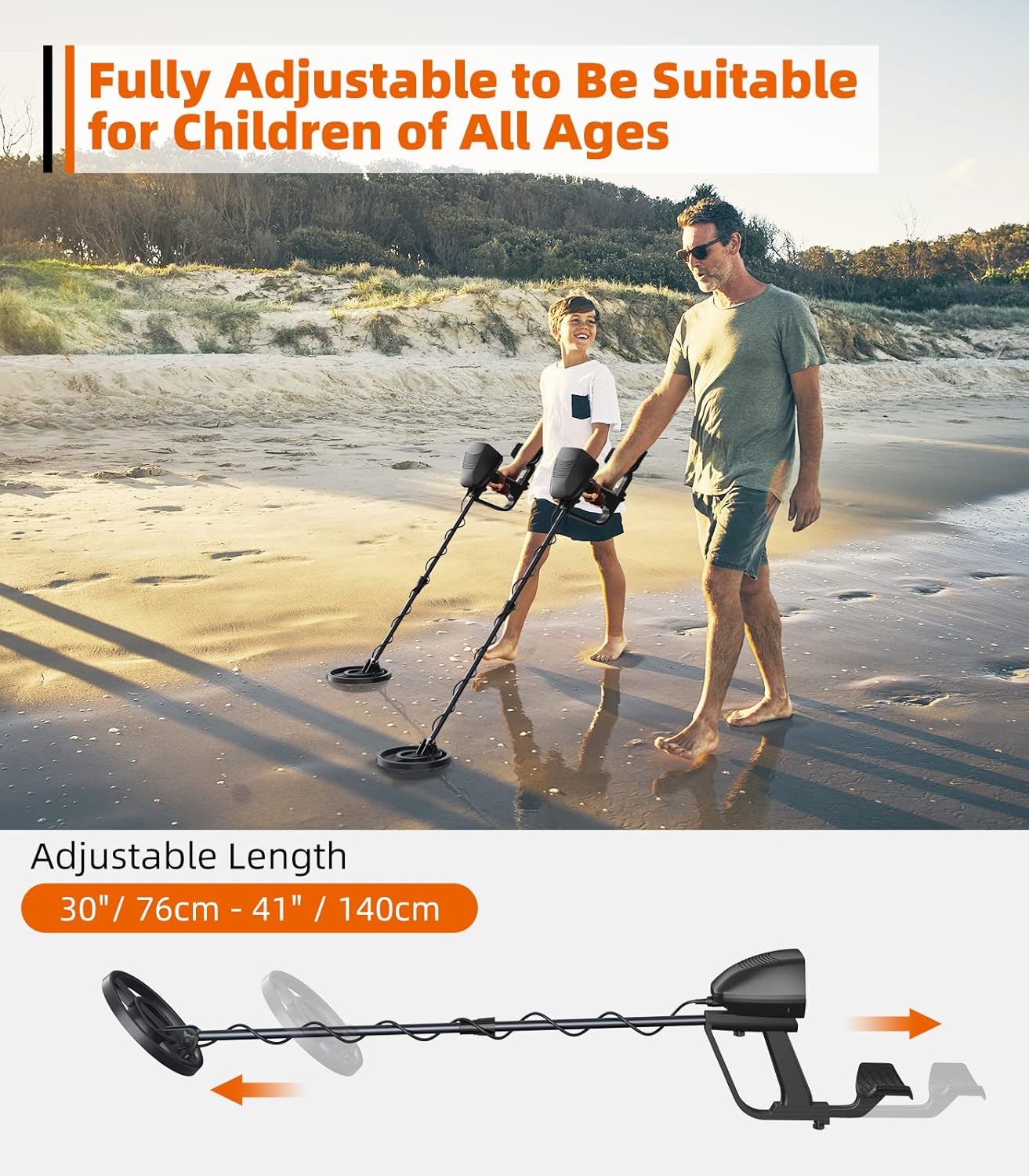
Image: The MD-4070 Kids Metal Detector demonstrating its adjustable length feature, suitable for children of various ages.
Charging the M55 Metal Detector
The M55 features a 4000 mAh rechargeable lithium battery, providing up to 40 hours of runtime.
- Locate the Type-C charging port on the control box.
- Connect the provided Type-C charging cable to the detector and a compatible USB power source.
- The battery indicator on the display will show charging status. Charge fully before first use.
Image: The M55 metal detector with its Type-C charging cable connected, illustrating the charging process for its 4000mAh battery.
Operating Instructions
M55 Professional Metal Detector Operation
The M55 is designed for precise detection with a user-friendly interface.

Image: Close-up of the M55 metal detector's control panel, highlighting the user-friendly interface with labels for Backlight ON/OFF, Volume Adjust, Sensitivity Adjust, Select Mode, Power ON/OFF, and Pinpoint buttons.
- Power ON/OFF: Press and hold the power button to turn the detector on or off.
- Volume Adjust: Use the volume buttons to adjust the audio output level.
- Sensitivity Adjust: Adjust sensitivity to optimize detection depth and reduce false signals. Higher sensitivity increases depth but may also increase interference.
- Backlight ON/OFF: Toggle the display backlight for visibility in various lighting conditions.
- 5 Detection Modes: Select the appropriate mode using the 'Mode' button:
- All Metal (A-M): Detects all types of metal without discrimination.
- Disc (Discrimination): Eliminates unwanted metals (e.g., iron trash) based on conductivity.
- Memory: Memorizes a specific target type and only detects that type.
- Jewelry: Optimized for finding jewelry.
- Pinpoint (PP): Narrows down the exact location of a detected target for precise recovery.
Image: Visual representation of the M55 metal detector's five detection modes: All Metal, Memory, Disc, Pinpoint, and Jewelry, with brief descriptions of each mode's function.
The M55 features an 11-inch IP68 waterproof search coil, allowing for detection in shallow water, beaches, and creeks. Note: The control box is not waterproof and should not be submerged.

Image: The M55 metal detector's 11-inch waterproof search coil submerged in water, illustrating its IP68 waterproof rating and 11-inch detection depth capability. A note indicates the control box is not waterproof.
MD-4070 Kids Metal Detector Operation
The MD-4070 is designed for young explorers, offering simple operation and effective detection.

Image: The MD-4070 Kids Metal Detector's LCD display, showing indicators for low battery, overload warning, target category, target depth, and controls for headphone jack, light ON/OFF, power ON/OFF, and Disc key.
- Power ON/OFF: Use the power button to turn the detector on or off.
- LCD Backlight: The LCD backlight improves visibility in low light conditions.
- 3 Detection Modes: The MD-4070 helps kids identify different metals and eliminate junk.
- All Metal: Detects all metal types.
- Discrimination: Allows for filtering out unwanted metals.
- Pinpoint: Helps locate the exact position of a target.
- Target Category Indicator: The display shows icons to help identify the type of metal detected (e.g., ironwork, gold, jewelry, nickel, copper, valuable silver).
- Target Depth Indicator: Provides an estimate of the target's depth.
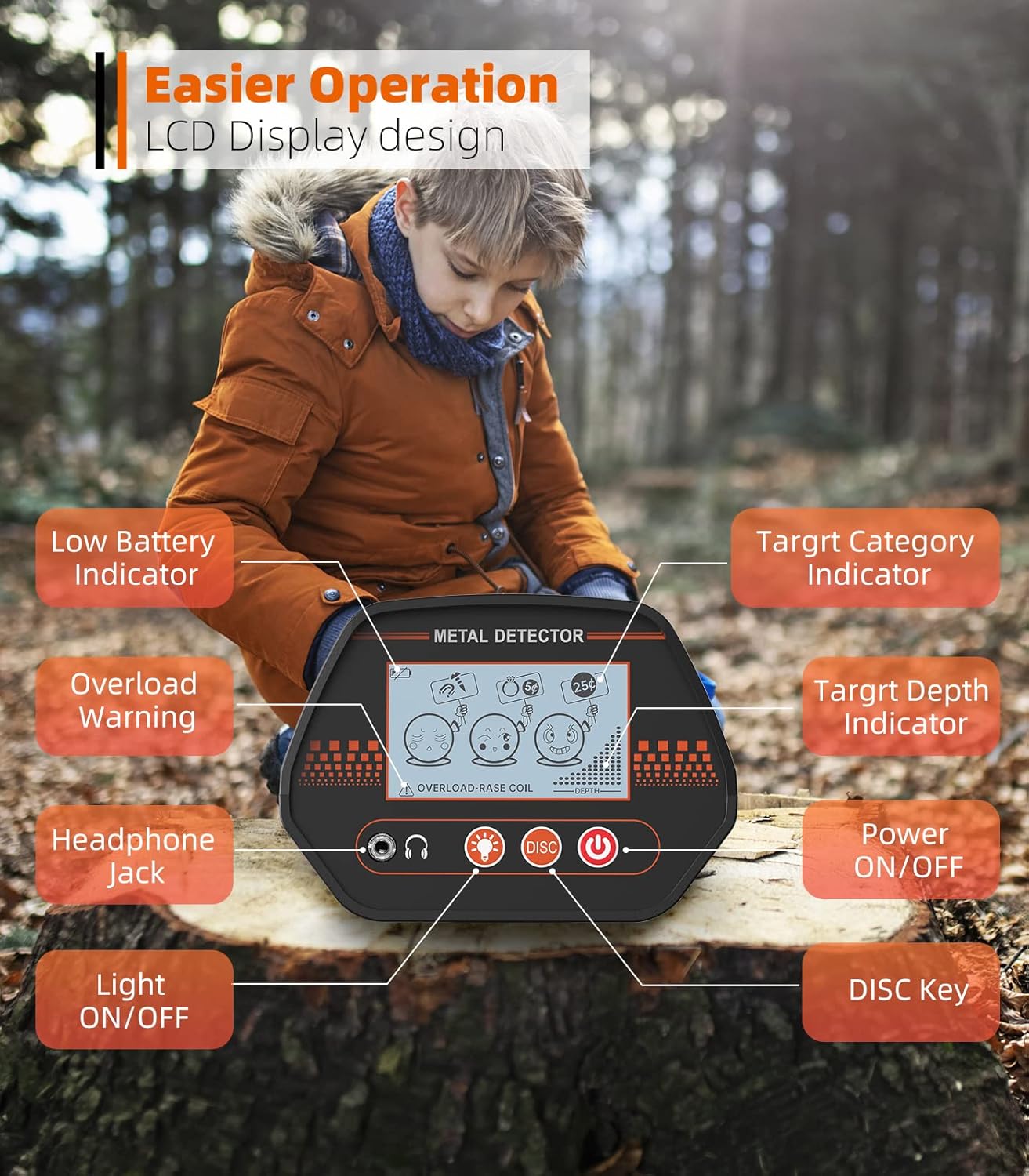
Image: A visual guide to the MD-4070 Kids Metal Detector's three detection modes, illustrating how it separates trash from treasure by identifying different metal types like ironwork, gold, jewelry, nickel, copper, and valuable silver.
The MD-4070 also features an IP68 waterproof search coil, making it suitable for beach and shallow water exploration. Note: The control box is not waterproof and should not be submerged.

Image: A child using the MD-4070 Kids Metal Detector with its waterproof search coil partially submerged in water, emphasizing its IP68 waterproof capability. A note reiterates that the control box is not waterproof.
Maintenance
- Cleaning: After each use, especially in sandy or wet conditions, wipe down the search coil and stem with a damp cloth. Avoid using abrasive cleaners or solvents.
- Control Box Care: Keep the control box dry and clean. Do not submerge it in water.
- Storage: Store the detectors in a cool, dry place away from direct sunlight and extreme temperatures. If storing for extended periods, ensure the M55 battery is partially charged (around 50%) to prolong its lifespan.
- Battery (M55): Recharge the M55 battery regularly to maintain optimal performance. Avoid fully discharging the battery frequently.
Troubleshooting
| Problem | Possible Cause | Solution |
|---|---|---|
| Detector does not power on. | M55: Low battery. MD-4070: Incorrect battery installation or depleted batteries. | M55: Recharge the battery. MD-4070: Check battery polarity, replace batteries if necessary. |
| Erratic signals or false positives. | High sensitivity setting, electromagnetic interference, mineralized ground. | Reduce sensitivity. Move away from power lines or other electronic devices. Use discrimination mode. |
| Poor detection depth. | Low sensitivity setting, incorrect ground balance (M55), small target size. | Increase sensitivity. Ensure proper ground balance (refer to M55 advanced settings if applicable). |
| MD-4070 shows "Overload Warning". | Search coil too close to a large metal object or highly mineralized ground. | Lift the coil slightly or move to a different area. |
Specifications
M55 Professional Metal Detector
- Search Coil: 11-inch IP68 Waterproof
- Detection Depth: Up to 11 inches for coins
- Chip: Upgraded DSP chip
- Detection Modes: 5 (All Metal, Disc, Memory, Jewelry, Pinpoint)
- Battery: 4000 mAh Rechargeable Lithium Battery
- Runtime: Up to 40 hours
- Charging: Type-C
- Adjustable Height: 19" to 51" (suitable for users 4'7" to 6'3")
MD-4070 Kids Metal Detector
- Search Coil: 8-inch IP68 Waterproof
- Detection Depth: Up to 4 inches for buried treasures
- Display: LCD with backlight
- Adjustable Height: 30" to 41"
Included Accessories
- Backpack
- Headphones
- Digging Tools (shovel, pick)
- Batteries (for MD-4070, if not rechargeable)
- Charging Cable (for M55)
Note: Control boxes for both M55 and MD-4070 are not waterproof.
Warranty and Support
For any questions, technical assistance, or warranty inquiries regarding your DetectTrek M55 and MD-4070 Metal Detector Kit, please contact DetectTrek customer support.
You can find more information and contact details by visiting the official DetectTrek Store on Amazon: DetectTrek Store.