
1. Introduction
Thank you for purchasing the COLSUR K8-WHITE Portable Bluetooth CD Player. This device is designed to provide versatile audio entertainment, combining CD playback with modern features like Bluetooth connectivity, FM radio, and a multi-level table lamp. Please read this manual thoroughly before use to ensure proper operation and to maximize your enjoyment of the product.
2. Safety Information
- Do not expose the device to rain, moisture, or extreme temperatures.
- Avoid placing the device near heat sources or in direct sunlight.
- Do not disassemble or attempt to repair the device yourself. Refer all servicing to qualified personnel.
- Keep the device away from strong magnetic fields.
- Use only the provided Type-C charging cable and a compatible power adapter (not included) for charging.
- Ensure proper ventilation when operating the device.
3. Package Contents
Please check the package for the following items:
- COLSUR K8-WHITE Portable Bluetooth CD Player
- Type-C Charging Cable
- User Manual
- Wall Mount Kit (if applicable)
- Table Stand (if applicable)
4. Product Overview
The COLSUR K8-WHITE is a versatile audio device designed for various listening experiences. It features a compact design suitable for tabletop placement or wall mounting.
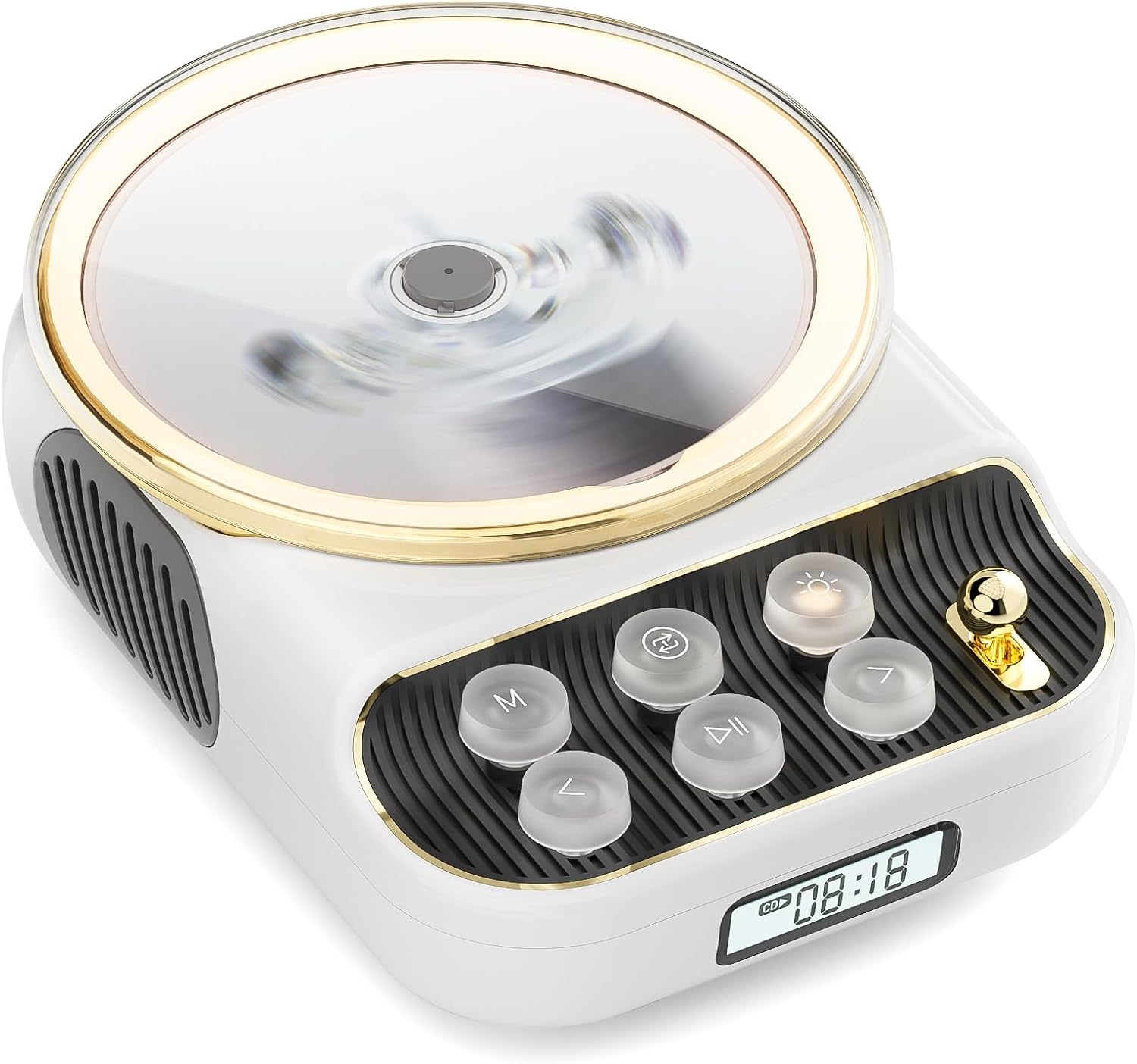
Front view of the COLSUR K8-WHITE Portable Bluetooth CD Player, showcasing its circular CD compartment, control buttons, and digital display.

This image illustrates the multifunctionality of the COLSUR K8-WHITE, highlighting its capabilities for CD playback, Bluetooth mode, FM radio, TF card speaker, 3.5mm audio jack, and night light function.
Control Layout

A detailed diagram showing the various buttons, ports, and features of the COLSUR K8-WHITE CD Player, including the CD cover, function buttons, display, Type-C charging port, TF card interface, and speaker.
- CD Compartment: For inserting audio CDs.
- Display: Shows current mode, track number, time, or FM frequency.
- Function Buttons: (M) Mode, (Loop) Repeat, (Light) Light/Bluetooth Transmit, (Play/Pause), (Previous/Volume Down), (Next/Volume Up).
- Volume Knob: Adjusts audio volume.
- Type-C Charging Port: For power input and charging the internal battery.
- TF Card Interface: For playing music from a TF card.
- 3.5mm Audio Output: For connecting headphones or external speakers.
5. Setup
5.1 Charging the Device
The device has a built-in 4000mAh rechargeable Lithium-ion battery. Before first use, fully charge the device.
- Connect the provided Type-C charging cable to the Type-C port on the device.
- Connect the other end of the cable to a compatible USB power adapter (5V/2A recommended, not included).
- The charging indicator on the display will show charging status. It will turn off or change color when fully charged.
5.2 Powering On/Off
To power on the device, press and hold the Power button (often integrated with Play/Pause or a dedicated button, refer to the control layout diagram). To power off, press and hold the Power button again.
5.3 Placement Options
The COLSUR K8-WHITE can be used as a tabletop device or mounted on a wall.
- Tabletop Use: Place the device on a stable, flat surface. Ensure the non-slip feet are securely positioned.
- Wall Mounting: Use the provided wall mount kit (if included) to securely attach the device to a wall. Follow the instructions provided with the wall mount kit for safe installation.
6. Operating Instructions
6.1 CD Playback

The image shows the COLSUR K8-WHITE CD Player on a wooden table, playing a CD, and a separate image illustrating its use as a Bluetooth speaker connected to a smartphone.
The player supports CD, CD-R, CD-RW, MP3, and WMA formats.
- Open the CD compartment cover.
- Carefully place a CD onto the spindle, ensuring it is seated correctly.
- Close the CD compartment cover.
- Press the M (Mode) button repeatedly until "CD" mode is displayed.
- Press the Play/Pause button to start playback.
- Use the Previous/Volume Down and Next/Volume Up buttons to skip tracks.
- Adjust the volume using the Volume Knob.
- Press the Loop button to cycle through repeat modes (e.g., repeat one, repeat all, random).
6.2 Bluetooth Receiver Mode
Connect your smartphone, tablet, or other Bluetooth-enabled devices to stream audio wirelessly. The device features Bluetooth version 5.3 for stable connection.
- Press the M (Mode) button repeatedly until "BT" (Bluetooth) mode is displayed. The device will enter pairing mode, indicated by a flashing Bluetooth icon or specific sound.
- On your external device, enable Bluetooth and search for available devices.
- Select "COLSUR K8-WHITE" (or similar name) from the list to pair.
- Once paired, you can play music from your external device, and the audio will output through the CD player's speakers.
6.3 FM Radio Mode

The COLSUR K8-WHITE CD Player is shown on a desk, with its display showing an FM radio frequency, indicating its radio function.
Enjoy your favorite radio stations with the built-in FM tuner (frequency range: 76 MHz to 108 MHz).
- Press the M (Mode) button repeatedly until "FM" mode is displayed.
- Press and hold the Play/Pause button to initiate an automatic scan for FM stations. The device will save found stations.
- Use the Previous/Volume Down and Next/Volume Up buttons to navigate through saved stations.
- Adjust the volume using the Volume Knob.
6.4 TF Card Playback
Play music files directly from a TF (MicroSD) card.
- Insert a TF card (with MP3/WMA files) into the TF card slot.
- Press the M (Mode) button repeatedly until "TF" mode is displayed. The device should automatically start playing music from the card.
- Use the Previous/Volume Down and Next/Volume Up buttons to skip tracks.
- Adjust the volume using the Volume Knob.
6.5 AUX Input
Connect external audio devices (e.g., MP3 players, older phones) via the 3.5mm AUX jack.
- Connect one end of a 3.5mm audio cable (not included) to the AUX port on the CD player.
- Connect the other end to the audio output of your external device.
- Press the M (Mode) button repeatedly until "AUX" mode is displayed.
- Control playback from your external device. Adjust volume using the Volume Knob on the CD player.
6.6 Headphone Output
For private listening, connect headphones to the 3.5mm audio output jack.
- Plug your headphones into the 3.5mm audio output jack.
- The internal speakers will automatically mute.
- Adjust volume using the Volume Knob.
6.7 Table Lamp Function and Bluetooth Transmission

The COLSUR K8-WHITE CD Player is shown on a bedside table, emitting a soft glow, functioning as a night light while a person sleeps in the background.
The device includes a table lamp with three brightness levels and a Bluetooth transmission mode.
- Short Press the Light Button:
- First press: Activates a warm light (low brightness).
- Second press: Activates a flashing light (medium brightness).
- Third press: Turns off the light. The lights will cycle through these states.
- Long Press the Light Button: Activates the device's Bluetooth transmission mode. In this mode, the CD player can transmit audio to wireless headphones or other Bluetooth speakers.
7. Maintenance
- Cleaning: Use a soft, dry cloth to clean the exterior of the device. Do not use liquid cleaners or abrasive materials.
- CD Care: Handle CDs by their edges. Clean CDs with a soft, lint-free cloth, wiping from the center outwards.
- Storage: When not in use for extended periods, store the device in a cool, dry place.
8. Troubleshooting
| Problem | Possible Cause | Solution |
|---|---|---|
| Device does not power on. | Battery is depleted. | Connect the device to a power source using the Type-C cable and charge it. |
| No sound from speakers. | Volume is too low or muted. Headphones are connected. Incorrect mode selected. | Increase volume. Disconnect headphones. Ensure correct mode (CD, BT, FM, TF, AUX) is selected. |
| CD does not play or skips. | CD is dirty, scratched, or inserted incorrectly. CD format not supported. | Clean the CD. Ensure the CD is inserted correctly. Try a different CD. Verify CD format compatibility. |
| Bluetooth pairing fails. | Device is not in pairing mode. External device Bluetooth is off or out of range. | Ensure the CD player is in Bluetooth mode and flashing. Move external device closer. Restart both devices. |
| FM radio reception is poor. | Weak signal. Interference. | Reposition the device. Extend any external antenna if available. Try scanning again. |
9. Specifications
- Brand: COLSUR
- Model: K8-WHITE
- Color: White
- Connectivity Technology: Bluetooth 5.3, AUX (3.5mm jack), Type-C (charging)
- Supported Media Formats: Audio CD, CD-R, CD-RW, MP3, WMA (from CD or TF card)
- FM Radio Frequency: 76 MHz - 108 MHz
- Battery: 4000mAh Lithium-ion (Rechargeable)
- Special Features: Built-in speaker, Table lamp with 3 brightness levels, TF card slot, Headphone output
- Compatible Devices: Headphones, Bluetooth speakers, Amplifiers, Bluetooth audio receivers
10. Warranty and Support
For warranty information or technical support, please refer to the documentation included with your purchase or contact the retailer/manufacturer directly. Keep your proof of purchase for warranty claims.