
Epico Epico Keyboard Case
Epico iPad Keyboard Case User Manual
Model: Epico Keyboard Case
Introduction
Transform your iPad into a versatile workstation with the Epico iPad Keyboard Case. This innovative accessory features a detachable keyboard with seven-colour backlighting, a multi-finger gesture touchpad, and comprehensive iPadOS shortcuts. Designed for both functionality and protection, it enhances your iPad experience for typing, watching, and browsing.

Image: The Epico iPad Keyboard Case with an iPad inserted, shown in a tilted typing position.
Features
- Backlit Keyboard: Seven distinct backlight colours with adjustable brightness levels for comfortable typing in any lighting condition.
- Touchpad Functionality: Multi-finger gesture touchpad provides precise control and enhanced navigation capabilities.
- Shortcut Integration: Comprehensive range of iPadOS shortcuts built into the keyboard for efficient device control and workflow optimisation.
- Versatile Design: Includes detachable keyboard and tilted backside stand for multiple viewing angles and usage modes.
- Power Solution: Equipped with Li-ion battery and USB-C charging capability, operating independently from iPad's power source.
Package Contents
- Epico iPad Keyboard Case
- USB-C to USB-C Charging Cable
- User Manual (this document)
Setup
1. Charging the Keyboard
Before first use, fully charge the keyboard. Connect the provided USB-C to USB-C charging cable to the keyboard's USB-C port and the other end to a compatible USB-C power adapter (not included).
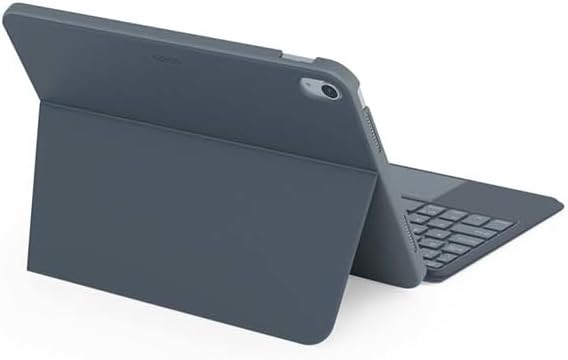
Image: Side view of the keyboard case, highlighting the USB-C charging port.
2. Inserting Your iPad
- Gently align your iPad with the case's frame.
- Press firmly but carefully to secure the iPad into the protective shell. Ensure all edges are properly seated.

Image: Rear view of the Epico iPad Keyboard Case, demonstrating the secure fit of the iPad.
3. Pairing with iPad
- Turn on the keyboard by sliding the power switch (usually located on the side or back of the keyboard).
- On your iPad, go to Settings > Bluetooth.
- Enable Bluetooth. The keyboard should appear in the "Other Devices" list as "Epico Keyboard" or similar.
- Tap on the keyboard name to pair. Follow any on-screen prompts.
- Once paired, the keyboard's indicator light will change, and it will be ready for use.
Operating Instructions
Keyboard Usage
The keyboard functions like a standard QWERTY keyboard. Ensure the keyboard is paired with your iPad before typing.

Image: Front view of the Epico iPad Keyboard Case, displaying the full keyboard layout and touchpad.
Backlight Control
- Press the Light Bulb key (often near the function keys) to cycle through backlight colours.
- Press Fn + Light Bulb key to adjust backlight brightness levels.
Touchpad Gestures
The integrated touchpad supports multi-finger gestures for enhanced navigation:
- Single Finger Tap: Left-click.
- Two Finger Tap: Right-click (context menu).
- Two Finger Scroll: Scroll up/down or left/right.
- Pinch to Zoom: Zoom in/out on content.
- Refer to iPadOS settings for additional gesture customization.
iPadOS Shortcuts
The keyboard includes dedicated function keys for common iPadOS shortcuts. These may vary slightly by iPadOS version, but typically include:
- Home: Return to home screen.
- Search: Activate Spotlight search.
- Brightness Control: Adjust screen brightness.
- Media Control: Play/Pause, Previous/Next track.
- Volume Control: Adjust system volume.
- Lock Screen: Lock your iPad.
Maintenance
Cleaning
- Use a soft, lint-free cloth to wipe the exterior of the case and keyboard.
- For stubborn marks, slightly dampen the cloth with water or a mild, non-abrasive cleaner.
- Avoid getting moisture into the keyboard keys or ports.
- Do not use harsh chemicals, solvents, or abrasive materials.
Storage
When not in use for extended periods, store the keyboard case in a cool, dry place. Ensure the keyboard is turned off to preserve battery life.
Troubleshooting
- Keyboard not connecting:
Ensure the keyboard is charged and turned on. Check iPad's Bluetooth settings to confirm it's enabled and the keyboard is paired. Try unpairing and re-pairing the keyboard.
- Keys not responding:
Check battery level. Restart both the keyboard and your iPad. Ensure no debris is lodged under the keys.
- Backlight not working:
Ensure the keyboard is on and charged. Cycle through backlight settings using the dedicated key.
- Touchpad not responding:
Ensure the touchpad is enabled (some keyboards have a function key to toggle it). Check iPadOS settings for touchpad functionality.
Specifications
| Brand | Epico |
| Model Name | Epico Keyboard Case |
| Compatible Devices | Apple iPad |
| Connectivity | Bluetooth |
| Backlight | 7-Colour, Adjustable Brightness |
| Touchpad | Multi-finger Gesture Support |
| Charging Port | USB-C |
| Power Source | Built-in Li-ion Battery |
| Item Weight | 15.9 ounces (approx. 450g) |
| Product Dimensions (LxWxH) | 9.94 x 7.24 x 0.48 inches (approx. 25.25 x 18.39 x 1.22 cm) |
| Material | Plastic, Metal |
Warranty and Support
This Epico product is covered by a manufacturer's warranty. Please refer to the warranty card included with your purchase or visit the official Epico website for detailed warranty terms and conditions.
For technical support, troubleshooting assistance, or inquiries about your product, please contact Epico customer service through their official website or the contact information provided on your purchase receipt.
Related documentsEpico Keyboard Case


Ask a question about this manual
Ask about setup, troubleshooting, compatibility, parts, safety, or missing instructions. Manuals+ will review the question and use this page’s manual context to help answer it.