
1. Introduction
This manual provides essential information for the installation, operation, maintenance, and troubleshooting of your Vipbear Smart Toilet, Model OPT01. Please read this manual thoroughly before installation and use to ensure proper function and safety.

Image 1.1: The Vipbear Smart Toilet OPT01, showcasing its modern design, integrated night light, and motion sensing capabilities.
2. Setup and Installation
Proper installation is crucial for the optimal performance of your smart toilet. This unit requires an electrical outlet for full functionality.
2.1 Pre-Installation Requirements
- Ensure your bathroom has an accessible electrical outlet. The toilet power cord is 1.5 meters long.
- Confirm a 12-inch rough-in measurement for compatibility.
- All necessary installation tools and accessories are included.
2.2 Installation Steps
- Prepare the installation area by ensuring the floor is clean and level.
- Connect the water supply line to the toilet's angle valve.
- Position the flange ring and secure the toilet to the floor using the provided hardware.
- Plug the 1.5M leakage-proof safety plug into a grounded electrical outlet.
- Perform a test flush to check for leaks and proper operation.
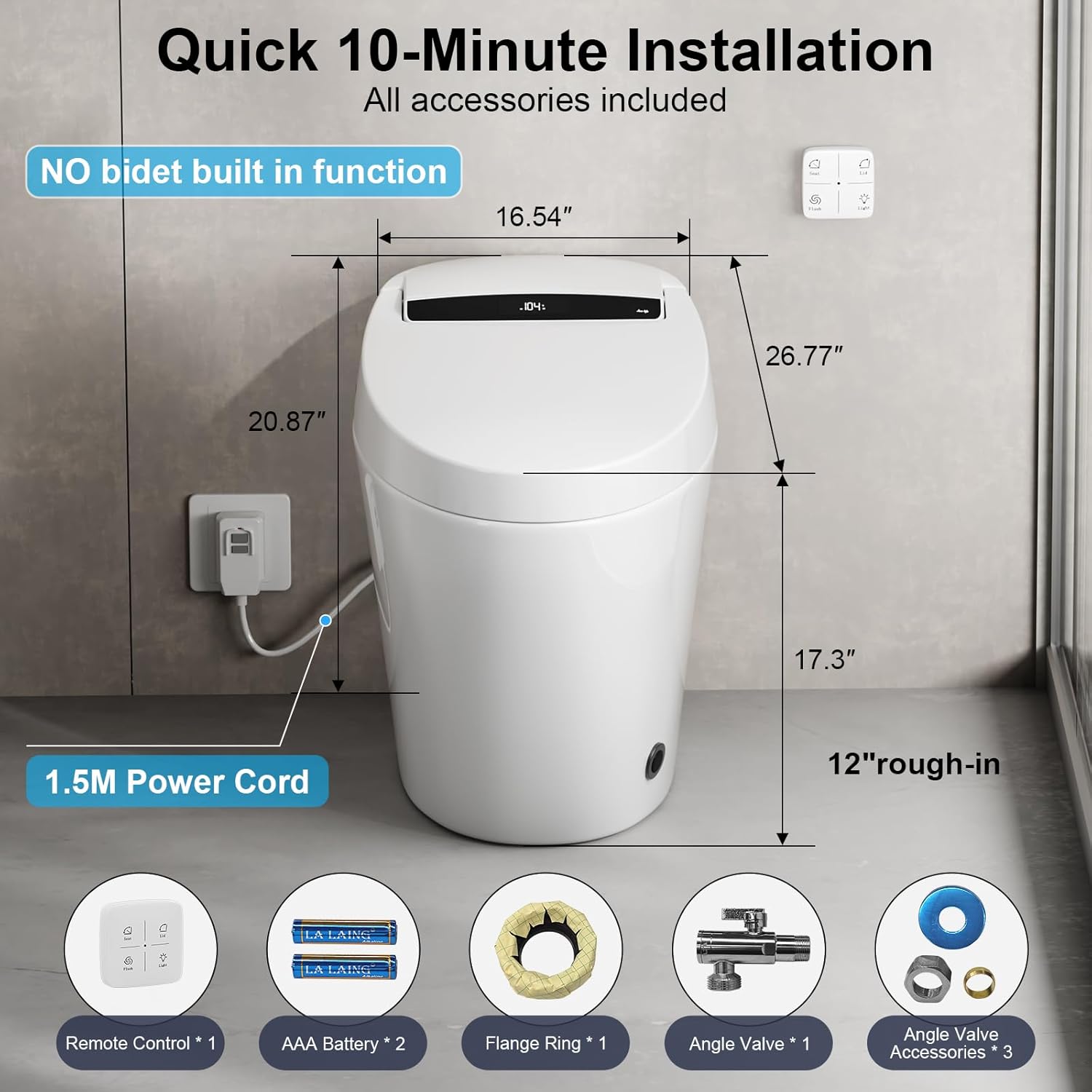
Image 2.1: Detailed dimensions (16.54" W x 20.87" H x 26.77" D) and included accessories for quick installation, including remote control, AAA batteries, flange ring, angle valve, and angle valve accessories. The 1.5M power cord is also visible.
3. Operating Instructions
Your Vipbear Smart Toilet offers a range of intelligent features designed for comfort and convenience.
3.1 Automatic Features
- Auto Open/Close Lid/Seat: Smart sensors detect your approach, automatically lifting the lid and seat. Upon leaving, the lid and seat will automatically close.
- Auto Flush: The toilet automatically flushes after use, providing a hands-free experience.
- Gentle Night Light: A soft, built-in night light illuminates the bowl, guiding you in the dark without causing disturbance.
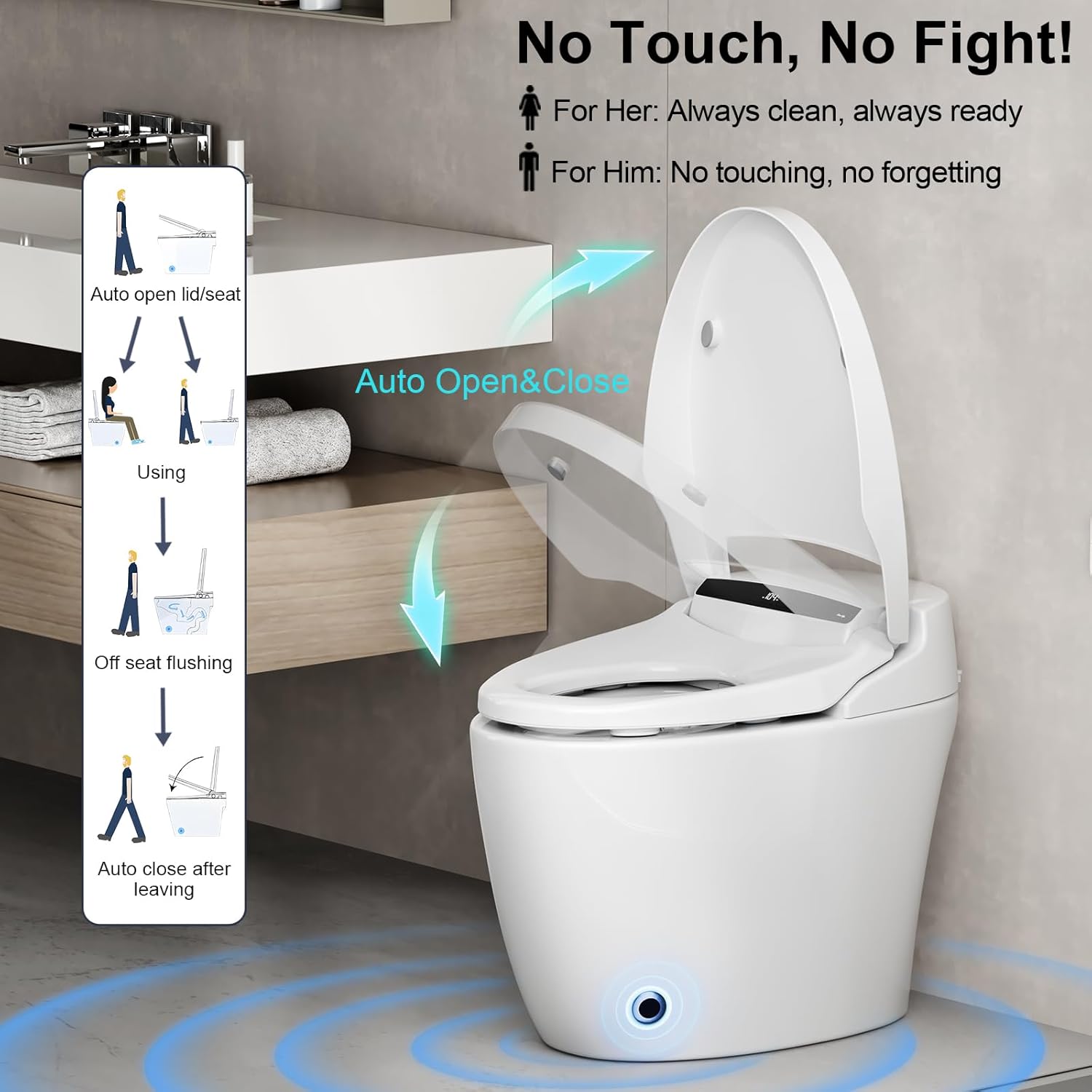
Image 3.1: Illustration of the automatic lid and seat opening and closing sequence, activated by user presence and departure.
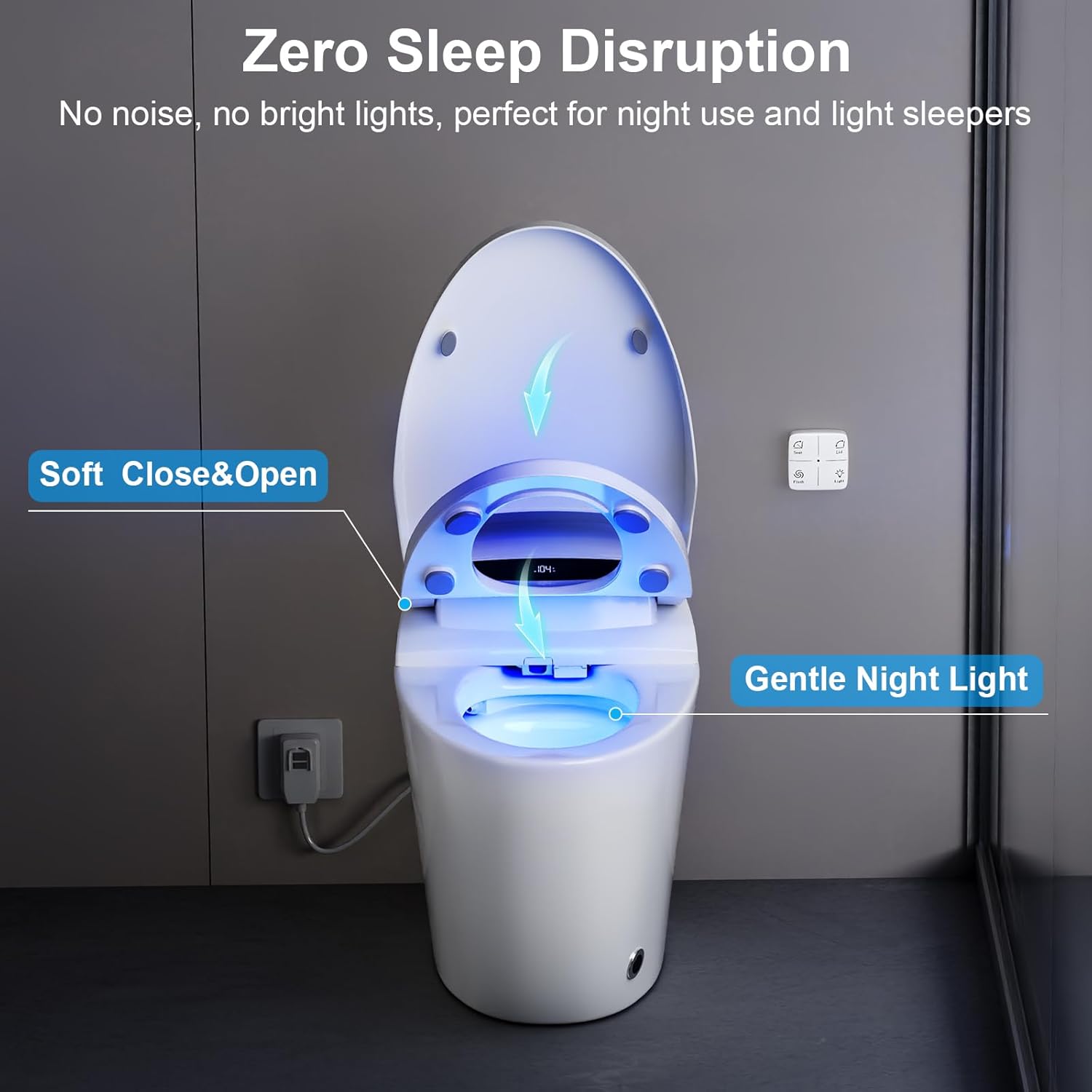
Image 3.2: The toilet displaying its gentle blue night light and the soft close mechanism for the lid and seat, ensuring quiet operation.
3.2 Heated Seat
The heated seat provides comfort, especially in colder environments. It features 4 adjustable warmth levels.

Image 3.3: A transparent view of the SIAA-certified antibacterial heated seat, showing the heating coils and indicating a temperature range from 93°F to 104°F with overheat protection.
3.3 Flushing System
The toilet utilizes a powerful and efficient flushing system:
- Pre-rinse Function: Automatically wets the bowl to prevent stains from sticking.
- 360° Vortex Flush: Clears waste thoroughly with minimal water, ensuring efficiency and eco-friendliness.
- WaterSense Certified: Operates at 1.28 GPF (Gallons Per Flush).
3.3.1 Smart Flushing Modes
The toilet offers four distinct flushing modes:
- Remote Flush: Activate flush using the included remote control.
- Side Button Flush: Manual flush option via buttons on the side panel.
- Off-Seat Auto Flush: Automatic flush upon user departure.
- Foot Sensor Flush: Activate flush by a foot gesture near the base sensor.

Image 3.4: A cutaway view illustrating the powerful flushing mechanism, including siphon wall dirt removal, pre-moisten function, and jet push dirt action. This tankless system is WaterSense Certified.
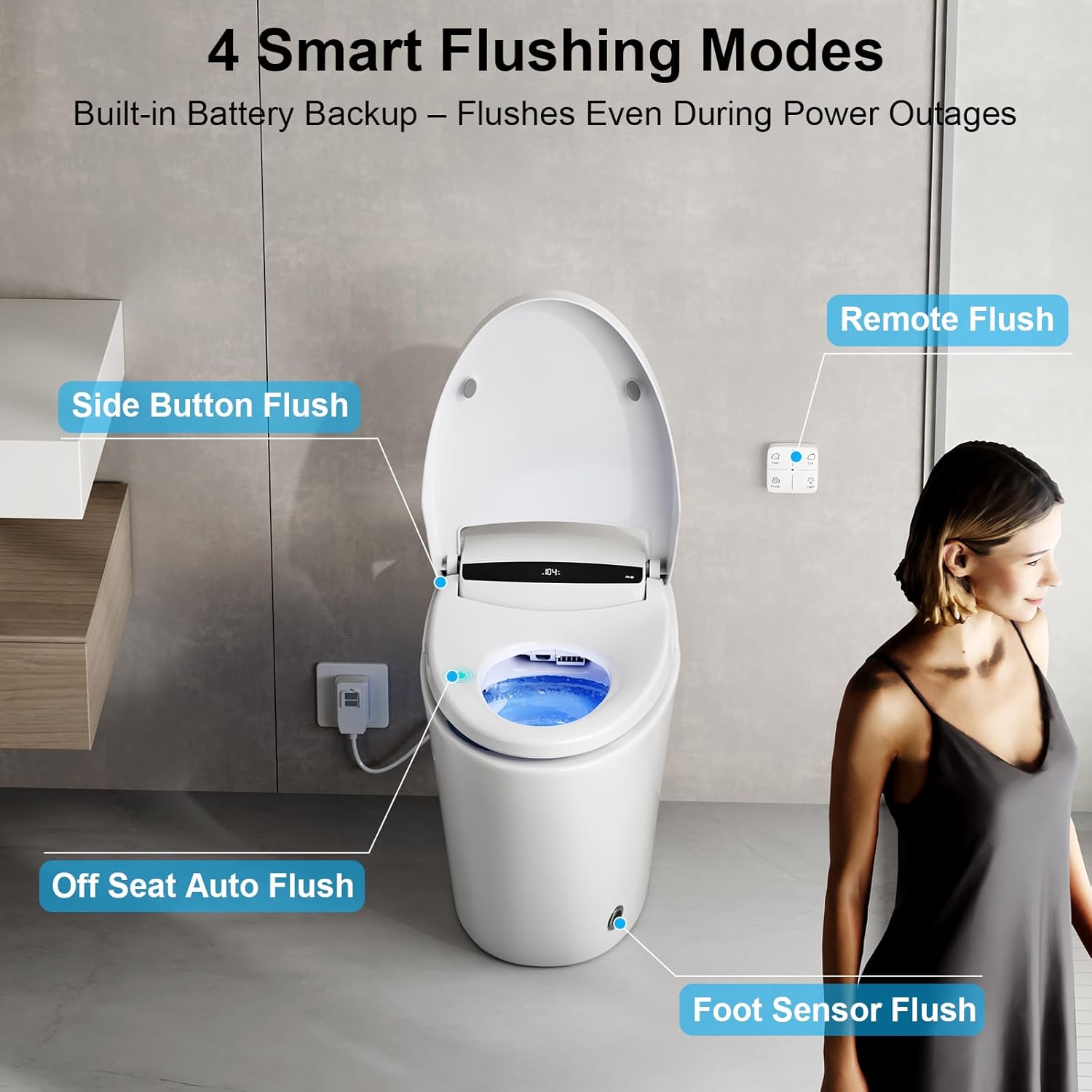
Image 3.5: The four smart flushing modes are depicted: Remote Flush, Side Button Flush, Off-Seat Auto Flush, and Foot Sensor Flush. The toilet also features a built-in battery backup for flushing during power outages.
3.4 Controls
The toilet can be controlled via the integrated side panel buttons or the included remote control.
- Side Panel Buttons: Control seat functions, light, temperature adjustment (reduce/plus), and flush.
- Remote Control: Offers dedicated buttons for seat, lid, flush, and light functions.

Image 3.6: A detailed view of the key operation buttons on the toilet's side panel (Seat, Light, Reduce, Plus, Flush) and the functions available on the remote control (Seat, Lid, Flush, Light).
4. Maintenance
Regular cleaning and maintenance will ensure the longevity and hygienic operation of your Vipbear Smart Toilet.
4.1 Cleaning
- Use a soft cloth and mild, non-abrasive cleaner for the ceramic surfaces.
- For the SIAA-certified antibacterial seat, wipe with a damp cloth and a gentle disinfectant. Avoid harsh chemicals that may damage the surface.
- Do not spray water directly onto the control panel or electrical components.
4.2 Pre-Wetting Feature
The automatic pre-wetting function helps maintain cleanliness by wetting the ceramic bowl when you sit, preventing stains and reducing cleaning frequency.

Image 4.1: The pre-wetting feature in action, showing water swirling in the bowl to prevent stains before use.
5. Troubleshooting
If you encounter any issues with your Vipbear Smart Toilet, refer to the following common problems and solutions.
| Problem | Possible Cause | Solution |
|---|---|---|
| Toilet does not flush automatically. | Sensor obstruction, power issue, or sensor sensitivity setting. | Ensure sensors are clean. Check power connection. Adjust sensor sensitivity if applicable (refer to remote control settings). |
| Lid/Seat does not open/close automatically. | Sensor obstruction, power issue, or user not within detection range. | Clear any obstructions around the sensors. Ensure power is connected. Stand within the detection range (e.g., 2 seconds near the toilet for microwave induction). |
| Heated seat is not warming. | Power issue, temperature setting, or overheat protection activated. | Check power connection. Adjust temperature settings using the remote or side panel. Allow time for the seat to cool if overheat protection was triggered. |
| Water leakage. | Loose connections or damaged seals. | Turn off water supply. Check all water connections for tightness. Inspect seals and gaskets for damage. Contact customer support if the issue persists. |
| No power to the unit. | Power cord unplugged, circuit breaker tripped, or outlet issue. | Ensure the power cord is securely plugged into a functional outlet. Check your home's circuit breaker. |
For issues not listed here or if troubleshooting steps do not resolve the problem, please contact Vipbear customer support.
6. Specifications
Key technical specifications for the Vipbear Smart Toilet OPT01.
| Feature | Specification |
|---|---|
| Model Number | OPT01 |
| Product Dimensions | 27"D x 16.5"W x 20.5"H |
| Material | Ceramic (Toilet), Plastic (Seat) |
| Installation Type | Floor Mounted |
| Flushing Volume | 1.28 GPF (WaterSense Certified) |
| Power Cord Length | 1.5M |
| Item Weight | 102 pounds |
| Included Components | All installation tools, Aromatherapy tablets, remote control |
| Certifications | IPX4 Waterproof, UL Certified, UPC/cUPC Listed, CEC Compliant |

Image 6.1: The Vipbear Smart Toilet highlighting its IPX4 Waterproof, UL Certified, UPC/cUPC Listed, and CEC Compliant certifications, along with its 1.5M leakage-proof safety plug.

Image 6.2: An overview of the various safety functions integrated into the toilet, including prevention of low temperature scald, flame retardant protection, over-heating prevention, short-circuit protection, leakage protection, water pressure protection, IPX4 waterproof rating, and over-voltage protection.
7. Warranty and Support
7.1 Warranty Information
The Vipbear Smart Toilet OPT01 is backed by a 1-year warranty from the date of purchase. This warranty covers manufacturing defects and malfunctions under normal use. Please retain your proof of purchase for warranty claims.
7.2 Customer Support
For any questions, technical assistance, or warranty claims, please contact Vipbear Home customer support. Our dedicated team is ready to help.
You can typically find contact information on the Vipbear Store page or through your purchase platform.