
BAOFENG UV-32
Contents
BAOFENG UV-32 Radio User Manual
Model: UV-32
Introduction
This manual provides comprehensive instructions for the operation and maintenance of your BAOFENG UV-32 Radio. The UV-32 is a high-power, multi-band two-way radio equipped with advanced features such as built-in GPS, USB-C charging, and NOAA weather alerts, designed for reliable communication in various environments. Please read this manual thoroughly before using the device to ensure proper function and safety.
Safety Information
- Do not operate the radio in explosive atmospheres (e.g., flammable gases, dust particles, metallic powders).
- Do not expose the radio to direct sunlight for prolonged periods or place it near heating appliances.
- Avoid using the radio in areas with strong electromagnetic interference.
- Use only BAOFENG approved batteries and chargers. Unauthorized accessories may cause damage or injury.
- Keep the radio away from water and moisture. This device is not water resistant.
- Do not disassemble or modify the radio. Repairs should only be performed by qualified technicians.
- Maintain a safe distance from the antenna during transmission to minimize RF exposure.
Package Contents
Verify that all items are present in the package:
- UV-32 Radio (1 unit)
- 2500mAh Battery (1 unit)
- High Gain Antenna (1 unit)
- Charger (1 unit)
- Strap (1 unit)
- User Manual (1 unit)

Image: Contents of the BAOFENG UV-32 package, showing the radio, battery, charger, and antenna.
Product Overview
Familiarize yourself with the components of your UV-32 radio.

Image: Labeled diagram of the BAOFENG UV-32 radio, showing various components from different angles.
- Antenna
- Encoder/Channel Selector Switch
- TX_RX Status Indication LED
- Power/Volume Knob
- 2.0" Color LCD Screen
- PTT Key (Push-to-Talk)
- Side Key (SK1) - Programmable Function Key
- Side Key (SK2) - Sweep/Monitor Function Key
- Numeric Keypad
- Built-in Microphone
- Charger Contact
- Speaker
- Accessory Port (2-pin K type)
- Type-C Charging Port

Image: Front and side views of the BAOFENG UV-32 radio, highlighting its ergonomic design.
Setup
1. Battery Installation and Charging
The UV-32 radio comes with a 2500mAh Li-ion battery.
- Align the battery with the grooves on the back of the radio.
- Slide the battery upwards until it clicks into place.
- To remove, press the battery release latch (if present) and slide the battery downwards.
Charging:
- Connect the USB-C cable to the Type-C Charging Port on the radio.
- Connect the other end of the USB-C cable to a compatible USB power source (wall adapter, power bank, laptop, car charger).
- The charging indicator LED will show red when charging and turn green when fully charged.
- A full charge typically takes approximately 4-5 hours.
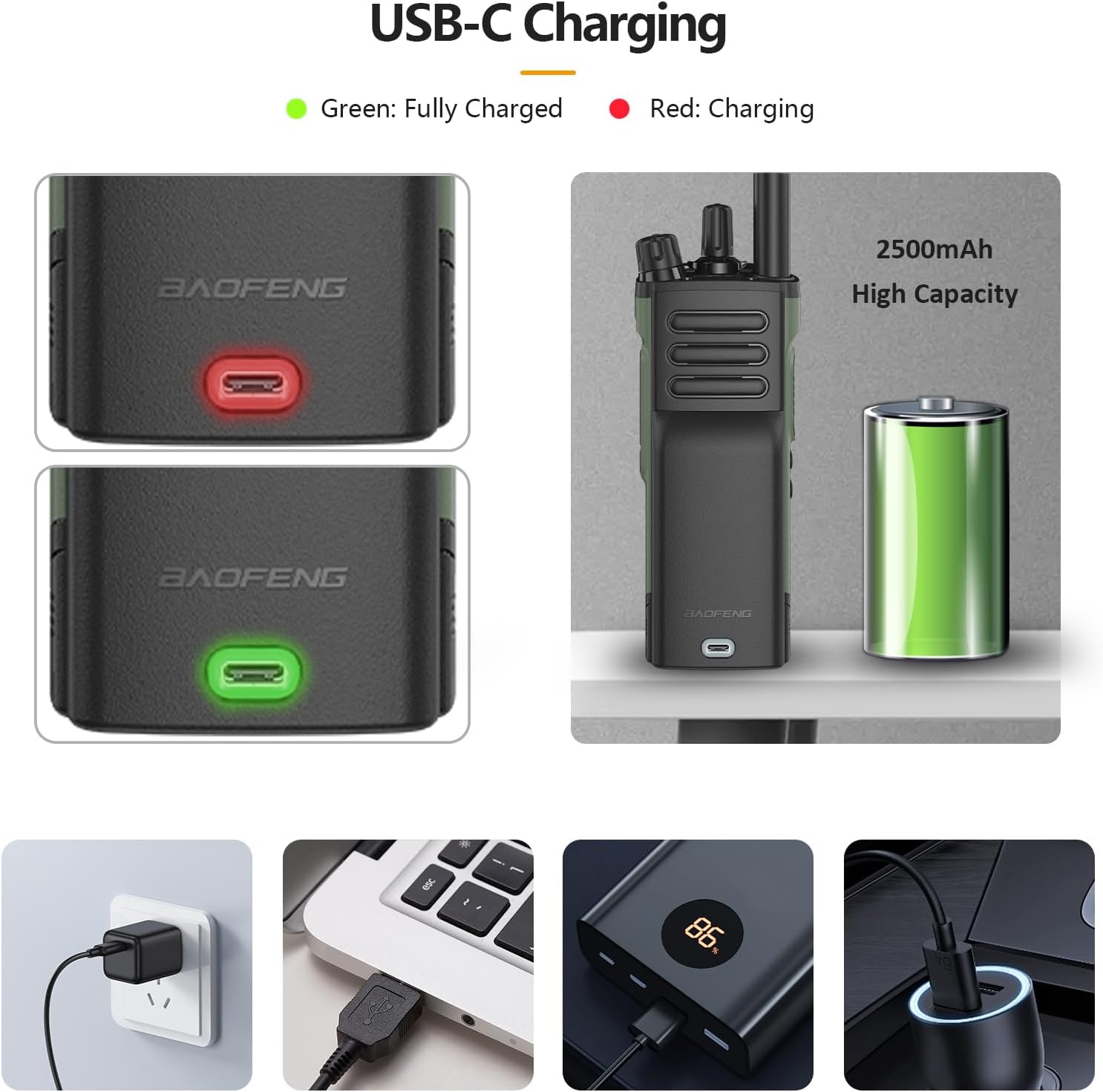
Image: Illustration of the USB-C charging process, showing the charging indicator light and various compatible power sources.
2. Antenna Attachment
Screw the high gain antenna clockwise into the antenna connector on top of the radio until it is finger-tight. Do not overtighten.
Operating Instructions
1. Powering On/Off and Volume Control
- To power on, rotate the Power/Volume Knob clockwise until you hear a click.
- To power off, rotate the Power/Volume Knob counter-clockwise until you hear a click.
- Adjust the volume by rotating the Power/Volume Knob.
2. Channel Selection and Frequency Adjustment
- Use the Encoder/Channel Selector Switch to navigate through channels or frequencies.
- Alternatively, use the Numeric Keypad to directly input frequencies or channel numbers.
- The 2.0" Color LCD Screen displays the current frequency, channel, and other operational information.

Image: Close-up view of the BAOFENG UV-32's 2.0-inch color LCD screen, showing frequency and zone information.
3. Transmitting and Receiving
- To transmit, press and hold the PTT Key (Push-to-Talk) on the side of the radio. Speak clearly into the built-in microphone.
- Release the PTT Key to receive.
- The TX_RX Status Indication LED will illuminate red during transmission and green during reception.
4. Multi-Band Operation
The UV-32 supports multiple frequency bands for both receiving (RX) and transmitting (TX).
- Receive (RX) Frequencies:
- FM: 76-108MHz
- AM: 108-136MHz
- 136-174MHz
- 220-260MHz
- 350-390MHz
- 400-520MHz
- Transmit (TX) Frequencies:
- 144-148MHz
- 420-450MHz

Image: Display showing the multi-band frequency capabilities of the BAOFENG UV-32 radio.
5. Built-in GPS Functionality
The integrated GPS module provides precise location tracking, waypoint marking, and navigation assistance.
- Access GPS features through the radio's menu system. Refer to the on-screen prompts for specific operations like viewing coordinates, setting waypoints, or navigating.
- Ensure clear line of sight to the sky for optimal GPS signal reception.
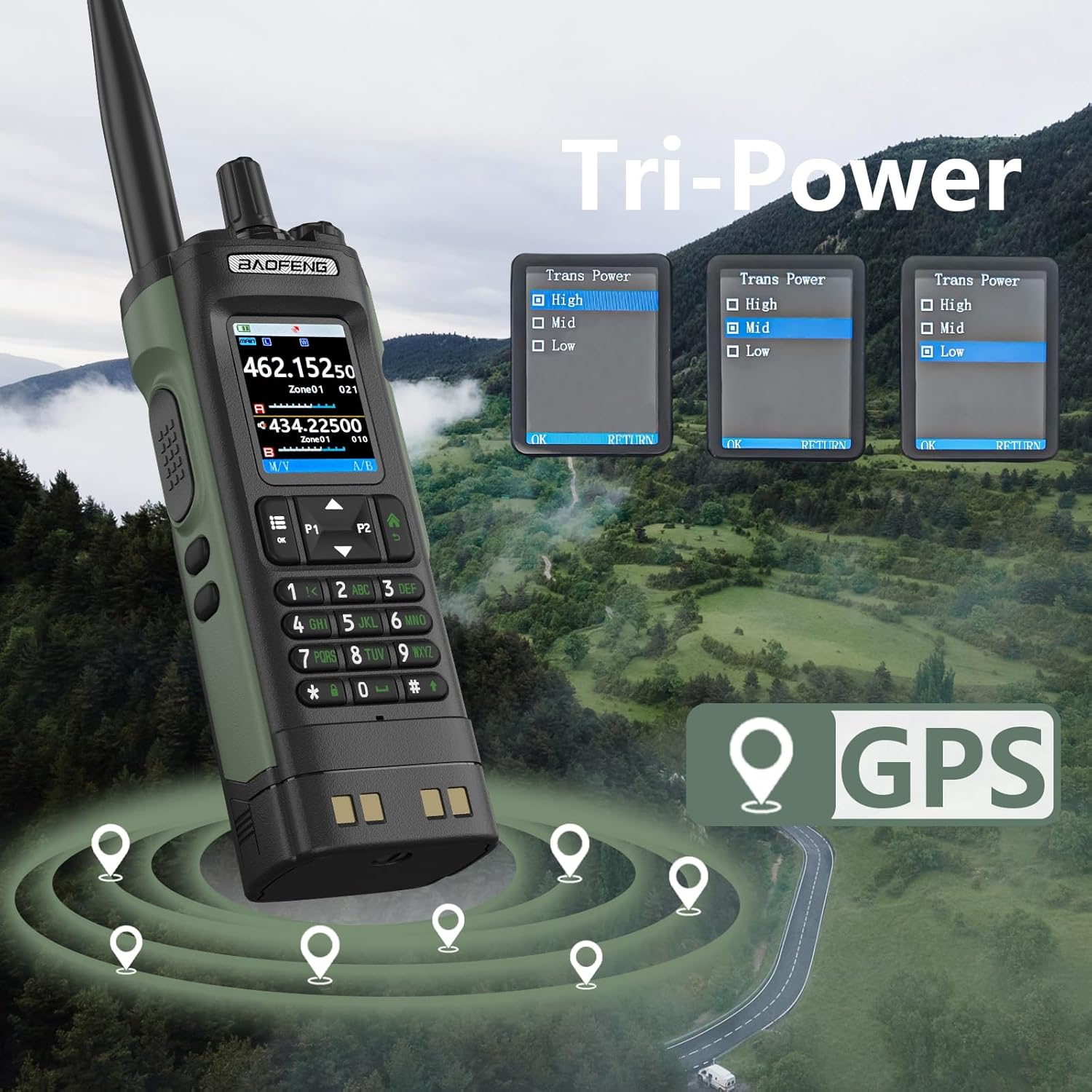
Image: Visual representation of the BAOFENG UV-32's GPS capabilities and its Tri-Power output settings (High, Mid, Low).

Image: The BAOFENG UV-32 displaying a map interface with GPS location markers.
6. NOAA Weather Alerts & AM/FM Radio
The radio can receive 10 NOAA weather channels for real-time alerts and also features an AM/FM radio for entertainment.
- To access NOAA weather channels, navigate through the menu or use a dedicated function key if programmed.
- To switch to AM/FM radio, select the appropriate mode from the menu.

Image: The BAOFENG UV-32 displaying a weather alert, with icons representing different weather conditions like sandstorm, rain, blizzard, and rainstorm.
7. Wireless Frequency Programming & One-Key Scan
- Wireless Programming: This feature allows for channel programming via a smartphone application, simplifying the setup process. Refer to the specific app instructions for pairing and programming.
- One-Key Scan: Activate the scan function (often assigned to a side key or menu option) to automatically detect active channels and frequencies. This helps in quickly finding clear communication channels.
8. Tri-Power Output
The UV-32 offers selectable power output levels (High, Mid, Low) to conserve battery life or extend communication range as needed.
- Adjust the power setting through the radio's menu. High power (10W) provides maximum range, while Low power is suitable for short-range communication and extends battery life.
Maintenance
- Cleaning: Use a soft, damp cloth to clean the radio's surface. Do not use harsh chemicals or abrasive cleaners.
- Battery Care:
- Charge the battery fully before first use.
- Avoid completely discharging the battery to prolong its lifespan.
- If storing the radio for an extended period, charge the battery to about 50% and remove it from the radio.
- Store batteries in a cool, dry place.
- Screen Protection: The radio comes with an anti-scratch screen protector. Ensure it is properly applied to protect the display.
- Accessory Port: Keep the 2-pin K type accessory port clean and free of debris.

Image: The anti-scratch screen protector being applied to the BAOFENG UV-32 radio's display.
Troubleshooting
| Problem | Possible Cause | Solution |
|---|---|---|
| Radio does not power on. | Battery is low or not installed correctly. | Charge the battery. Ensure the battery is securely installed. |
| Cannot transmit or receive. | Incorrect frequency/channel, out of range, or antenna not attached. | Verify frequency/channel. Ensure you are within range. Check antenna connection. |
| Poor audio quality. | Low battery, weak signal, or microphone/speaker obstruction. | Charge battery. Move to an area with better signal. Clean microphone/speaker. |
| GPS not acquiring signal. | Obstructed view of sky, indoors. | Move to an open outdoor area with clear view of the sky. |
Specifications
| Feature | Detail |
|---|---|
| Model Number | UV-32 |
| Dimensions | 1.59"D x 2.61"W x 7.09"H |
| Power Output | 10W (High), Mid, Low selectable |
| Battery Capacity | 2500mAh Li-ion |
| Charging Type | USB-C |
| Frequency Range (RX) | FM: 76-108MHz, AM: 108-136MHz, 136-174MHz, 220-260MHz, 350-390MHz, 400-520MHz |
| Frequency Range (TX) | 144-148MHz, 420-450MHz |
| Number of Channels | 1000 |
| Special Features | GPS, NOAA Weather Alerts, Wireless Programming, One-Key Scan, DTMF, VOX |
| Screen | 2.0" Color LCD |
| Water Resistance Level | Not Water Resistant |
| Operating Voltage | 3.7 Volts |
| Talking Range Maximum | 10 Kilometer (approx. 3-4 miles in forests, 2-3 miles in urban areas) |
Warranty and Support
Warranty: The BAOFENG UV-32 Radio comes with a 1-year limited warranty from the date of purchase. This warranty covers manufacturing defects and workmanship. It does not cover damage caused by misuse, accidents, unauthorized modifications, or normal wear and tear. Please retain your proof of purchase for warranty claims.
Customer Support: For technical assistance, troubleshooting, or warranty inquiries, please contact BAOFENG customer support through their official website or the retailer from whom you purchased the product.
For more information, visit the official BAOFENG store: BAOFENG Store on Amazon.
Documents and downloads
Ask a question about this manual
Ask about setup, troubleshooting, compatibility, parts, safety, or missing instructions. Manuals+ will review the question and use this page’s manual context to help answer it.