
1. Introduction
This manual provides detailed instructions for the proper use and care of your Altec Lansing Nanophones ANC 2.0 Wireless Over-Ear Bluetooth Headphones. Please read this manual thoroughly before using the product to ensure optimal performance and longevity.

Image 1.1: Altec Lansing Nanophones ANC 2.0 in Silver.
2. Package Contents
Verify that all items are present in your package:
- Altec Lansing Nanophones ANC 2.0 Wireless Over-Ear Headphones
- USB-C Charging Cable
- 3.5mm Audio Cable
- User Manual (this document)

Image 2.1: Included USB-C charging cable and 3.5mm audio cable.
3. Product Overview
Familiarize yourself with the headphone components and controls.
3.1 Headphone Features
- Active Noise Cancellation (ANC): Reduces ambient noise for an immersive listening experience.
- Foldable Design: Allows for compact storage and portability.
- Adjustable Headband & Soft Ear Cushions: Ensures a comfortable fit for extended wear.
- Integrated Microphone: For hands-free calls and voice assistant commands.
- USB-C Charging: For fast and convenient power replenishment.
- Voice Assistant Compatibility: Access Siri or Google Voice with ease.

Image 3.1: Key features of the Nanophones ANC 2.0 headphones.
3.2 Controls and Ports
Locate the following controls on your headphones:
- Power Button: On/Off, Play/Pause, Answer/End Call.
- Volume Up/Next Track Button: Short press for volume up, long press for next track.
- Volume Down/Previous Track Button: Short press for volume down, long press for previous track.
- ANC Button: Activates/Deactivates Active Noise Cancellation.
- USB-C Charging Port: For connecting the charging cable.
- 3.5mm Audio Jack: For wired connection.
- LED Indicator: Displays power, pairing, and charging status.

Image 3.2: Side view illustrating the location of controls and ports.
4. Setup
4.1 Charging the Headphones
- Connect the small end of the USB-C charging cable to the USB-C port on the headphones.
- Connect the large end of the USB-C charging cable to a USB power source (e.g., wall adapter, computer USB port).
- The LED indicator will glow red during charging and turn off when fully charged.
- A full charge takes approximately 2-3 hours.
Note: Ensure the headphones are fully charged before first use for optimal battery life.
4.2 Powering On/Off
- To Power On: Press and hold the Power Button for 3 seconds. The LED indicator will flash blue.
- To Power Off: Press and hold the Power Button for 3 seconds. The LED indicator will turn off.
4.3 Bluetooth Pairing
- Ensure the headphones are powered off.
- Press and hold the Power Button for 5-7 seconds until the LED indicator flashes red and blue alternately. This indicates pairing mode.
- On your device (smartphone, tablet, computer), enable Bluetooth and search for available devices.
- Select "Nanophones ANC 2.0" from the list of devices.
- Once paired, the LED indicator will flash blue slowly.
- If prompted for a password, enter "0000".
Note: The headphones will automatically attempt to reconnect to the last paired device when powered on.
5. Operating Instructions
5.1 Music Playback
- Play/Pause: Short press the Power Button.
- Volume Up: Short press the Volume Up button.
- Volume Down: Short press the Volume Down button.
- Next Track: Long press the Volume Up button.
- Previous Track: Long press the Volume Down button.
5.2 Phone Calls
- Answer/End Call: Short press the Power Button.
- Reject Call: Long press the Power Button.
- Redial Last Number: Double-press the Power Button.
5.3 Active Noise Cancellation (ANC)
- Activate ANC: Press the ANC Button. The ANC LED indicator will light up.
- Deactivate ANC: Press the ANC Button again. The ANC LED indicator will turn off.
Note: Using ANC will reduce battery life. The headphones provide up to 20 hours of playtime with ANC active, and up to 30 hours without ANC.
5.4 Voice Assistant
- Activate Voice Assistant: Triple-press the Power Button to activate Siri or Google Voice (depending on your connected device).
- You can then issue commands through the headphone's microphone.
5.5 Wired Connection
- Insert one end of the 3.5mm audio cable into the headphone's audio jack.
- Insert the other end into your audio device's 3.5mm output.
- The headphones can be used in wired mode even if the battery is depleted.
6. Maintenance
6.1 Cleaning
- Wipe the headphones with a soft, dry cloth.
- Do not use abrasive cleaners, alcohol, or chemical solvents.
- Avoid getting moisture into any openings.
6.2 Storage
- Store the headphones in a cool, dry place away from extreme temperatures.
- When not in use, fold the headphones to protect them and save space.
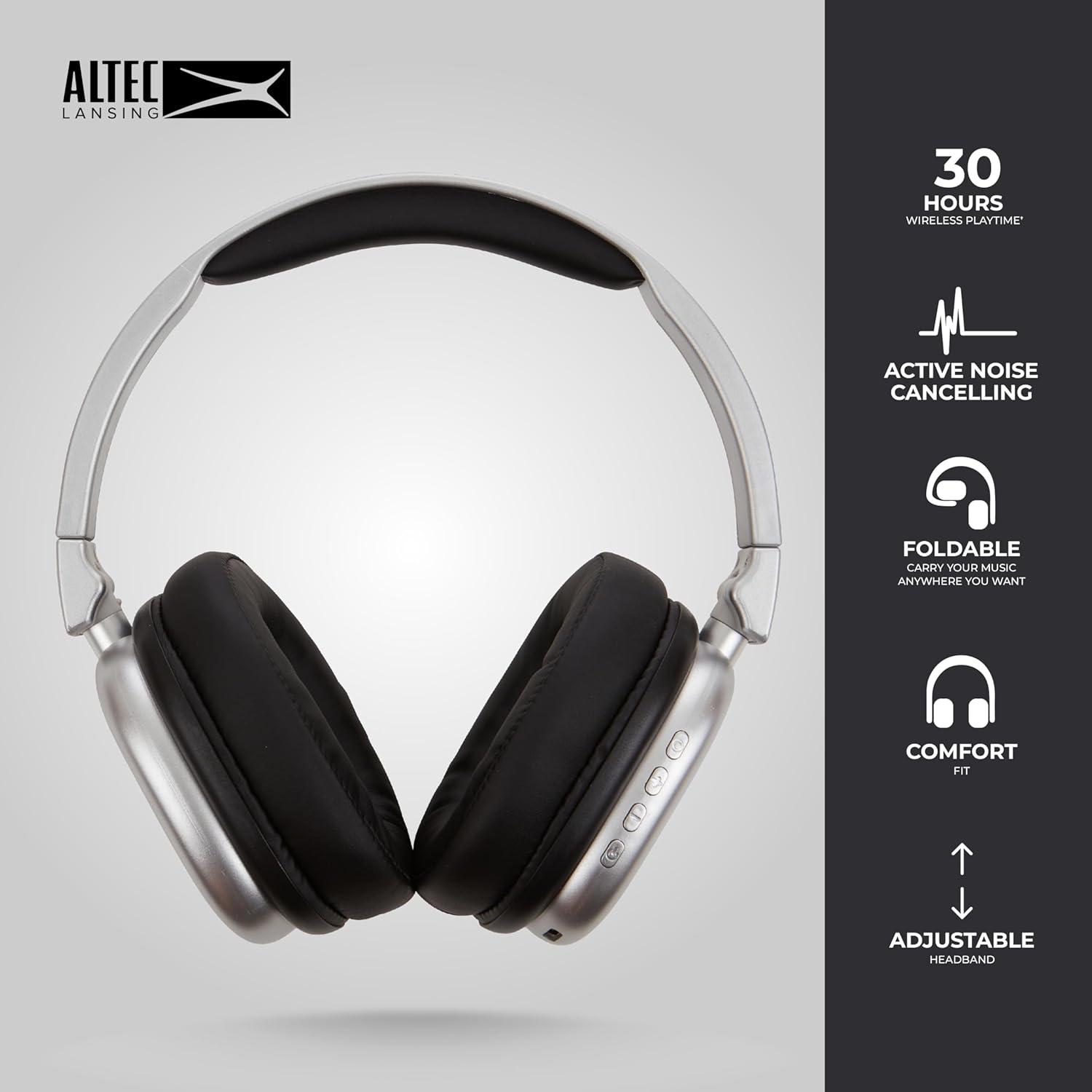
Image 6.1: The foldable design aids in compact storage.
7. Troubleshooting
| Problem | Solution |
|---|---|
| Headphones do not power on. | Ensure the headphones are charged. Connect to a power source using the USB-C cable. |
| Cannot pair via Bluetooth. |
|
| No sound or low volume. |
|
| Active Noise Cancellation not working. | Ensure the ANC button has been pressed and the ANC LED indicator is lit. |
8. Specifications
| Model Name | Nanophones ANC 2.0 |
| Model Number | MZX5501-MSIL-STK-6 |
| Brand | Altec Lansing |
| Connectivity | Wireless (Bluetooth 4.1), Wired (3.5mm) |
| Ear Placement | Over-Ear |
| Noise Control | Active Noise Cancellation |
| Battery Life | Up to 30 hours (wireless), Up to 20 hours (with ANC) |
| Charging Port | USB-C |
| Audio Driver Type | Dynamic Driver (1.5" Neodymium) |
| Frequency Range | 20Hz - 20,000Hz |
| Weight | 7.05 Ounces |
| Material | Plastic |
9. Warranty and Support
9.1 Manufacturer Warranty
This product is covered by a manufacturer's warranty. Please refer to the warranty card included in your package or visit the official Altec Lansing website for detailed warranty terms and conditions.
9.2 Customer Support
For technical assistance, troubleshooting, or product inquiries, please contact Altec Lansing customer support through their official website or the contact information provided in your product packaging.
Website: www.alteclansing.com