
Introduction
This manual provides essential information for the safe and effective operation of your ENDYSHOW 3-Head Moving Head DJ Light. Please read thoroughly before installation and use. Retain this manual for future reference.
Important Safety Instructions
- Always connect to a grounded power outlet.
- Ensure proper ventilation to prevent overheating.
- Do not expose the device to rain or moisture.
- Avoid direct eye exposure to the light source.
- Disconnect power before cleaning or servicing.
- Installation should be performed by qualified personnel.
What's in the Box
- 3-Head Moving Head DJ Light ×1
- Instruction Manual ×1
- Power Cord ×1
- Mounting Brackets ×1
Product Overview
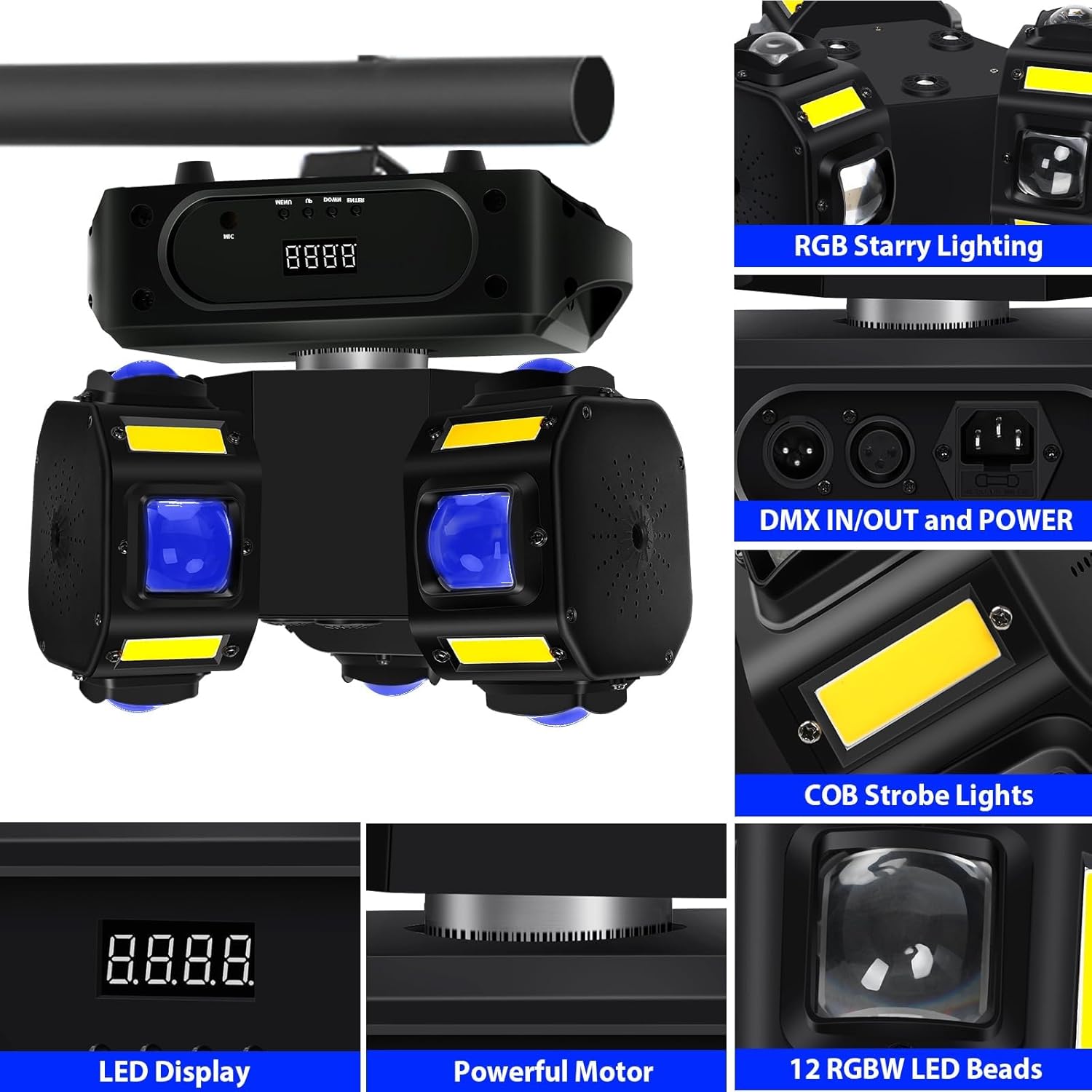
The ENDYSHOW 3-Head Moving Head DJ Light features 12*10W RGBW 4-in-1 LED rotating beam lights and 12*5W Arbe COB LED lighting effects, with a powerful RGB starry lighting effect at the center. It supports various lighting effects including beam, strobe, fast sweep, chase, pulse, and dimming.


Specifications
| Feature | Detail |
|---|---|
| Voltage | AC110-240V, 50/60Hz |
| Power | 180W |
| LEDs | 12 × 10W RGBW 4-in-1 CREE |
| Strobe | 12 × 5W Arbe COB LED |
| Dimmer | 0-100% Linear Dimming |
| Movement (X-axis) | 540° Horizontal Rotation |
| Movement (Y-axis) | Infinite Tilt |
| Control Modes | Auto, DMX512, Sound-Activated, Master/Slave |
| Beam Angle | 13 degrees |
| Material | Aluminum |
| Product Dimensions | 12.25"L x 8.58"W x 12.38"H |
| Item Weight | 10.74 pounds |
Setup
1. Mounting
The DJ light comes with two types of mounting brackets for versatile installation. It can be placed on tables, floors, or hung from walls, trusses, or ceilings. Ensure the mounting surface is stable and capable of supporting the device's weight. Always use appropriate safety cables when suspending the unit.

2. Power Connection
Connect the provided power cord to the device's power input and then to a suitable AC110-240V, 50/60Hz power outlet. The unit features a power in/out for daisy-chaining multiple units.
3. DMX Connection
For DMX512 control, connect a DMX cable from your DMX controller to the DMX IN port on the light. If chaining multiple units, connect the DMX OUT of the first unit to the DMX IN of the next. It is recommended to use a DMX terminator on the last unit in the chain to prevent signal interference.
Operating Modes
The ENDYSHOW 3-Head Moving Head DJ Light offers several control modes:
- DMX512 Mode: Allows precise control over various parameters (color, movement, strobe, dimming) using a DMX controller. The unit supports 9 or 11 DMX channels. Refer to the DMX channel table in the included manual for detailed channel assignments.
- Sound-Activated Mode: The light reacts to music and sound, creating dynamic effects synchronized with the audio. This mode is ideal for parties and events without a dedicated DMX controller.
- Auto Mode: The light cycles through pre-programmed patterns and effects automatically.
- Master-Slave Mode: Link multiple units together. One unit acts as the master, controlling all other slave units, ensuring synchronized lighting effects across your setup.
Maintenance
1. Cleaning
Regularly clean the lenses and housing with a soft, lint-free cloth to maintain optimal light output and prevent dust buildup. Do not use abrasive cleaners or solvents.
2. Storage
When not in use, store the device in a dry, dust-free environment, preferably in its original packaging or a protective case.
Troubleshooting
- No Power: Check the power cord connection and ensure the power outlet is functional. Verify the unit's power switch is in the 'ON' position.
- No Light Output: Ensure the unit is powered on and not in a 'Blackout' or 'Standby' mode. Check DMX settings if applicable.
- No DMX Control: Verify DMX cable connections. Ensure the DMX address is correctly set on the unit and matches your controller. Check for a DMX terminator on the last unit.
- Sound-Activated Mode Not Responding: Ensure the microphone is not obstructed. Adjust the sound sensitivity setting on the control panel.
- Abnormal Movement/Noise: Perform a reset function (refer to the manual's control panel section). Ensure the unit is mounted securely and free from obstructions.
Warranty and Support
For warranty information or technical support, please refer to the contact details provided in your product packaging or visit the official ENDYSHOW website. Keep your purchase receipt as proof of purchase for warranty claims.