
PULIVIA YS-810F
PULIVIA YS-810F Waterproof Stopwatch Timer User Manual
Introduction
This manual provides detailed instructions for the operation and maintenance of your PULIVIA YS-810F Waterproof Stopwatch Timer. Please read this manual thoroughly before using the device to ensure proper function and longevity.
Product Overview
The PULIVIA YS-810F is a versatile digital stopwatch designed for various sports and timing needs. Key features include:
- 1/100-second accuracy
- 10 Lap/Split time memory storage
- Countdown Timer function
- Date, Clock, and Alarm functions
- Pace Mode (Fitness metronome)
- Large three-row display
- Water-resistant design

Image: Front view of the PULIVIA YS-810F Waterproof Stopwatch Timer, showing the display and buttons.
Setup
- Unpacking: Carefully remove the stopwatch and included lanyard from the packaging.
- Screen Protector: A screen protector is attached to the display. You may peel it off for clearer viewing if desired.
- Lanyard Attachment: Attach the black nylon lanyard to the stopwatch for convenient carrying.
- Initial Power: The stopwatch comes with a pre-installed CR2032 battery. If the display is blank, ensure the battery is properly seated or consider replacing it if necessary.
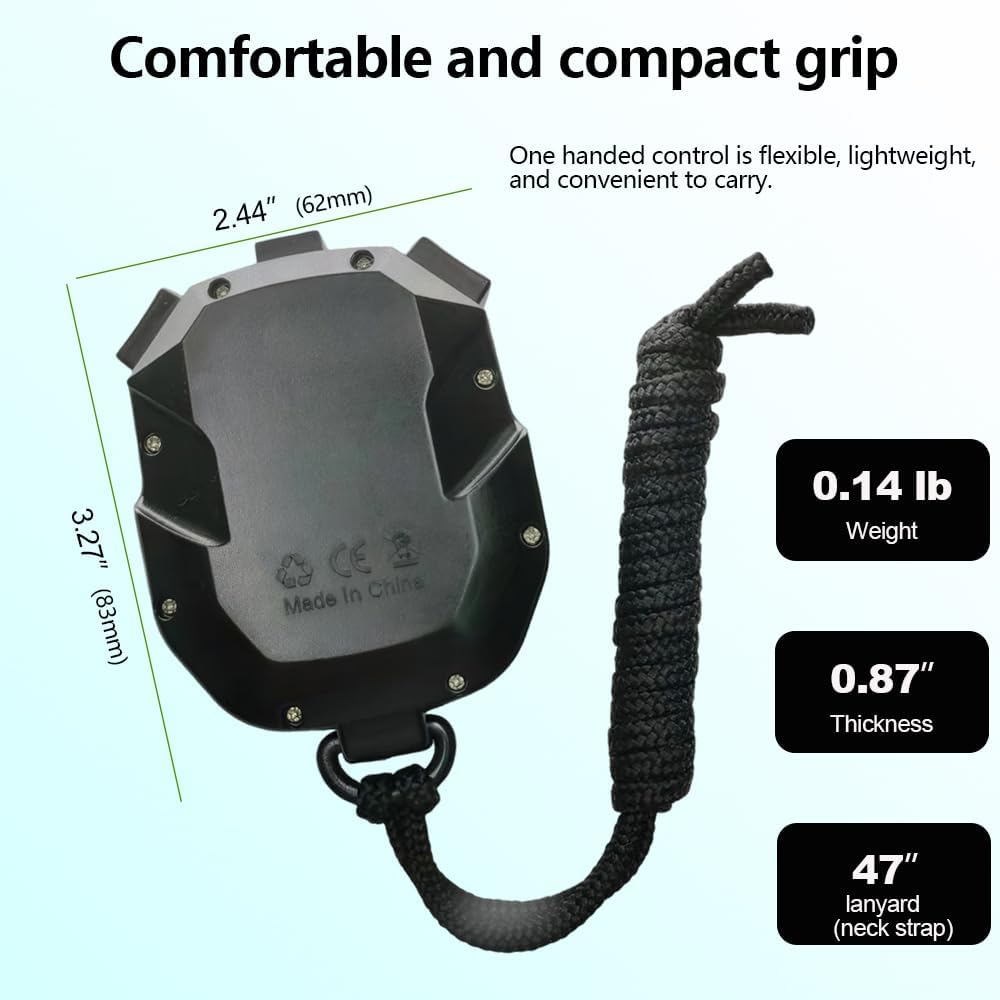
Image: Diagram showing the dimensions (2.44" W x 3.27" H x 0.87" T) and weight (0.14 lb) of the PULIVIA YS-810F stopwatch, along with the 47" lanyard.
Operating Instructions
The stopwatch features several modes. Press the "MODE" button to cycle through them: Stopwatch, Countdown Timer, Clock/Calendar/Alarm, and Pace Mode.
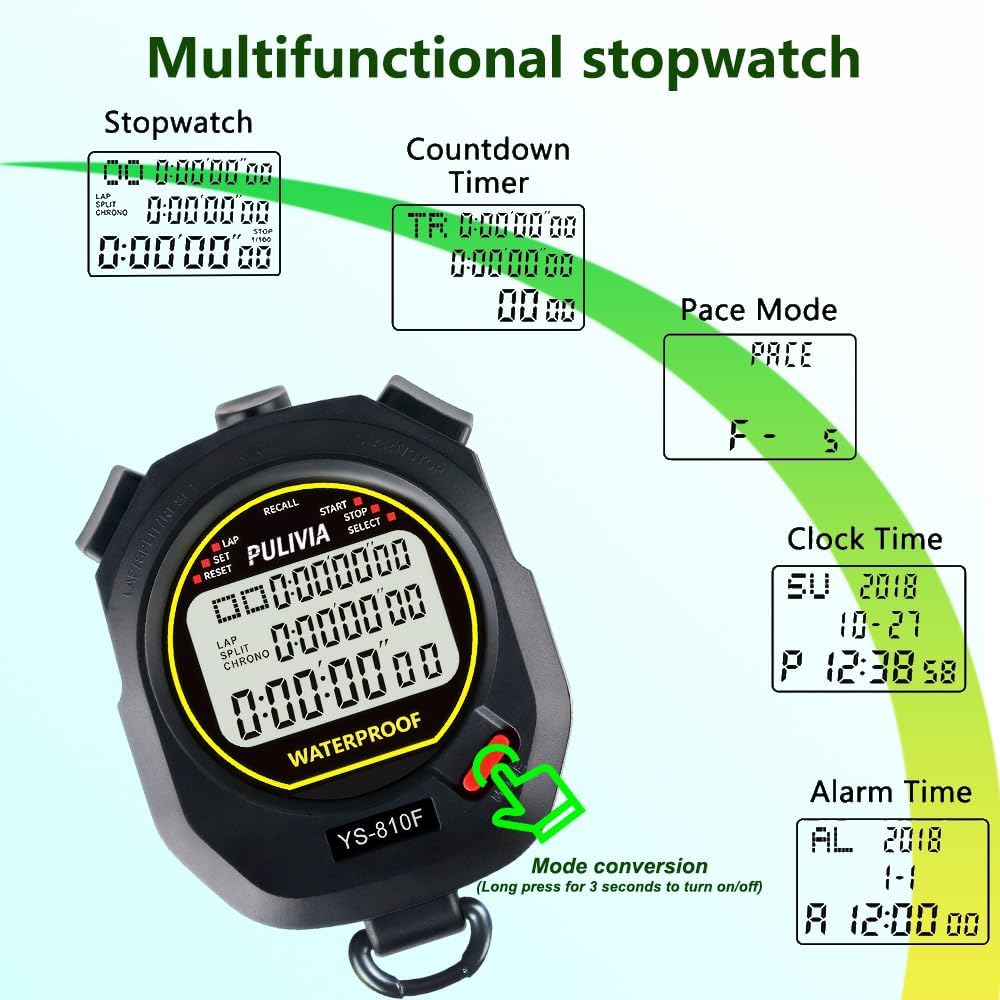
Image: Illustration demonstrating the different modes of the PULIVIA YS-810F stopwatch: Stopwatch, Countdown Timer, Pace Mode, Clock Time, and Alarm Time, with an arrow indicating mode conversion via a long press.
1. Stopwatch Mode
This is the primary timing function.
- Press the START/STOP button to begin timing.
- Press START/STOP again to pause the timer.
- Press the RESET button to clear the timer to zero.
- Lap/Split Timing: While the stopwatch is running, press the LAP/SPLIT button to record a lap or split time. The display will momentarily show the recorded time while the main timer continues in the background.
- Memory Recall: After stopping the timer, press the RECALL button to view stored lap/split times. Up to 10 memories can be stored. Use the SELECT button to navigate through the stored times.
2. Countdown Timer Mode
To use the countdown function:
- Press MODE until "TR" appears on the screen.
- Use the SET button to adjust the desired countdown time (hours, minutes, seconds).
- Press START/STOP to begin the countdown.
- When the countdown reaches zero, an alarm will sound.
3. Clock, Calendar, and Alarm Mode
To set the time, date, and alarm:
- Press MODE to navigate to the clock display.
- Press and hold SET to enter setting mode. The digit to be set will flash.
- Use SELECT to adjust the value and SET to move to the next setting (e.g., hour, minute, year, month, day).
- Repeat for alarm settings.
- Press MODE to exit setting mode.
4. Pace Mode (Metronome)
This mode helps maintain a consistent pace during training.
- Press MODE until "PACE" appears.
- Use SET to adjust the pace value (from 5 to 320 counts per minute).
- Press START/STOP to activate the metronome. The stopwatch will emit a "B" sound at the set frequency.
Maintenance
- Cleaning: Wipe the stopwatch with a soft, dry cloth. Do not use abrasive cleaners or solvents.
- Water Resistance: The stopwatch is water-resistant for dripping, splashing, and sweat (IPX7 rated). Do NOT press any buttons underwater. Avoid prolonged submersion or exposure to heavy rain. It is not suitable for swimming or diving.
- Battery Replacement: The stopwatch uses a CR2032 battery. When the display dims or becomes erratic, replace the battery. Open the back cover carefully, replace the old battery with a new one, ensuring correct polarity, and securely close the cover.

Image: The PULIVIA YS-810F stopwatch being splashed with water, illustrating its IPX7 water resistance rating. Note: Do not press buttons underwater.
Troubleshooting
| Problem | Possible Cause | Solution |
|---|---|---|
| Display is blank or dim. | Low or dead battery (CR2032). | Replace the battery. Ensure correct polarity. |
| Buttons are unresponsive. | Device might be in a locked state or battery issue. | Try removing and reinserting the battery. If issue persists, contact support. |
| Water ingress after exposure. | Buttons pressed underwater or prolonged submersion. | The device is water-resistant, not fully waterproof for submersion. Avoid pressing buttons underwater. Allow to dry thoroughly. |
Specifications
- Brand: PULIVIA
- Model Number: YS-810F
- Material: Acrylonitrile Butadiene Styrene
- Dimensions: 0.78"D x 3.2"W x 2.4"H
- Item Weight: 2.08 ounces
- Battery: 1 x CR2032 (included)
- Accuracy: 1/100-second
- Memory: 10 Lap/Split memory
- Max Timing Capacity: 10 hours
- Water Resistance: IPX7 (Water-resistant for splashes, not for submersion or pressing buttons underwater)
Warranty and Support
For any questions, concerns, or support needs regarding your PULIVIA YS-810F Stopwatch Timer, please contact PULIVIA customer service via the Amazon email system. We offer 7 days/24 hours customer service.
Please refer to your purchase documentation for specific warranty details.
Ask a question about this manual
Ask about setup, troubleshooting, compatibility, parts, safety, or missing instructions. Manuals+ will review the question and use this page’s manual context to help answer it.