
1. Introduction
This instruction manual provides essential information for the proper installation, use, and maintenance of your RATION Billy Goat Blower Vibration Mounts, Part# 400173. These mounts are designed to reduce vibrations in compatible Billy Goat blowers, ensuring secure component installation and contributing to optimal equipment performance and longevity. Please read this manual thoroughly before installation.
2. Product Overview
The RATION Billy Goat Blower Vibration Mounts (Part# 400173) are supplied as a 6-pack of replacement parts. Each mount is engineered to absorb mechanical vibrations, which helps to protect the blower's components from wear and tear, reduces operational noise, and improves user comfort during operation. These mounts are crucial for maintaining the structural integrity and efficient functioning of your blower.
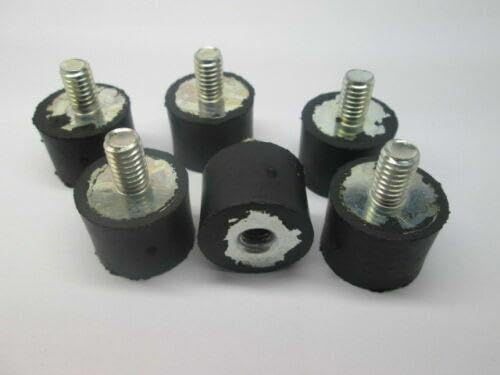
Image 2.1: A 6-pack of RATION Billy Goat Blower Vibration Mounts, Part# 400173. These mounts feature a rubber body with a threaded metal stud on one end and a threaded insert on the other, designed to isolate vibrations.
3. Safety Information
Always prioritize safety when working with power tools and replacement parts. Failure to follow safety guidelines may result in injury or damage to equipment.
- Read the Blower's Manual: Always consult your specific Billy Goat blower's owner's manual for additional safety instructions and disassembly/assembly procedures.
- Disconnect Power: Before attempting any installation or maintenance, ensure the blower's engine is off and the spark plug wire is disconnected to prevent accidental starting.
- Wear Protective Gear: Use appropriate personal protective equipment (PPE), such as gloves and eye protection, during installation.
- Use Correct Tools: Employ the correct tools for the job to avoid damaging the mounts or the blower.
- Secure Work Area: Work in a well-lit, stable environment.
4. Installation Instructions
These vibration mounts are designed as direct replacements for Billy Goat blowers requiring Part# 400173. Ensure compatibility by checking your blower's manual or existing part before proceeding.
4.1. Tools Required
- Wrench or socket set (appropriate size for existing fasteners)
- Screwdriver (if needed for panel removal)
- Gloves
- Safety glasses
4.2. Installation Steps
- Prepare the Blower: Ensure the blower is turned off, cooled down, and the spark plug wire is disconnected. Place the blower on a stable, flat surface.
- Locate Existing Mounts: Identify the vibration mounts that need replacement. These are typically found securing the engine to the frame or other vibrating components.
- Remove Old Mounts: Using the appropriate wrench or socket, carefully loosen and remove the nuts or bolts securing the old vibration mounts. Remove the old mounts from their positions. Note the orientation of the old mounts for correct installation of the new ones.
- Inspect Mounting Area: Clean any debris or corrosion from the mounting surfaces. Ensure the area is free from obstructions.
- Install New Mounts: Position the new RATION vibration mounts (Part# 400173) into the designated locations. Ensure they are correctly aligned.
- Secure New Mounts: Reinstall the nuts or bolts, tightening them securely but without over-tightening, which could damage the mounts or threads. Refer to your blower's manual for specific torque specifications if available.
- Verify Installation: Gently check that all components are securely fastened and that the new mounts are properly seated.
- Reconnect Power: Reconnect the spark plug wire.

Image 4.1: A detailed view of a RATION Billy Goat Blower Vibration Mount. This image highlights the robust construction and threaded ends designed for secure attachment and vibration dampening.
5. Ensuring Optimal Performance
Properly installed vibration mounts are essential for the optimal performance of your Billy Goat blower. They contribute to:
- Reduced Vibration: Minimizing the transfer of engine vibrations to the blower's frame and handles, improving user comfort and reducing fatigue.
- Component Protection: Protecting sensitive components from vibration-induced stress, extending the lifespan of the blower.
- Stable Operation: Ensuring that the engine and other parts remain securely in place during operation, preventing misalignment or loosening.
6. Maintenance
Regular inspection of your vibration mounts is recommended to ensure continued optimal performance and safety.
- Periodic Inspection: Visually inspect the mounts for signs of wear, cracking, hardening, or deterioration of the rubber material. Check for any looseness in the mounting bolts or nuts.
- Replacement: If any mounts show significant signs of wear, damage, or if vibrations become excessive, replace them promptly with new RATION Billy Goat Blower Vibration Mounts (Part# 400173).
- Cleaning: Keep the mounts and surrounding areas clean from dirt, oil, and debris, which can accelerate material degradation.
7. Troubleshooting
If you experience persistent or increased vibrations after installing new mounts, consider the following:
- Incorrect Installation: Double-check that all mounts are installed correctly and securely tightened according to the instructions.
- Damaged Mounts: Inspect the new mounts for any manufacturing defects or damage that may have occurred during installation.
- Other Components: Excessive vibration may also stem from other worn or damaged components within the blower, such as engine mounts, fan blades, or bearings. Consult your blower's service manual or a qualified technician for further diagnosis.
- Compatibility: Ensure that Part# 400173 is the correct vibration mount for your specific Billy Goat blower model.
8. Specifications
| Feature | Detail |
|---|---|
| Part Number | 400173 |
| Quantity | 6 per pack |
| Compatibility | Designed for Billy Goat Blowers requiring Part# 400173 |
| Function | Vibration dampening and secure component mounting |
| Manufacturer | RATION |
9. Warranty and Support
For information regarding product warranty, returns, or technical support, please refer to the RATION manufacturer's official website or contact their customer service directly. Keep your purchase receipt as proof of purchase.