1. Introduction
Thank you for choosing the VOOPON C56TB Mini Walkie Talkies. These compact and lightweight two-way radios are designed for reliable long-range communication, making them ideal for various activities such as family outings, hiking, camping, cruising, and shop use. This manual provides essential information for the proper setup, operation, and maintenance of your device.
2. What's in the Box
- VOOPON C56TB Walkie Talkie (Quantity as per pack)
- Belt Clip
- User Manual
- Lithium Battery (Quantity as per pack)
- Type-C USB Charging Cable (Quantity as per pack)
- Charger (Quantity as per pack)
3. Product Overview
Familiarize yourself with the components of your VOOPON C56TB walkie talkie.

Figure 3.1: Front and side view of the VOOPON C56TB walkie talkie with labeled components including antenna, signal light, charger light, microphone, channel selector plus (CH+), power button, channel selector minus (CH-), PTT key, volume up/monitor, volume down/lock key, MIC/Speaker port, and USB plug. Dimensions are also indicated: length 2.17 inches, width 0.78 inches, height 5.12 inches.
- Antenna: For transmitting and receiving signals.
- Signal Light: Indicates transmission (red) or reception (green).
- Charger Light: Indicates charging status.
- Microphone: For speaking.
- CH+ / CH- Buttons: To select channels.
- Power Button: To turn the device on or off.
- PTT Key (Push-to-Talk): Press and hold to transmit, release to listen.
- VOL+ / Monitor: Adjusts volume up, short press for monitor function.
- VOL- / Lock Key: Adjusts volume down, press and hold for 2 seconds to activate/deactivate Key Lock.
- MIC/Speaker Port: For external audio accessories.
- USB Plug (Type-C): For charging the device.
4. Setup
4.1 Battery Installation
- Remove the belt clip by sliding it upwards from the back of the walkie talkie.
- Open the back cover by gently prying it open from the bottom edge.
- Insert the Lithium battery into the compartment, ensuring correct polarity.
- Replace the back cover and reattach the belt clip.
Figure 4.1: Steps for battery installation, including removing the belt clip, opening the back cover, and inserting the battery.
4.2 Charging the Battery
Before first use, fully charge the walkie talkie battery.
- Connect the Type-C USB charging cable to the USB plug on the side of the walkie talkie.
- Connect the other end of the cable to the provided charger, and plug the charger into a standard wall outlet.
- The charger light will indicate the charging status. A full charge typically takes approximately 4 hours.
- Once fully charged, disconnect the charger. The device features a low voltage alert to inform you when charging is needed.
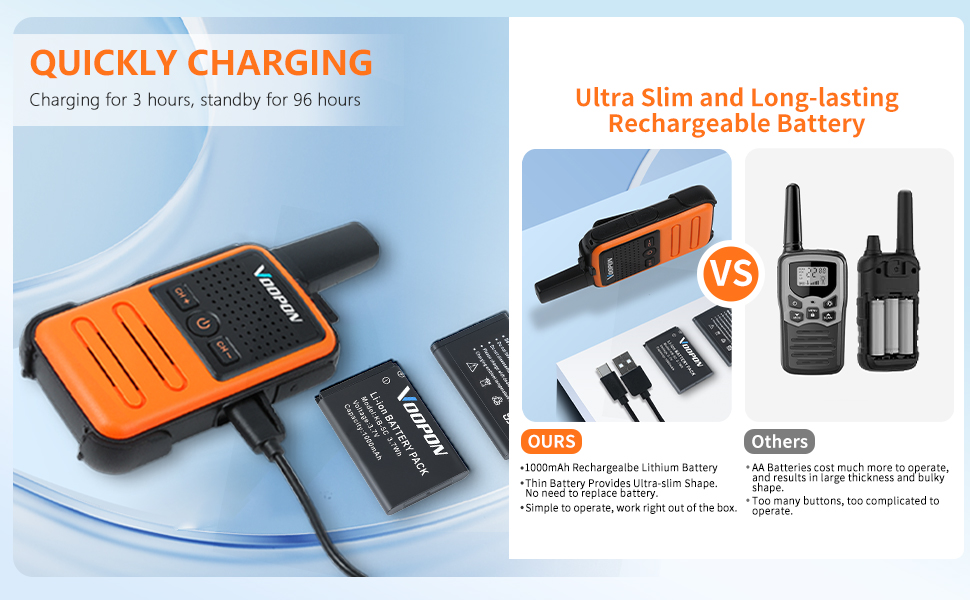
Figure 4.2: VOOPON C56TB walkie talkie connected for charging via USB-C, highlighting its quick charging capability.
5. Operating Instructions
5.1 Power On/Off
Press and hold the Power Button (center button) for approximately 2 seconds to turn the walkie talkie on or off. The device will announce the current channel number when powered on.
5.2 Channel Selection
Your walkie talkie has 22 FRS channels. To change channels:
- Press the CH+ button to increase the channel number.
- Press the CH- button to decrease the channel number.
Ensure all walkie talkies in your group are set to the same channel for communication. These radios are preset with privacy codes for secure communication.
5.3 Transmitting and Receiving (PTT)
- To transmit, press and hold the PTT Key on the side of the walkie talkie. Speak clearly into the microphone. The signal light will turn red.
- To receive, release the PTT Key. The signal light will turn green when receiving a signal.
5.4 Volume Adjustment
Use the VOL+ and VOL- buttons to adjust the speaker volume to a comfortable level.
5.5 Key Lock Function
To prevent accidental channel changes or button presses, activate the Key Lock:
- Press and hold the VOL- / Lock Key for 2 seconds to activate or deactivate the Key Lock.
5.6 VOX Function (Voice Operated Exchange)
The VOX function allows for hands-free operation. When activated, the radio will transmit automatically when it detects your voice, without needing to press the PTT key. Refer to the detailed programming software guide for activation and sensitivity settings.
5.7 Auto Squelch
The auto squelch feature automatically mutes weak signals and background noise, ensuring clear audio reception only when a strong signal is present.
6. Maintenance
- Cleaning: Wipe the device with a soft, damp cloth. Do not use harsh chemicals or abrasive cleaners.
- Storage: Store the walkie talkie in a cool, dry place when not in use. Remove the battery if storing for extended periods.
- Battery Care: Avoid fully discharging the battery frequently. Recharge regularly to prolong battery life.
- Water Resistance: This device is Not Water Resistant. Avoid exposure to water or high humidity.
7. Troubleshooting
| Problem | Possible Cause | Solution |
|---|---|---|
| No power | Battery is low or depleted. Battery not installed correctly. | Charge the battery. Ensure the battery is correctly inserted with proper polarity. |
| Cannot communicate with other radios | Radios are on different channels. Radios are out of range. Key Lock is active. | Verify all radios are on the same channel. Move closer to the other radio. Deactivate Key Lock by pressing and holding VOL- for 2 seconds. |
| Short communication range | Obstructions (buildings, hills). Low battery. Interference. | Move to an open area. Ensure battery is fully charged. Avoid areas with high electromagnetic interference. |
| No sound or distorted sound | Volume is too low. Squelch level too high. Loose connection for external accessories. | Increase volume using VOL+. Adjust squelch settings (if programmable). Ensure external accessories are securely connected. |
| Charging issue | Faulty cable or charger. Damaged charging port. | Try a different Type-C USB cable and charger. Inspect the charging port for damage. If damage is present, contact support. |
8. Specifications
| Feature | Detail |
|---|---|
| Model Number | C56TB |
| Item Weight | 7.7 ounces |
| Product Dimensions | 0.83 x 2.32 x 5.35 inches |
| Batteries | 4 Nonstandard Lithium Battery (included) |
| Number of Channels | 22 FRS Channels |
| Frequency Range | FRS |
| Talking Range Maximum | 3 Kilometers (approx. 1.86 miles) |
| Voltage | 3.7 Volts |
| Water Resistance Level | Not Water Resistant |
| Special Features | Keypad Lock, Lightweight, Long Range, Mini Compact, Rechargeable |

Figure 8.1: Physical dimensions of the VOOPON C56TB walkie talkie, illustrating its compact size.
9. Warranty Information
The VOOPON C56TB Mini Walkie Talkies come with a 30-day warranty from the date of purchase. This warranty covers manufacturing defects. Please retain your proof of purchase for any warranty claims.
10. Support
For further assistance, technical support, or inquiries regarding PC programming software, please refer to the official VOOPON website or contact your retailer. Product guides and documents, including programming software, may be available on the product's online listing page.