
1. Introduction
Thank you for choosing the HomeTro HM3 Walking Pad Treadmill. This compact and versatile fitness machine is designed for walking, jogging, and light running in various home or office environments. Please read this manual thoroughly before initial use to ensure safe operation and optimal performance.
2. Safety Information
Your safety is paramount. Please observe the following precautions:
- Always consult with a healthcare professional before starting any new exercise program.
- Ensure the treadmill is placed on a flat, stable surface with adequate clearance around it.
- Keep children and pets away from the treadmill during operation.
- Wear appropriate athletic footwear.
- Do not operate the treadmill if it is damaged or malfunctioning.
- Unplug the treadmill from the power outlet when not in use or before cleaning/maintenance.
- The maximum user weight capacity for this treadmill is 120 kg (265 lbs). Do not exceed this limit.
3. Setup
3.1 Unpacking and Placement
The HomeTro HM3 Walking Pad Treadmill requires no assembly and is ready for use directly out of the box. Carefully remove all packaging materials.

Image: The packing list includes the treadmill, remote control, 5mm hex wrench, front foot pads, 20ml silicone oil, user manual, and power cord.
Place the treadmill on a firm, level surface. Ensure there is at least 0.6 meters (2 feet) of clear space behind the treadmill and 0.3 meters (1 foot) on each side for safe operation.
3.2 Connecting Power
Connect the power cord to the treadmill's power input and then plug it into a standard electrical outlet. Ensure the power switch on the treadmill is in the 'OFF' position before plugging it in.
4. Operating Instructions
4.1 Basic Operation Modes
The HomeTro HM3 offers three primary modes, adjustable via the remote control or the smart app:
- Working Mode: 0.6 - 1.6 MPH (for light activity while working or standing)
- Walking Mode: 1.6 - 3.0 MPH (for brisk walking)
- Running Mode: 3.0 - 5.0 MPH (for jogging or light running)
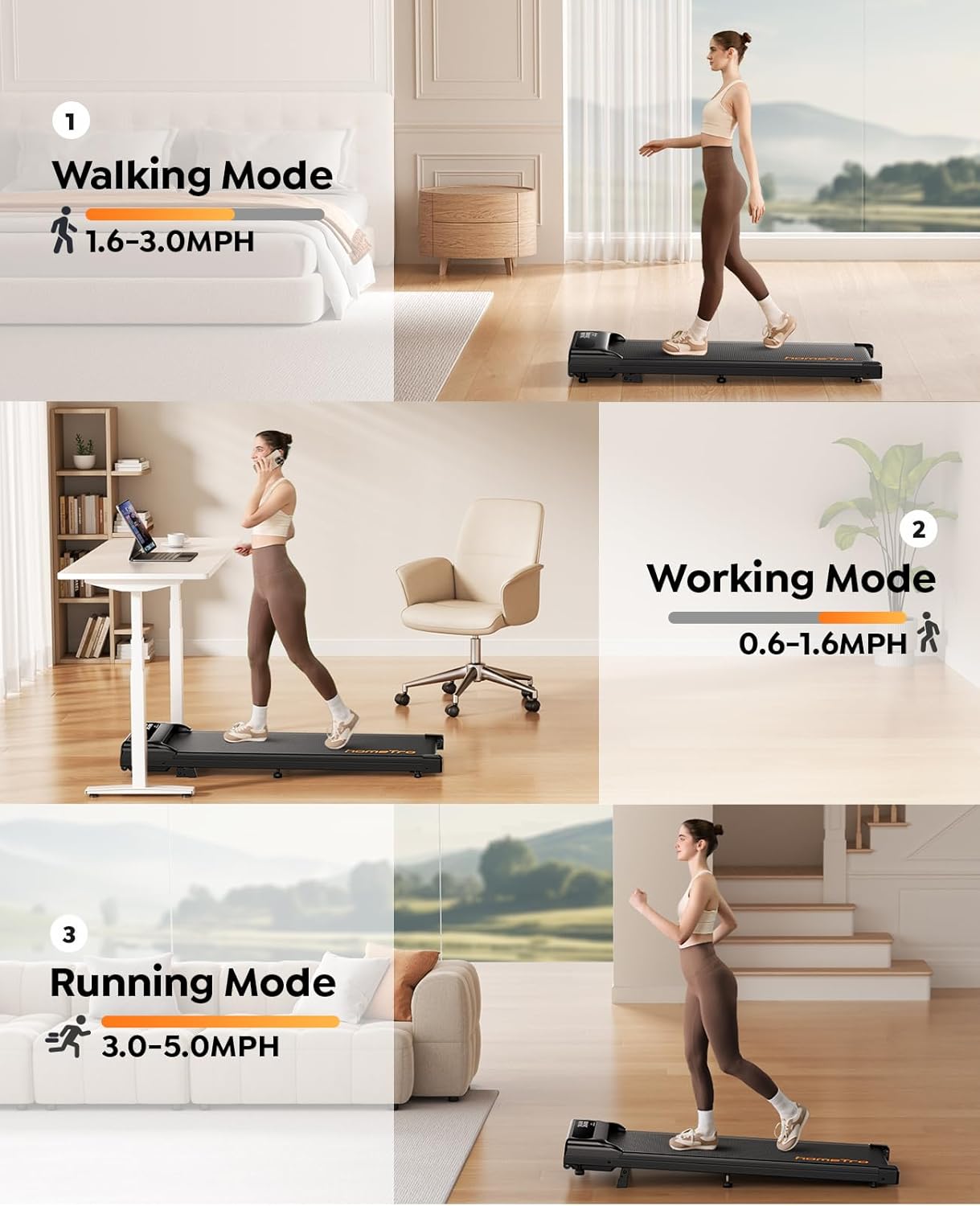
Image: Visual representation of the Walking Mode (1.6-3.0MPH), Working Mode (0.6-1.6MPH), and Running Mode (3.0-5.0MPH) with individuals using the treadmill in different settings.
4.2 Remote Control
Use the provided remote control to start/stop the treadmill, adjust speed, and change incline settings. The remote also features a convenient pause and resume function, allowing you to temporarily stop your workout without losing your progress data.
4.3 Smart App Connectivity
The HomeTro HM3 Walking Pad Treadmill supports Bluetooth 5.0 connectivity for integration with smart fitness applications. This allows for advanced control, tracking of workout data (time, speed, distance, calories), and access to interactive training programs.

Image: A user interacting with the smart app on a phone while using the treadmill, showing various workout metrics and control options, alongside the physical remote control.
Connecting to the App:
To connect your treadmill to a compatible fitness app, ensure Bluetooth is enabled on your device. Follow the app's instructions to add new equipment. You may need to select 'Treadmill' and search for 'FTMS' or 'ESANGLINKER' as the brand/model for connection.
Video: This video demonstrates the process of connecting the HomeTro HM3 Walking Pad Treadmill to a fitness application via Bluetooth 5.0. It shows how to select 'Treadmill' and search for 'FTMS' or 'ESANGLINKER' to establish a connection and begin tracking your workout data.
4.4 Adjustable Incline
The treadmill features an adjustable incline of up to 9%, allowing you to simulate uphill walking or running for a more challenging workout. Adjust the incline using the remote control or the smart app.

Image: A person running on the HomeTro HM3 Walking Pad Treadmill, highlighting the 9% adjustable incline feature and its benefits for calorie burning.
5. Maintenance
Regular maintenance ensures the longevity and safe operation of your treadmill.
5.1 Cleaning
Wipe down the treadmill surface with a damp cloth after each use. Avoid using abrasive cleaners or solvents that could damage the finish.
5.2 Lubrication
The running belt requires periodic lubrication to reduce friction and extend its lifespan. The treadmill features a unique lubrication hole design for convenient application. Refer to the included user manual for specific lubrication intervals and instructions. Use only the provided silicone oil or a recommended treadmill lubricant.
5.3 Running Belt Adjustment
Over time, the running belt may shift or become loose. Use the included tool kit (hex wrench) to adjust the belt tension and alignment as needed. Consult the detailed instructions in the full user manual for proper adjustment procedures.

Image: A cutaway view illustrating the 5-layer anti-slip and wear-resistant running belt, designed for cushioning and shock absorption to reduce impact on joints.
6. Troubleshooting
If you encounter issues with your HomeTro HM3 Walking Pad Treadmill, please refer to the following common solutions:
- Treadmill does not power on: Ensure the power cord is securely plugged into both the treadmill and a working electrical outlet. Check the power switch on the treadmill.
- Remote control not responding: Check the remote control's battery. Ensure there are no obstructions between the remote and the treadmill's receiver.
- Running belt slipping or uneven: The running belt may require adjustment. Refer to the 'Running Belt Adjustment' section in the full user manual for detailed instructions.
- Unusual noise during operation: Stop the treadmill immediately. Check for any foreign objects caught in the belt or motor area. If the noise persists, contact customer support.
For more complex issues, please consult the comprehensive user manual or contact HomeTro customer support.
7. Specifications
| Feature | Detail |
|---|---|
| Model Number | HM3 |
| Product Dimensions (L x W x H) | 116 x 48.5 x 18 cm (45.7 x 19.1 x 7.1 inches) |
| Item Weight | 18.7 kg (41.2 lbs) |
| Maximum User Weight | 120 kg (265 lbs) |
| Motor Horsepower | 3.0 HP |
| Maximum Speed | 5 Miles per Hour |
| Incline | Up to 9% adjustable |
| Connectivity | Bluetooth 5.0 (FTMS compatible) |
| Material | Alloy Steel |
| Power Source | Corded Electric |
| Color | Black |
8. Warranty & Support
8.1 Warranty Information
Please refer to the warranty card included with your purchase or visit the official HomeTro website for detailed warranty terms and conditions. Keep your proof of purchase for warranty claims.
8.2 Customer Support
For technical assistance, spare parts, or any questions regarding your HomeTro HM3 Walking Pad Treadmill, please contact HomeTro customer support. Contact details can typically be found on the HomeTro website or in your purchase documentation.