
1. Introduction
Thank you for choosing the Kuulaa Magsafe Power Bank 5000mAh. This portable magnetic wireless charger is designed to provide convenient and efficient power for your compatible devices, featuring both wireless and wired charging capabilities, along with a versatile folding swivel stand. Please read this manual carefully before use to ensure optimal performance and safety.
2. Safety Information
- Do not expose the power bank to extreme temperatures, direct sunlight, or fire.
- Avoid dropping, disassembling, or attempting to repair the device yourself.
- Keep the power bank away from water and other liquids.
- Use only certified charging cables and adapters.
- Keep out of reach of children.
- Dispose of the product responsibly according to local regulations.
3. Package Contents
Please check the package for the following items:
- Kuulaa Magsafe Power Bank 5000mAh
- USB-C Charging Cable
- User Manual
4. Product Features and Components
The Kuulaa Magsafe Power Bank is designed for convenience and efficiency:
- 5000mAh Capacity: Provides reliable power for your devices.
- Magnetic Wireless Charging: Securely attaches to compatible iPhone models (12/13/14/15 series) for 7.5W wireless charging.
- PD 20W USB-C Port: Supports fast wired charging for input and output, charging an iPhone to 50% in approximately 30 minutes.
- LED Battery Indicator: Four small LED lights display the remaining power level.
- Folding Swivel Stand: Integrated stand for hands-free viewing in various orientations.
- Slim & Portable Design: Ergonomic, lightweight, and travel-friendly.
- Advanced Safety Features: Built-in protection against overcharging, overcurrent, short circuit, and high temperature.
Product Overview

Figure 1: Side view of the power bank, illustrating its slim and portable design (0.8cm thickness, 110g weight).

Figure 2: The power bank magnetically attached to a smartphone, showcasing the secure and efficient magnetic connection.

Figure 3: Illustration of both wireless (top) and wired (bottom) charging methods supported by the power bank.
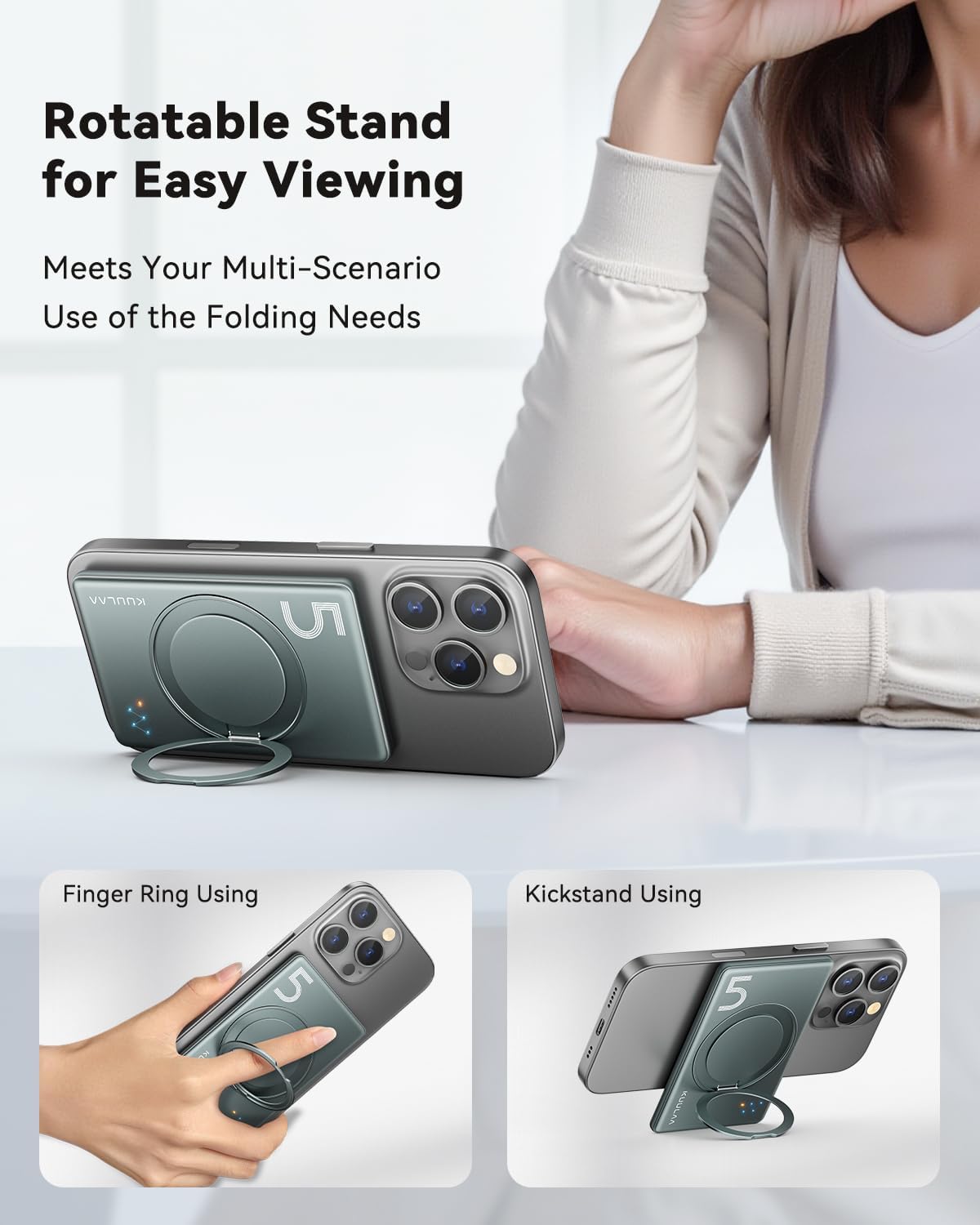
Figure 4: Examples of the integrated folding swivel stand being used as a kickstand and a finger ring for enhanced usability.
5. Setup
Initial Charging of the Power Bank
- Connect the provided USB-C cable to the USB-C port on the power bank.
- Connect the other end of the USB-C cable to a compatible USB power adapter (not included).
- The LED indicators will light up to show the charging status. All four LEDs will be solid when fully charged.
- For optimal performance, fully charge the power bank before its first use.
6. Operating Instructions
6.1. Wireless Charging
- Ensure your device is compatible with MagSafe wireless charging (iPhone 12/13/14/15 series).
- Align the power bank with the back of your iPhone. The magnets will automatically snap it into place.
- Wireless charging will begin automatically. The LED indicators on the power bank will illuminate to confirm charging.
- For best results, ensure there are no foreign objects between the power bank and your device.
6.2. Wired Charging
- Connect one end of a USB-C cable (or your device's charging cable) to the USB-C port on the power bank.
- Connect the other end of the cable to your smartphone, smartwatch, or headphones.
- The power bank will automatically begin charging your device.
6.3. Using the Folding Swivel Stand
- Gently pull out the integrated stand from the back of the power bank.
- The stand can be rotated 360 degrees to achieve your desired viewing angle.
- It can be used as a kickstand for hands-free viewing or as a finger ring for a more secure grip on your phone.
6.4. Checking Battery Level
The four LED indicators on the power bank display the remaining battery capacity:
- 4 LEDs Solid: 75% - 100% charged
- 3 LEDs Solid: 50% - 75% charged
- 2 LEDs Solid: 25% - 50% charged
- 1 LED Solid: 0% - 25% charged (recharge soon)
7. Maintenance
- Cleaning: Wipe the power bank with a soft, dry cloth. Do not use harsh chemicals or abrasive materials.
- Storage: Store the power bank in a cool, dry place away from direct sunlight and extreme temperatures. If storing for extended periods, charge it to about 50% every three months to prolong battery life.
- Avoid Impact: Protect the device from drops and impacts.
8. Troubleshooting
| Problem | Possible Solution |
|---|---|
| Power bank not charging |
|
| Device not charging wirelessly |
|
| Device not charging via USB-C cable |
|
| LED indicators not working |
|
9. Specifications
| Feature | Detail |
|---|---|
| Model Number | KL-YD68 |
| Battery Capacity | 5000 mAh |
| Wireless Charging Output | 7.5W (for iPhone 12/13/14/15 series) |
| USB-C Input/Output | PD 20W Max |
| Product Dimensions | 10L x 6.6W x 0.8Th Centimetres |
| Item Weight | 170 g |
| Number of Ports | 2 (1x USB-C, 1x Wireless) |
| Compatible Devices | Smartphone, Smartwatch, Headphone |
| Manufacturer | Shenzhen Kula Technology Co.,Ltd. |

Figure 5: Overview of the power bank's sophisticated security features and certifications.
10. Warranty and Support
The Kuulaa Magsafe Power Bank comes with a standard manufacturer's warranty. For detailed warranty information, please refer to the warranty card included in your package or visit the official KUULAA website.
If you encounter any issues or have questions regarding your product, please contact KUULAA customer support through the retailer where you purchased the product or via the contact information provided on the official KUULAA website.


