
iENYRID iE-M4 PRO
iENYRID M4 Pro S+ Electric Scooter User Manual
Model: iE-M4 PRO
1. Introduction
Thank you for choosing the iENYRID M4 Pro S+ Electric Scooter. This manual provides essential information for the safe operation, maintenance, and troubleshooting of your new electric scooter. Please read this manual thoroughly before your first ride to ensure optimal performance and safety.
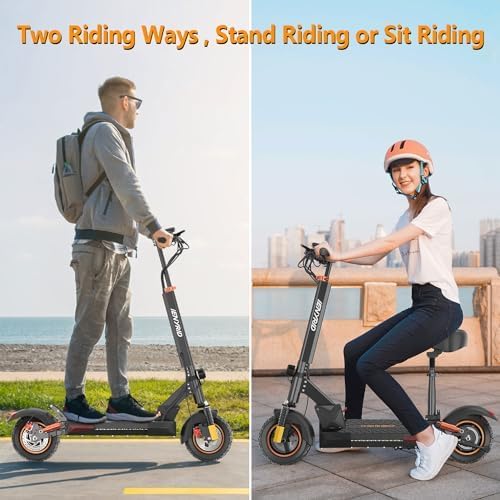
The iENYRID M4 Pro S+ is an 800W foldable electric scooter designed for adults, featuring a detachable seat, long-range capabilities, and a top speed of 28 MPH, making it ideal for commuting and short trips.
2. Safety Guidelines
Your safety is paramount. Always adhere to the following guidelines:
- Always wear a helmet and appropriate safety gear (knee pads, elbow pads) when riding.
- Do not ride under the influence of alcohol or drugs.
- Observe all local traffic laws and regulations.
- Avoid riding in heavy rain, snow, or icy conditions. The scooter is not fully waterproof.
- Maintain a safe distance from other vehicles and pedestrians.
- Regularly check brakes, tires, and all moving parts for wear and tear.
- Do not exceed the maximum weight limit of 330 pounds.
- Children should only operate the scooter under direct adult supervision.

3. Package Contents
Upon opening the package, please verify that all items are present and in good condition:
- iENYRID M4 Pro S+ Electric Scooter x 1
- Detachable Seat x 1 (if included with your model)
- Power Adapter/Charger x 1
- User Manual x 1
- Tool Kit (for assembly and maintenance) x 1
4. Setup and Assembly
Your iENYRID M4 Pro S+ Electric Scooter comes mostly pre-assembled. Follow these steps to complete the setup:
- Unfolding the Scooter: Carefully lift the handlebar stem until it locks into place. Ensure the folding mechanism is securely latched.
- Attaching the Handlebars: Insert the handlebar assembly into the stem and tighten the screws using the provided tool kit. Ensure the handlebars are aligned with the front wheel.
- Installing the Seat (Optional): If your model includes a detachable seat, attach it to the designated mounting point on the deck and secure it firmly.
- Initial Charge: Before first use, fully charge the scooter's battery. Connect the power adapter to the charging port and then to a power outlet. The indicator light on the charger will change when fully charged (approximately 8 hours).
5. Operating Instructions
Familiarize yourself with the scooter's controls and features before riding.
5.1. Controls and Display
The scooter features a multifunctional LCD instrument panel (Smart-DO intelligent control system) that displays gear shift, official data, power level, and real-time speed.

5.2. Starting and Riding
- Power On: Press and hold the power button on the display to turn on the scooter.
- Select Speed Mode: Use the mode button to cycle through the 3 available speed modes.
- Initiate Movement: Place one foot on the deck and push off with the other foot to gain some initial momentum. Once moving, gently press the throttle lever to engage the motor.
- Braking: The scooter is equipped with a dual braking system (porous disc braking system and E-ABS anti-lock braking system). Apply the brake levers gently to slow down or stop.
- Lights: Activate the LED Headlights, Safety Taillights, and side lights for improved visibility, especially during low-light conditions.

5.3. Folding for Storage/Transport
The unique foldable design allows for easy storage and transport. Follow the instructions in the quick start guide or refer to the product video for the two-step folding process.
5.4. Official Product Video
Watch the official product video for a visual guide on the features and operation of the iENYRID M4 Pro S+ Electric Scooter.
6. Maintenance
Regular maintenance ensures the longevity and safe operation of your scooter.
- Battery Care: Charge the battery regularly, even if not in use, to maintain its health. Avoid completely draining the battery.
- Tire Pressure: Check tire pressure periodically. The 10-inch pneumatic tires require proper inflation for optimal performance and safety.
- Brakes: Inspect brake pads and discs for wear. Adjust brakes as needed to ensure responsive stopping power.
- Cleaning: Wipe down the scooter with a damp cloth. Do not use high-pressure water jets or immerse the scooter in water.
- Storage: Store the scooter in a cool, dry place away from direct sunlight and extreme temperatures.


7. Troubleshooting
If you encounter issues with your scooter, refer to the common problems and solutions below:
| Problem | Possible Cause | Solution |
|---|---|---|
| Scooter does not power on. | Low battery; loose connections. | Charge the battery; check all cable connections. |
| Reduced range or speed. | Under-inflated tires; heavy load; riding uphill; cold weather. | Check tire pressure; reduce load; ride on flat terrain; battery performance may decrease in cold. |
| Brakes feel weak. | Worn brake pads; loose brake cable. | Adjust brake cable tension; replace worn brake pads. |
| Unusual noises during operation. | Loose components; debris in wheels. | Inspect and tighten all screws; remove any debris from wheels and motor area. |
If the problem persists, please contact customer support.
8. Specifications
| Feature | Detail |
|---|---|
| Brand | iENYRID |
| Model Name | iE-M4 PRO |
| Motor Power | 800W Brushless Motor |
| Battery | 48V 12.5AH Lithium Battery |
| Max Speed | Up to 28 MPH |
| Max Range | Up to 31 Miles |
| Charging Time | Approx. 8 Hours |
| Weight Limit | 330 Pounds |
| Item Weight | 52 Pounds |
| Wheel Size | 10 Inches |
| Wheel Type | Pneumatic |
| Suspension | Dual Suspension (Front & Rear) |
| Braking System | Dual Disc Braking System & E-ABS Anti-lock System |
| Frame Material | Aluminum |
| Product Dimensions | 47"L x 10"W x 19"H |
| UPC | 768604700985 |
9. Warranty and Support
iENYRID provides a manufacturer's warranty for the M4 Pro S+ Electric Scooter.
- Warranty Period: 360-day or 180-day warranty on different parts, as per manufacturer's policy. Please refer to your purchase documentation for specific warranty terms.
- Customer Support: For any questions, technical assistance, or warranty claims, please contact iENYRID customer service. Contact information can typically be found on the product packaging or the official iENYRID website.
Related documentsiE-M4 PRO


Ask a question about this manual
Ask about setup, troubleshooting, compatibility, parts, safety, or missing instructions. Manuals+ will review the question and use this page’s manual context to help answer it.