
Introduction
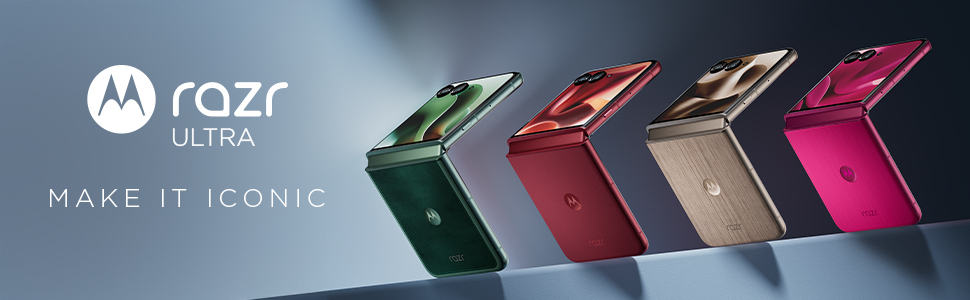
The Motorola Razr Ultra 2025 is an advanced foldable smartphone designed for enhanced user experience and portability. This manual provides essential information for setting up, operating, maintaining, and troubleshooting your device. It highlights key features such as its ultra-compact design, interactive external display, 50MP camera system with moto ai integration, and Snapdragon 8 Elite performance.

Image: The Motorola Razr Ultra 2025 in Pantone Scarab color, presented in both its unfolded and folded states, showcasing its dual-screen functionality.
What's in the Box
Upon unboxing your Motorola Razr Ultra 2025, verify that all the following items are included:
- Motorola Razr Ultra 2025 Device
- USB Cable
- User Guide
- SIM Tray Ejector
Setup
1. SIM Card Installation
- Locate the SIM tray on the side of your device.
- Insert the SIM tray ejector tool into the small hole next to the tray and press firmly until the tray pops out.
- Place your Nano-SIM card(s) into the tray with the gold contacts facing down. Ensure proper orientation.
- Carefully reinsert the SIM tray into the device until it clicks into place.
2. Powering On/Off
- To Power On: Press and hold the Power button (located on the side) until the Motorola logo appears.
- To Power Off: Press and hold the Power button, then tap 'Power off' on the screen.
3. Initial Setup Wizard
Upon first power-on, follow the on-screen instructions to:
- Select your language and region.
- Connect to a Wi-Fi network.
- Sign in with your Google account or create a new one.
- Set up screen lock and security features.
- Transfer data from an old device (optional).
Operating Your Device
Main Display and External Display Usage
The Motorola Razr Ultra 2025 features a large internal foldable display and a highly interactive external display. The external display allows access to various apps and notifications without unfolding the phone.
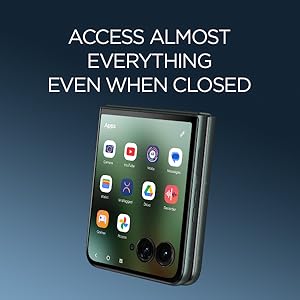
Image: The Motorola Razr Ultra 2025 in its folded state, with the external display showing a grid of application icons, demonstrating its interactive capabilities.
Camera System
The device is equipped with a 50MP camera system, enhanced by moto ai for professional-level photos and videos. The foldable design allows for unique shooting angles and hands-free photography.
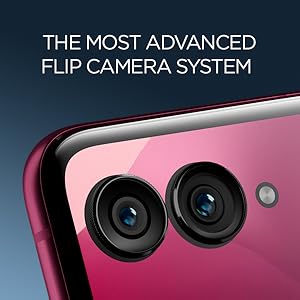
Image: A detailed close-up of the dual camera lenses on the Motorola Razr Ultra 2025, highlighting the advanced flip camera system.
Moto AI Features
Experience personalized assistance and elevated interactions through the seamless integration of moto ai. Features include advanced photo and video capabilities, and intelligent device management. A Motorola Account login and internet/cellular connection are required for full functionality.

Image: The Motorola Razr Ultra 2025 displaying an interface related to 'moto ai', with options like 'Pay Attention', 'Catch me up', and 'Talk to Moto AI'.
Connectivity
The device supports various connectivity options:
- Bluetooth: For connecting to wireless accessories.
- NFC: For contactless payments and quick pairing.
- USB Type C: For charging and data transfer.
- Wi-Fi: For internet access.
- GPS: Built-in for navigation and location services.

Image: A graphic showing logos of various major U.S. carriers (AT&T, Verizon, T-Mobile, Boost Mobile, Cricket Wireless, Tracfone, Metro by T-Mobile, Google Fi), indicating the Motorola Razr Ultra 2025 is universally unlocked.
Maintenance and Care
Charging
The Motorola Razr Ultra 2025 supports 68W TurboPower charging. Use the provided USB cable and a compatible Motorola TurboPower 68W charger (sold separately) for optimal charging speed. The phone can be fully charged in approximately 40 minutes under Charge boost mode when substantially depleted.
Battery Life
The device is designed to provide over 36 hours of battery life under typical usage conditions. Actual battery performance may vary based on signal strength, network settings, temperature, and usage patterns.
Water Resistance
The Motorola Razr Ultra 2025 features water-resistant properties. However, it is not waterproof. Avoid submerging the device in water or exposing it to high-pressure water jets. Liquid damage is not covered under warranty.
Cleaning
To clean your device, use a soft, lint-free cloth. Avoid abrasive materials or harsh chemicals that could damage the screen or finish.
Troubleshooting
External Display Not Responding
- Ensure the phone is adequately charged.
- Try restarting the device by holding the Power button.
- Check for any pending software updates in the device settings.
Charging Issues
- Verify that the USB cable and charger are securely connected to both the phone and the power outlet.
- Use only Motorola-approved charging accessories.
- Inspect the charging port for any debris or damage.
General Performance Issues
- Close unused applications running in the background.
- Clear cache for problematic apps.
- If issues persist, consider a factory reset (Note: This will erase all data on your device. Back up important information first).
Specifications
| Feature | Detail |
|---|---|
| Model Name | Motorola razr ultra 2025 |
| Item Model Number | PB770020US |
| Operating System | Android 15 |
| CPU Model | Snapdragon 8 Elite |
| CPU Speed | 3.53 GHz |
| RAM Memory Installed Size | 16 GB |
| Memory Storage Capacity | 512 GB (implied from title, not explicit in specs list) |
| Main Display Size | 7 Inches |
| Main Display Resolution | Super HD 2992 x 1224 |
| External Display Resolution | 1272x1080 |
| Refresh Rate | 165 Hz |
| Other Camera Features | Front, Rear (50MP main camera) |
| Battery Capacity | 4700 mAh |
| Phone Talk Time | 36 Hours |
| Special Features | Always On Display, Built-In GPS, Fast Charging Support, Mobile Hotspot Capability, Stereo Speakers, Water Resistant, Wireless Charging |
| Connectivity Technologies | Bluetooth, NFC, USB Type C, Wi-Fi |
| Color | Pantone Scarab |
| Product Dimensions | 2.91 x 0.28 x 6.75 inches |
| Item Weight | 12.7 ounces |
Warranty and Support
Your Motorola Razr Ultra 2025 comes with a standard manufacturer's warranty. For detailed warranty information, including terms and conditions, please refer to the warranty card included with your device or visit the official Motorola support website.
For further assistance, technical support, or to find service centers, please visit the Motorola Support Website.


