
MOUNTO Pro Restoration Bundle
MOUNTO Pro Restoration Bundle User Manual
AM33 Air Movers, DH165 LGR Dehumidifier, HEPA 500 Air Scrubber
Introduction
The MOUNTO Pro Restoration Bundle is a comprehensive solution designed for efficient water damage restoration, construction drying, and air quality management. This bundle includes eight AM33 Air Movers, one DH165 LGR Dehumidifier, and one HEPA 500 Air Scrubber, providing powerful air movement, high-volume moisture removal, and advanced air filtration. This manual provides essential information for the safe and effective setup, operation, and maintenance of your equipment.
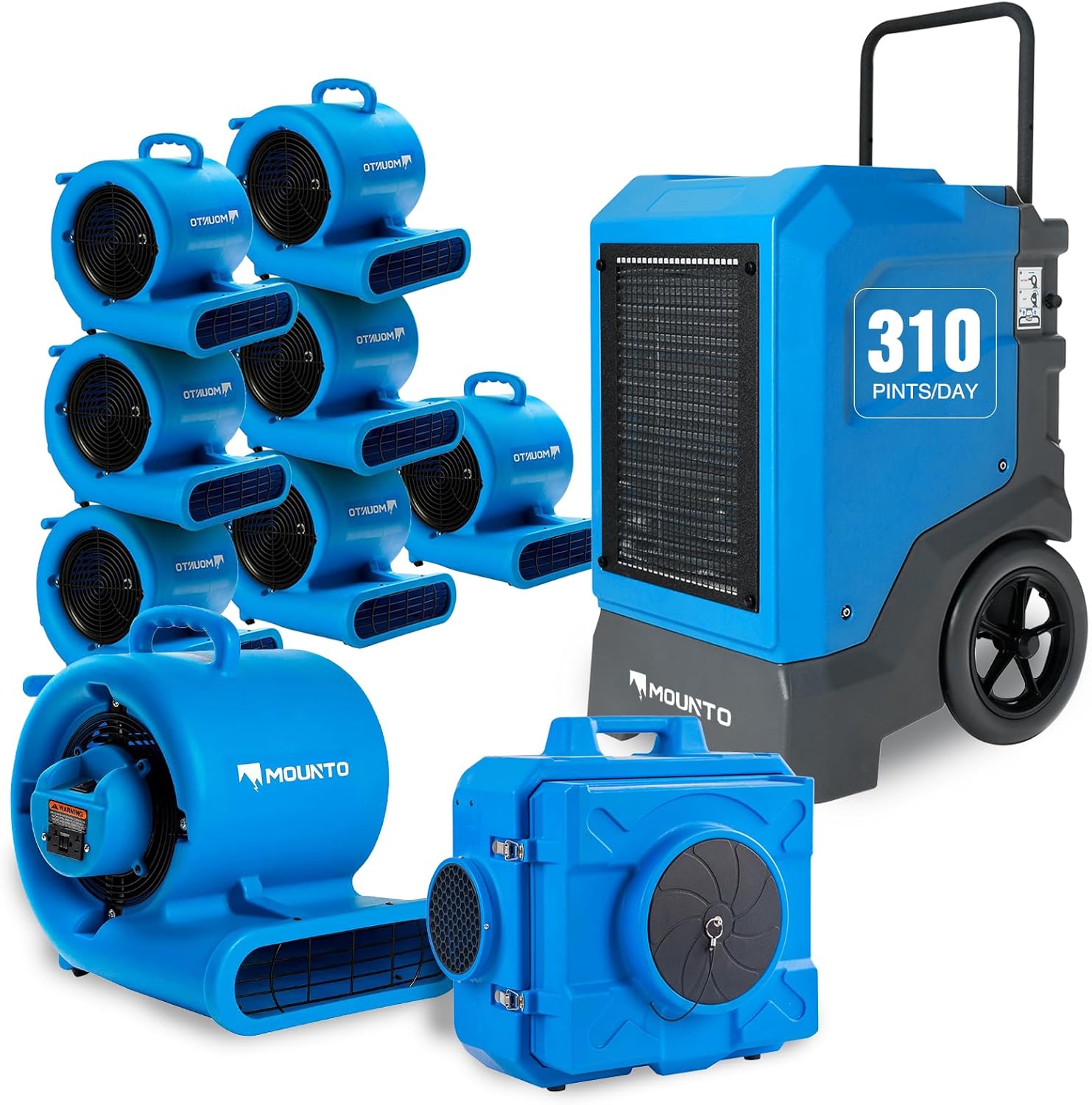
Image: The complete MOUNTO Pro Restoration Bundle, showcasing all included components.
Safety Information
Read all safety warnings and instructions carefully before operating the equipment. Failure to follow these instructions may result in electric shock, fire, or serious injury.
- Always connect to a properly grounded outlet.
- Do not operate any equipment with a damaged cord or plug.
- Keep children and pets away from operating equipment.
- Do not use in standing water or extremely wet conditions.
- Ensure proper ventilation when operating dehumidifiers and air scrubbers.
- Unplug equipment before performing any maintenance or cleaning.
- Use only manufacturer-recommended replacement parts and accessories.
Components Overview
AM33 Air Mover (x8)
The AM33 Air Mover is a powerful and versatile drying unit. It features a 1/3 HP motor, delivering high-velocity airflow for rapid drying of floors, carpets, and walls. Its stackable design allows for efficient storage and transport, and multiple operating angles provide flexibility for various drying tasks.

Image: A MOUNTO AM33 Air Mover, highlighting its compact design and powerful airflow capabilities.
DH165 LGR Dehumidifier (x1)
The DH165 LGR Dehumidifier is designed for high-volume moisture removal in demanding environments. It can remove up to 165 PPD (Pints Per Day) at AHAM conditions and 310 PPD at saturation. Equipped with a built-in pump and a 25-ft drain hose, it ensures continuous operation without manual emptying. The robust rotomolded body provides durability for jobsite use.

Image: The MOUNTO DH165 LGR Dehumidifier, illustrating its key features like high PPD, auto operation, and humidity control.
HEPA 500 Air Scrubber (x1)
The HEPA 500 Air Scrubber provides advanced air filtration, delivering up to 500 CFM (Cubic Feet per Minute) airflow through a 3-stage filtration system, including a true HEPA filter. It captures 99.97% of airborne particles down to 0.3 microns, improving air quality during restoration or construction projects. It features a variable speed control and a durable housing.

Image: The MOUNTO HEPA 500 Air Scrubber, detailing its filtration capabilities and operational features.
Setup Instructions
General Placement
- Position air movers to direct airflow across wet surfaces (floors, walls, ceilings) to maximize evaporation.
- Place the dehumidifier in a central location within the affected area to efficiently draw moisture from the air.
- Position the air scrubber to capture airborne particles, typically near the work area or in a central location for general air purification.
- Ensure all units are placed on a stable, level surface.
AM33 Air Mover Setup
- Unpack the air mover.
- Plug the power cord into a grounded 120V AC outlet.
- Adjust the unit to the desired operating angle (0°, 45°, 90°).
- Multiple AM33 units can be daisy-chained using the onboard GFCI outlets (up to 6 units).
DH165 LGR Dehumidifier Setup
- Unpack the dehumidifier and ensure the wheels are securely attached.
- Connect the provided 25-ft drain hose to the drain outlet. Ensure the hose is routed to a suitable drain point (e.g., floor drain, sink) with a continuous downward slope to prevent water backup.
- Plug the power cord into a grounded 120V AC outlet.
- Turn on the unit and set the desired humidity level (20%-90% RH). The unit will automatically operate to maintain this level.
HEPA 500 Air Scrubber Setup
- Unpack the air scrubber.
- Ensure all filters are correctly installed (pre-filter, carbon filter, HEPA filter).
- Plug the power cord into a grounded 120V AC outlet.
- Multiple HEPA 500 units can be daisy-chained using the onboard dual outlets (up to 5 units).
Operating Instructions
AM33 Air Mover Operation
- After setup, turn the power switch to the desired speed setting (typically two speeds available).
- Adjust the unit's angle to direct airflow precisely where needed for optimal drying.
- Monitor drying progress and reposition as necessary.
DH165 LGR Dehumidifier Operation
- Press the power button to turn on the unit.
- Use the control panel to set the target humidity level. The unit will automatically cycle on and off to maintain this level.
- The built-in pump will automatically discharge collected water through the drain hose. Ensure the hose remains unobstructed and properly routed.
- The unit features an auto-defrost function to prevent coils from freezing in low-temperature conditions.
- In case of power loss, the memory restart function will resume operation with previous settings once power is restored.
HEPA 500 Air Scrubber Operation
- Press the power button to turn on the unit.
- Adjust the variable speed control to achieve the desired airflow (250-500 CFM). Higher speeds provide faster air changes.
- Monitor the filter indicator light. Replace filters when the light illuminates or when airflow significantly decreases.
Maintenance
Regular maintenance ensures optimal performance and extends the lifespan of your MOUNTO equipment. Always unplug units before performing maintenance.
General Cleaning
- Wipe down the exterior of all units with a damp cloth to remove dust and debris.
- Avoid using harsh chemicals or abrasive cleaners.
AM33 Air Mover Maintenance
- Periodically inspect the fan blades and grille for debris accumulation. Clean with a brush or vacuum as needed.
- Check the power cord for any signs of damage.
DH165 LGR Dehumidifier Maintenance
- Coil Cleaning: Inspect the evaporator and condenser coils regularly. Clean with a coil cleaner or a soft brush to remove dust and lint, ensuring efficient heat exchange.
- Drain System: Periodically check the drain hose and pump for blockages. Flush with clean water if necessary.
- Air Filter: Clean or replace the air filter every 2-4 weeks, or more frequently in dusty environments. A clogged filter reduces efficiency.
HEPA 500 Air Scrubber Maintenance
- Pre-filter Replacement: The pre-filter (first stage) should be checked and replaced frequently, typically every 1-2 weeks depending on usage and environment.
- Carbon Filter Replacement: The activated carbon filter (second stage) should be replaced every 3-6 months, or when odors persist.
- HEPA Filter Replacement: The true HEPA filter (third stage) typically lasts 6-12 months, or when the filter indicator light illuminates and cleaning the pre-filter does not resolve the issue.
- Always replace filters with genuine MOUNTO replacement parts to ensure proper filtration efficiency.
Troubleshooting
| Problem | Possible Cause | Solution |
|---|---|---|
| Air Mover / Air Scrubber does not turn on | No power, tripped GFCI, damaged cord. | Check power outlet, reset GFCI, inspect cord for damage. |
| Dehumidifier not collecting water | Humidity setting too high, clogged filter, low ambient temperature, drain hose kinked/blocked. | Lower humidity setting, clean/replace filter, ensure room temperature is above 40°F (4°C), check drain hose. |
| Air Scrubber airflow is low | Clogged filters, motor issue. | Check and replace pre-filter, carbon filter, or HEPA filter. If issue persists, contact support. |
| Unusual noise from any unit | Loose components, debris in fan/motor, motor malfunction. | Unplug and inspect for loose parts or debris. If noise persists, discontinue use and contact support. |
| Dehumidifier displays error code | Specific internal issue. | Refer to the specific error code in the full product manual (if available) or contact customer support with the code. |
Specifications
AM33 Air Mover
- Motor: 1/3 HP
- Airflow: Up to 1000 CFM (approximate)
- Speeds: 2
- Operating Angles: 0°, 45°, 90°
- Daisy Chain: Up to 6 units via dual GFCI outlets
- Housing: Rotomolded, stackable
DH165 LGR Dehumidifier
- Moisture Removal: 165 PPD @ AHAM (80°F, 60% RH), 310 PPD @ Saturation
- Drainage: Built-in pump with 25-ft hose
- Humidity Setting Range: 20% - 90% RH
- Features: Auto Operation, Auto Defrost, Memory Restart
- Housing: Rotomolded
HEPA 500 Air Scrubber
- Airflow: 250-500 CFM (Variable Speed)
- Motor: 1/3 HP Industrial Copper Motor
- Filtration: 3-stage (Pre-filter, Carbon Filter, True HEPA filter)
- HEPA Efficiency: 99.97% of particles down to 0.3 microns
- Daisy Chain: Up to 5 units via dual outlets
Warranty and Support
MOUNTO products are designed for durability and performance. For specific warranty details, please refer to the warranty card included with your purchase or visit the official MOUNTO website. If you encounter any issues or require technical assistance, please contact MOUNTO customer support. Have your product model and serial number ready when contacting support.
Contact Information: Please refer to your purchase documentation or the MOUNTO official website for the most current customer support contact details.
Ask a question about this manual
Ask about setup, troubleshooting, compatibility, parts, safety, or missing instructions. Manuals+ will review the question and use this page’s manual context to help answer it.