
Introduction
This manual provides instructions for the SCS Sentinel 12V DC 1A Built-in Power Transformer, designed for safe and stable power supply to various electrical equipment. It converts 230V AC 50/60 Hz to 12V DC 1A, suitable for electric strikes, intercoms, gate motors, and home automation systems. Features an integrated voltage regulator for consistent and secure power delivery, ensuring optimal performance and longevity of connected devices.
Safety Information
Please read all safety instructions carefully before installation and use. Failure to follow these instructions may result in electric shock, fire, or serious injury.
- Professional Installation Recommended: Installation should be performed by a qualified electrician in accordance with local electrical codes and regulations.
- Power Disconnection: Always disconnect power at the main circuit breaker before installing, servicing, or removing the transformer.
- Voltage Compatibility: Ensure the input voltage (230V AC 50/60 Hz) matches your electrical supply.
- Output Load: Do not exceed the maximum output current of 1A (12W) to prevent overheating and damage.
- Environmental Conditions: Do not expose the transformer to moisture, extreme temperatures, or corrosive environments.
- Enclosure: The transformer is designed for built-in installation. Ensure it is properly enclosed and ventilated as per installation guidelines.
- Damaged Unit: Do not operate the transformer if it appears damaged.
Package Contents
Verify that all items are present and undamaged upon opening the package.
- 1x SCS Sentinel 12V DC 1A Built-in Power Transformer (Model: AAA0047)
- 1x Instruction Manual (this document)

Image: The product packaging for the SCS Sentinel 12V DC 1A Built-in Power Transformer, showing the brand logo and product details.
Product Overview
The SCS Sentinel Built-in Power Transformer is a compact and efficient device designed to convert standard household AC power to a stable 12V DC output. It features an integrated voltage regulator to protect connected devices from power fluctuations.
- Input: 230V AC, 50/60 Hz
- Output: 12V DC, 1A (12W)
- Integrated Voltage Regulator: Ensures stable and consistent power delivery.
- Compact Design: Allows for easy built-in installation in standard electrical boxes.
- Applications: Ideal for electric strikes, intercoms, keypads, chimes, video door phones, and gate motors requiring 12V DC power.
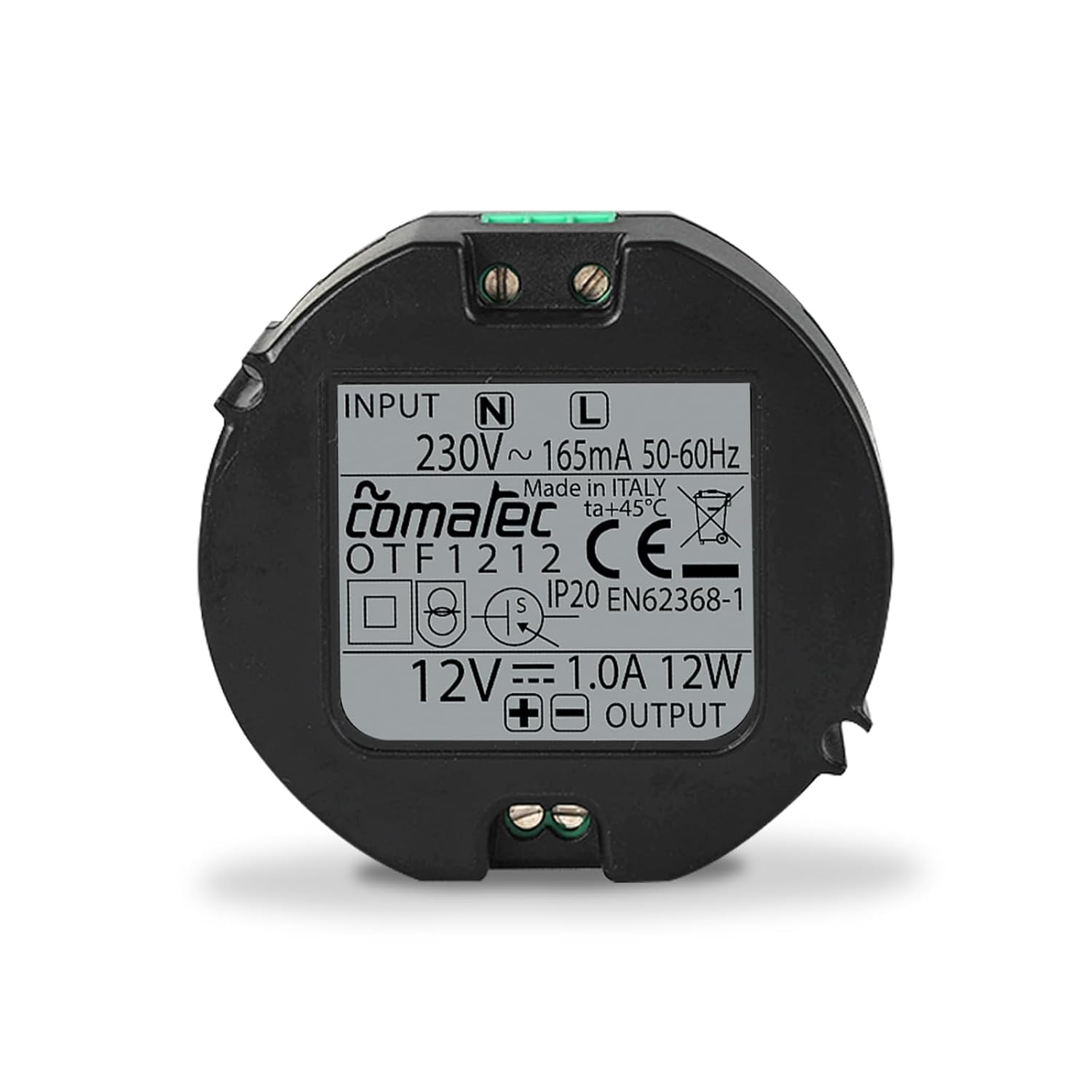
Image: A close-up view of the SCS Sentinel 12V DC 1A Built-in Power Transformer, showing the input (N, L) and output (12V DC) terminals, along with technical specifications printed on its surface.
Setup and Installation
This transformer is designed for built-in installation. It is crucial to follow all safety guidelines and local electrical codes. If you are not comfortable with electrical wiring, consult a qualified electrician.
- Disconnect Power: Before starting any installation, ensure the main power supply to the installation area is turned off at the circuit breaker. Verify with a voltage tester.
- Prepare Wiring: Identify the 230V AC input wires (Live and Neutral) and the 12V DC output wires for your device.
- Mounting: The compact design allows for integration into a standard flush-mounted electrical box. Ensure adequate space and ventilation.
- Connect Input: Connect the 230V AC Live (L) and Neutral (N) wires to the corresponding input terminals on the transformer. Ensure connections are secure.
- Connect Output: Connect the 12V DC positive (+) and negative (-) wires from your device to the corresponding output terminals on the transformer. Observe polarity.
- Secure Connections: Double-check all wire connections to ensure they are tight and properly insulated.
- Enclose: Once connections are made, carefully place the transformer and wiring into the electrical box and secure the cover.
- Restore Power: Turn the main power supply back on at the circuit breaker.
- Test Functionality: Verify that the connected device is receiving power and operating correctly.

Image: The SCS Sentinel 12V DC 1A Built-in Power Transformer shown alongside its packaging and a screwdriver, indicating the tools and context for its built-in installation.
Operating Instructions
Once properly installed and connected, the SCS Sentinel 12V DC 1A Built-in Power Transformer operates automatically. It converts the incoming 230V AC power to a stable 12V DC output for your connected devices.
- Automatic Operation: The transformer will supply 12V DC power to connected devices whenever the main power supply is active.
- Voltage Regulation: The integrated regulator ensures a consistent 12V DC output, protecting your devices from voltage fluctuations.
- Power On/Off: To power off the connected devices, you must disconnect the main power supply to the transformer at the circuit breaker.
Maintenance
The SCS Sentinel Power Transformer requires minimal maintenance. Regular checks can help ensure its longevity and safe operation.
- Cleaning: Ensure the area around the transformer is free from dust and debris to allow for proper heat dissipation. If cleaning is necessary, disconnect power and use a dry, soft cloth.
- Connection Checks: Periodically (e.g., annually), with power disconnected, inspect the wiring connections for any signs of loosening or corrosion. Tighten if necessary.
- Environmental Inspection: Ensure the installation environment remains dry and within acceptable temperature ranges.
- Professional Inspection: If you notice any unusual behavior, sounds, or smells from the transformer, disconnect power immediately and consult a qualified electrician.
Troubleshooting
If you encounter issues with your SCS Sentinel Power Transformer, refer to the following common problems and solutions:
| Problem | Possible Cause | Solution |
|---|---|---|
| No power output from transformer. |
|
|
| Unstable or incorrect output voltage. |
|
|
| Transformer is hot to the touch. |
|
|
If troubleshooting steps do not resolve the issue, contact SCS Sentinel customer support for further assistance.
Specifications
| Brand | SCS Sentinel |
| Model Number | AAA0047 |
| Input Voltage | 230V AC, 50/60 Hz |
| Output Voltage | 12V DC |
| Output Current | 1A |
| Output Power | 12W |
| Dimensions (L x W x H) | 5.08 x 2.64 x 5.45 cm |
| Weight | 14 Grams |
| Mounting Type | Built-in (Encastrable) |
| Compliance | CE |
| Country of Origin | France |
Warranty Information
The SCS Sentinel 12V DC 1A Built-in Power Transformer is covered by a 2-year warranty from the date of purchase. This warranty covers manufacturing defects and ensures the proper functioning of the device under normal use conditions.
The warranty does not cover damages resulting from improper installation, misuse, unauthorized modifications, accidents, or natural disasters. Please retain your proof of purchase for warranty claims.
Support
For technical assistance, troubleshooting beyond this manual, or warranty claims, please contact SCS Sentinel customer support.
Please have your product model number (AAA0047) and proof of purchase ready when contacting support.
SCS Sentinel Website: www.scs-sentinel.com
Refer to the website for contact details specific to your region.