1. Introduction
Thank you for choosing the BLITZHOME Countertop Portable Dishwasher. This compact and efficient appliance is designed to simplify your dishwashing routine, offering powerful cleaning and convenient features for apartments, RVs, dorms, or any small kitchen space. This manual provides essential information for safe operation, maintenance, and troubleshooting to ensure optimal performance and longevity of your dishwasher.

Figure 1.1: BLITZHOME Countertop Portable Dishwasher, front view with dishes inside.
2. Important Safety Instructions
To reduce the risk of fire, electric shock, or injury when using your dishwasher, follow these basic precautions:
- Read all instructions before using the dishwasher.
- Connect the dishwasher to a properly grounded outlet only. Refer to the grounding instructions in this manual.
- Do not operate the dishwasher if it has a damaged power cord or plug, or if it is not working properly.
- Keep children away from the dishwasher, especially when it is in operation.
- Do not wash plastic items unless they are marked "dishwasher safe" or equivalent.
- Use only detergents and rinse aids recommended for automatic dishwashers.
- Do not tamper with controls.
- Always unplug the dishwasher before cleaning or performing any maintenance.
- Do not immerse the appliance, cord, or plug in water or other liquids.
- Ensure proper ventilation around the unit during operation.
3. Product Overview
3.1 Key Features
- 9 Wash Programs: Standard, ECO, Baby Care, Strong, Quick, Fruit, Self-Clean, Dry, and Delayed Start.
- 360° High-Temperature Cleaning: 167°F (75°C) high-temperature sprays with 3 spray arms for thorough cleaning.
- PTC Hot Air Drying & Air Refresh System: 60-minute hot air drying and 72-hour air refresh function for dry, odor-free dishes.
- Dual Water Supply Modes: 5.2L built-in water tank (Tank Mode) or direct faucet connection (Faucet Mode).
- Compact & Large Capacity: Measures 21.6 in x 14.2 in x 19.5 in, fits plates up to 11.81 inches, suitable for 4-6 person households.
- 24-Hour Delayed Start: Schedule washes at your convenience.
- 2-Level Rack Design: Maximizes loading capacity.
- Water Saving: Consumes only 5.2L of water per cycle, saving up to 85% compared to handwashing.
3.2 Components Included
The BLITZHOME Countertop Portable Dishwasher comes with the following accessories:
- 1 x Dishwasher Unit
- 1 x Measuring Cup
- 1 x Fruit and Vegetable Basket
- 1 x Drain Hose
- 1 x Water Inlet Hose
- 1 x Clamp
- 1 x Suction Cup
- 1 x Instruction Manual (this document)

Figure 3.1: All accessories included with the BLITZHOME Countertop Portable Dishwasher.
4. Setup
4.1 Unpacking
Carefully remove the dishwasher and all accessories from the packaging. Inspect the unit for any damage during transit. Keep the packaging materials for future transport or storage if needed.
4.2 Placement
Place the dishwasher on a flat, stable, and level surface near a power outlet and a water source/drain. Ensure there is enough space around the unit for proper ventilation and operation. The dimensions of the dishwasher are approximately 21.6 inches (D) x 14.2 inches (W) x 19.5 inches (H).

Figure 4.1: Compact design and dimensions of the dishwasher, showing its suitability for various spaces.
4.3 Water Supply Connection
Your BLITZHOME dishwasher offers two convenient water supply options:
- Tank Mode (Manual Fill): For maximum portability, you can use the built-in 5.2L water tank. Simply open the water inlet cover on top of the unit and pour water using the provided measuring cup until the tank is full. The dishwasher will indicate when the tank is full.
- Faucet Mode (Direct Connection): For continuous water supply, connect the included water inlet hose to a standard faucet. Ensure a secure connection to prevent leaks.
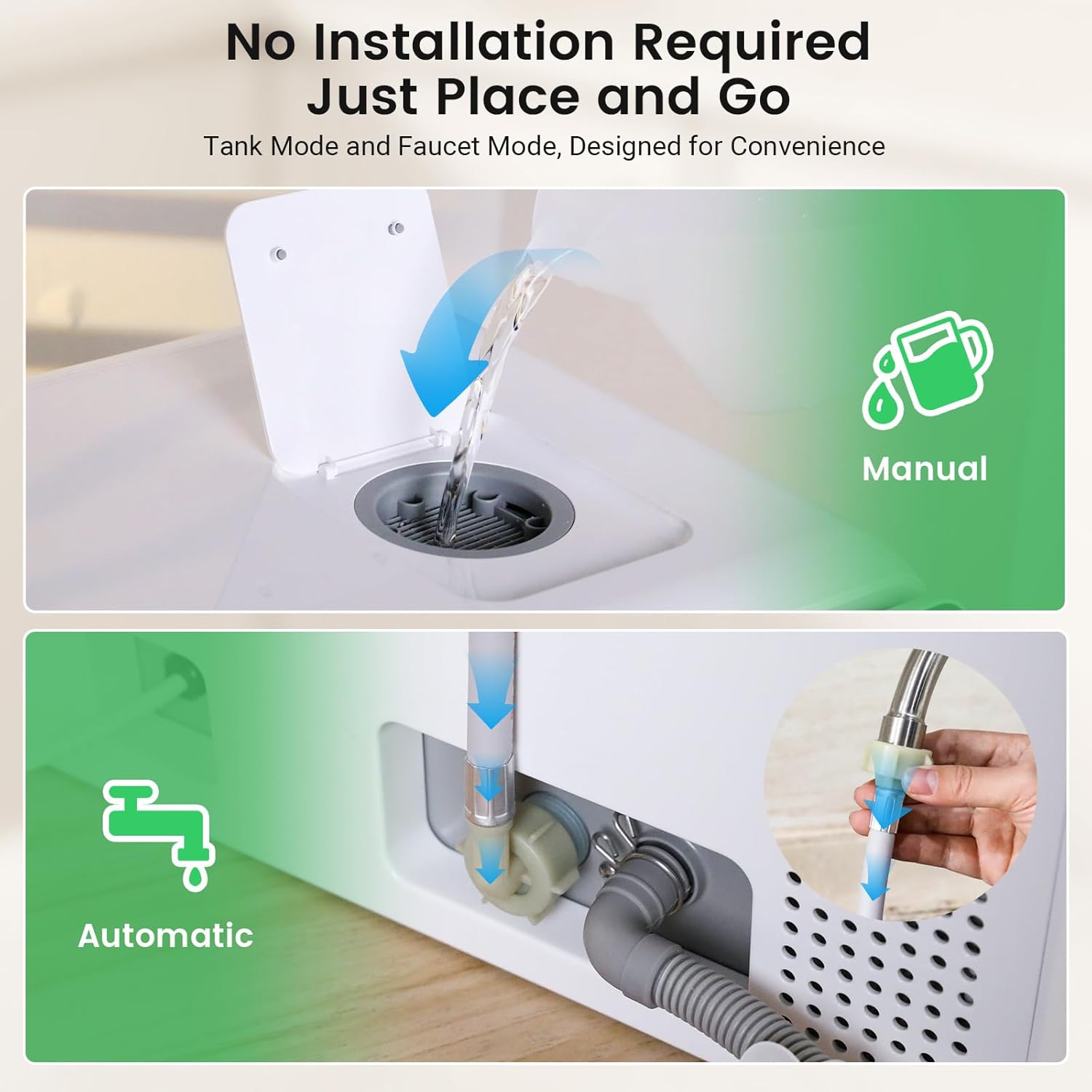
Figure 4.2: Illustration of manual water filling (Tank Mode) and direct faucet connection (Faucet Mode).
4.4 Drainage Setup
Connect the drain hose to the designated outlet on the back of the dishwasher. Route the other end of the drain hose to a sink or a larger drain. Use the provided suction cup and clamp to secure the drain hose, ensuring it remains in place during operation and prevents water backflow.
4.5 Setup Demonstration Video
Video 4.1: This video demonstrates the setup process, including water filling options and general operation of the BLITZHOME Countertop Portable Dishwasher.
5. Operating Instructions
5.1 Control Panel Overview
The dishwasher features an intuitive touch control panel. Familiarize yourself with the icons and their functions:
- Power: Turns the dishwasher on/off.
- Standard: Default wash program.
- ECO: Energy-saving program.
- Baby Care / Strong: Hold for 3 seconds to switch between these programs.
- Quick: Fast wash cycle.
- Fruit / Self Clean: Hold for 3 seconds to switch between these programs.
- Dry: Drying cycle.
- Start/Pause: Starts or pauses the selected program.
- Display: Shows remaining time or error codes.
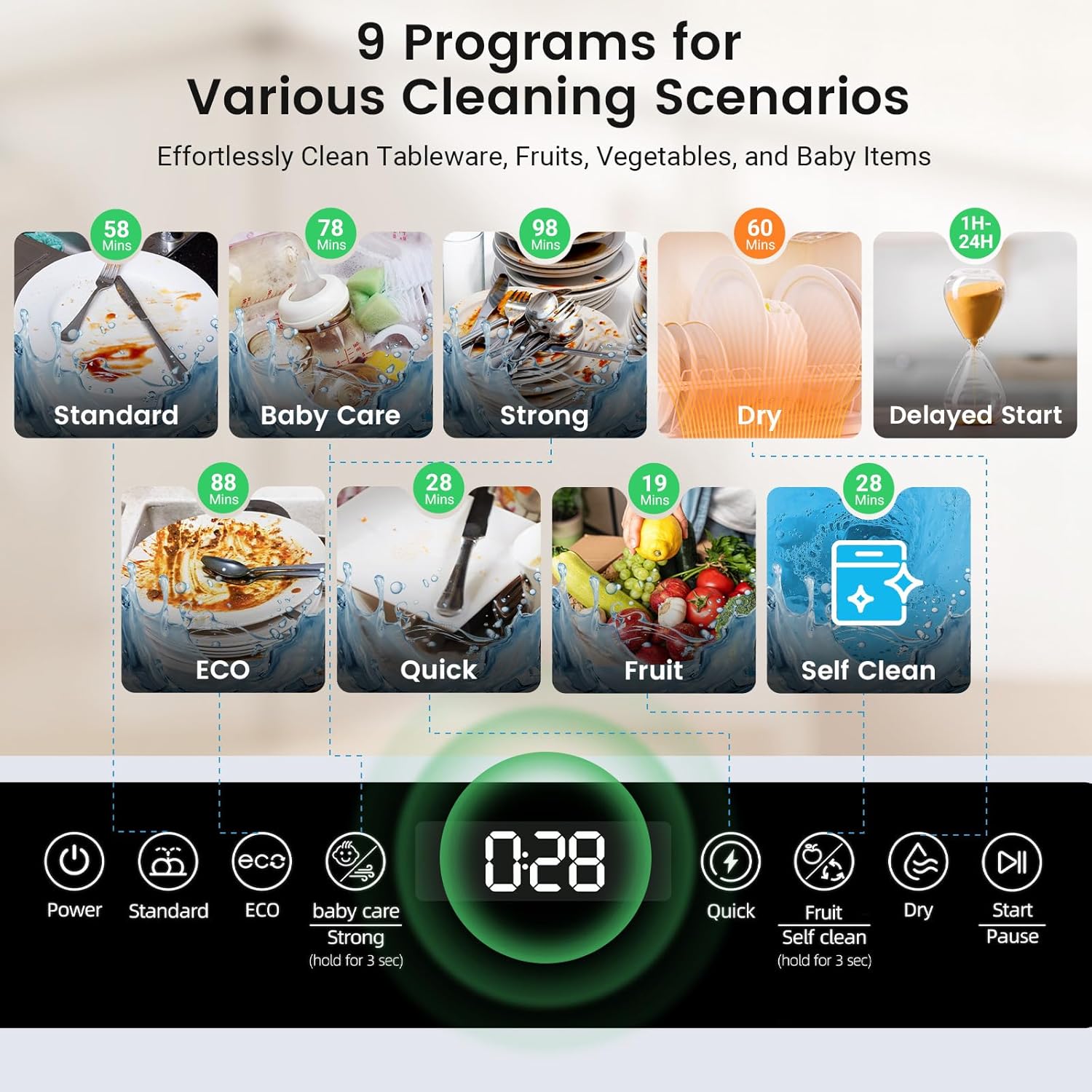
Figure 5.1: The control panel displaying various wash programs and functions.
5.2 Loading Dishes
Arrange dishes in the racks, ensuring they do not block the spray arms. The 2-level rack design accommodates various items, including plates up to 11.81 inches in diameter. Place larger items on the bottom rack and smaller items, cups, and cutlery on the top rack or in the cutlery basket.

Figure 5.2: Example of properly loading dishes, including plates, glasses, and cutlery, into the dishwasher's racks.
5.3 Adding Detergent and Rinse Aid
Add a small amount of dishwasher detergent to the dispenser. If desired, fill the rinse aid dispenser for improved drying performance and to prevent water spots.
5.4 Selecting a Wash Program
Press the "Power" button to turn on the dishwasher. Select your desired wash program by pressing the corresponding button. The display will show the estimated cycle time. Refer to the table below for program details:
| Program | Description | Approx. Duration |
|---|---|---|
| Standard | For daily dishwashing of normally soiled dishes. | 58 minutes |
| ECO | Energy-saving program for light to normal loads. | 88 minutes |
| Baby Care | High-temperature wash for baby bottles and items requiring sterilization. | 78 minutes |
| Strong | For heavily soiled dishes and pots. | 98 minutes |
| Quick | For lightly soiled dishes that need a fast wash. | 28 minutes |
| Fruit | Gentle wash for fruits and vegetables. | 19 minutes |
| Self-Clean | Program to clean the interior of the dishwasher. | 28 minutes |
| Dry | Drying cycle only. | 60 minutes |
| Delayed Start | Allows delaying the start of a wash cycle by 1-24 hours. | N/A (Delay only) |
5.5 Starting a Cycle
After selecting the program, press the "Start/Pause" button to begin the wash cycle. If you wish to use the delayed start function, press the "Delayed Start" button repeatedly to set the desired delay time (1-24 hours) before pressing "Start/Pause".
5.6 Drying and Air Refresh System
After the wash cycle, the PTC hot air drying system activates for 60 minutes to ensure dishes are thoroughly dry. Additionally, the 72-hour air refresh function circulates fresh air periodically, preventing odors and keeping dishes hygienic for extended storage within the unit.
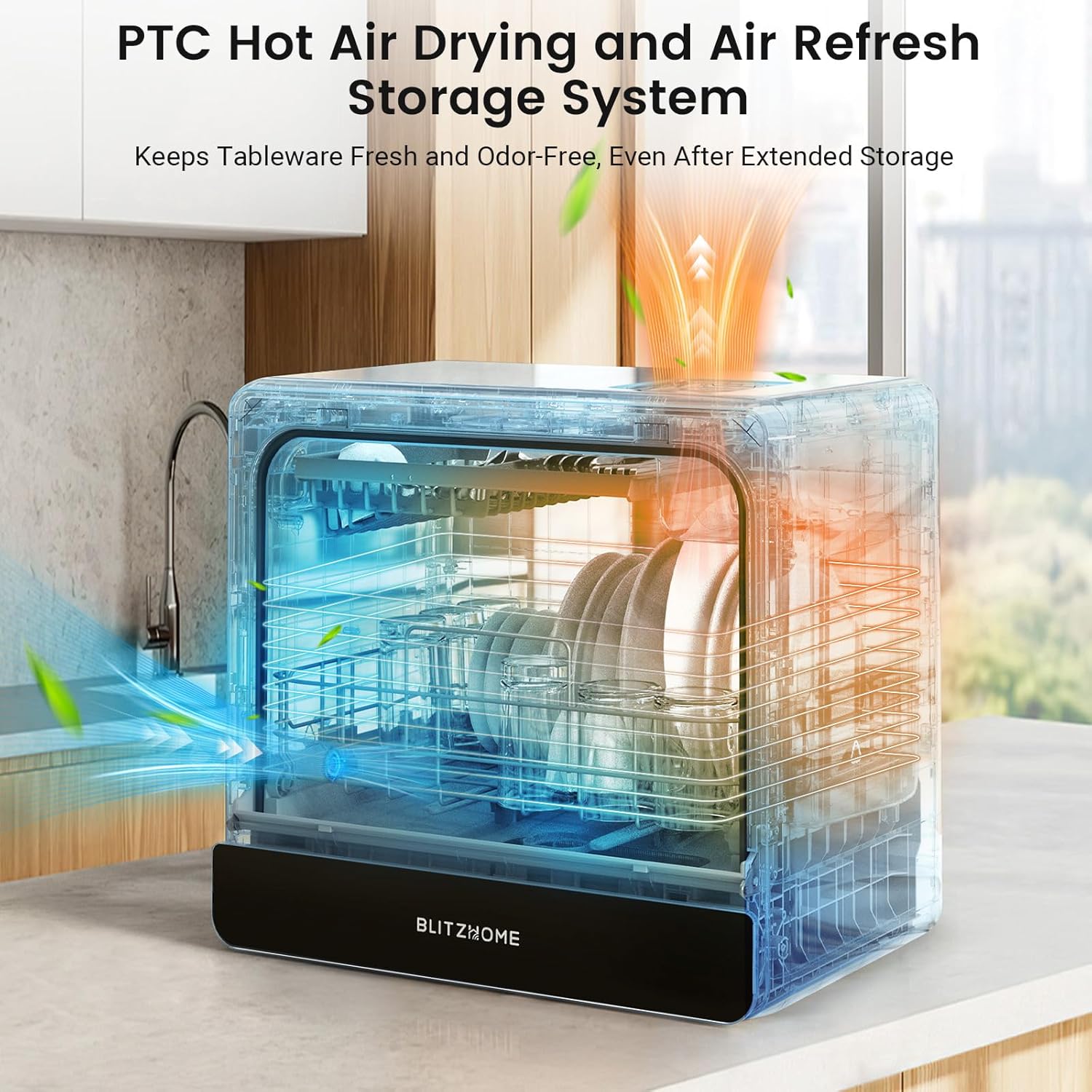
Figure 5.3: Illustration of the PTC hot air drying and air refresh system in operation, ensuring dry and odor-free dishes.
6. Maintenance and Care
Regular maintenance ensures the optimal performance and longevity of your dishwasher.
6.1 Cleaning the Filter System
The filter system should be cleaned regularly to prevent food particles from clogging the spray arms and affecting wash performance. To clean:
- Turn off and unplug the dishwasher.
- Locate the filter assembly at the bottom of the wash tub.
- Twist and lift out the filter.
- Rinse the filter under running water to remove any trapped food debris. Use a soft brush if necessary.
- Reinsert the filter and twist to lock it into place.
6.2 Cleaning the Spray Arms
Check the spray arm nozzles for blockages. If clogged, remove the spray arms and rinse them under running water. Use a thin wire or toothpick to clear any stubborn blockages.
6.3 Exterior and Interior Cleaning
- Wipe the exterior surfaces with a soft, damp cloth. Avoid abrasive cleaners.
- For the interior, run the "Self-Clean" program periodically. You can also wipe down the interior with a damp cloth and a mild detergent.
6.4 Winterizing (for RVs/Seasonal Use)
If the dishwasher will be stored in an unheated location, it must be winterized to prevent damage from freezing. Consult a qualified technician or refer to specific winterization guides for portable appliances.
7. Troubleshooting Guide
Before contacting customer service, please refer to the following table for common issues and their solutions.
| Problem | Possible Cause | Solution |
|---|---|---|
| Dishwasher does not start. | Not plugged in; power outage; door not closed properly; program not selected. | Check power connection; ensure door is latched; select a program and press Start. |
| Dishes are not clean. | Improper loading; clogged spray arms; insufficient detergent; incorrect program. | Reload dishes correctly; clean spray arms and filter; use appropriate detergent; select a stronger program. |
| Water not draining. | Drain hose kinked or blocked; filter clogged; drain pump issue. | Check drain hose for kinks/blockages; clean filter; contact support if pump is faulty. |
| Dishwasher leaks. | Hose connections loose; excessive suds; door seal damaged. | Tighten hose connections; use less detergent; inspect and replace door seal if damaged. |
| Dishes are not dry. | No rinse aid; plastic items; drying cycle not selected. | Add rinse aid; note that plastic items dry less efficiently; ensure drying cycle is part of program or selected. |
8. Product Specifications
| Specification | Detail |
|---|---|
| Model Name | BH-6-CDW |
| Brand | BLITZHOME |
| Installation Type | Countertop |
| Item Weight | 38.6 Pounds (approx. 17.5 kg) |
| Product Dimensions (D x W x H) | 21.57 x 14.17 x 19.53 inches (approx. 54.8 x 36 x 49.6 cm) |
| Voltage | 120 Volts |
| Annual Energy Consumption | 950 Watts |
| Capacity | 5.2 Liters (water tank) |
| Number of Programs | 9 |
| Noise Level | 56 dB |
| Controls Type | Touch Panel |
| Special Features | 2 Water Supply Modes, 24Hrs Delay Start, PTC Hot Air Drying and 72H Air Refresh Storage |
| UPC | 850073031209 |
9. Warranty and Customer Support
BLITZHOME products are manufactured to the highest quality standards. For information regarding your product's warranty, please refer to the warranty card included in your packaging or visit the official BLITZHOME website. If you encounter any issues or have questions not covered in this manual, please contact BLITZHOME customer support for assistance.
BLITZHOME Official Website: www.blitzhome.com


