
Introduction
This manual provides instructions for the safe and proper use of the Hape Little Dentist Kit, Model E3227. This educational toy is designed to introduce children to dental health concepts through interactive role-play.
Important Safety Information
- WARNING: Not suitable for children under 3 years due to small parts which may present a choking hazard.
- Adult supervision is recommended during play.
- This toy is for pretend play only. Do not use any components on real teeth or for actual medical purposes.
- Ensure all parts are clean before and after use.
- Batteries for the vibrating toothbrush should be installed and replaced by an adult.
Package Contents
Please check that all the following items are included in your Hape Little Dentist Kit:
- 4 Pretend Teeth
- 1 Vibrating Toothbrush
- 1 Toothpaste Tube (pretend)
- 1 Polishing Tool (pretend)
- 1 Water Floss (pretend)
- 1 Dental Mirror (pretend)
- 1 Syringe (pretend)
- 1 Tongs (pretend)
- 1 Top Braces (pretend)
- 1 Bottom Braces (pretend)
- Food Pieces of Sweets (pretend)
- 1 Pretend ID Badge
- Double-sided Reusable Activity Cards
- Tooth Decay Stickers
- Changeable Teeth
- 1 Tooth Bag
- 1 Stylish Storage Bag

Image: The Hape Little Dentist Kit, showing all included components neatly arranged within its storage bag.
Setup
- Unpack Components: Carefully remove all items from the storage bag.
- Battery Installation (Vibrating Toothbrush):
- Locate the battery compartment on the vibrating toothbrush.
- Using a small screwdriver (not included), open the compartment.
- Insert the required batteries (1 Unknown battery, typically AAA, not included) ensuring correct polarity (+/-).
- Securely close the battery compartment.
- Prepare Dental Model: Place the pretend teeth into the dental model. Some teeth are designed to be removable for play.
- Organize Tools: Arrange the dental tools for easy access during play.
Operating Instructions
The Hape Little Dentist Kit encourages imaginative play and learning about oral hygiene. Here are some ways to use the kit:
1. Brushing Teeth

Image: A child demonstrating the use of the vibrating toothbrush on the dental model.
- Use the vibrating toothbrush with the pretend toothpaste tube to simulate brushing the teeth on the dental model.
- The toothbrush includes 3 interchangeable cleaning heads for varied play.
- Encourage proper brushing techniques, such as brushing all surfaces of each tooth.
2. Dental Check-up and Treatment
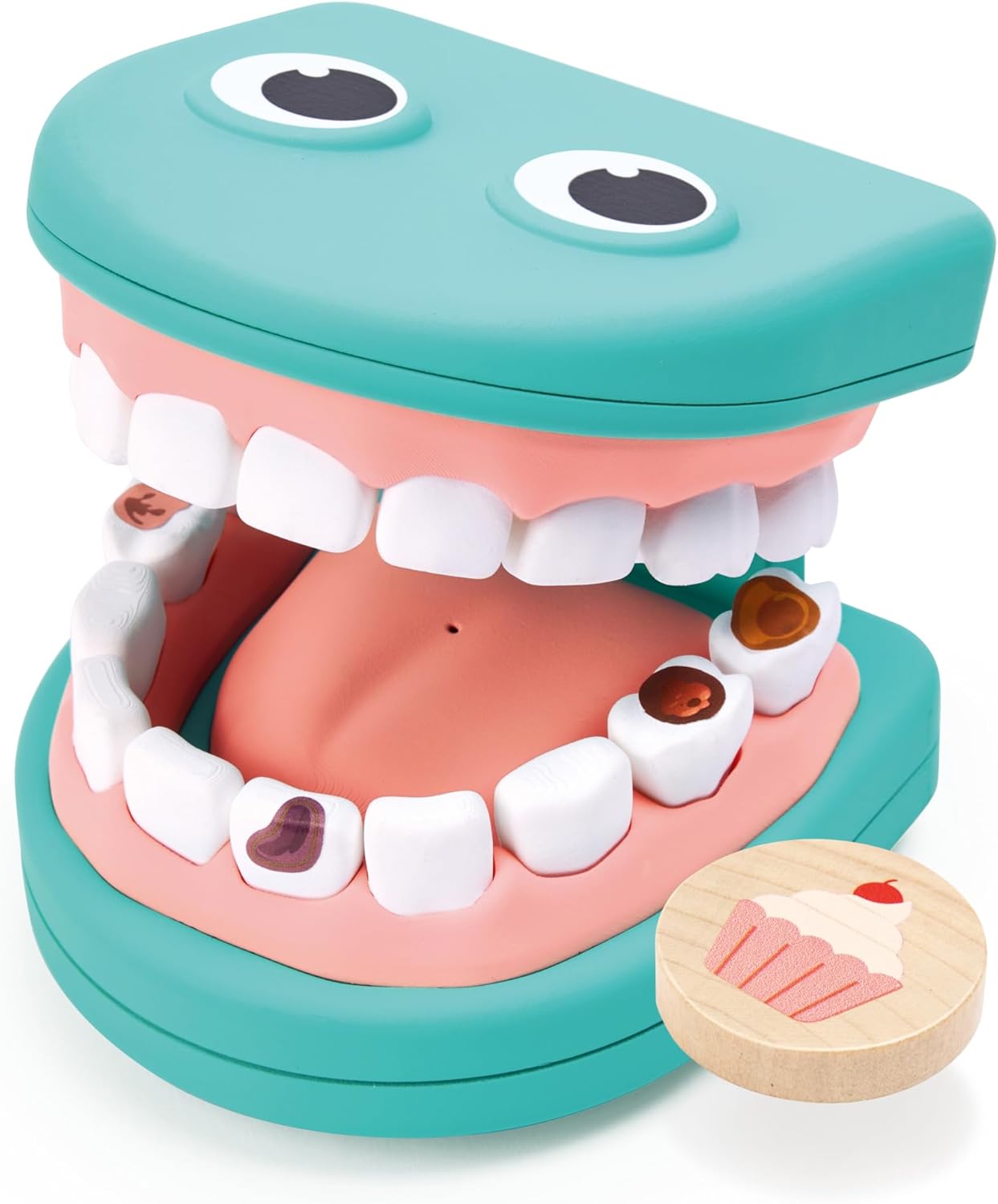
Image: The dental model with several teeth marked with pretend cavities, illustrating areas for treatment.
- Use the dental mirror to inspect the teeth for pretend cavities (represented by the tooth decay stickers or pre-marked teeth).
- Apply the pretend polishing tool to clean and polish the teeth.
- The syringe can be used for pretend rinsing or administering medication.
- Attach the top and bottom braces to the dental model to simulate orthodontic treatment.
3. Tooth Removal Practice

Image: The wooden tongs are shown in action, carefully removing a pretend tooth from the dental model.
- Use the tongs to carefully remove the changeable teeth from the dental model.
- Place removed teeth into the provided tooth bag.
4. Interactive Play

Image: Two children engaged in role-play with the Hape Little Dentist Kit, one brushing teeth and the other observing.
- Utilize the double-sided reusable activity cards to guide play scenarios and learn about healthy eating habits and dental care.
- The electronic false teeth are designed to make sounds, enhancing the realistic play experience and teaching good habits.
- Use the pretend food pieces (sweets) to discuss the effects of different foods on dental health.
- The pretend ID badge allows children to fully immerse themselves in the role of a dentist.
Maintenance
- Cleaning: Wipe all plastic and wooden components with a damp cloth and mild soap if necessary. Do not immerse electronic parts (vibrating toothbrush) in water. Air dry thoroughly.
- Storage: Store all components in the provided stylish storage bag when not in use to prevent loss and damage. Keep in a cool, dry place away from direct sunlight.
- Battery Care: Remove batteries from the vibrating toothbrush if the toy will not be used for an extended period to prevent leakage.
Troubleshooting
| Problem | Possible Cause | Solution |
|---|---|---|
| Vibrating toothbrush not working. | Dead or incorrectly installed batteries. | Check battery polarity. Replace with fresh batteries. Ensure battery compartment is securely closed. |
| Missing components. | Items misplaced during play or storage. | Refer to the "Package Contents" list and thoroughly check the play area and storage bag. |
| Difficulty removing teeth. | Teeth are designed to fit snugly. | Ensure the tongs are properly gripping the tooth. Apply gentle, steady pressure. |
Specifications
| Product Dimensions | 9.45 x 1.97 x 7.87 inches |
| Item Weight | 1.21 pounds |
| Model Number | E3227 |
| Recommended Age | 36 months - 3 years |
| Batteries Required | 1 Unknown battery (typically AAA) |
| Manufacturer | HAPE |
Warranty Information
Hape products are manufactured to high-quality standards. For specific warranty details, please refer to the warranty card included with your purchase or visit the official Hape website. Keep your proof of purchase for any warranty claims.
Customer Support
If you have any questions or require assistance with your Hape Little Dentist Kit, please contact Hape customer support. Contact information can typically be found on the product packaging or the official Hape website.
Online: Visit the Hape Store on Amazon